
Cooler Master Q300L V1
4.5Editor score
Micro-ATX support
High airflow design
Modular I/O panel
Discover the top horizontal PC cases for 2026. This guide compares ten best models for home theater, gaming, and office setups based on cooling, size, and
Horizontal PC cases offer a unique footprint that fits perfectly under monitors or inside entertainment centers. They provide a sleek low profile while still accommodating powerful hardware components for gaming and work.
We evaluated ten top models based on airflow, component compatibility, build quality, and aesthetic design. Each case was reviewed for its ability to maintain low noise and stable temperatures under heavy loads.
Every pick includes detailed specs and real-world performance notes to help you choose the right chassis. Keep in mind that prices fluctuate often so check current listings before making your final decision.
4.5Editor score

4.5Editor score

4.8Editor score
This side-by-side comparison highlights the key specifications and features of every top-rated horizontal case to help you find the perfect match for your build needs.


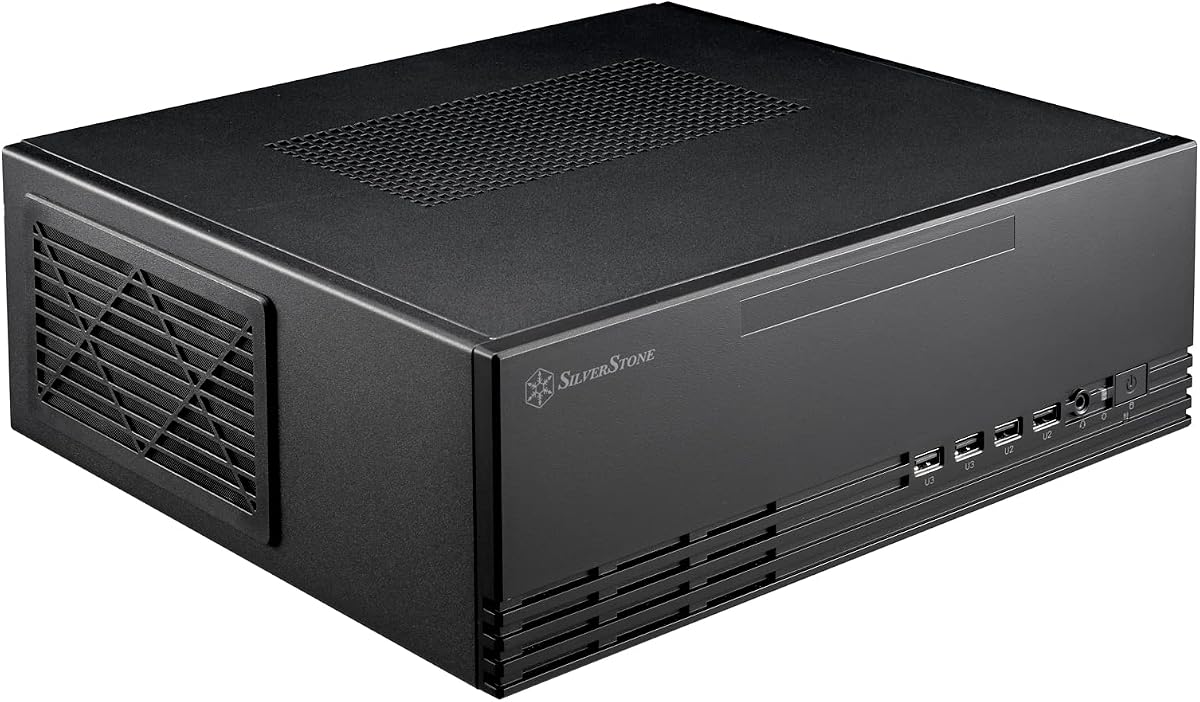
The Silverstone GD09 stands out as a top tier horizontal case with its sleek faux aluminum finish and strong cooling design. It achieves a 4.5 rating from users who praise its ability to keep components cool while staying quiet.
We may earn a commission when you buy through this link, at no additional cost to you.
Its positive air pressure design ensures dust stays out while delivering excellent airflow to your graphics card and processor. The 358mm depth allows most modern GPUs to fit comfortably inside a home theater cabinet.
One trade-off is the price which is higher than budget options but justified by the build quality and acoustic performance. The lack of RGB lighting means it blends in better in media centers than flashy setups.
This case is ideal for anyone building a home theater PC or office workstation that needs to stay out of sight. If you value low noise and high cooling efficiency the GD09 is the top recommendation.
The positive air pressure setup forces cool air in and hot air out efficiently reducing dust buildup and noise levels significantly.
Its low profile and depth allow it to slide neatly under shelves or TVs without blocking vents or looking out of place.
We may earn a commission when you buy through this link, at no additional cost to you.
The QUBE 540 is engineered for flexibility allowing you to mount it horizontally or vertically depending on your desk space needs. It supports massive GPUs up to 415mm which is rare in compact cases.
We may earn a commission when you buy through this link, at no additional cost to you.
Its full front mesh panel maximizes ventilation helping high-end graphics cards run cooler even in tight spaces. The I/O panel is reversible so you can position USB ports exactly where they are most useful.
While the case lacks pre-installed fans the airflow potential is high if you add your own. The handles are movable which adds to the customization options but requires some assembly effort.
Buy this case if you want a modern look with maximum flexibility for future upgrades. The versatility makes it a strong choice for gamers who need space for large graphics cards.
You can flip the case 90 degrees and move the I/O panel to match your desk layout or storage shelf requirements perfectly.
With 415mm clearance even the largest current generation graphics cards fit without needing to remove front fans or modify the case.
We may earn a commission when you buy through this link, at no additional cost to you.
The Grandia 11 offers a stereo-shaped design that looks great in living rooms while supporting ATX boards and liquid cooling. It fits nicely into tight spaces without sacrificing too much performance.
We may earn a commission when you buy through this link, at no additional cost to you.
It includes a 240mm radiator support which is impressive for a chassis of this size. The positive air pressure design keeps dust filters clean and maintains cool internal temperatures efficiently.
The trade-off is that you cannot install larger radiators so extreme cooling setups are limited. The price is higher than standard cases but the build quality and aesthetics justify the cost.
This is the best pick for users wanting a clean media center setup with some cooling headroom. If you need a small case that supports water cooling the Grandia 11 delivers.
The design mimics high-end audio equipment making it look like a stereo component rather than a computer tower on your shelf.
A fully meshed front panel provides large surface area for air intake ensuring the system stays cool during extended use.
We may earn a commission when you buy through this link, at no additional cost to you.
The B4-mATX stands out with its real wood finish available in black walnut or white beech. It provides a unique premium look that blends into office or home environments easily.
We may earn a commission when you buy through this link, at no additional cost to you.
It supports up to 358mm GPUs and includes slim 120mm fans which help with airflow without adding bulk. The ability to mount vertically or horizontally makes it very adaptable to different desks.
One downside is the lack of front I/O ports which can make cable routing tricky if you use many peripherals. The wood finish is beautiful but may require careful handling to avoid scratches.
Choose this case if you prioritize design and want a high-end look for your build. The wood finish and cooling flexibility make it a standout option among standard metal cases.
Available in walnut or beech this case offers a natural premium aesthetic that matches wooden furniture better than painted metal.
You can place it horizontally on a desk or vertically against a wall to save floor space without changing internal components.
We may earn a commission when you buy through this link, at no additional cost to you.
The Q300L V1 is an excellent budget option that does not compromise on airflow or component clearance. It supports Micro-ATX boards and offers plenty of room for GPUs up to 360mm.
We may earn a commission when you buy through this link, at no additional cost to you.
Its open thermal design with perforated panels promotes optimal airflow and heat dissipation. The modular I/O panel lets you move ports to the top bottom or front as you need.
While the build material is plastic it feels sturdy enough for daily use. The magnetic dust filters are a nice touch that keeps debris out while maintaining a clean look.
This case is perfect for those on a tight budget who still want good cooling and expandability. It is the top pick for anyone needing a reliable cheap horizontal chassis.
At this price point you get excellent airflow and component support that usually costs significantly more in other cases.
You can adjust the position of USB ports to avoid cable clutter and improve access depending on your setup layout.
We may earn a commission when you buy through this link, at no additional cost to you.
The G300 is a compact portable case built for gamers who travel or attend LAN parties. It supports large GPUs up to 340mm and includes a strong handle rated for 30kg.
We may earn a commission when you buy through this link, at no additional cost to you.
It features a full mesh side panel for airflow and a horizontal PSU layout to reduce cable interference. The front I/O includes USB Type-C for fast data transfers without adapters.
The small 16.8L volume means you may need to use SFX power supplies for liquid cooling. Despite its size it packs impressive performance potential for such a small chassis.
Choose this case if you need a rig you can move frequently. It is the best option for portable gaming without sacrificing GPU power or cooling.
The aluminum mesh chassis and military grade handle make this case durable enough for transport to tournaments or dorms.
You can fit powerful graphics cards like the RTX 5090 or RX 9070 XT without compromising on gaming performance.
We may earn a commission when you buy through this link, at no additional cost to you.
The A3-mATX is a top-tier case with a 4.8 rating reflecting its excellent build quality and design. It supports GPUs up to 415mm and allows a 360mm radiator for top cooling.
We may earn a commission when you buy through this link, at no additional cost to you.
The wood front panel adds a premium touch that complements any room. Steel mesh side panels ensure optimal airflow for high-TDP components without noise issues.
One trade-off is the weight and price which are higher than standard cases. However the flexibility in PSU placement and expansion slots makes it worth it for enthusiasts.
This case is ideal for builders who want the best cooling and aesthetics combined. If budget is not a concern the A3-mATX delivers top performance and design.
Supporting 360mm radiators and multiple fans ensures high-end components stay cool even under extreme gaming loads.
The walnut front panel and modular structure allow for a clean minimalist build that looks unique compared to glass cases.
We may earn a commission when you buy through this link, at no additional cost to you.
The GD09B-C is an updated version of the popular GD09 with a front USB Type-C port for modern connectivity. It retains the same quiet cooling and faux aluminum design.
We may earn a commission when you buy through this link, at no additional cost to you.
Its positive air pressure keeps dust out and maintains cool temperatures. The quick access filters make maintenance easy even when the case is installed in a cabinet.
The only real difference is the USB Type-C port which improves convenience for modern devices. The design is similar to the original so it may look dated compared to mesh cases.
Choose this if you need USB-C access on a horizontal HTPC case. It is a reliable choice for media centers requiring modern connectivity and low noise.
Front access Type-C allows fast data transfer and charging for peripherals without needing internal adapters or cables.
The positive pressure design ensures dust stays out while airflow keeps components cool during long media playback sessions.
We may earn a commission when you buy through this link, at no additional cost to you.
The Grandia GD09 is a classic HTPC case known for its sturdy aluminum build and reliable performance. It supports ATX boards and graphics cards up to 12.2 inches.
We may earn a commission when you buy through this link, at no additional cost to you.
Its positive air pressure design and quick access filters ensure dust management and cool operation. The rackmount ear support allows for professional installation in AV cabinets.
The front panel lacks modern ports and design elements found on newer cases. However for a pure media center build where looks matter less than function it is solid.
This case is good for users who need a durable and quiet HTPC solution. If you value functionality over modern aesthetics the Grandia GD09 fits well.
The solid aluminum chassis provides durability and a classic look that matches professional AV equipment in media racks.
You can fit larger expansion cards up to 12.2 inches allowing for capture cards or specialized hardware.
We may earn a commission when you buy through this link, at no additional cost to you.
The Milo 11 is an ultra-slim Micro-ATX enclosure designed for office desks or home theaters. It occupies minimal space with a volume of only 10.35L.
We may earn a commission when you buy through this link, at no additional cost to you.
It supports TFX power supplies which are slim but less common than standard ATX. The enclosure supports one slim optical drive which adds functionality for media tasks.
The main limitation is the need for a TFX PSU and lack of GPU space limiting performance for gaming. It is ideal for basic office or media playback needs.
Choose this case if you need a minimal footprint for a non-gaming build. It is the best option for space-constrained office PCs or simple home media boxes.
At just 10.35L this case saves desk space and looks neat under monitors or on small shelves.
While TFX supplies are less common they offer the slim profile needed for this specific compact form factor.
We may earn a commission when you buy through this link, at no additional cost to you.
Selecting the right horizontal case depends on understanding size compatibility and cooling needs. This section details key factors to consider for your specific build.
Most horizontal cases support Micro-ATX or Mini-ITX boards to keep the footprint small. Larger ATX boards require specific wider chassis which are less common but available for better cooling. Always verify the motherboard support before buying to avoid fit issues.
Check the case specs for ATX Micro-ATX or Mini-ITX support to ensure your board fits comfortably.
GPU length is a major constraint in horizontal cases especially for gaming builds. Look for clearances over 300mm to fit modern graphics cards. Some premium cases support up to 415mm for future proofing.
Ensure the GPU clearance exceeds your graphics card length to prevent installation problems.
Horizontal cases often require ATX or SFX power supplies depending on the design. Some models support TFX or SFX-L for a slimmer profile but this limits wattage. Check the PSU support to match your hardware needs.
Verify the PSU form factor support to avoid buying a case that cannot house your power supply.
Airflow is critical in horizontal setups since heat rises and can pool at the top. Mesh panels and positive air pressure help direct cool air to components. Look for cases with fan mounts and radiator support if using liquid cooling.
Choose a case with mesh front panels and fan mounts to ensure good airflow in a horizontal layout.
Measure your cabinet or desk space carefully before buying a horizontal case. Some models are designed to fit inside standard AV cabinets with specific depth limits. A slim profile ensures it sits flush without sticking out.
Double check case dimensions to ensure it fits inside your existing furniture or desk space.
Horizontal cases often look like media components so a clean finish is important. Aluminum and wood finishes blend better in living rooms while glass shows off internals. Decide if you want a minimalist look or visible hardware.
Select a finish like aluminum or wood that matches your room decor for a cohesive look.
Dust filters help keep internal components clean especially in horizontal setups where dust settles easily. Quick access filters make cleaning easier without disassembling the case. Look for magnetic or easy-to-remove filter designs.
Pick a case with accessible dust filters to maintain performance and reduce noise over time.
Front I/O ports like USB Type-C are convenient for peripherals without reaching behind the case. Horizontal cases may have limited space for ports so check what is included. Some models allow modular I/O panels for flexibility.
Check front USB ports including Type-C to ensure you can connect devices easily.
Place the case on a flat surface with enough clearance around it for airflow. Ensure vents are not blocked by books or decor to prevent overheating issues. Leave space behind the case for cable routing and power connection.
Clean dust filters regularly to maintain proper airflow and reduce fan noise. Use a soft brush or vacuum to remove debris without damaging the mesh. Remove filters gently if they are magnetic or snap-in for deep cleaning.
Avoid placing the case in direct sunlight or near heat sources to protect components. If using a TV stand ensure the case does not block heat from the TV itself. Keep the area dry to avoid moisture damage to electronics.
Yes many horizontal cases support GPUs up to 350mm or more which fits most full-size cards. Some models like the Lian Li A3-mATX support up to 415mm for larger options. Always check the specific clearance in the specs before buying to be sure.
Most horizontal cases support standard ATX power supplies but some require SFX or TFX for space. Check the compatibility list before purchasing to ensure your PSU fits correctly. Using the wrong PSU type can block other components or cables.
Horizontal cases are good for gaming if they offer enough clearance and airflow. Models with mesh front panels and GPU support over 300mm handle gaming loads well. Ensure the case has adequate cooling to keep high-end components stable during play.
Horizontal cases are ideal for under desk setups or home theater cabinets where space is limited. They sit flush with surfaces and look like media components rather than computer towers. This design helps save floor space and blend into living rooms.
Some horizontal cases include pre-installed fans while others require you to buy them separately. Always check the box contents before purchasing to avoid missing parts for cooling. Adding extra fans can improve airflow if the case supports them.
Use compressed air to blow dust out through vents and remove filters for deeper cleaning. Horizontal cases tend to collect dust on the bottom so check there regularly. Keep filters clean to maintain airflow and reduce noise from fans.
These ten options cover everything from budget-friendly builds to premium home theater setups. The Silverstone GD09 and Lian Li A3-mATX stand out for cooling and aesthetics respectively.
Prioritize GPU clearance and cooling performance if you plan to game on your horizontal PC. For media centers focus on design and noise levels to ensure a quiet viewing experience.
Check current prices and availability before making your final decision as deals change frequently. Finding the right horizontal case will help you build a compact powerful system that fits your space.