
VSD Mini Macro Pad
4.1Editor score
Compact 6 LCD keys
Dual side RGB lighting
USB powered operation
This guide compares the top macro keypad controller decks for streaming to help you choose the best programmable keypad for OBS, Twitch, and content creation
Streaming professionals need reliable tools to manage complex workflows without interrupting their live shows. A macro keypad controller deck offers quick access to commands, allowing seamless transitions and real-time adjustments during broadcasts.
We evaluated ten highly rated programmable keypads based on customization options, build quality, and software compatibility. Each product was analyzed for its ability to integrate with popular streaming platforms and productivity applications.
Every pick highlights unique features like LCD customization, RGB lighting, and multi-step macro support. Prices fluctuate frequently, so verify current costs before purchasing to ensure you get the best value for your setup.
4.1Editor score

4.4Editor score

4.9Editor score
This side-by-side comparison evaluates all ten macro keypad controller decks across key specifications including key count, display types, compatibility, and unique features to help you make an informed decision.


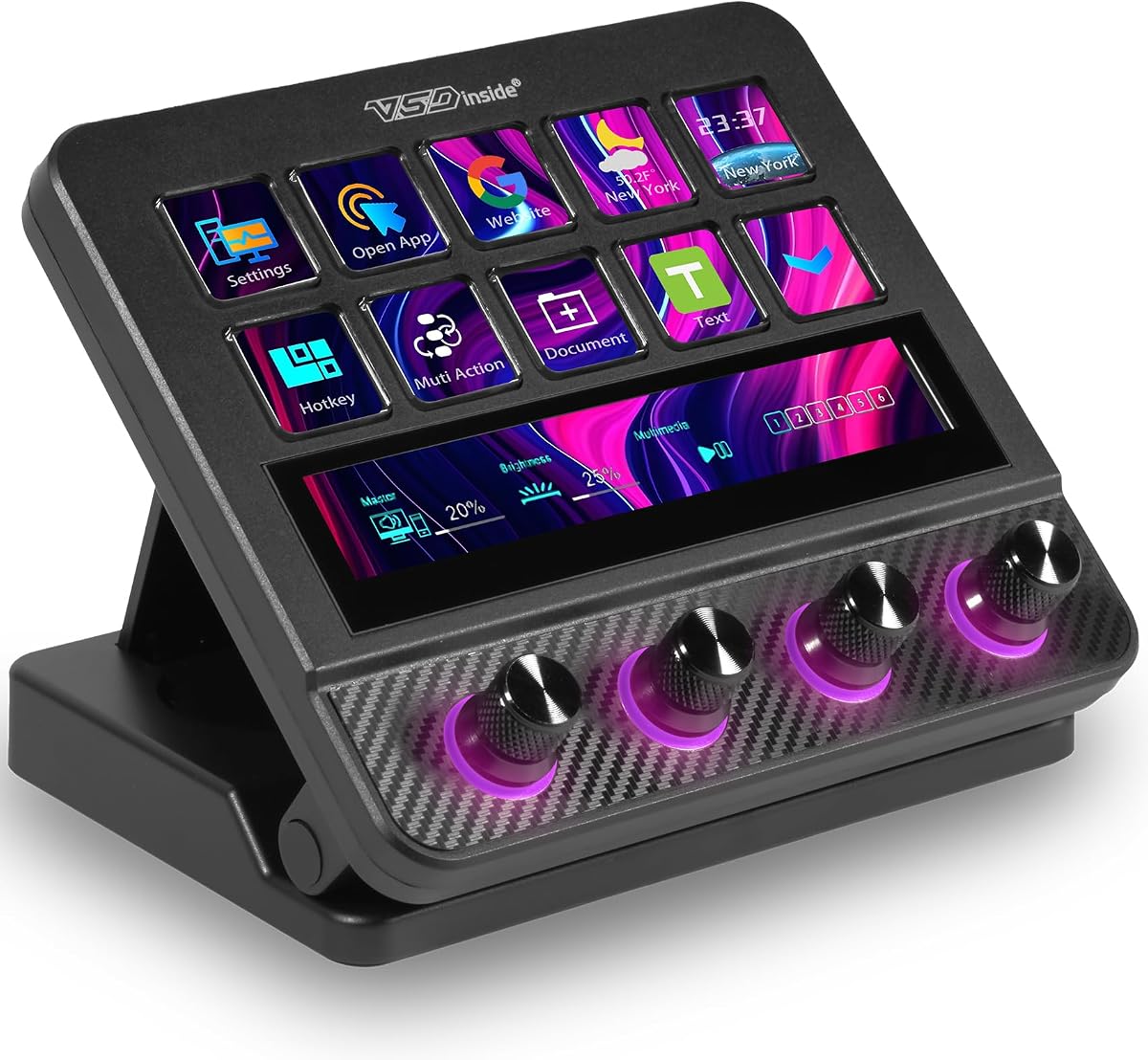


The VSD M18 Macro Pad stands out as a versatile streaming controller with its 18 programmable keys and robust feature set. Rated highly by users, it combines physical buttons with visual LCD keys to offer comprehensive control for streamers and gamers.
We may earn a commission when you buy through this link, at no additional cost to you.
Its standout quality is the ability to program single or multi-step sequences, allowing complex workflows like OBS scene switches or game combos to run with a single tap. The RGB light ring adds aesthetic value, while built-in plugins like clocks and weather widgets enhance productivity.
While it offers excellent value, users should note that native Linux support is unavailable, and setup requires installing VSD Craft software. However, these minor limitations are outweighed by its cross-platform compatibility with major apps like Discord and Photoshop.
This deck is ideal for streamers needing quick access to multiple functions without cluttering their main keyboard. We recommend it for anyone seeking a reliable, customizable controller that balances performance and affordability.
Each key supports custom images and animations, making it easy to identify functions during high-pressure streaming sessions.
The adjustable RGB ring creates an immersive desk atmosphere that syncs with your setup theme for professional presentations.
We may earn a commission when you buy through this link, at no additional cost to you.
The VSD M18 Stream Controller emphasizes speed and efficiency with its one-touch operation design. Users praise its ability to launch macros and switch scenes instantly, making it a strong contender for live broadcasting environments.
We may earn a commission when you buy through this link, at no additional cost to you.
Key strengths include the multi-hotkey macro functionality, which allows sequential or simultaneous task execution. The high-quality construction ensures stability during extended use, and the RGB ring adds a customizable aesthetic touch to your workspace.
Potential drawbacks involve the initial setup process which requires software configuration. Additionally, Linux users will need to rely on open-source SDKs rather than native plug-and-play support.
This model is best for streamers prioritizing workflow speed and visual feedback. Its balance of features and build quality makes it a reliable choice for daily content creation.
Program complex task chains to execute with one click, saving time during critical streaming moments.
Access tools like weather, calendar, and schedule reminders to keep your workflow organized and efficient.
We may earn a commission when you buy through this link, at no additional cost to you.
The Stream Deck N1 features a vertical design that minimizes desk footprint while maximizing accessibility. Rated highly by users, it combines productivity tools with streaming functions through its unique mode-switching capability.
We may earn a commission when you buy through this link, at no additional cost to you.
Its three distinct modes—shortcut keyboard, calculator, and numeric keypad—offer versatility that standard keypads lack. Users appreciate the drag-and-drop customization process, which simplifies setup for less technical individuals.
While the warranty and support options are strong, the lack of native Linux support and limited documentation can be frustrating. These factors may deter users preferring straightforward plug-and-play solutions.
This deck suits users with limited desk space who need multiple function modes. Its ergonomic design makes it ideal for left-handed users or compact workstation setups.
Save valuable desk real estate with a vertical layout that keeps shortcuts within easy reach.
Switch between streaming, calculation, and numeric functions to adapt to different tasks seamlessly.
We may earn a commission when you buy through this link, at no additional cost to you.
The VSD Mini Macro Pad delivers essential streaming functionality in a compact design ideal for smaller setups. While it has fewer keys, its portability and affordability make it an excellent entry-level option.
We may earn a commission when you buy through this link, at no additional cost to you.
Key strengths include its dual side RGB lighting, which adds a sleek aesthetic without bulk. The one-touch shortcut execution ensures quick access to essential macros like scene switches or volume adjustments.
Drawbacks include the requirement for dedicated software and a limited key count compared to larger models. However, these are minor trade-offs for its price and size advantages.
This pad is perfect for beginners or streamers with desk space constraints. Its simplicity ensures you can get started quickly without extensive configuration.
Take your controller on the go with a lightweight deck that fits easily into any bag.
Enhance your desk ambiance with ambient side lighting that complements any color theme.
We may earn a commission when you buy through this link, at no additional cost to you.
The ActionRing Stream Controller stands out with its built-in volume dials, offering precise audio adjustments alongside standard macro functions. This feature is particularly valuable for podcasters and live streamers managing real-time sound levels.
We may earn a commission when you buy through this link, at no additional cost to you.
Its Action Flow function enables complex task chains, while the plugin ecosystem provides access to tools like weather and calendar reminders. The 24-month warranty adds reliability, ensuring long-term support.
Limitations include the limited key count compared to larger decks, which might restrict complex workflows. Additionally, setup requires software installation rather than plug-and-play operation.
This controller is ideal for creators needing quick audio adjustments without leaving their main interface. Its blend of macro and audio control makes it a versatile tool for hybrid workflows.
Adjust volume and playback instantly with dedicated dials that provide tactile control during sessions.
Chain multiple actions to execute sequentially with one click, streamlining repetitive tasks efficiently.
We may earn a commission when you buy through this link, at no additional cost to you.
The VSD N4 Pro bridges the gap between macro control and audio production with its USB sound deck capabilities. It allows streamers to trigger sound effects and adjust audio levels directly from the deck, centralizing control.
We may earn a commission when you buy through this link, at no additional cost to you.
Its ergonomic stand and dynamic RGB visuals enhance both usability and desk aesthetics. The 500+ plugin ecosystem ensures you have extensive tools for daily tasks, from weather to calendar reminders.
While powerful, the higher price and complex setup may challenge beginners. Users should be prepared for a learning curve to unlock its full potential.
This deck suits professional creators needing integrated audio management. Its focus on studio-grade features makes it a robust investment for serious streamers.
Trigger and manage sound effects with dedicated controls, reducing reliance on external mixers.
The adjustable stand ensures comfortable viewing angles during long editing or streaming sessions.
We may earn a commission when you buy through this link, at no additional cost to you.
The Elgato Stream Deck MK.2 remains an industry standard for content creators seeking a reliable and user-friendly controller. Its reputation for stability and seamless integration makes it a top choice for professionals.
We may earn a commission when you buy through this link, at no additional cost to you.
Key strengths include its extensive plugin library covering everything from OBS to social media. The one-touch operation and visual feedback ensure you know exactly when commands are executed.
Drawbacks involve a higher price and fewer customization options compared to some newer models. However, its reliability justifies the cost for critical production workflows.
This deck is perfect for users prioritizing simplicity and stability. It is a safe choice for streamers who need consistent performance without extensive configuration.
Access a wide range of pre-built integrations to streamline workflows across multiple platforms instantly.
See instant confirmation on LCD keys when commands execute, ensuring accurate control during live streams.
We may earn a commission when you buy through this link, at no additional cost to you.
The TreasLin VSDinside XL offers unparalleled customization with 32 programmable keys and dual scroll wheels. Rated highest by users, it is designed for power users managing complex, multi-software workflows.
We may earn a commission when you buy through this link, at no additional cost to you.
Its semi-transparent animated icons and application-specific profiles allow tailored control for every task. The dual scroll wheels simplify scene and page switching, saving valuable keys for other actions.
While powerful, the high price and large footprint may not suit smaller desks. However, its versatility ensures it grows with your needs from beginner to pro.
This deck is ideal for power users needing maximum control. Its premium features justify the investment for those managing extensive workflows.
Navigate scenes and pages with effortless flicks, preserving keys for essential commands.
Switch automatically between profiles for OBS, Photoshop, or Excel, ensuring relevant keys are always active.
We may earn a commission when you buy through this link, at no additional cost to you.
The Streonor S10 combines LCD keys with an integrated touchscreen and rotary knobs, creating a premium console for complex tasks. This hybrid approach provides both quick macros and precise adjustments.
We may earn a commission when you buy through this link, at no additional cost to you.
Key strengths include the touchscreen for accessing detailed controls without leaving the deck. The rotary knobs offer tactile volume and timeline adjustments, making it ideal for editing and mixing.
While Linux support is limited, the Windows and macOS compatibility is robust. The software setup ensures you can harness all its powerful features effectively.
This controller is perfect for streamers needing detailed audio control. Its professional design makes it a central hub for production workflows.
Access detailed settings and information directly on the deck for seamless task management.
Adjust volume and playback with precision, offering tactile feedback during critical moments.
We may earn a commission when you buy through this link, at no additional cost to you.
The TreasLin VSDinside N1 stands out for its support of dynamic animated icons, transforming static interfaces into vibrant, personalized setups. Rated well by users, it combines functionality with a unique aesthetic appeal.
We may earn a commission when you buy through this link, at no additional cost to you.
Its three operating modes allow seamless switching between streaming, calculator, and numeric keypad functions using a rotary knob. The extensive plugin marketplace ensures endless customization options for any workflow.
While it requires software installation, the flexibility it offers is unmatched. The lack of Linux support is a minor drawback for most users focused on Windows or macOS.
This deck is ideal for creators wanting a personalized, vibrant setup. Its blend of mode switching and visual customization makes it a unique choice in the market.
Use GIFs and animations to identify functions, adding personality and visual interest to your deck.
Rotate a dedicated knob to instantly switch between numeric, calculator, and streaming modes.
We may earn a commission when you buy through this link, at no additional cost to you.
Selecting the right macro keypad requires considering key count, software compatibility, and build quality to match your workflow needs effectively.
The number of keys determines how many functions you can assign simultaneously. Higher key counts offer more versatility but may occupy more desk space.
Choose a layout that fits your workspace and workflow complexity.
LCD keys allow visual identification of commands through images or animations. Look for support for GIFs or dynamic icons for better feedback.
Dynamic icons help distinguish tasks during high-pressure streaming moments.
Ensure the controller supports your operating system and streaming apps like OBS or Twitch. Check for plugin availability to expand functionality.
Broad software support ensures seamless integration with your existing tools.
High-quality materials ensure longevity during extended use. Look for devices with sturdy switches and reliable USB connections.
Durable construction minimizes the risk of hardware failure over time.
RGB lighting adds visual appeal to your desk setup. Adjustable options allow you to match colors to your branding or mood.
Aesthetic customization enhances the overall look of your streaming environment.
Balance features against your budget to find the best value. Higher-end models offer more customization but may not be necessary for basic needs.
Consider long-term benefits when evaluating initial costs.
Connect the device to your computer via USB and install the required software to begin configuration. Follow the setup guide to assign specific actions to each key.
Regularly update the firmware and software to access new features and ensure compatibility with latest apps. This maintenance improves performance and security.
Clean the surface with a dry cloth to prevent dust buildup. Avoid harsh chemicals that may damage the LCD screens or buttons.
Yes, many macro keypads support game-specific shortcuts and combos. Check software compatibility to ensure seamless integration with your gaming applications.
Most models focus on Windows and macOS compatibility. Some provide SDKs for Linux adaptation, but native support is limited across the industry.
Use the provided software to assign actions to keys. Drag and drop desired functions or record steps for sequential execution.
Yes, most decks integrate directly with OBS, Twitch, and YouTube. Look for plugins that simplify scene switching and audio control.
LCD keys are designed for frequent use with durable materials. However, avoid pressing too hard to ensure longevity.
Most products come with a 24-month warranty. Verify specific terms before purchasing to ensure coverage for your region.
Our top picks include the VSD M18 for versatility, the Mini Pad for budget users, and the XL for power creators. Each offers unique strengths for different streaming needs.
Prioritize key count, software compatibility, and build quality when making your decision. Ensure the controller aligns with your specific workflow requirements.
Prices change frequently, so check current listings before buying. Verify compatibility and warranty details to ensure you select the right device for your setup.