
Thrustmaster T-Flight Hotas X
4.5Editor score
Detachable throttle design
Adjustable resistance joystick
Plug and play setup
This guide compares the top Mac game flight controllers for simulation enthusiasts, evaluating compatibility, build quality, and features to help you choose
Flight simulation on Mac requires precise inputs to mimic real aircraft controls. A quality controller enhances immersion and accuracy, allowing pilots to manage complex systems without cluttered keyboards.
We evaluated ten top-rated flight controllers based on build quality, feature sets, and Mac compatibility. Each entry offers unique advantages for hobbyists, students, and professional simmers seeking realism.
This list highlights key strengths and trade-offs for every model. Prices and availability fluctuate frequently, so check current listings before purchasing to ensure you get the best deal available today.
4.5Editor score

4.3Editor score

4.4Editor score
The following table compares key specifications across all ten selected flight controllers. This side-by-side view helps you quickly identify which model aligns with your specific simulation needs and hardware constraints.





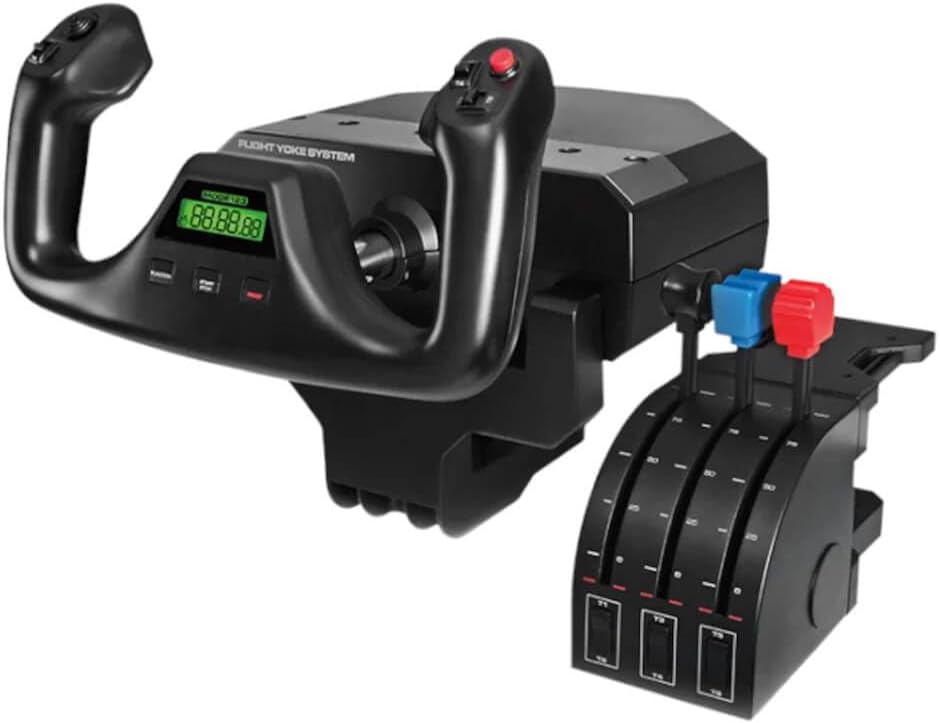

The Logitech G PRO Flight Yoke System is a robust solution for Mac flight simulation. It holds a strong rating for its realistic controls and durable build quality suitable for daily use.
We may earn a commission when you buy through this link, at no additional cost to you.
Its stainless steel shaft ensures smooth pitch and roll inputs. The included throttle quadrant adds necessary axes for managing engines and flaps during complex flight profiles.
While the setup requires initial configuration, the payoff is high immersion. The desk clamps secure the unit firmly, preventing unwanted movement during aggressive maneuvers.
Pilots seeking a balance between cost and performance will appreciate this system. It is ideal for those moving beyond keyboard inputs to dedicated hardware controls.
The mechanical design mimics actual aircraft yokes for authentic handling.
Over fifty controls allow deep customization for specific aircraft simulations.
We may earn a commission when you buy through this link, at no additional cost to you.
This Hotas system offers exceptional value for beginners. It provides a complete stick and throttle setup without the high cost of premium units.
We may earn a commission when you buy through this link, at no additional cost to you.
The throttle is detachable, allowing flexible desk arrangements. Users can separate the throttle for a dedicated cockpit feel or keep it connected for compact space.
Although the build is largely plastic, it withstands regular use well. The adjustable resistance dial lets you fine-tune stick tension to match your preference.
It is perfect for casual simmers or those testing the waters of flight gaming. The plug-and-play nature ensures you can start flying immediately after unboxing.
Separate the throttle for a flexible setup that suits your desk space.
Tune the joystick tension to match your preferred control feel.
We may earn a commission when you buy through this link, at no additional cost to you.
The Honeycomb Alpha Yoke is designed by pilots for maximum realism. It features a full 180-degree rotation and smooth bearings that replicate actual aircraft mechanics.
We may earn a commission when you buy through this link, at no additional cost to you.
A unique switch panel comes included, providing master avionics and light switches. This removes the need for extra peripherals to manage essential aircraft systems.
You can mount it using clamps or heavy-duty suction pads for thicker tables. This flexibility ensures it fits various desk setups without compromising stability.
Serious simmers and aviation enthusiasts will find this worth the investment. It offers a professional level of fidelity unmatched by cheaper alternatives.
Access master avionics and lights directly without extra hardware.
Choose between clamps or suction pads to fit your desk type.
We may earn a commission when you buy through this link, at no additional cost to you.
This advanced Hotas system is built for high performance and customization. It provides over 189 programmable controls to manage complex flight profiles easily.
We may earn a commission when you buy through this link, at no additional cost to you.
The twin throttles allow separate management of engine power and systems. RGB lighting helps identify buttons quickly, which is especially useful in VR environments.
While feature-rich, the sheer number of buttons can be overwhelming initially. Users should spend time mapping controls before their first serious flight session.
It is best suited for pilots who need extensive control over their sim. The precision sensors ensure accurate inputs even during aggressive maneuvering.
Buttons are placed under your fingers for easy VR navigation.
Change the stick tension using the advanced 4-spring system.
We may earn a commission when you buy through this link, at no additional cost to you.
This flightstick stands out with its integrated OLED display and touchpad. These features help you manage flight data without looking away from your screen.
We may earn a commission when you buy through this link, at no additional cost to you.
It works across multiple platforms including Xbox and PC. The touchpad navigation sensor allows for cursor control, which is useful for menu systems.
The non-contact main axes ensure longevity and consistent precision. You can customize the throttle and flap levers to match your flight style.
Pilots needing a compact yet functional controller will find it useful. It is a strong option for those who want extra digital features.
View real-time flight data on the built-in OLED screen.
Use the touchpad for full cursor control during menus.
We may earn a commission when you buy through this link, at no additional cost to you.
The X52 Pro is a well-known choice for flight simulation. It features an LCD display that shows vital info during flight without cluttering your screen.
We may earn a commission when you buy through this link, at no additional cost to you.
The progressive throttle offers resistance adjustment for realism. Detents for idle and afterburner provide tactile feedback essential for accurate inputs.
Hand size varies, so the five-position adjustment system ensures comfort. Smart technology software helps map controls intuitively for different games.
It remains a solid choice for those needing specific legacy features. The build quality is generally durable despite its age in the market.
Monitor essential flight data directly on the controller.
Adjust throttle resistance to mimic real aircraft controls.
We may earn a commission when you buy through this link, at no additional cost to you.
This bundle pairs the Pro Yoke with professional rudder pedals. It allows you to control yaw independently, adding a critical layer of realism to ground handling.
We may earn a commission when you buy through this link, at no additional cost to you.
The pedals feature differential toe brakes for takeoff and landing. Adjustable foot rests ensure comfort during long sessions regardless of shoe size.
Having the pedals included saves separate procurement time and cost. This integration ensures the yoke and pedals work seamlessly together out of the box.
Pilots focusing on civil aviation will benefit most from this setup. It provides the necessary control surfaces for realistic runway operations.
Apply brakes individually for realistic ground taxi control.
Customize pedal height to match your leg length.
We may earn a commission when you buy through this link, at no additional cost to you.
This Hotas unit offers an extensive number of inputs for customization. It includes a color display for real-time flight data and performance tuning.
We may earn a commission when you buy through this link, at no additional cost to you.
Hall-Effect sensors provide high precision without physical contact. This ensures longevity and consistent performance even after years of use.
The dual throttle detents offer tactile thrust reference points. You can adjust resistance settings to match specific aircraft types.
Although it has a high input count, it may be overkill for casual use. Advanced users will appreciate the depth of control and customization.
Hall-Effect sensors ensure precise inputs without physical wear.
Supports pedals and mounts for a full cockpit setup.
We may earn a commission when you buy through this link, at no additional cost to you.
This classic yoke system provides essential controls for serious simulation. It features an integrated USB hub to connect other devices directly to the yoke.
We may earn a commission when you buy through this link, at no additional cost to you.
Configurable throttle knobs offer precise engine management. The stainless steel shaft ensures smooth and accurate movement for your virtual aircraft.
It includes an LCD display for quick information checks. This helps pilots track vital stats without switching windows during flight.
Users looking for a proven reliable yoke will find it suitable. It remains a solid choice for those preferring traditional flight controls.
Connect additional peripherals directly through the yoke system.
Adjust throttle knobs for precise engine management.
We may earn a commission when you buy through this link, at no additional cost to you.
This renewed option offers a classic yoke experience at a lower price. It includes a digital chronograph useful for navigation and time management.
We may earn a commission when you buy through this link, at no additional cost to you.
The stainless steel shaft provides the smooth control expected from this model. It is confirmed to support Mac OSX operating systems for broader compatibility.
Since it is refurbished, you may get previous generation tech. Ensure you check the condition details before finalizing your purchase decision.
Budget conscious simmers who still want quality hardware should consider this. It is a practical entry point into professional simulation hardware.
Track elapsed time during flights with the integrated chronograph.
Compatible with older Mac OSX systems for broad access.
We may earn a commission when you buy through this link, at no additional cost to you.
Selecting the right flight controller requires evaluating compatibility, build quality, and features that match your simulation style.
Always verify that the controller supports macOS. Some hardware only lists Windows drivers, which may limit functionality on a Mac.
Check the manufacturer website or product description for explicit Mac support before purchasing.
Decide between a yoke, a Hotas, or a flightstick based on the aircraft you fly most. Yokes mimic general aviation, while Hotas suits fighters.
Choose the type that aligns with your primary simulation genre.
Look for steel shafts and metal switches for durability. Plastic parts may wear down faster with intense use over time.
Prioritize materials that ensure long-term performance.
More buttons allow deeper integration with complex simulations. Ensure you can map essential switches like flaps and lights easily.
Select a model with enough inputs for your needs.
Clamps work well for thin desks, while suction pads suit glass or thick tops. Ensure your workspace can support the chosen mounting method.
Secure mounting prevents unwanted movement during play.
Good software helps map controls accurately and save profiles. Check if the tools are updated regularly for new games.
Robust software ensures smooth operation and customization.
Higher prices often mean better precision and more axes. Balance your budget against the realism you require.
Choose a model that fits your financial limits.
Consider if the system supports pedals or separate throttles. Expandability allows you to upgrade components later without replacing everything.
Look for ecosystems that grow with your needs.
Install all drivers before connecting the device to ensure full functionality. Follow the manufacturer's setup guide for optimal mapping.
Regularly clean the buttons and knobs with a soft, dry cloth to remove dust. Avoid using liquids directly on the electronics.
Store your controller in a cool, dry place when not in use. Extreme temperatures can damage sensitive internal components.
Not all controllers work seamlessly on Mac. Some rely on Windows-only drivers. Always check the product description for macOS compatibility or use third-party mapping tools if needed.
Yes, most flight controllers support simultaneous connection of pedals. Ensure you have enough USB ports or use a hub to connect multiple devices effectively.
Use the software provided by the manufacturer to calibrate axes and buttons. Follow the calibration steps to ensure inputs match your intended actions.
Wired USB controllers are preferred for flight sims due to lower latency. Wireless options exist but may introduce slight delays that affect precision.
A throttle quadrant adds physical control for engine power and systems. It helps manage complex aircraft without reaching for keyboard shortcuts during flight.
Yoke controllers need significant desk space to function properly. Ensure your desk is deep enough to support the base and clamps without clutter.
The Logitech G PRO Flight Yoke, Thrustmaster T-Flight Hotas X, and Honeycomb Alpha Yoke stand out as top choices for Mac users.
Prioritize compatibility and build quality to ensure a smooth simulation experience. The right controller should match your preferred aircraft type.
Check current prices and stock availability before buying. Prices fluctuate, and checking regularly helps you secure the best deal.