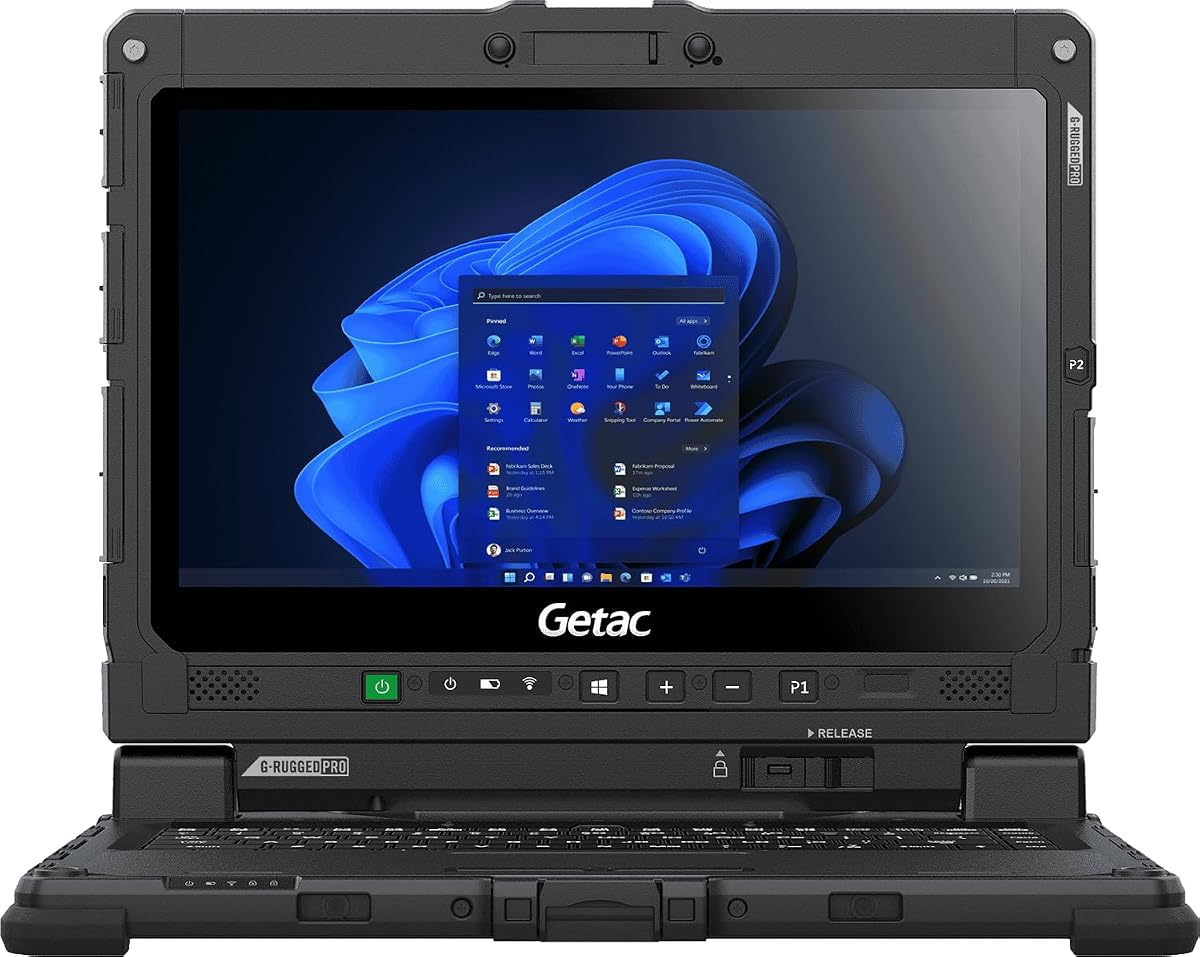
Getac Renewed K120
5.0Editor score
1200 Nits Touchscreen
MIL-STD-810H Certified
Amazon Renewed Value
Finding a laptop that remains visible under direct sunlight is essential for field professionals, construction managers, and outdoor researchers who need reliable access to data without compromising productivity in harsh lighting conditions.
We have evaluated ten top-rated devices based on screen brightness, durability standards, processing power, and overall build quality to help you choose the right tool for demanding outdoor environments where standard screens often fail.
Each selection highlights specific strengths such as sun readable displays, rugged certifications, and performance capabilities so you can make an informed decision while keeping in mind that pricing and availability may fluctuate over time.
5.0Editor score

4.1Editor score

4.5Editor score
As an Amazon Associate we earn from qualifying purchases.
This comprehensive comparison table allows you to quickly assess the key specifications of each recommended laptop to determine which device best aligns with your specific operational needs and environmental challenges.


The MUNBYN IRX17 stands out as a top contender for professionals requiring reliable computing in bright outdoor environments. With a rating of 4.1 stars, this rugged laptop delivers high-end industrial power suitable for complex design and simulation tasks while maintaining exceptional visibility under direct sunlight.
We may earn a commission when you buy through this link, at no additional cost to you.
Its standout feature is the 1000-nit sunlight-readable display which ensures that all information remains clear and legible even in harsh lighting conditions. The device is powered by an Intel i7-1255U processor and equipped with 32GB of DDR5 RAM allowing it to handle demanding applications like AutoCAD and SolidWorks without lag or slowdowns.
While the build is robust and certified with IP65 protection against dust and water the laptop is heavier than standard ultrabooks which may limit portability for those who move frequently. However the durability and performance trade-off is generally acceptable for users working in construction sites or field research where equipment reliability is paramount.
This device is ideal for industry professionals who need a secure and powerful workstation that can withstand tough conditions. Its physical camera switch adds an extra layer of privacy for sensitive operations making it a versatile choice for both fieldwork and office environments where data security is critical.
The 1000-nit brightness level ensures text and graphics remain readable outdoors without the need for additional shade or covers.
IP65 ratings and MIL-STD-810H certification provide confidence that the unit will survive exposure to rain dust and physical impacts.
We may earn a commission when you buy through this link, at no additional cost to you.
The Getac K120 offers an impressive balance of rugged features and affordability making it a strong option for budget-conscious buyers who still require outdoor visibility. With a perfect 5.0 star rating, this renewed unit proves that high performance and durability do not always come with a premium price tag.
We may earn a commission when you buy through this link, at no additional cost to you.
Its 1200-nit sunlight-readable display is one of the brightest in its class ensuring that users can work effectively even in the most challenging lighting conditions. The device is built to survive extreme temperatures from -29C to 63C and withstands drops and vibrations making it suitable for harsh environments like deserts or Arctic zones.
One limitation is the older 8th Gen Intel Core i5 processor and 256GB SSD which may not support the most demanding software or large data sets over time. However for basic field applications and data entry tasks the performance remains adequate and the price point makes it an accessible entry into rugged computing.
This laptop is best suited for organizations or individuals needing multiple reliable units without breaking the bank. The Amazon Renewed certification ensures it has been professionally tested and restored providing peace of mind while the 90-day warranty adds further security to the purchase.
The 1200 nits brightness guarantees visibility in direct sunlight allowing field workers to view maps and data without squinting.
Buying a renewed model provides access to military-grade construction and high brightness at a fraction of the new device cost.
We may earn a commission when you buy through this link, at no additional cost to you.
The Getac S510 represents the pinnacle of modern rugged computing combining AI power with essential outdoor visibility features. Rated at 4.5 stars, this premium device brings the latest Intel Core Ultra 5 processor to the field allowing for advanced multitasking and energy efficiency that older models cannot match.
We may earn a commission when you buy through this link, at no additional cost to you.
The 15.6-inch 1000-nit touchscreen provides clear visuals under bright sun while the 1TB PCIe NVMe SSD ensures ample space for large datasets and applications. At roughly 5.18 pounds it is lighter than many fully rugged counterparts which enhances mobility for professionals who travel between sites frequently.
The primary downside is the higher price which may not fit all budgets compared to more standard laptops. Additionally the IP53 rating offers basic splash protection rather than full water resistance so users must be mindful of heavy rain or submersion scenarios despite the solid build quality.
Ideal for high-demand industries requiring both performance and portability this model bridges the gap between consumer tech and industrial utility. The inclusion of the Copilot key and modern connectivity options ensures it remains future proof for evolving software needs and AI enhanced workflows.
The Ultra 5 processor delivers enhanced efficiency and AI capabilities making complex field tasks faster and more intuitive.
With a 1TB SSD users can store extensive project files locally without relying on external drives or constant internet access.
We may earn a commission when you buy through this link, at no additional cost to you.
The MUNBYN IRX16 is designed to meet the needs of industrial professionals who require dependable performance and clear outdoor views. With a 4.0 star rating, this model offers a robust set of features including a high brightness display and modern processing power suitable for CAD and mapping software.
We may earn a commission when you buy through this link, at no additional cost to you.
A key advantage is the 1000-nit sunlight-readable display which guarantees visibility even in direct sun. The laptop also features a replaceable 512GB SSD allowing users to expand storage up to 4TB as project data grows without needing to buy a new device entirely.
While the build quality is strong with IP65 ratings the device is slightly heavier than consumer laptops and might require a sturdy bag for transport. The single battery configuration is also less flexible than dual battery systems found in more expensive models which could impact long field days without power.
This choice fits well for field technicians and designers who need a balance of cost and capability. The inclusion of WiFi 6 ensures fast data transfer and low latency which is crucial for real-time monitoring and remote collaboration in outdoor settings.
The replaceable SSD design allows users to upgrade storage capacity easily to suit future project requirements.
WiFi 6 technology provides faster speeds and better range for reliable internet access in remote field locations.
We may earn a commission when you buy through this link, at no additional cost to you.
The HP OmniBook 3 14 inch is an excellent option for users prioritizing portability and battery life over ruggedness. With a 4.1 star rating, this device features a Snapdragon processor that supports efficient performance and all-day battery usage making it convenient for mobile work away from power sources.
We may earn a commission when you buy through this link, at no additional cost to you.
Its 2K OLED display provides rich colors and crisp visuals though the 300 nits brightness may struggle in direct sunlight. However for shaded outdoor work or quick tasks the screen quality is impressive and the lightweight chassis makes it easy to carry in any bag.
Users should note that the standard build lacks the protection needed for harsh environments so this is best for light field use in parks or shaded areas. The battery life and fast charging capabilities are major perks that enhance productivity during long days on the move.
This laptop suits professionals who travel frequently and need a sleek machine for presentations and note taking. The AI capabilities and modern connectivity ensure it stays relevant for daily tasks even if it is not built for extreme physical challenges.
With up to 41 hours of battery life users can work through multiple days without needing to find a charging outlet.
The OLED screen delivers deep blacks and vibrant colors ideal for media consumption and detailed graphic work.
We may earn a commission when you buy through this link, at no additional cost to you.
The HP OmniBook 3 16 inch offers a spacious display that enhances productivity for tasks requiring wide layouts or detailed views. With a 4.5 star rating, this model features an IPS touchscreen that delivers wide viewing angles and accurate color reproduction suitable for light design or data review.
We may earn a commission when you buy through this link, at no additional cost to you.
The 1920×1200 resolution provides ample detail and the IPS technology ensures better visibility from different angles compared to basic TN panels. However the brightness is typical at 300 nits so direct sunlight may still wash out the screen but shaded use remains effective.
While 8GB of RAM is sufficient for general tasks it might limit heavy multitasking capabilities. For users focused on single applications or light browsing this memory configuration is adequate and the large screen makes up for the lack of extra space on smaller devices.
This model is perfect for students or office workers who want a larger visual experience without the bulk of a workstation. The balance of cost and screen quality makes it an appealing choice for everyday use in semi-outdoor or well-lit indoor environments.
The 16-inch screen provides more room for multiple windows or detailed spreadsheets making work more comfortable.
The capacitive touch panel allows intuitive interaction for navigation and quick selections across various apps.
We may earn a commission when you buy through this link, at no additional cost to you.
The Dell 15.6 laptop is a reliable everyday device suited for general computing needs with a focus on user comfort. With a 4.3 star rating, this model includes features like ComfortView to reduce blue light and an ergonomic hinge design that supports comfortable typing for extended periods.
We may earn a commission when you buy through this link, at no additional cost to you.
While the brightness is standard and not optimized for direct sunlight the laptop performs well for indoor or shaded outdoor use. The Intel Core i5 1334U processor ensures smooth operation for common productivity tasks and the lightweight design makes it easy to move between locations.
Users should be aware that without a high brightness screen reading under direct sun will be difficult and may require shade. However for budget conscious buyers who prioritize comfort and reliability over ruggedness this is a solid choice for daily school or office work.
This laptop is ideal for students or home users needing a dependable machine for coursework and entertainment. The inclusion of Dell Onsite Service adds an extra layer of support ensuring that any hardware issues can be resolved quickly without long wait times.
ComfortView software helps reduce blue light to minimize strain during long hours of screen time.
Dell services provide onsite assistance ensuring minimal downtime if technical issues arise with the hardware.
We may earn a commission when you buy through this link, at no additional cost to you.
The HP 17.3 laptop stands out with its large display and anti-glare finish which helps reduce reflections in bright conditions. With a 5.0 star rating, this model offers ample storage and strong processing power making it a versatile machine for entertainment and productivity combined.
We may earn a commission when you buy through this link, at no additional cost to you.
The anti-glare treatment is a significant advantage for outdoor use as it minimizes glare even if the brightness is limited to 300 nits. This makes reading text and viewing content easier in well-lit areas compared to glossy screens that reflect surroundings heavily.
The size and weight mean it is not the most portable option for carrying around constantly. However for stationary work in shaded outdoor spots or large workspaces the screen real estate and battery performance provide a satisfying experience for long sessions.
This device suits users who want a desktop replacement that can occasionally be used outside. The 1TB storage ensures plenty of room for media files and the privacy shutter adds security for video calls in any setting.
The anti-glare finish cuts down on surface reflections allowing clearer viewing in bright lit rooms.
A 17.3 inch display gives more room to work on multiple applications or watch high resolution videos comfortably.
We may earn a commission when you buy through this link, at no additional cost to you.
The Panasonic Toughbook FZ-55 MK1 is a durable option known for its high brightness touchscreen and solid build quality. With a 4.7 star rating, this renewed unit provides a reliable mix of performance and visibility making it suitable for professional use in demanding environments.
We may earn a commission when you buy through this link, at no additional cost to you.
Its 1000 nit display ensures clear visibility even under bright sunlight which is crucial for outdoor data entry and map reading. The device is sealed against dust and water with IP53 certification and meets MIL-STD standards for resistance against drops and shocks.
The processor is older which might slow down newer software requiring advanced compute power. Yet for typical field operations and data logging the performance remains adequate and the touch interface makes interaction intuitive even when wearing gloves.
Ideal for industrial and logistics teams this model offers robustness at a lower cost than buying new. The docking support ensures easy integration with other peripherals in field stations making it a practical choice for mobile command units.
The high brightness touchscreen ensures users can interact with data clearly even in direct sun exposure.
Renewed Toughbooks offer trusted military-grade durability without the cost of brand new hardware units.
We may earn a commission when you buy through this link, at no additional cost to you.
The Dell 16 laptop provides a large high resolution display suitable for multitasking and detailed work. With a 4.4 star rating, this model focuses on comfort and performance offering features like ComfortView Plus to maintain color accuracy while reducing harmful blue light emissions.
We may earn a commission when you buy through this link, at no additional cost to you.
While not specifically designed for extreme outdoor brightness the adaptive thermals and strong processor ensure smooth performance indoors or under shade. The 16-inch FHD+ screen offers more vertical space than standard laptops which improves workflow efficiency for document editing and coding.
Users planning to work in direct sunlight will find the screen less effective without external shade. However for office environments or covered outdoor work the clarity and response times make it a compelling option for professionals needing a balance of portability and power.
This laptop is well suited for general business use and media consumption where visual quality is key. The inclusion of high resolution camera technology ensures clear virtual meetings making it a versatile tool for hybrid work environments.
ComfortView Plus reduces blue light while keeping true-to-life color for comfortable extended viewing sessions.
Adaptive thermals manage heat and power usage efficiently ensuring stable performance across different usage scenarios.
We may earn a commission when you buy through this link, at no additional cost to you.
Selecting the right laptop for bright sunlight requires attention to specific technical attributes that impact visibility and durability in outdoor settings.
Display brightness is measured in nits and determines how well you can see the screen under direct sunlight. For outdoor work a brightness level of at least 1000 nits is recommended to ensure text and images remain clear without glare. Standard laptop displays often range between 250 to 400 nits which is insufficient for sunny environments.
Look for models that specifically advertise sunlight readable features to guarantee performance in bright conditions.
Durability standards such as IP ratings and MIL-STD certifications indicate how well the laptop can handle physical stress and environmental elements. IP65 or higher ratings protect against dust and water jets while MIL-STD-810H certification ensures resistance to drops and vibrations.
Choosing a unit with these certifications ensures the device survives harsh field conditions without failure.
Processing power affects how quickly your laptop can run software and handle data tasks. For professional work involving CAD or data analysis a modern multi-core processor like an Intel i7 or Ryzen 5 is ideal to prevent slowdowns during heavy usage.
Ensure the processor matches the complexity of the applications you plan to run regularly.
Battery life is critical when working away from power outlets for extended periods. A laptop with at least 8 to 10 hours of usage allows you to complete tasks without interruption and should be paired with fast charging capabilities for quick top-ups.
Long battery life enhances productivity during travel or remote field operations.
RAM and storage determine how many applications can run simultaneously and how much data you can store locally. 16GB of RAM is a good baseline for multitasking while a 512GB SSD provides fast access to files and efficient system performance.
Adequate storage ensures you can work with large datasets without relying on external drives.
Connectivity options such as USB ports and Wi-Fi standards impact how you connect peripherals and access networks. Wi-Fi 6 offers faster speeds and better range which is useful for remote work areas where signal strength varies.
Check that the laptop supports the necessary ports for your specific tools and accessories.
Privacy features like physical camera switches or shutters allow you to control when sensors are active. This is important for sensitive work environments where data security and confidentiality are required.
A dedicated camera switch ensures your privacy is protected without needing software settings.
Weight and portability affect how easy the laptop is to carry during travel. Rugged laptops tend to be heavier due to protective casings but lighter options exist for users who move frequently between locations.
Balance the need for protection with the convenience of carrying the device daily.
To ensure the longevity of your device keep it clean and free of dust especially if you work in construction or outdoor environments. Use a soft cloth to wipe the screen and avoid using harsh chemicals that could damage protective coatings on the display.
Protect the laptop from extreme temperature fluctuations by storing it in an insulated bag when not in use. Sudden changes in heat can impact battery health and internal components so gradual transitions are better for hardware stability.
Regularly update your software and drivers to maintain optimal performance and security. This helps ensure that all features like brightness adjustments and connectivity work correctly and reduces the risk of unexpected issues during critical tasks.
For clear visibility in direct sunlight a laptop should have a display brightness of at least 1000 nits. This ensures that text and images remain legible without glare. Standard consumer displays often fall short at 300 nits or less which requires shade for use.
Rugged laptops are worth the cost if you regularly work in harsh conditions like construction sites or field research. They offer durability that standard laptops cannot match ensuring long-term reliability. For occasional outdoor use a standard laptop with a shade might suffice.
Not all sunlight readable laptops include touchscreens though many modern rugged models do. Touchscreens add convenience for fieldwork but some users prefer traditional keyboards. Check the specs carefully to ensure the display type meets your interaction needs.
To protect your laptop from dust and water choose a model with an IP65 rating or higher. Use a protective case or sleeve when transporting the device. Avoid exposing the ports to rain and wipe the exterior regularly to prevent debris buildup.
Many rugged laptops allow storage upgrades through replaceable SSD slots or additional bays. It is important to check the specific model specifications before purchasing to confirm compatibility. Some units offer easy access panels making upgrades straightforward without specialized tools.
A renewed laptop is professionally inspected and tested by certified suppliers to meet working standards. Refurbished items may vary more in quality depending on the seller. Buying renewed often comes with warranties which adds confidence to your purchase decision.
Choosing the best laptop for bright sunlight involves balancing screen brightness durability and performance to suit your specific work environment. The top picks highlight models that excel in these areas ensuring you can work confidently regardless of the weather.
Prioritize display brightness and rugged certifications if your work takes you outdoors frequently as these features directly impact productivity and device lifespan. For lighter outdoor needs standard laptops with high resolution screens may be sufficient.
Remember to check current prices and availability before making your final decision as market conditions change regularly. With the right choice you can ensure reliable computing power wherever your work takes you without compromise.