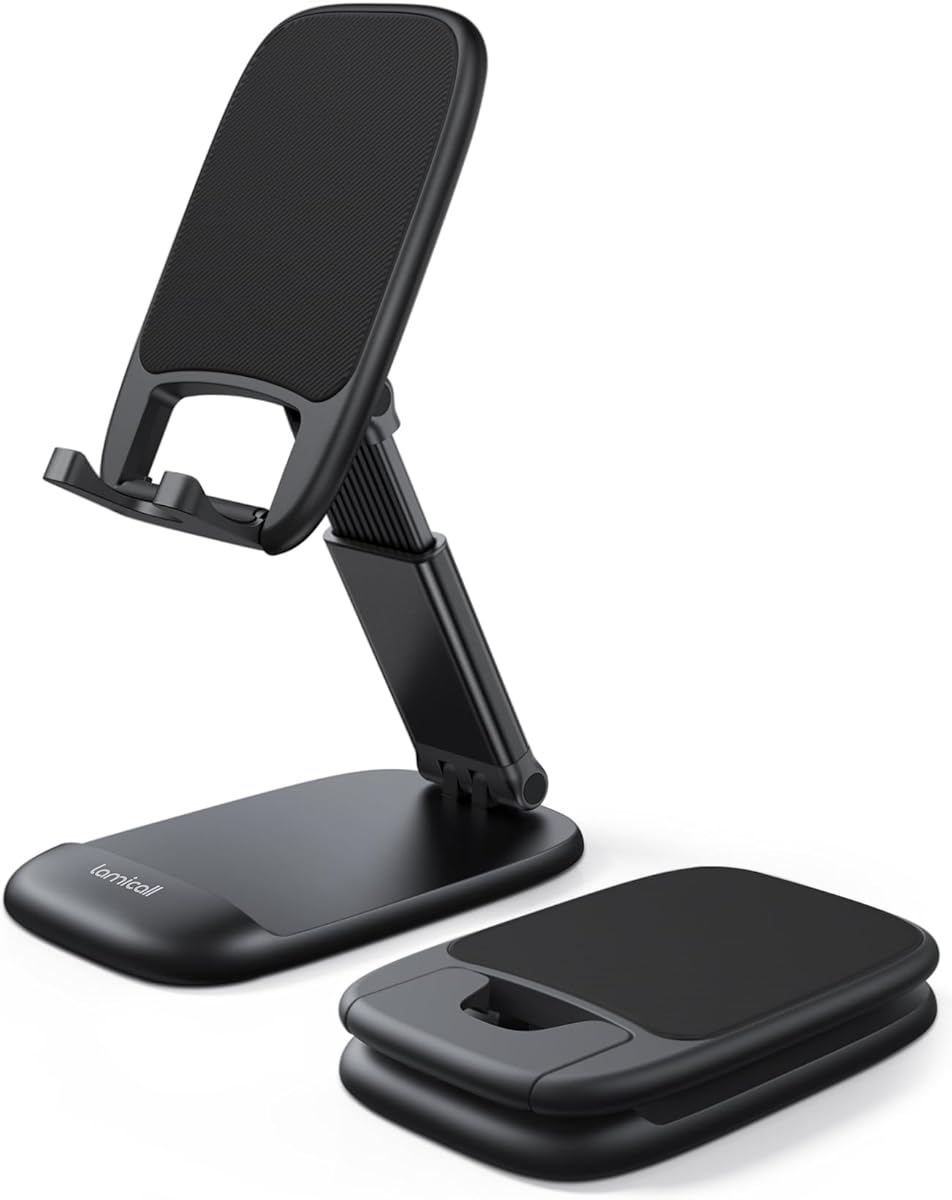
Lamicall Cell Phone Stand for Desk
4.8Editor score
Height extends up to 3.2 inches
Thick case friendly design
Portable foldable structure
Finding the right iPhone stand for Facetime can transform your daily video calls and media consumption experience. A good stand elevates your device to eye level, reducing neck strain and improving audio quality for clearer communication.
We compared ten top-rated models based on stability, adjustability, build quality, and compatibility with various iPhone cases. Our analysis focuses on features that matter most for hands-free video conferencing and content creation needs.
Each pick highlights unique strengths for different users, from budget buyers to premium seekers. Prices and availability change frequently, so check current listings before purchasing to ensure you get the best value for your setup.
4.8Editor score

4.6Editor score
4.6Editor score
As an Amazon Associate we earn from qualifying purchases.
The following table provides a side-by-side comparison of all ten featured iPhone stands for Facetime. Review each model's key specifications to determine which best fits your specific desk setup and usage requirements.


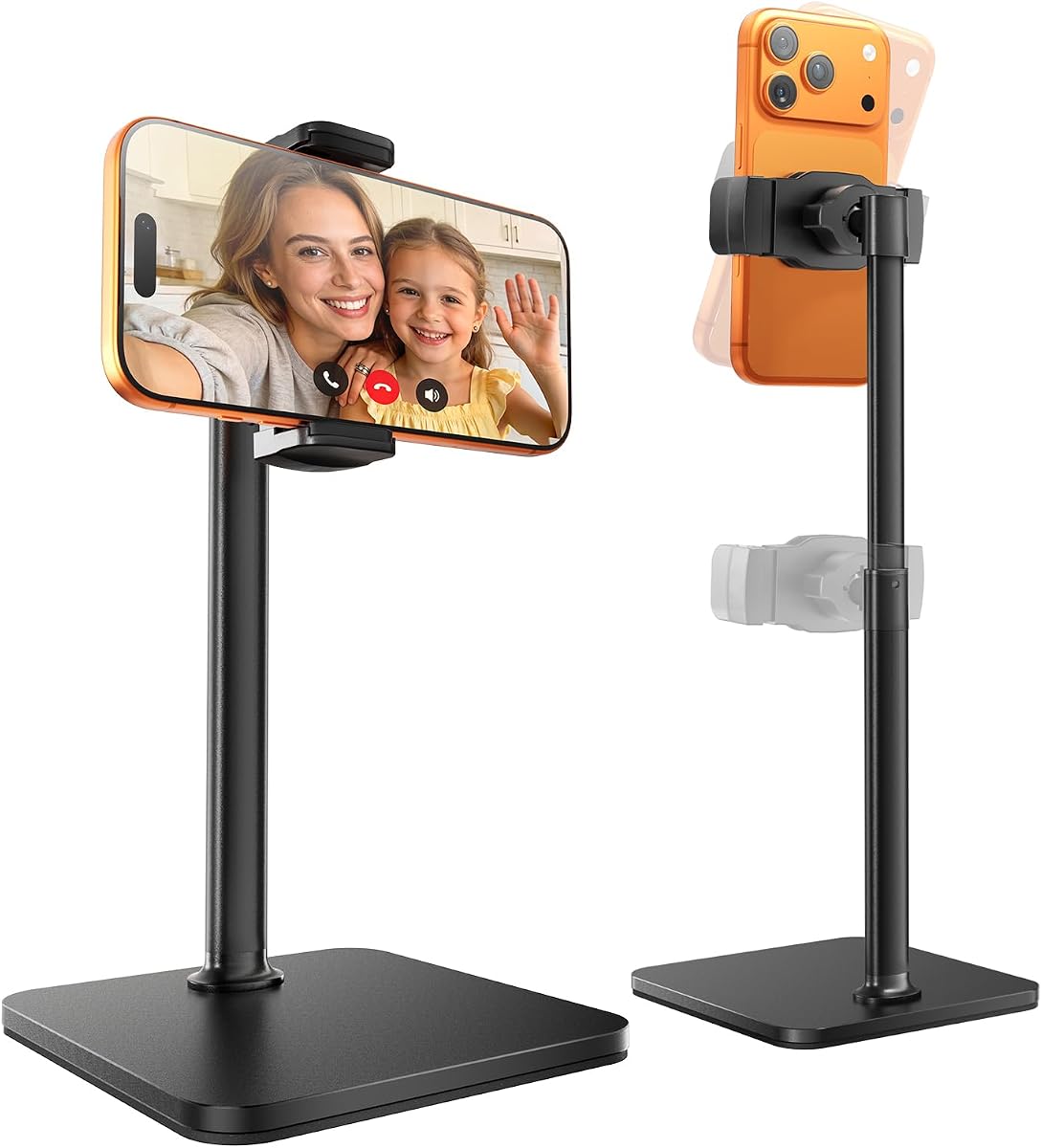

The COOPER ChatStand is a sturdy cell phone holder designed specifically for face-level video calls and recording. With a 4.6 rating, it offers a reliable solution for FaceTime, Zoom meetings, and content creation without needing to hold your device.
We may earn a commission when you buy through this link, at no additional cost to you.
Its telescoping positioning adjusts from 9 to 13 inches, allowing you to achieve an ergonomic angle that eliminates neck and back strain. The weighted metal base with non-slip pads ensures the stand stays put even during active video sessions.
While it is slightly heavier than some portable options, this weight contributes to its excellent stability. The only notable trade-off is the bulk compared to minimal stands, but this is acceptable given the robust performance.
This stand is ideal for anyone working from home or creating content who needs a reliable, stable platform. We recommend it for those prioritizing comfort and stability over portability.
The adjustable height range allows users to position their iPhone at eye level, significantly reducing physical strain during long calls.
Non-slip padded and weighted metal base ensures the stand does not tip over, providing peace of mind for active users.
We may earn a commission when you buy through this link, at no additional cost to you.
The Lamicall Cell Phone Stand holds a high 4.8 rating, making it a top choice for users seeking value and reliability. It adjusts angle and height to reduce the need to look down, improving posture during video calls or watching content.
We may earn a commission when you buy through this link, at no additional cost to you.
Its thick case friendly design accommodates devices with cases up to 0.71 inches, ensuring a secure fit without removing protection. The weighted metal base and high-precision smooth surface prevent scratches and breaks even after long-term use.
The main limitation is its height adjustment range compared to taller models, which might limit eye-level positioning for some users. However, for desktop use where extreme height is not needed, it offers sufficient flexibility.
We recommend this stand for budget-conscious users who need a durable, portable solution for their iPhone. Its foldable design makes it perfect for travel or temporary desk setups.
The bi-folding design allows this stand to be folded into a pocket-sized shape, making it easy to carry in a handbag or backpack.
Enlarged anti-slip silicone mats protect your mobile phone from sliding and scratching, even when using thick protective cases.
We may earn a commission when you buy through this link, at no additional cost to you.
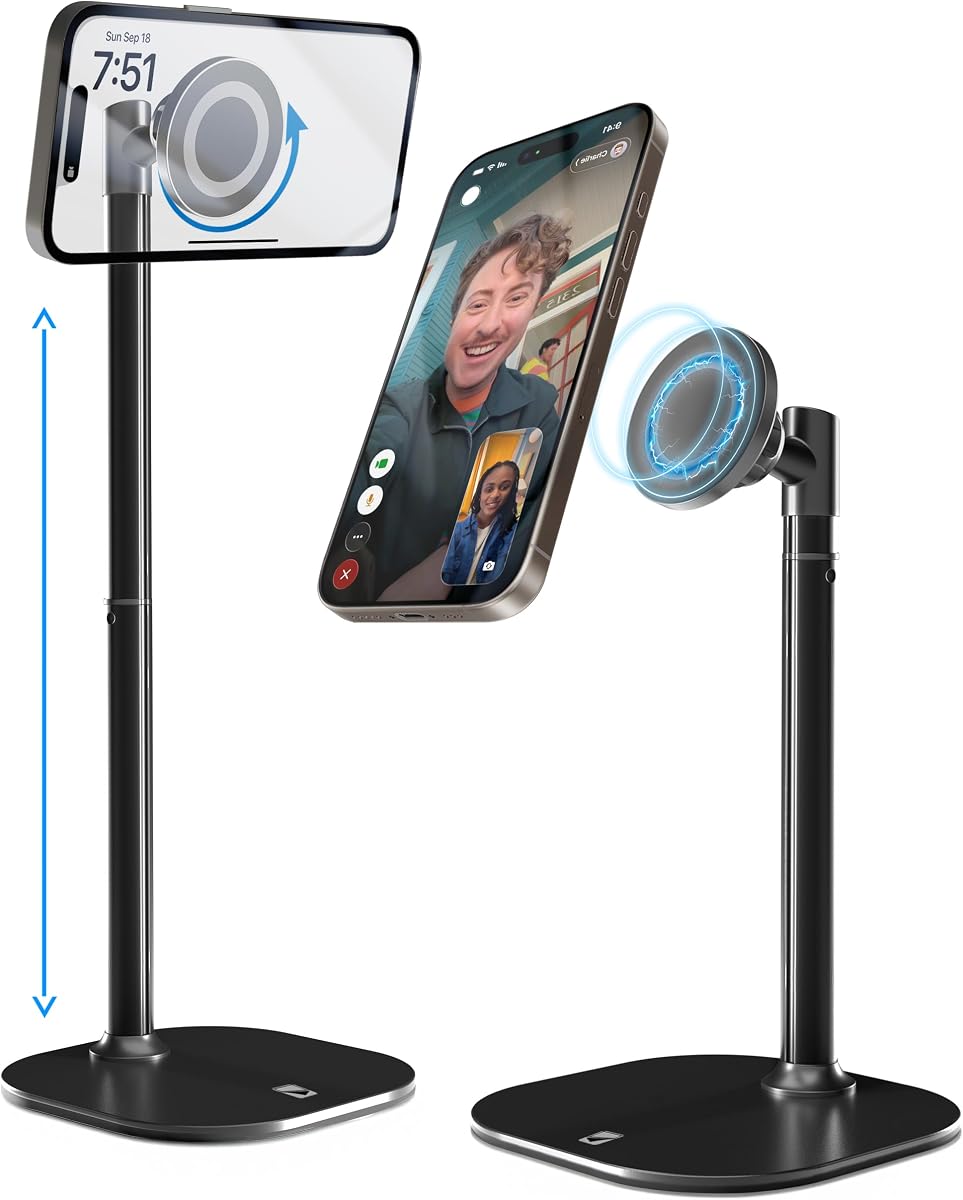
The COOPER MagStand is designed for iPhone 12 and newer models with MagSafe compatibility, offering a seamless magnetic attachment experience. With a 4.6 rating, it is perfect for FaceTime, Zoom, and streaming without fiddling with clips.
We may earn a commission when you buy through this link, at no additional cost to you.
Its adjustable height from 9 to 13 inches and 360 degree rotation allow for flexible viewing angles. The stable wide weighted metal alloy base with EVA padding prevents neck and back strain by keeping the device steady.
The primary trade-off is that it requires a MagSafe-compatible case or device, which may not suit users with older iPhones or non-MagSafe cases. However, for compatible users, the ease of use is unmatched.
We recommend this stand for iPhone users who want a premium magnetic solution for desk use. It combines style and function for a high-end video calling experience.
MagSafe compatibility allows for quick and secure attachment, eliminating the need for clips and making device changes effortless.
360 degree rotation and 55 degree tilt provide full framing freedom for vertical or horizontal video content creation.
We may earn a commission when you buy through this link, at no additional cost to you.
The DIMONCOAT Phone Stand is engineered with ergonomic design to correct text neck, offering an impressive height adjustment range. With a 4.4 rating, it supports comfortable viewing angles that help fix posture during video calls and media consumption.
We may earn a commission when you buy through this link, at no additional cost to you.
Its 180 degree flip and 360 degree rotation allow for versatile positioning suitable for watching, reading, or live streaming. The upgraded silicone clip works with thick cases up to 0.75 inches, ensuring stability without removing protection.
While the rating is slightly lower than competitors, the product offers a 2-year promise for quality issues, showing confidence in durability. The trade-off is potential build consistency issues compared to higher-rated brands.
This stand is ideal for users needing significant height flexibility for different tasks. We recommend it for those who prioritize adjustability and warranty support over top-tier ratings.
The ergonomic design helps fix your posture and reduce neck and back strain by providing comfortable viewing angles at eye level.
Upgraded silicone clips solve the problem of devices falling, accommodating thick cases without compromising stability.
We may earn a commission when you buy through this link, at no additional cost to you.
The OCYCLONE Phone Stand features a 4-point freely adjustable design, allowing users to change height and viewing angle for various daily uses. With a 4.6 rating, it is suitable for everything from typing to high-angle video watching.
We may earn a commission when you buy through this link, at no additional cost to you.
Its reinforced structure with anti-slip pads ensures stability during use without deformation. The fully foldable design makes it lightweight and easy to carry, fitting perfectly in pockets or backpacks for travel convenience.
While the design is somewhat generic compared to premium options, it offers practical functionality at a reasonable level. The only downside is that it lacks unique features like magnetic attachment found in other models.
We recommend this stand for users who need a versatile, portable option for multiple environments. It is particularly useful for those who value flexibility and ease of storage.
Perfect for video meetings, online classes, cooking recipes, and gaming, this stand adapts to various home and office needs.
Reserved charging port space allows you to charge your device while watching videos or working without unplugging.
We may earn a commission when you buy through this link, at no additional cost to you.
The LISEN Cell Phone Stand is designed to fight text neck with an adjustable height and angle that improves posture during office desk use. With a 4.5 rating, it offers a viewing experience that reduces neck back strain for gamers and streamers.
We may earn a commission when you buy through this link, at no additional cost to you.
Its sleek and stable design includes a built-in charging hole and smart cable management to keep your workspace clutter-free. The anti-slip design ensures your phone stays secure while protecting your desktop from scratches.
The height adjustment range is more limited compared to taller stands, restricting eye-level positioning for some users. However, the integrated cable management makes it an excellent choice for tidy desktop setups.
We recommend this stand for users who prioritize a tidy workspace and simple setup. It is ideal for those who value aesthetics and basic functionality.
Built-in charging hole and smart cable management keep your phone secure and your workspace clutter-free for a professional look.
A 365-day warranty and responsive customer support ensure a quick resolution for any assembly or quality issues.
We may earn a commission when you buy through this link, at no additional cost to you.
The OMOTON C2 Adjustable Aluminum Cell Phone Stand is a durable option with a high 4.8 rating, suitable for hands-free gaming and Facetime. Its multiple angle adjustments allow you to meet different viewing demands comfortably.
We may earn a commission when you buy through this link, at no additional cost to you.
Using 3mm thick aluminum material, this stand guarantees stability and longevity. The long hook holds devices with heavy cases without needing removal, and the larger silicone pads protect against slipping or scratching.
The stand offers a fixed height which may not suit users needing significant vertical adjustment. However, the robust construction ensures it remains steady even with larger phones and cases.
We recommend this stand for those who value durability and premium materials. It is an excellent choice for a fixed desk setup where stability is key.
The 3mm thick aluminum material and CNC technology similar to Macbook provide a comfortable sense of touch and high stability.
The long hook is designed to hold devices with heavy cases securely, so you do not need to take off the case when charging.
We may earn a commission when you buy through this link, at no additional cost to you.
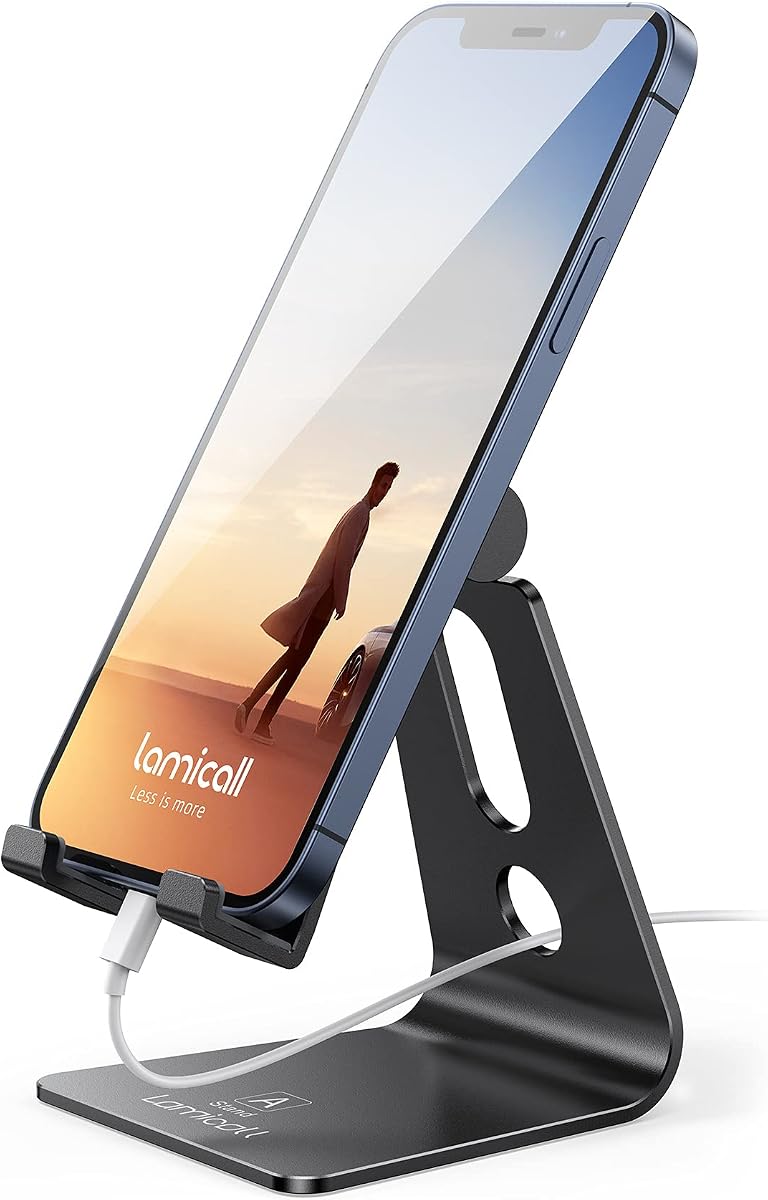
The Lamicall Aluminum Cell Phone Stand is a great desktop partner for office and home use with a 4.7 rating. It offers a sleek and elegant look with high-quality aluminum alloy that features a smooth edge and metallic luster.
We may earn a commission when you buy through this link, at no additional cost to you.
Its low gravity center design holds your phone stably, while rubber cushions protect it from scratches and sliding. The universal compatibility works with most smartphones from 4 to 8 inches, even with cases on.
The hook width limits device thickness to no more than 14mm, which might exclude some heavy cases. Users with larger phones should set them in landscape mode for more stability as advised.
We recommend this stand for users who appreciate premium aesthetics and reliability. It is perfect for a stylish desk setup that requires a solid, protective holder.
Made of high-quality aluminum alloy, this desk phone holder has a smooth edge and beautiful metallic luster that looks elegant on any desktop.
A low gravity center and rubber cushions protect the phone from scratches and sliding, ensuring a secure hold.
We may earn a commission when you buy through this link, at no additional cost to you.
The tounee Phone Stand is an 8 to 11 inch adjustable holder designed for content creators needing full framing freedom. With a 4.5 rating, it supports full-body shots and eye-level streaming for TikTok and YouTube.
We may earn a commission when you buy through this link, at no additional cost to you.
Its metal weighted anti-slip base keeps the phone rock-solid during typing or gesturing, preventing shaky footage. The open-grip design works with phones and cases without removal, provided dimensions stay within specific limits.
While it offers excellent versatility, the base may add some bulk compared to minimal stands. The trade-off is justified by the stability and adjustability it provides for professional-looking content.
We recommend this stand for creators who need specific angles for live selling or tutorials. It is ideal for those who prioritize framing and stability.
Extends from 8 to 11 inches with 50 degree tilt, supporting full-body shots and overhead tutorials.
Reinforced weighted base and non-slip silicone pads keep your phone stable during intense live sessions.
We may earn a commission when you buy through this link, at no additional cost to you.
The CreaDream Aluminum Cell Phone Stand offers a multi-angle design making it possible to adjust to your desired angle with 270 degree rotation. With a 4.7 rating, it is a hands-free option for games, Facetime, and Youtube while charging.
We may earn a commission when you buy through this link, at no additional cost to you.
Its hook is widened to fit devices with protective cases better than other stands. The sturdy aluminum body and rubber pads protect your device from scratches and sliding while ensuring stable performance.
The stand has limited vertical adjustability compared to taller models. However, the wide hook and durable build make it a practical choice for standard desktop use.
We recommend this stand for users seeking a simple, sturdy aluminum holder. It is ideal for those who need a reliable support for regular daily tasks.
Multi-angle design makes the phone stand possible to be adjusted to your desired angle with 270 degree rotation.
Compared with other stands, the hook of this stand is widened to fit well with devices in protective cases.
We may earn a commission when you buy through this link, at no additional cost to you.
Selecting the right iPhone stand involves considering several factors to ensure it meets your video calling and media needs effectively.
Adjustability allows you to set the device at eye level, which reduces strain on your neck and back during long calls. Look for stands with telescoping or folding mechanisms that offer a wide height range to suit your desk setup.
A stand that adjusts from 8 to 13 inches provides the flexibility needed for different chair heights and desk arrangements.
Materials like aluminum alloy and metal bases provide stability and a premium look, while plastic options may be lighter but less durable. Heavier bases help prevent the stand from tipping over during active use.
Metal construction generally ensures a longer lifespan and better resistance to bending or deformation over time.
Ensure the stand accommodates your iPhone with its current protective case, as some models have limited hook widths. Models designed to be thick case friendly allow you to keep your case on for protection without removal.
Check the maximum thickness specification to avoid issues with bulky protective armor cases.
Stability is crucial for video calls to prevent shaking or tipping. Look for features like non-slip pads, weighted bases, or reinforced structures that keep the device steady.
Anti-slip silicone pads on the base and contact points ensure your phone does not slide during use.
Decide whether you need a portable foldable stand for travel or a fixed, sturdy one for permanent desk placement. Portable models are lightweight and compact but may sacrifice some stability compared to desk-focused options.
Foldable designs allow for easy storage and transport if you frequently move between locations.
If you use an iPhone 12 or newer, a MagSafe-compatible stand offers a magnetic attachment that is easy to use. This eliminates clips and provides a clean aesthetic for compatible devices.
Ensure your device or case supports MagSafe technology before purchasing a magnetic stand.
A reliable warranty indicates the manufacturer's confidence in product durability and protects against defects. Look for brands offering at least a one-year warranty and responsive customer support.
Good support ensures that assembly issues or quality problems are resolved quickly without hassle.
The design of the stand should match your workspace style, with options ranging from sleek aluminum to minimalist plastics. A well-designed stand can improve your workspace organization and professional appearance.
Choose a finish that complements your other desk accessories for a cohesive look.
Start by adjusting the stand to your preferred height and angle to ensure your iPhone camera is at eye level for natural video calls. This helps reduce strain and improves the visual connection during FaceTime sessions.
Place the stand on a flat, stable surface and ensure all non-slip pads are firmly in contact with the desk to prevent sliding. Adjust the angle slightly to avoid glare on the screen during video calls or media viewing.
Clean the stand regularly with a soft, dry cloth to remove dust and debris that could scratch your device. Avoid using harsh chemicals or abrasive materials that might damage the protective silicone pads or metal finish.
Yes, most stands are universally compatible with iPhones and Android devices ranging from 4 to 8 inches. Models like Lamicall and OMOTON support older versions such as iPhone 7 through 14 without issue. Just verify the width and thickness limits before purchasing.
No, many stands are designed to be thick case friendly, allowing you to keep your protective case on. Look for adjustable clips or open-grip designs that accommodate cases up to 0.75 inches thick. MagSafe stands require a compatible case for attachment.
Yes, stands with weighted metal bases and anti-slip pads provide excellent stability for active sessions. The COOPER and tounee models feature reinforced bases that prevent tipping. Avoid lightweight plastic stands if you tend to touch or move the desk frequently.
The Lamicall Cell Phone Stand and OCYCLONE stand offer foldable designs that are compact and easy to carry. They can be folded into pocket-sized shapes for handbags or backpacks. These are ideal for business trips or temporary desk setups.
Yes, several models like LISEN and OMOTON have charging cutouts or space reserved for cables. This allows you to keep your phone powered during long video calls without unplugging. Check the product specs for specific charging port clearance.
Use a soft, dry cloth to wipe down the stand regularly to remove dust and debris. Avoid harsh chemicals that might damage silicone pads or finishes. For metal stands, a gentle polish can restore shine without causing scratches.
Yes, stands with rotation capabilities like COOPER MagStand allow for vertical orientation. Check for 360-degree rotation features to ensure the phone can be positioned for TikTok or Instagram stories. Most universal stands support this orientation.
Ideally, the camera should be at eye level to reduce neck strain and improve audio quality. Stands adjustable between 8 and 13 inches allow for this ergonomic positioning. Adjust based on your chair and desk height for the best comfort.
We have reviewed ten top iPhone stands for Facetime, highlighting the COOPER ChatStand, Lamicall Cell Phone Stand, and COOPER MagStand as top picks. Each offers unique benefits ranging from ergonomic adjustment to magnetic convenience.
Prioritize adjustability, stability, and case compatibility to ensure the stand meets your specific video calling needs. Consider whether you need a portable option for travel or a sturdy one for permanent desk use.
Remember that prices and availability may change, so check current listings on Amazon for the most accurate deals. Choose the model that best fits your workflow to enhance your hands-free experience.