
NZXT H5 Flow
4.7Editor score
Compact ATX mid-tower design
Ultra-fine mesh panels
Two quiet airflow fans included
This guide compares the top ten high airflow PC cases for cooling performance, design, and value to help you choose the right chassis for your build.
Choosing the right chassis is critical for thermal performance and system longevity. High airflow cases ensure cool components stay stable under load while maintaining quiet operation for daily tasks and intense gaming sessions.
We evaluated ten leading models based on ventilation design, fan inclusion, build quality, and component compatibility. Each pick offers distinct advantages for different budgets and hardware configurations without compromising on essential cooling metrics.
Every selection highlights specific strengths like modular flexibility or advanced fan layouts. Prices and availability fluctuate frequently so always check current listings before purchasing to ensure you get the best deal available today.
4.7Editor score

4.8Editor score

4.8Editor score
This side-by-side comparison highlights key specifications and unique features across all ten models to help you quickly identify the best fit for your specific hardware needs and aesthetic preferences.





The MONTECH AIR 903 MAX stands out as a top contender in the high airflow category with its exceptional thermal performance and comprehensive fan setup. It earns a strong rating from users who prioritize cooling efficiency and build flexibility. This case delivers on its promise of keeping demanding components cool under heavy load while maintaining a clean aesthetic.
We may earn a commission when you buy through this link, at no additional cost to you.
Its standout quality is the inclusion of four high-performance 140mm fans pre-installed at the front and rear. This configuration ensures immediate airflow optimization without needing additional purchases. The ventilated mesh front panel allows unrestricted air intake which is crucial for modern GPUs and processors that generate significant heat during operation.
One trade-off involves the brightness of the ARGB lighting which some users find overpowering. However this is easily managed through software control or by adjusting fan profiles. The need for regular filter cleaning is standard for mesh designs and ensures long-term airflow efficiency remains consistent throughout the lifespan of your system.
This case is ideal for builders seeking high performance without excessive cost. It supports a wide range of motherboard sizes including E-ATX and fits large graphics cards comfortably. For anyone looking to balance cooling capability with aesthetic appeal this model offers a compelling package that meets diverse build requirements effectively.
The mesh front and included fans create a direct path for cool air to reach critical components efficiently.
Support for E-ATX boards and massive GPUs ensures your system can grow without needing a case upgrade soon.
We may earn a commission when you buy through this link, at no additional cost to you.
The CORSAIR 4000D RS redefines customization with its revolutionary FRAME system allowing users to adapt the case to evolving needs. It receives high marks for its thoughtful design and superior airflow characteristics. This model is perfect for enthusiasts who want a chassis that can grow and change alongside their hardware upgrades.
We may earn a commission when you buy through this link, at no additional cost to you.
Its InfiniRail mounting system provides unmatched flexibility for positioning fans where they are needed most. The 3D Y-Pattern front panel minimizes obstruction while maximizing air intake volume. Additionally the included RS fans offer efficient cooling with silent operation modes that reduce noise during idle periods.
A minor limitation is the roof fan size restriction to 140mm which may limit some liquid cooling setups. Despite this the overall cooling performance remains excellent for most builds. The modular aspects may require some planning during assembly but the result is a highly adaptable and durable chassis.
Ideal for users valuing long-term flexibility this case supports a wide variety of configurations. Whether you prefer clean minimalism or turbo cooling with side fans the options are nearly limitless. Its robust construction and smart thermal design make it a reliable choice for building a high-performance PC.
Upgrade the motherboard tray or I/O panel to tailor the case exactly to your hardware requirements.
Slide rails let you mount fans in optimal positions for precise cooling management.
We may earn a commission when you buy through this link, at no additional cost to you.
The NZXT H5 Flow offers exceptional value for builders seeking efficient cooling in a smaller footprint. It achieves a high rating for its balance of performance and compact design. This case proves that good airflow does not require a massive chassis making it perfect for space-constrained environments.
We may earn a commission when you buy through this link, at no additional cost to you.
Key strengths include ultra-fine mesh on all key panels which maximizes airflow while filtering dust effectively. The perforated PSU shroud enables optimal air intake from the bottom improving overall system cooling. Two quiet fans ensure basic thermal needs are met without unnecessary noise.
Trade-offs involve limited radiator support compared to full tower options and fewer fan mounts overall. However these constraints are acceptable for standard air cooled builds or smaller liquid cooling loops. The compact size might limit very large graphics cards but fits most modern components comfortably.
Best suited for budget-conscious gamers or office users this case delivers reliable thermal management. Its sleek design fits well in living rooms or desks where space is premium. If you need a clean simple build with strong cooling in a smaller package this is an excellent choice.
Maximize cooling in a smaller footprint with strategic ventilation and fan placement.
Ultra-fine mesh panels keep internal components clean while allowing air to flow freely.
We may earn a commission when you buy through this link, at no additional cost to you.
The LIAN LI LANCOOL 216 is designed specifically to accommodate the latest generation of large graphics cards with ease. It receives strong ratings for its cooling efficiency and user-friendly build experience. This case is particularly well-suited for those planning high-end air cooled systems that require ample space.
We may earn a commission when you buy through this link, at no additional cost to you.
Its key feature is the inclusion of two 160mm ARGB fans at the front delivering massive airflow potential. The modular motherboard I/O allows position adjustments to optimize clearance for air coolers. Fine mesh panels on all sides ensure that airflow remains unrestricted throughout the chassis.
While the glass panels look stunning they do show fingerprints and dust which requires regular wiping. The RGB features work well but may need external software control beyond the motherboard. Despite these minor aesthetic concerns the functional benefits for cooling and component fit are outstanding.
Ideal for builders with large NVIDIA 4000 series cards this case provides the necessary room without compromising style. The flexible mounting options allow for both air and liquid cooling configurations. Its thoughtful design makes it a top recommendation for performance-focused enthusiasts needing extra clearance.
160mm fans provide significant volume to keep even the hottest GPUs cool under load.
Adjustable I/O allows optimization for tall CPU coolers and specific motherboard layouts.
We may earn a commission when you buy through this link, at no additional cost to you.
The Antec Flux Pro represents a pinnacle in cooling design with six included PWM fans and massive radiator support. It earns high marks for its robust build quality and innovative features like the iShift PSU mount. This case is designed for enthusiasts who demand the absolute best thermal performance.
We may earn a commission when you buy through this link, at no additional cost to you.
Its multi-directional vent design and generous fan capacity ensure that no component runs hot under sustained load. The combination of metal glass and wood textures creates a premium look that stands out. Dual temperature displays offer real-time monitoring to track thermal performance effectively.
The weight of the chassis is substantial which can make relocation tricky after assembly. Front filters are also somewhat difficult to access for cleaning requiring patience. However these are minor inconveniences given the superior cooling potential and unique aesthetic appeal offered here.
Best for large form factor builds this case supports extreme cooling configurations including dual large radiators. The flexible brackets and cable management options simplify complex builds significantly. If you prioritize thermal excellence and premium materials this model is a top-tier investment.
Six fans and support for 420mm radiators ensure top-tier thermal performance.
Unique mix of textures provides a high-end look unmatched by standard steel cases.
We may earn a commission when you buy through this link, at no additional cost to you.
The CORSAIR 3500X RS delivers an unmatched view of your build with its wraparound glass design. It maintains high ratings for balancing aesthetics with essential cooling features. This case is perfect for those who want to showcase their components without sacrificing performance or usability.
We may earn a commission when you buy through this link, at no additional cost to you.
Key strengths include three high-performance ARGB fans that provide ample airflow despite the glass front. Removable tempered glass panels make building and maintenance straightforward without compromising the seamless look. The interior supports up to ten 120mm fans ensuring robust cooling potential.
The weight and visibility of dust on glass are unavoidable trade-offs for the stunning visuals. Regular cleaning is required to keep the view pristine but this is a manageable task. Despite these factors the aesthetic benefit makes it a popular choice for visual-focused builds.
Ideal for users wanting a showcase PC this model supports various motherboard sizes up to EATX. The cooling capacity ensures that high-end parts stay efficient while the view remains unobstructed. It successfully merges beauty and function for a truly immersive building experience.
Wraparound glass lets you view every detail of your custom build clearly.
Despite glass panels the internal airflow remains optimized for high thermal efficiency.
We may earn a commission when you buy through this link, at no additional cost to you.
The Lian Li V100 offers a sleek compact solution that supports back-connect motherboards for cleaner looks. It receives excellent ratings for its integrated lighting and efficient cooling design. This case is ideal for small form factor enthusiasts seeking modern aesthetics and simplicity.
We may earn a commission when you buy through this link, at no additional cost to you.
Its pre-installed fans and integrated LED strip create a vibrant build experience out of the box. Tool-less mounting mechanisms allow quick access to internals for maintenance or upgrades. Support for back-connect boards eliminates front panel clutter for a pristine visual presentation.
The limitation to smaller motherboard sizes restricts use for full tower builders but suits compact needs well. Fan noise can increase under heavy load but remains acceptable for most users. The compact size may restrict very large GPUs but fits most mid-range cards comfortably.
Best for compact gaming rigs this case maximizes cooling in a small footprint efficiently. The design ensures airflow is optimized without needing extra modifications. If you value a tidy aesthetic and easy access this model stands out as a practical and attractive choice.
Pre-installed fans and strips provide full RGB coverage without extra purchases.
Tool-less panels and mounts streamline assembly and maintenance tasks significantly.
We may earn a commission when you buy through this link, at no additional cost to you.
The Cooler Master HAF II 500 stands out with its massive fans designed for maximum airflow. It earns top ratings for superior cooling performance and unique features like the dual-mode GPU holder. This case is perfect for users needing extreme cooling without compromising on noise or stability.
We may earn a commission when you buy through this link, at no additional cost to you.
Oversized intake and exhaust fans drive massive airflow with low resistance design for efficiency. Split-level cable management optimizes routing and maintains clear air paths throughout the chassis. The MasterRail system supports diverse radiator and fan configurations with high flexibility.
The price reflects its premium features but may be higher than average for casual users. Space requirements are significant meaning it fits best in larger desks or rooms. These constraints are worth it for those prioritizing the highest possible thermal performance and stability.
Ideal for high-end workstation or gaming builds this case accommodates the latest graphics cards. The holder system ensures stability for large cards while maintaining clean airflow. If thermal efficiency and build quality are top priorities this model offers a premium solution.
220mm fans ensure sufficient cooling for even the most demanding hardware configurations.
Dual-mode holders prevent GPU sagging with heavy cards securely.
We may earn a commission when you buy through this link, at no additional cost to you.
The NZXT H9 Flow introduces a dual-chamber layout that separates components for better cooling. It receives high ratings for its innovative design and panoramic view. This case offers a sophisticated approach to airflow management ensuring critical components stay cool efficiently.
We may earn a commission when you buy through this link, at no additional cost to you.
Separating the PSU and drives from main components reduces heat buildup significantly. Support for back-connect motherboards maintains a clean look while improving airflow. The high fan capacity allows for customizable thermal setups tailored to specific needs.
The internal complexity might challenge first-time builders but pays off in thermal results. The price reflects the advanced features and build quality available here. Despite the cost the separation of zones offers tangible benefits for system stability.
Best for builders prioritizing thermal separation this case fits high-end GPU setups well. It supports up to 420mm radiators ensuring liquid cooling potential is maximized. If you need a balance of style advanced features and efficient cooling this is a strong choice.
Separating heat sources keeps critical components cooler and reduces fan noise.
Panoramic glass panels offer a stunning view of your internal components.
We may earn a commission when you buy through this link, at no additional cost to you.
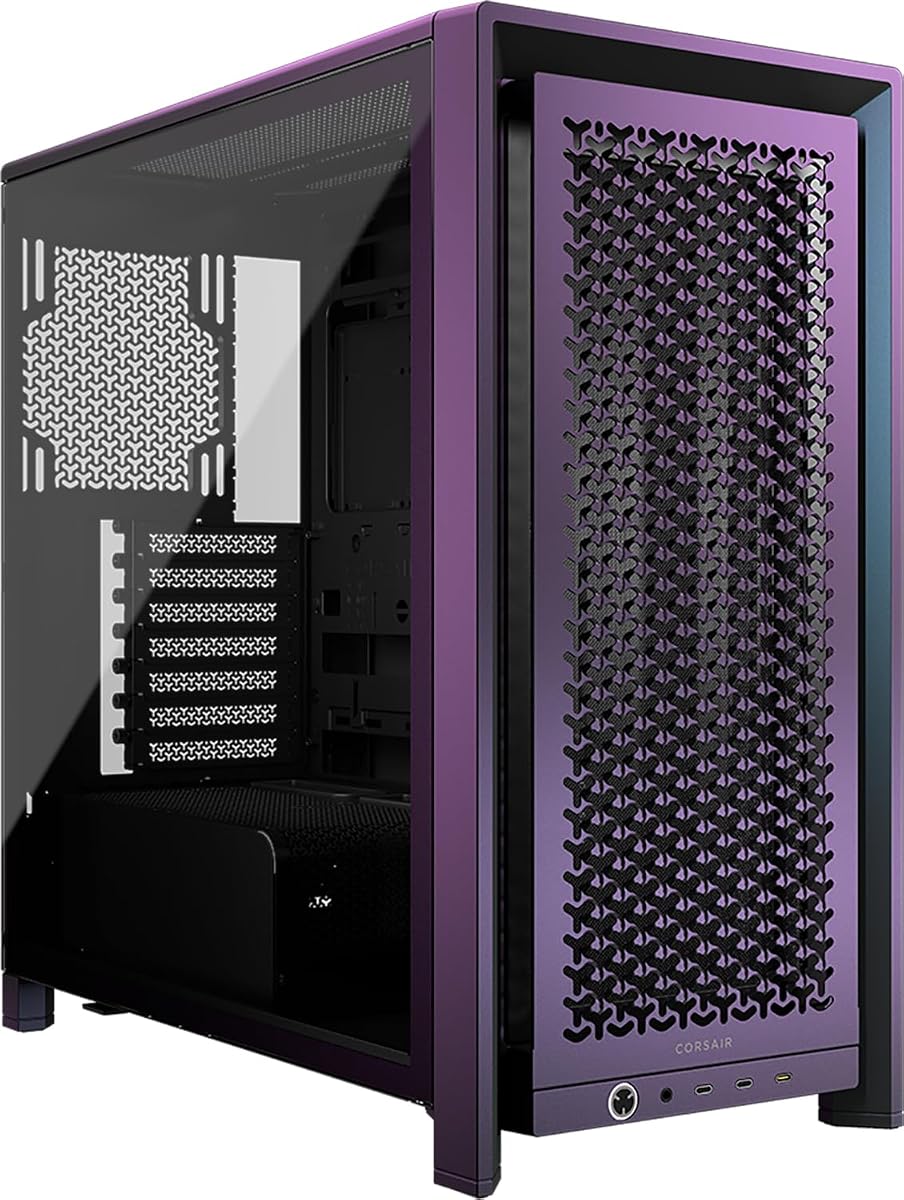
The CORSAIR Frame 4000D Vault Series stands out as a limited edition offering with unique finishes. It earns strong marks for its modularity and high-end design. This case is ideal for collectors who value exclusivity alongside high-performance thermal capabilities.
We may earn a commission when you buy through this link, at no additional cost to you.
Its modular FRAME system allows upgrades like aluminum trays or swapped panels. The InfiniRail system provides unmatched flexibility for fan positioning. This combination ensures that the case adapts to any build style or cooling requirement easily.
Limited availability means finding one may require patience or higher costs. The price reflects the exclusivity and craftsmanship which may not suit budget builds. However for enthusiasts looking for something unique this is a standout option.
Best for collectors and enthusiasts this case combines rarity with practical performance features. The high customization allows tailoring to exact preferences without compromise. If you seek a unique chassis that offers both looks and function this limited edition delivers well.
Limited run numbering makes each unit a unique collector's item.
Modular system lets you upgrade parts without buying a new case.
We may earn a commission when you buy through this link, at no additional cost to you.
Selecting the right high airflow case requires careful attention to ventilation design, fan options, and component compatibility to ensure optimal thermal performance.
The front and top panels should feature mesh or perforated steel to allow unrestricted air intake. Look for cases with open layouts that minimize barriers between fans and components.
Prioritize cases with mesh front panels for maximum cooling efficiency.
Check how many fans are pre-installed and their sizes. High airflow cases typically include at least three to five fans to ensure balanced pressure. Larger fans like 140mm or 160mm move more air at lower noise levels.
Choose a case with enough large fans to cover your cooling needs out of the box.
Ensure the case fits your GPU length and CPU cooler height. High airflow designs sometimes reduce internal space so verify dimensions match your hardware specs. Extra space helps maintain airflow paths around components.
Verify that your GPU and cooler fit comfortably without blocking airflow paths.
Cases with adjustable mounts or modular panels allow future upgrades without replacing the chassis. This is vital for keeping up with new hardware generations. Look for cases with swappable I/O or removable panels.
Pick a modular case to extend its lifespan as your components upgrade.
Proper cable routing ensures that cables do not obstruct airflow paths inside the case. Wide channels and dedicated tie-down points help keep the interior organized. Clean interiors improve thermal performance significantly.
Select cases with ample routing space to maintain clean airflow paths.
Dust filters protect internal components from debris that blocks airflow over time. Look for removable fine mesh filters on intake points for easy cleaning. Regular maintenance ensures long-term thermal efficiency.
Ensure all intake panels have high-quality removable dust filters.
Durable materials like steel and tempered glass provide structural integrity and safety. Heavy-duty frames prevent warping under component weight and ensure stability. Quality materials also help dampen operational noise.
Opt for cases with strong metal frames to ensure long-term stability.
If you plan on liquid cooling, verify the case supports your desired radiator size. Top and front mounts should handle standard sizes like 360mm or 420mm. Support for dual radiators can boost cooling for complex setups.
Check radiator support to ensure compatibility with your chosen cooling system.
When assembling your PC, place all pre-installed fans so they pull air from the front and bottom while exhausting through the rear and top. This creates positive air pressure and reduces dust accumulation inside the case.
Maintain your case by cleaning dust filters every few months to prevent airflow restriction. Remove side panels gently and use compressed air to clear dust from fans and heatsinks without causing damage.
Periodically check cable routing to ensure no wires have shifted into critical airflow paths. Re-tie or re-route any loose cables to keep internal airflow unobstructed for consistent thermal performance.
A high airflow PC case features open mesh panels, multiple pre-installed fans, and minimal internal obstructions to maximize air movement. This design ensures components stay cooler under load and reduces thermal throttling.
Most high airflow cases come with several pre-installed fans sufficient for standard builds. Extra fans are only necessary if you plan extensive liquid cooling or want quieter operation at higher RPMs.
For best performance clean dust filters every two to three months or more often in dusty environments. Regular cleaning ensures that air pathways remain unobstructed and thermal efficiency stays optimal.
Mesh cases generally run quieter because fans do not have to work as hard to push air through obstructions. While they are open to the outside the reduced resistance lowers overall noise levels.
Yes most high airflow cases support large radiators like 360mm or 420mm on top and front. The open design also aids in dissipating heat from radiators effectively.
Several modern high airflow cases include support for back-connect boards like ASUS BTF or MSI Zero. Look for models specifically labeled with back-connect compatibility for cable-free builds.
Positive air pressure means more fans are blowing in than blowing out which reduces dust intake. High airflow cases allow you to adjust fan curves to maintain slight positive pressure easily.
This guide has highlighted ten exceptional cases offering superior cooling performance and versatile designs for diverse build needs. The MONTECH AIR 903 MAX and NZXT H5 Flow stand out for value while the Cooler Master HAF II 500 leads in premium performance.
When selecting a case prioritize ventilation design and fan capacity to ensure your components stay cool under sustained loads. Also consider component compatibility and modularity to accommodate future hardware upgrades seamlessly.
Remember that prices and availability can change frequently so always verify current listings before making a purchase. This ensures you secure the best deal and availability for your desired chassis at the time of building.