
HDMI Splitter 1 in 3 Out
4.6Editor score
Affordable price point
Supports 4K@30Hz
Includes LED status indicators
This guide compares the top 10 HDMI splitter for 3 monitors to help you choose the right device for multi-screen setups in office or home use.
Choosing the right HDMI splitter for 3 monitors can transform your workspace or entertainment setup significantly. It allows you to connect a single source to multiple screens efficiently. Understanding the differences between mirroring and extending is crucial for your specific needs.
We evaluated ten top-rated models based on resolution support, build quality, and compatibility. Each device was analyzed for its ability to handle 4K content and maintain stable signals across all outputs. Our goal is to help you find a reliable solution for your display requirements.
Each pick highlights unique strengths and potential limitations to inform your decision. We cover budget-friendly options and high-performance models for professional use. Remember that prices and availability change frequently so check current listings before purchasing.
4.6Editor score

4.4Editor score

4.2Editor score
This comparison table lists all ten products side by side with their key specifications. It helps you quickly identify which model matches your specific technical requirements and usage scenarios.



The UANTIN DisplayPort to HDMI Splitter is a top choice for users with DisplayPort-enabled graphics cards. It earns high marks for its ability to split one DP signal into three HDMI outputs while maintaining 4K@60Hz resolution. This makes it ideal for multitasking environments where screen real estate is critical.
We may earn a commission when you buy through this link, at no additional cost to you.
Its standout quality lies in its support for extended displays rather than just mirroring. The device uses MST technology to allow each monitor to show different content. The all-aluminum casing ensures efficient heat dissipation during long hours of operation. Gold-plated interfaces and tin-plated copper cores reduce signal interference effectively.
While it performs exceptionally well, it does require a graphics card that supports multi-screen output and at least 18Gbps bandwidth. Users with Mac systems or laptop DP ports might face compatibility issues as it is designed primarily for desktop PCs with dedicated GPUs.
This product is best for office workers or designers needing a stable triple-monitor setup from a single DP source. If your hardware supports the requirements, this splitter offers a reliable and high-performance solution for expanding your workspace without multiple cables.
Unlike standard splitters this device supports MST allowing independent screens for better productivity.
The aluminum casing and gold-plated ports ensure long-term reliability and minimal signal loss.
We may earn a commission when you buy through this link, at no additional cost to you.
The NEWCARE 4K@60Hz HDMI Splitter is designed for users who need to mirror content across three screens at high refresh rates. It is a solid option for retail displays or meeting rooms where everyone needs to see the same information clearly. The included 4ft HDMI cable adds convenience to the package.
We may earn a commission when you buy through this link, at no additional cost to you.
Key strengths include its support for HDR10 and Dolby Vision which enhances visual quality significantly. The auto downscaler allows mixed resolution displays to work together seamlessly. It supports various audio formats making it versatile for multimedia setups. The powered design ensures stable signal transmission without flickering.
Users should note that this device does not support extended displays. It is strictly for mirroring which limits its use for multitasking workspaces. Also it cannot connect audio devices directly so external speakers must be connected to the source or displays.
This splitter is ideal for presentations or digital signage where consistency across screens is more important than individual screen content. If you need synchronized playback on multiple monitors without extra cabling this model offers reliable performance.
The 60Hz capability ensures smooth video playback suitable for dynamic content display.
The included HDMI cable simplifies setup reducing the need for additional purchases immediately.
We may earn a commission when you buy through this link, at no additional cost to you.
The MT-ViKI 4K HDMI Splitter offers a unique value proposition by supporting four outputs instead of three. This is useful if you plan to expand your setup later or need to cover a larger area with more screens. It is built for reliability with a metal housing that handles heat effectively.
We may earn a commission when you buy through this link, at no additional cost to you.
Its signal boosting capability allows for longer cable runs up to 100 feet total without losing quality. This makes it perfect for conference rooms or security monitoring where screens are spread out. The cascading feature allows even more screens to be connected in a chain for massive installations.
A trade-off is that it supports 30Hz at 4K resolution which might be less smooth for video content compared to 60Hz models. Also it strictly mirrors content so it is not suitable for extended desktop configurations. You must connect a power adapter to avoid signal drops.
For commercial environments or large home theaters requiring multiple displays this unit delivers robust performance. If you need to reach distant screens or add a fourth monitor later this splitter provides the necessary flexibility and range.
Built-in amplifiers support long cable runs making installation easier over large spaces.
Cascading support allows for future expansion without replacing the main splitter unit.
We may earn a commission when you buy through this link, at no additional cost to you.
This DisplayPort to HDMI Splitter is a strong alternative to the UANTIN model for users needing triple 4K displays. It uses MST technology to extend your desktop across three monitors rather than just mirroring them. This functionality is crucial for professionals who need to see different applications on each screen simultaneously.
We may earn a commission when you buy through this link, at no additional cost to you.
The device is built with durability in mind featuring an integrated aluminum alloy shell for heat dissipation. It includes a nylon braided cable that resists wear and tear over time. The gold-plated ports ensure stable signal transmission and reduce the risk of connection issues during extended use.
However it requires a powerful graphics card with at least 18Gbps bandwidth to drive three 4K monitors effectively. Users with integrated graphics or older cards may find it limits them to mirroring mode only. It also does not support macOS due to MST limitations on Apple systems.
If you have a capable PC and need a dedicated triple monitor setup for work or gaming this adapter is an excellent choice. It provides the connectivity and resolution support needed for high-definition multitasking without excessive cabling.
Designed specifically to drive three monitors simultaneously with extended desktop capabilities.
Nylon cables and metal housing ensure longevity in active work environments.
We may earn a commission when you buy through this link, at no additional cost to you.
This budget-friendly HDMI splitter offers excellent value for users needing a simple three-screen mirroring setup. It is highly rated for its reliability and ease of use with various sources like consoles and laptops. The aluminum casing helps keep it cool during operation which is important for longevity.
We may earn a commission when you buy through this link, at no additional cost to you.
It supports 4K at 30Hz which is sufficient for static content or slow video playback. The LED indicators on each output port help you quickly identify connection status. It is plug and play requiring no software installation which simplifies the setup process significantly for beginners.
While it is a budget device it does not support high refresh rates for gaming at 4K. It is primarily designed for content display rather than interactive applications. Also it only mirrors screens so it cannot extend your desktop for multitasking tasks.
For home theater setups or basic office needs where cost is a major factor this splitter performs well above expectations. If you need a reliable way to share one image across three screens without spending much this is a practical choice.
No drivers required and LED indicators make troubleshooting simple for any user.
Delivers reliable performance at a price point that is accessible for most buyers.
We may earn a commission when you buy through this link, at no additional cost to you.
This compact HDMI splitter is designed to fit discreetly into tight spaces while providing reliable signal distribution. It mirrors input to three screens with zero latency which is great for live feeds or presentations. The solid aluminum alloy build ensures it runs cool even during continuous operation.
We may earn a commission when you buy through this link, at no additional cost to you.
It supports 4K resolution at 30Hz ensuring sharp visuals for text and images. The LED lights on the output ports allow you to verify connections at a glance. It works with a wide range of devices including gaming consoles and streaming sticks making it versatile for home use.
The main limitation is that it only supports mirroring so it cannot extend your desktop. This restricts its use to scenarios where identical content is required on all screens. It also does not support connecting audio outputs directly to the device.
Ideal for retail displays or small meeting rooms this unit offers a simple solution for multi-screen broadcasting. If space is limited and you need consistent image replication this model delivers dependable performance without bulk.
Small footprint ensures it fits easily on desks or entertainment centers without clutter.
Zero latency mirroring ensures real time content display across all connected screens.
We may earn a commission when you buy through this link, at no additional cost to you.
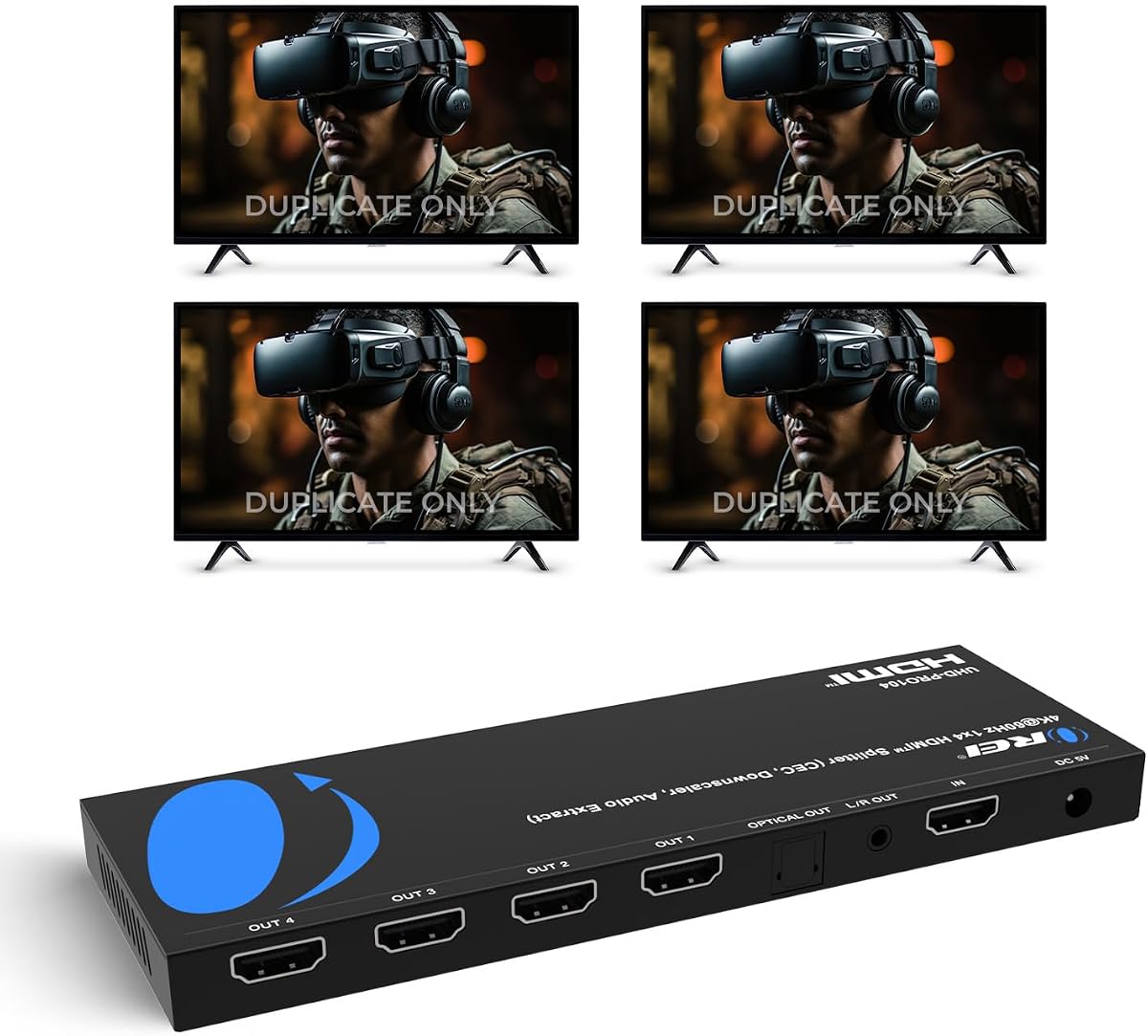
The OREI UltraHD splitter is known for its high-quality construction and strong video performance. It handles 18Gbps bandwidth allowing 4K content at 60Hz on all four outputs. This makes it suitable for premium home theater setups where image quality is a priority.
We may earn a commission when you buy through this link, at no additional cost to you.
It features a heavy-duty metal enclosure that helps dissipate heat efficiently. The plug and play setup requires no drivers making it easy to use immediately. It supports a wide range of audio formats including Dolby TrueHD which enhances the viewing experience significantly.
Users should be aware that it does not support extended displays so it is not for multitasking workstations. The mirroring function is limited to identical content on all connected screens. However its stability and build quality make up for this limitation in many applications.
For users needing to distribute high-quality video to multiple screens reliably this model is a strong choice. It offers peace of mind with a warranty and consistent performance for entertainment or professional presentation use.
Supports 18Gbps ensuring smooth high resolution video without compression or dropouts.
Wide audio format support ensures immersive sound for multimedia applications.
We may earn a commission when you buy through this link, at no additional cost to you.
This OREI splitter stands out with its built-in audio extractor which allows separate audio output via optical or analog connections. This is useful when your TV or monitor has poor built-in speakers. It also supports HDR10+ and Dolby Vision for enhanced color contrast.
We may earn a commission when you buy through this link, at no additional cost to you.
The downscaling feature allows 4K sources to be converted to 1080p for compatible displays making it flexible for mixed setups. EDID management helps prevent black screens or signal loss by optimizing communication between devices. The HDMI 2.0b compliance ensures modern standards are met.
The advanced features come at a higher price point which might not be needed for simple setups. The setup is slightly more complex due to audio extraction options compared to basic splitters. However for enthusiasts this provides significantly more control over signal routing.
Ideal for home theater enthusiasts who want to control audio independently this unit offers a robust feature set. It bridges the gap between a simple splitter and a full AV solution for demanding entertainment environments.
Dedicated audio outputs allow connection to external speakers for better sound quality.
Advanced EDID management ensures stable connections across diverse display configurations.
We may earn a commission when you buy through this link, at no additional cost to you.
This premium splitter is designed for the latest HDMI standards supporting up to 8K resolution and 48Gbps bandwidth. It is one of the few options that supports 4K at 120Hz making it ideal for high-end gaming setups. The EDID modes allow customization of signal settings for specific needs.
We may earn a commission when you buy through this link, at no additional cost to you.
Features like VRR and HDR10+ ensure the best visual fidelity for compatible content. It is future proof for upcoming display technologies and high bandwidth requirements. The build quality reflects its status with robust internal components to handle such heavy data throughput.
While powerful it does not support extended displays so it is not for office workspaces. The price is high which limits it to users needing top-tier performance. Also it requires high-speed HDMI cables to realize its full potential effectively.
For gamers or professionals with 8K monitors this is a top choice for maintaining quality across multiple screens. If you need the absolute best in video bandwidth and resolution support this model delivers premium performance.
Supports 120Hz at 4K for smooth gaming without compromising visual clarity.
8K support ensures longevity as display technology advances in the coming years.
We may earn a commission when you buy through this link, at no additional cost to you.
UGREEN is a well trusted brand in the cable and adapter space known for reliable products. This splitter supports 4K at 60Hz and 18Gbps bandwidth making it a solid choice for high definition video. The EDID setting helps prevent flickering and black screens automatically.
We may earn a commission when you buy through this link, at no additional cost to you.
It offers a simple plug and play experience with USB power for stable transmission. The compatibility list is extensive covering consoles and computers alike. The build is compact and efficient for home or small office environments easily.
It is strictly a mirroring device which limits its use to identical content distribution. While reliable it lacks some advanced features like audio extraction found in higher priced models. For general use it provides consistent quality without unnecessary complexity.
This splitter is a safe choice for users who prefer well known brands for their peripherals. It delivers solid performance for multi-screen viewing where ease of use and reliability are key priorities.
UGREEN has a reputation for quality peripherals ensuring customer confidence in purchase.
USB powered design ensures consistent power for uninterrupted video delivery over time.
We may earn a commission when you buy through this link, at no additional cost to you.
Selecting the right splitter requires considering your specific usage needs and technical requirements. The following factors will help you make an informed decision.
Check whether your source device has HDMI or DisplayPort output. Some splitters require specific ports like DisplayPort to handle multiple extended monitors while others work with standard HDMI inputs.
Always verify the input port matches your computer or console to ensure compatibility before buying.
Determine the resolution you need such as 1080p 4K at 30Hz or 60Hz. Higher resolutions require higher bandwidth splitters to avoid image degradation or flickering.
Choose a device that supports at least the highest resolution your monitors can display for best performance.
Decide if you need screens to show the same content or different content. Mirroring splitters are cheaper but extended display hubs cost more and need stronger graphics cards.
For multitasking always look for MST support to extend your desktop across multiple screens effectively.
Some splitters need external power adapters for stable signal transmission over long distances. Others rely on USB ports which may not supply enough power for 4K output.
Opt for a powered model if you use longer cables or higher resolutions to prevent signal drops.
Metal casings provide better heat dissipation and durability compared to plastic ones. Look for gold-plated ports and braided cables for better connection stability over time.
A sturdy build ensures the splitter lasts longer especially if it will be used continuously.
Consider how far your screens are from the source and if cables are included. Longer distances may require active cables or signal boosters to maintain quality.
Check if the package includes cables to save time and money on additional purchases immediately.
If you need separate audio outputs check if the splitter supports audio extraction. Some models embed audio into video which works fine for most modern monitors.
Select a splitter with audio out features if you plan to connect external speakers directly to it.
Ensure the splitter works with your specific devices like gaming consoles or Macs. Some devices have limitations like Macs not supporting MST for extended displays.
Research compatibility lists to avoid issues with your specific hardware setup before purchasing.
Connect your source device to the splitter input port using a high-quality HDMI cable. Ensure the power adapter is plugged in if required before turning on any equipment.
Connect all three monitors to the output ports on the splitter using HDMI cables. Turn on the monitors first then the source device to establish the connection properly.
Keep the splitter in a well-ventilated area to prevent overheating during long use. Avoid bending the cables sharply and clean the ports regularly to maintain good contact.
Standard HDMI splitters usually mirror content. To extend your desktop you need a DisplayPort MST hub that supports multiple screens independently.
No only models with HDMI 2.0 or DisplayPort 1.2 support 4K@60Hz. Check specifications to ensure your desired refresh rate is supported.
This could be due to insufficient power or HDCP compatibility issues. Ensure the splitter is powered and your monitors support the same HDCP version.
It is recommended for stable 4K performance. USB powered models might work but external power reduces flickering and signal loss risks.
Most HDMI splitters work for mirroring but macOS does not support MST for extended displays via DisplayPort. You may need a specific adapter.
Shorter cables like 6 feet work best. For longer runs use active HDMI cables or powered splitters to maintain signal integrity.
We reviewed ten top models ranging from budget-friendly options to premium high-performance units. Each offers unique features depending on whether you need mirroring or extended displays.
Prioritize the resolution and connection type you need before buying to ensure compatibility. A solid splitter improves workflow efficiency significantly for home and office setups.
Check current availability and pricing before making a final purchase decision as stock levels change frequently.