
GIGABYTE B550 Gaming X V2
4.5Editor score
Affordable price point
Supports Ryzen 5000 series
Includes PCIe 4.0 support
This guide compares the top ten Gigabyte motherboard options for AMD and Intel platforms to help you choose the right model for your build needs.
Choosing the right Gigabyte motherboard is crucial for any PC builder looking to maximize performance and reliability. These boards support a wide range of processors and offer advanced features for gaming and productivity.
We evaluated ten distinct models based on power delivery, thermal management, connectivity options, and overall user ratings. Our analysis focuses on real-world usability and technical specifications that matter most to enthusiasts.
Each pick highlights specific strengths tailored to different budget ranges and platform requirements. Please note that pricing and availability can fluctuate frequently so always verify current details before purchasing your component.
4.5Editor score

4.4Editor score

4.2Editor score
The following table provides a side-by-side comparison of all ten selected models highlighting their key specifications and platform compatibility for easy reference.


This Gigabyte motherboard stands out as a top choice for builders seeking a balance between performance and value on the AMD AM5 platform. With a solid rating from users it delivers reliable power and features that support modern Ryzen processors effectively.
We may earn a commission when you buy through this link, at no additional cost to you.
The power design features twin 14 plus2 plus1 phases with 70A power stages ensuring stable performance even under heavy loads. Thermal solutions include fully covered MOSFET heatsinks and an M.2 thermal guard to keep temperatures in check during intensive tasks.
Connectivity is a strong point here with PCIe 5.0 support for next generation graphics cards and storage devices. The inclusion of WIFI6E and a 2.5GbE LAN port ensures you have fast and stable network options for both gaming and productivity.
Buyers looking for a robust foundation for a high end AMD build should consider this model seriously. It offers the necessary headroom for future upgrades while providing the features needed for a premium computing experience today.
The VRM design ensures stable voltage delivery to the CPU which is critical for maintaining high boost clocks during gaming or rendering tasks.
Support for PCIe 5.0 allows you to take advantage of the fastest available storage and graphics cards when they become more widely adopted.
We may earn a commission when you buy through this link, at no additional cost to you.
This model brings the latest wireless technology to the table making it an excellent choice for those who want the fastest possible network speeds. It supports the newest Ryzen processors and offers a comprehensive suite of features for a high end build.
We may earn a commission when you buy through this link, at no additional cost to you.
The motherboard includes four M.2 slots allowing for extensive storage expansion without needing add on cards. Power delivery is handled by a robust 16 plus2 plus2 phase design which ensures that even the most demanding CPUs get the power they need.
Connectivity is further enhanced by dual USB4 ports which provide versatile high speed data transfer and display capabilities. The inclusion of a five year warranty adds peace of mind for long term ownership and reliability.
If you are building a system that needs the absolute latest in connectivity and storage options this board is a strong candidate. It is particularly suitable for users who plan to utilize high speed networking gear in their setup.
WIFI7 offers significantly lower latency and higher throughput than previous standards which is ideal for competitive gaming and large file transfers.
Having four M.2 slots means you can configure multiple high speed NVMe drives in RAID or simply have ample space for media and applications.
We may earn a commission when you buy through this link, at no additional cost to you.
The PRO ICE variant offers a visually striking white finish that appeals to builders looking to create a pristine themed system. It matches the feature set of other high end boards while delivering superior performance and connectivity options.
We may earn a commission when you buy through this link, at no additional cost to you.
Power is delivered through 16 plus2 plus2 phases with 80A smart power stages which provide exceptional efficiency and stability. The thermal design ensures that heat is effectively dissipated from critical components to maintain performance during long sessions.
Connectivity includes dual USB4 ports which are among the fastest available for data and video transmission. The board also supports WIFI7 ensuring that your wireless network keeps up with the demands of modern applications and games.
This board is ideal for users who want both top performance and a premium look for their build. It is a great choice for those building a showcase PC where aesthetics matter as much as raw capability.
The white PCB and heatsinks are designed to look cohesive with other components helping you create a visually stunning build without sacrificing power.
USB4 ports enable rapid data moves and support for multiple high resolution displays making this a versatile choice for content creators.
We may earn a commission when you buy through this link, at no additional cost to you.
This board is designed for the latest Intel Core Ultra processors offering a robust platform for high performance computing. It includes a wide array of features that cater to enthusiasts and professionals who need the best connectivity available.
We may earn a commission when you buy through this link, at no additional cost to you.
The power design features 18 plus1 plus2 phases with 110A smart power stages which ensure that the CPU receives clean and stable power. This is essential for maintaining high performance during demanding workloads such as rendering or scientific computing.
Connectivity is outstanding with dual Thunderbolt 4 ports which allow for rapid data transfers and connection to high speed peripherals. The 10GbE LAN port ensures that your wired network can keep up with high speed internet plans and local file transfers.
For users building with the latest Intel architecture this board provides the performance and features needed for a top tier system. It is particularly well suited for workstations that require extensive connectivity and reliable power delivery.
Thunderbolt 4 offers speeds up to 40Gbps which is perfect for connecting external drives and displays without compromising performance.
The EZ-Debug zone includes LEDs that quickly identify issues during boot which saves time and frustration when assembling or troubleshooting the PC.
We may earn a commission when you buy through this link, at no additional cost to you.
The Eagle AX model offers a great balance of features and price making it a popular choice for many builders. It supports the latest AMD processors and includes essential features like WIFI6E and fast storage options.
We may earn a commission when you buy through this link, at no additional cost to you.
Thermal management is handled well with advanced armor and M.2 thermal guards to keep system temperatures stable. The power solution uses 12 plus2 plus2 phases which are sufficient for most consumer level processors without overclocking.
Connectivity includes a front panel USB 3.2 Gen 2×2 Type-C port which is very fast for external storage. The network setup includes WIFI6E and a Realtek GbE LAN port to ensure reliable internet access.
This board is an excellent choice for users who want a reliable and modern AMD platform without breaking the bank. It provides the necessary features for gaming and general productivity at a competitive price point.
You get access to DDR5 and PCIe 5.0 features at a price that is accessible for mid range builds without compromising on essential quality.
The thermal and power design ensures that your system runs reliably over long periods which is important for daily use and gaming.
We may earn a commission when you buy through this link, at no additional cost to you.
For those sticking with the AM4 platform this board offers a reliable and feature rich option. It supports a wide range of Ryzen processors and includes modern connectivity features that were often missing from earlier AM4 boards.
We may earn a commission when you buy through this link, at no additional cost to you.
The power design includes twin 12 plus2 phases with premium components to ensure stable power delivery. Thermal features include an advanced VRM heatsink and M.2 thermal guard to maintain performance under load.
Connectivity is enhanced with a 2.5GbE LAN port and WIFI6 which provide faster network speeds than older standards. The Q-Flash Plus feature allows you to update the BIOS without installing a CPU which is very convenient.
This model is ideal for upgraders who want to maximize the performance of existing DDR4 components. It offers a solid platform for gaming and general use at a price point that is often more attractive than newer AM5 boards.
AM4 has a long history of support and this board allows you to get great performance from older CPUs without upgrading memory or storage.
Q-Flash Plus means you can update firmware even if you are swapping CPUs which simplifies the build process and troubleshooting.
We may earn a commission when you buy through this link, at no additional cost to you.
This board brings the Z790 chipset to a more accessible price point for Intel users. It supports the latest Intel Core processors and includes DDR5 memory support for high speed data access.
We may earn a commission when you buy through this link, at no additional cost to you.
The power design uses 12 plus1 plus1 phases which provide enough headroom for most Core processors. Thermal solutions include advanced heatsinks and an M.2 thermal guard to keep components cool during operation.
Connectivity includes PCIe 5.0 for future proofing and WIFI6E for fast wireless speeds. The board also features a 2.5GbE LAN port to ensure that your wired connection is not a bottleneck.
It is a strong choice for users who want an Intel platform without the premium cost of top tier boards. It offers the essential features needed for a high performance system at a reasonable price.
This board makes it easier to build a modern Intel system without paying for features you do not need in your specific use case.
DDR5 and PCIe 5.0 ensure that you are ready for the latest storage and graphics cards as they become available in the market.
We may earn a commission when you buy through this link, at no additional cost to you.
The AORUS Elite AX offers a step up in performance and build quality compared to the standard models. It includes a stronger power design and more storage options for users who need extra flexibility.
We may earn a commission when you buy through this link, at no additional cost to you.
Power is delivered through 16 plus1 plus2 phases with 70A power stages which ensure stability under heavy loads. The thermal design includes a M.2 Thermal Guard III and fully covered MOSFET heatsinks for effective heat dissipation.
Connectivity includes four M.2 slots which allows for extensive storage configurations. The board also supports WIFI6E and a 2.5GbE LAN port to ensure fast network speeds.
This board is recommended for users who need more storage slots or want more robust power delivery. It provides a premium experience with better features at a price that is still competitive.
The higher phase count ensures that the CPU gets clean power which is important for stability during rendering or gaming sessions.
Four M.2 slots mean you can use multiple high speed SSDs without needing to rely on slower SATA drives for additional storage.
We may earn a commission when you buy through this link, at no additional cost to you.
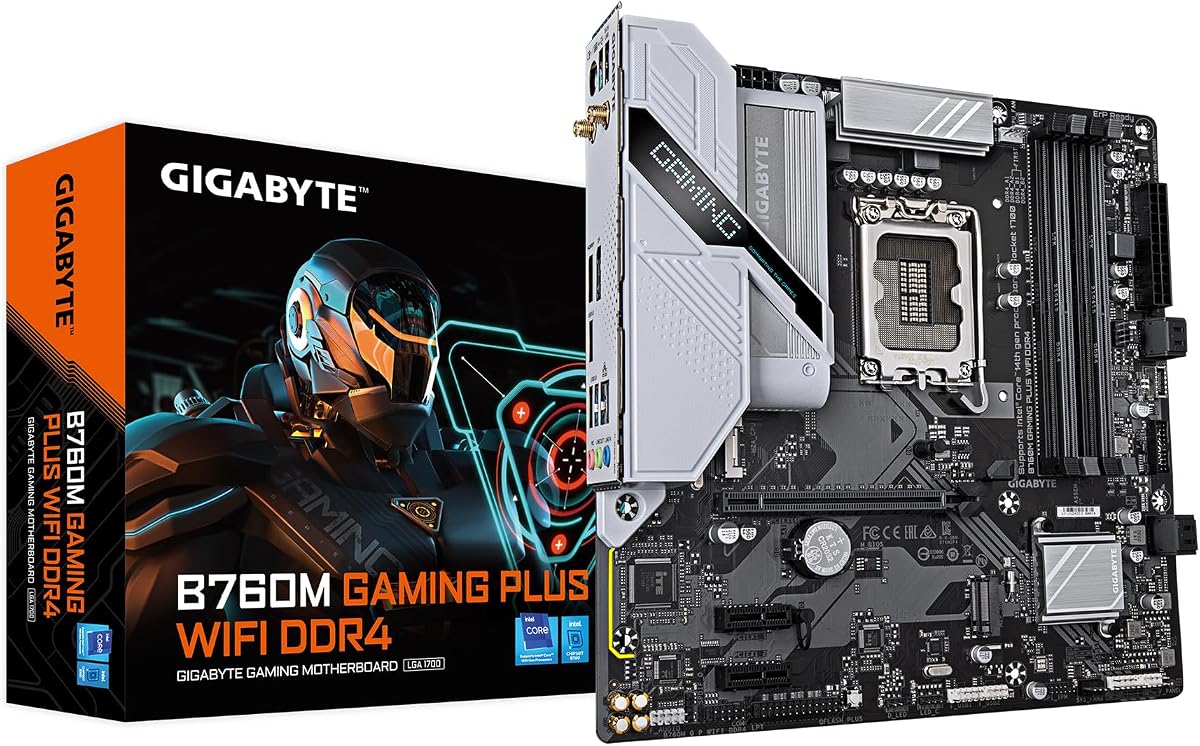
This compact board is ideal for smaller cases where space is limited but performance is still a priority. It supports Intel Core processors and offers essential features for a modern build.
We may earn a commission when you buy through this link, at no additional cost to you.
The power solution uses hybrid digital 4 plus1 plus1 phases with premium components to ensure steady power delivery. Thermal design includes enlarged MOSFET heatsinks to help with heat dissipation in smaller chassis.
Connectivity includes two M.2 slots for storage and WIFI6E for wireless speed. The front USB 3.2 Gen 1 Type-C port provides a convenient high speed connection for peripherals.
It is a great choice for users building a compact gaming or office PC. It offers a reliable platform at a price that is easy to manage within a budget.
The M-ATX form factor allows you to use smaller cases which can reduce the overall size and cost of your PC build.
Having WIFI6E and fast USB ports means you can still have a modern experience even in a smaller form factor build.
We may earn a commission when you buy through this link, at no additional cost to you.
This model is one of the most affordable options available for AM4 builds making it a top pick for budget focused users. It supports a wide range of Ryzen processors and includes modern features like PCIe 4.0.
We may earn a commission when you buy through this link, at no additional cost to you.
Power is delivered through twin 10 plus3 phases with premium chokes and capacitors to ensure steady performance. The thermal design includes an advanced VRM heatsink to maintain stability during normal operation.
Connectivity includes two M.2 slots and a front USB-C port for convenience. While it does not have built in WIFI it offers a stable GbE LAN connection for wired networks.
It is the perfect choice for users who want to spend more on the CPU or GPU. It provides a reliable foundation for a gaming PC without unnecessary extras that increase the cost.
By focusing on essential features and removing extras like WIFI this board keeps costs low while still offering modern performance.
PCIe 4.0 support ensures that you can use fast storage and graphics cards which are essential for a good gaming experience.
We may earn a commission when you buy through this link, at no additional cost to you.
Selecting the right motherboard depends on several key factors that align with your budget and system requirements.
The most critical factor is ensuring the motherboard socket matches your CPU. Gigabyte offers boards for AM4, AM5, and various Intel sockets. Always check the specific model to confirm it supports your processor generation.
Verify socket compatibility before buying to ensure your processor fits and functions correctly with the board.
Motherboards support either DDR4 or DDR5 memory which are not interchangeable. Newer platforms typically use DDR5 for higher speeds while older ones use DDR4. Ensure your memory matches the board requirements.
Match your memory type to the motherboard to avoid purchasing incompatible hardware components.
VRM design impacts stability and performance especially for high end CPUs. Look for adequate phase counts and thermal solutions to ensure consistent power. This is vital for overclocking or sustained workloads.
Choose a board with strong power delivery to support your CPU needs effectively.
Modern builds rely on NVMe SSDs which connect via M.2 slots. Check how many M.2 slots are available and if they support the latest PCIe versions. More slots provide better flexibility for storage expansion.
Ensure enough M.2 slots for your storage needs to maintain system performance.
Networking options vary from standard Gigabit Ethernet to 2.5GbE and WIFI6E. Decide if you need wireless capability or if wired is sufficient. Faster speeds improve online gaming and file transfer rates.
Select network specs that match your internet plan and usage habits.
Check for available PCIe slots for graphics cards and other peripherals. Some boards include PCIe 5.0 support for future proofing. Make sure the primary slot aligns with your GPU requirements.
Verify PCIe slot versions and counts to support your graphics card.
Motherboards come in ATX, M-ATX, or Mini-ITX sizes. Ensure the board fits your PC case. Larger boards offer more expansion slots while smaller ones save space.
Check case compatibility to ensure the board fits correctly in your build.
Some boards feature RGB lighting and specific color schemes. Aesthetics matter for those building visible systems. Gigabyte offers various designs to match your theme preferences.
Choose a board that aligns with your visual preferences if aesthetics are a priority.
Install the board in your case using standoffs to prevent short circuits. Ensure all cables are connected securely to the correct headers. Proper installation is key for stable operation.
Update the BIOS to the latest version using Q-Flash or Q-Flash Plus features. This ensures compatibility with newer processors and includes important stability fixes. Always follow instructions during the update process.
Monitor temperatures using included software to ensure thermal solutions are working effectively. Keep the system clean and dust free to maintain airflow. Regular maintenance helps prolong the lifespan of your component.
Gigabyte X series motherboards typically offer more features and higher power delivery than B series models. B series boards are more budget friendly and suitable for mainstream builds. Choose based on your performance and feature needs.
Yes many Gigabyte motherboards support overclocking for both AMD and Intel CPUs. Higher end models like Z and X series provide better tools for tuning. Budget models may have more limited overclocking capabilities.
Gigabyte motherboards are highly rated for gaming due to reliable power delivery and networking features. They offer PCIe 5.0 and WIFI6E on newer models. This ensures low latency and high performance for gaming setups.
WIFI6E refers to the latest wireless standard that supports the 6GHz band. It offers lower latency and higher speeds than WIFI6. It is ideal for high performance wireless gaming and large file transfers.
You can update the BIOS using the Q-Flash utility in the system or Q-Flash Plus without a CPU. Download the latest BIOS file from the support page. Follow the on screen instructions carefully during the update process.
It is recommended to install drivers from the Gigabyte support page for best performance. This includes chipset and LAN drivers. While Windows provides basic drivers specific ones ensure full functionality.
EZ-Latch refers to tool free mechanisms for installing RAM and M.2 SSDs. It simplifies the building process by removing the need for screws. This feature is available on many modern Gigabyte models.
Most Gigabyte ATX motherboards have four RAM slots. M-ATX models may have fewer depending on the design. Always check the specific product page to confirm the number of DIMM slots.
We have reviewed ten top Gigabyte motherboards catering to different needs and budgets. From the budget friendly B550 Gaming X to the premium Z890 AORUS Master each offers unique strengths.
When choosing prioritize the socket compatibility and power delivery for your CPU. Also consider connectivity needs like WIFI6E or USB4 based on your usage requirements.
Prices can change so always check current availability before making your purchase. This guide helps you find the right model for your build needs today.