
MEKO Stylus Pen for Touchscreen, 3-in-1 Universal iPad Stylus Stylists
4.6Editor score
High sensitivity disc tip included
Durable silicone rubber tips
Includes multiple replacement tips
Compare the top fine point stylus pens for touchscreens including iPad and Android. This guide reviews precision, compatibility, and battery life for digital
Finding the right fine point stylus can transform how you interact with your touchscreen devices. Whether you are an artist sketching on an iPad or a professional signing documents on an Android tablet, the right tool ensures precision and comfort. A good stylus should offer responsive feedback without scratching your screen.
We compared ten top-rated stylus pens based on their tip accuracy, build quality, and compatibility with various devices. Our analysis focuses on capacitive models that do not require Bluetooth pairing as well as active digital pens with battery power. This list covers a wide range of budgets and specific use cases.
Each pick highlights key features like replaceable tips, magnetic charging, or multi-function designs. Note that product availability and pricing can change frequently on retail platforms. Always check the latest details before purchasing to ensure the model fits your current device and needs.
4.6Editor score

4.5Editor score

4.2Editor score
The following table provides a side-by-side comparison of all ten products featured in this guide. Use this overview to quickly identify which stylus offers the specific features you need for your device.




This stylus pen ranks as a top choice for its versatility and ease of use. With a 4.5 star rating, it offers a practical solution for users who need different tips for different tasks. The standout quality is the transparent disc tip which allows precise visibility of your touch point.
We may earn a commission when you buy through this link, at no additional cost to you.
The 3-in-1 design includes two rubber tips and one disc tip to cover all needs. The rubber tips are great for scrolling and gaming while the disc tip excels at writing and detailed selection. You can switch between them in seconds without any tools.
One trade-off is that it does not support palm rejection so you must rest your hand carefully. However this is common for capacitive styluses at this price point. The lack of battery dependency makes it reliable for daily quick tasks.
This pick is ideal for students and casual users who want a reliable tool for multiple devices. If you need a single pen that works on iPhones tablets and Kindles this option delivers strong performance without the complexity of Bluetooth connections.
The transparent disc allows you to see exactly where you are tapping which improves accuracy for small icons.
Works seamlessly across iOS Android and Windows touchscreens making it a great travel companion for tech.
We may earn a commission when you buy through this link, at no additional cost to you.
The MEKO stylus stands out as a budget friendly option that does not sacrifice quality. It offers a 3-in-1 design that meets daily needs from clicking icons to drawing. The 4.6 star rating reflects high user satisfaction with its performance.
We may earn a commission when you buy through this link, at no additional cost to you.
Key strengths include the inclusion of multiple replacement tips which extends the life of the pen. The disc tip is sensitive and precise allowing for smooth writing without screen scratching. The protective cap ensures the disc tip stays safe when not in use.
While it lacks pressure sensitivity which is typical for capacitive pens the rubber tips are smooth and durable. Users with long nails appreciate the rubber tips for browsing. The replacement process is quick and tool free.
This bundle is perfect for families or teams needing multiple pens. The value proposition is strong given the number of included accessories. It is an excellent choice for anyone wanting a reliable fine point stylus without breaking the bank.
The silicone material is designed to resist wear and aging which keeps the pen functional longer.
A protective cap for the disc tip prevents damage and keeps the pen ready for use.
We may earn a commission when you buy through this link, at no additional cost to you.
This active stylus digital pen offers a more premium experience with a battery powered design. With a 4.2 star rating it targets users who need a fine tip for detailed work. The 1.5mm tip provides smooth writing and drawing capabilities.
We may earn a commission when you buy through this link, at no additional cost to you.
The built-in battery offers about eight hours of active use which is sufficient for most daily sessions. It charges via Micro USB in sixty minutes. The smart saver function auto shuts down after thirty minutes to preserve power.
A limitation is the older Micro USB port which may require specific cables. Also the lack of Bluetooth means it is not an Apple Pencil alternative for tilt features. However for simple note taking it performs well.
Ideal for journalists and teachers this pen balances portability and performance. It works well on newer iPad models and Android devices. If you want a dedicated active pen that feels like a real pen this is a solid option.
The buffer unit at the tip design gives extra accuracy against tablets and cellphones screens.
The automatic power off feature ensures you do not wake up to a dead battery unexpectedly.
We may earn a commission when you buy through this link, at no additional cost to you.
This white universal stylus is notable for its magnetic adsorption design. It is compatible with iPad Pro 11 and 12.9 inch models which keeps it within reach and prevents loss. The rating of 4.4 stars indicates good user satisfaction.
We may earn a commission when you buy through this link, at no additional cost to you.
The one touch switch design allows quick control without digging into settings. A full charge takes just forty minutes and provides nine to ten hours of continuous use. This helps keep creative juices flowing without interruption.
Be aware that it does not have accidental touch prevention so you must manage hand placement carefully. It also only supports specific Pro models so check your device compatibility first. It is a convenient tool for Pro users.
If you use an iPad Pro this magnetic pen offers great convenience. The quick charge feature is a major plus for heavy users. It is a good choice for artists who need a stylus that is always ready and easily accessible.
The magnetic design ensures the stylus stays within reach and prevents it from getting lost in bags.
The fast charging capability means less downtime and more time for writing or drawing projects.
We may earn a commission when you buy through this link, at no additional cost to you.
This black active pencil focuses on quick accessibility and ease of use. It powers on within one second without needing USB or Bluetooth connections. This makes it ready for sudden inspiration or quick notes instantly.
We may earn a commission when you buy through this link, at no additional cost to you.
The 1.5mm diameter tip provides a realistic feeling for creation suitable for drawing. It offers long battery life of ten to twelve hours with just a couple of hours of charging. It automatically turns off after thirty minutes of inactivity.
A limitation is that it lacks pressure sensitivity so all lines have the same thickness. This is acceptable for basic handwriting but might limit advanced digital art. It is a functional tool for general touch screen interaction.
Ideal for casual artists this pen offers a good balance of features. It works with many popular tablets and smartphones. If you need an active pen that wakes up fast and lasts long this is a practical choice.
The ability to power on in one second allows for immediate use without waiting for boot up.
Long usage hours combined with automatic power off help extend the lifespan of the battery.
We may earn a commission when you buy through this link, at no additional cost to you.
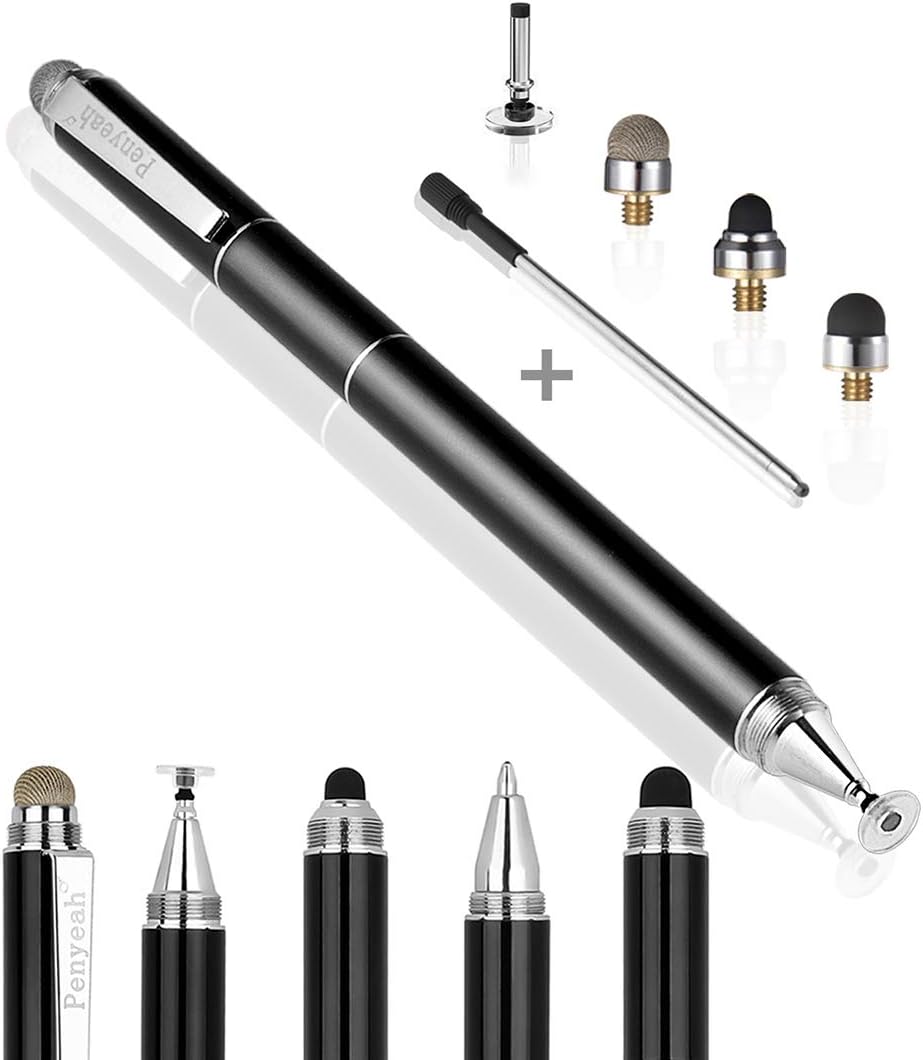
The Penyeah stylus offers a unique four-in-one design that combines touch tools with a traditional pen. This versatility is highlighted by its 4.4 star rating. It allows you to carry a single device that works on screens and paper.
We may earn a commission when you buy through this link, at no additional cost to you.
It includes a clear disc stylus, mesh fiber tip, two rubber tips, and a standard ballpoint pen. The high grade metal material makes it solid and durable. The slim design with a pocket clip ensures easy carry.
You must not rest your hand on the screen due to lack of palm rejection. This might be frustrating for long note taking sessions. However the durability and versatility of the tips are significant advantages for professionals.
Best for business users this pen covers digital signing and physical notes. The metal body feels premium and resists corrosion. If you want a single tool for daily use that bridges digital and physical writing this is excellent.
The included ballpoint pen allows you to switch from digital screens to paper notes without changing tools.
The metal body ensures durability and adds a professional look that resists corrosion over time.
We may earn a commission when you buy through this link, at no additional cost to you.
This active stylus digital pen offers a more premium experience with a battery powered design. With a 4.2 star rating it targets users who need a fine tip for detailed work. The 1.5mm tip provides smooth writing and drawing capabilities.
We may earn a commission when you buy through this link, at no additional cost to you.
The built-in battery offers about eight hours of active use which is sufficient for most daily sessions. It charges via Micro USB in sixty minutes. The smart saver function auto shuts down after thirty minutes to preserve power.
A limitation is the older Micro USB port which may require specific cables. Also the lack of Bluetooth means it is not an Apple Pencil alternative for tilt features. However for simple note taking it performs well.
Ideal for journalists and teachers this pen balances portability and performance. It works well on newer iPad models and Android devices. If you want a dedicated active pen that feels like a real pen this is a solid option.
The buffer unit at the tip design gives extra accuracy against tablets and cellphones screens.
The automatic power off feature ensures you do not wake up to a dead battery unexpectedly.
We may earn a commission when you buy through this link, at no additional cost to you.
This six-pack set is perfect for groups or families needing multiple stylus pens. The vibrant colors like black blue and silver help distinguish devices. With a 4.6 star rating these pens are reliable for daily use.
We may earn a commission when you buy through this link, at no additional cost to you.
The durable rubber tips are high sensitivity and allow for detailed work without scratching. Each pen includes a clip so you can attach them to pockets or notebooks easily. They work on a wide range of devices including the Nintendo Switch.
As a basic capacitive set there are no fancy features like charging or pressure sensitivity. This simplicity makes them cheap and effective for simple tasks. You can keep one at home and another at the office without worry.
Best for offices and classrooms this set solves the need for multiple pens. The clip feature adds convenience for on-the-go use. If you need reliable pens for everyone in your circle this value pack is highly effective.
The included clip allows for easy attachment to notebooks and bags for instant access.
Vibrant colors make it easy to assign pens to different users or devices easily.
We may earn a commission when you buy through this link, at no additional cost to you.
This MEKO pack provides four stylus pens with twelve replacement tips total. It is designed for users needing multiple pens such as students in a family. The rating of 4.5 stars reflects consistent quality across all units.
We may earn a commission when you buy through this link, at no additional cost to you.
The aluminum barrel adds a comfortable grip and durable feel. Each pen has a transparent disc and a soft rubber tip on either end. The package includes replacement tips to ensure long-term use without buying new pens.
The main limitation is that it uses capacitive technology without pressure sensitivity. This is fine for note taking but not for advanced digital art. However the durability and tip variety make it a strong value.
Best for students this set covers all basic needs with reliability. The aluminum body feels premium and the tips are responsive. If you need four pens for shared use this bundle offers exceptional value and convenience.
The aluminum barrel provides a comfortable grip for extended writing sessions.
Including twelve tips ensures that you always have spares ready for any damaged tips.
We may earn a commission when you buy through this link, at no additional cost to you.
The DAXINGXING 10-pack is a fantastic bulk option for schools or large families. It holds a high 4.7 star rating which suggests strong durability. Each pen features a dual rubber tip design for different writing needs.
We may earn a commission when you buy through this link, at no additional cost to you.
The solid alloy metal body ensures long-lasting durability for daily use. The 5.31 inch length provides a balanced comfortable grip. Since no charging or pairing is required they are ready to use right out of the package.
While they lack advanced features like Bluetooth the simplicity is their strength. You get a reliable tool that works instantly. The mix of vibrant colors helps distinguish pens for different users in a classroom.
Best for bulk procurement this pack offers exceptional cost-effectiveness. It is perfect for school procurement or office bulk orders. If you need many pens without fuss this set is a reliable and practical solution.
The solid alloy metal body ensures long-lasting durability for daily use and has a 5.31 inch length.
A mix of vibrant colors makes it easy to distinguish pens for different users or scenarios.
We may earn a commission when you buy through this link, at no additional cost to you.
This 10-piece set offers high precision and sensitivity with a 4.6 star rating. It is designed for those who need multiple stylus pens for various tasks. The set includes ten pens with dual rubber tips for different needs.
We may earn a commission when you buy through this link, at no additional cost to you.
Each pen features a sleek aluminum body and an anti-scratch design to keep screens pristine. The rubber tips glide effortlessly across the screen ensuring pixel-perfect precision. They require no charging or Bluetooth connection for instant use.
While they lack advanced features like Bluetooth the simplicity makes them reliable. You get a versatile tool that works on all capacitive devices. The set is perfect for sharing among family members or office colleagues.
Best for bulk needs this set offers exceptional value and accuracy. It is ideal for those needing multiple pens for writing or gaming. If you want reliable performance across many devices this set is a practical choice.
The anti-scratch design safeguards your device from fingerprints and keeps your screen pristine.
No Bluetooth connection or charging required means you can pick it up and start writing instantly.
We may earn a commission when you buy through this link, at no additional cost to you.
Choosing the right fine point stylus depends on your specific device and usage patterns. Consider these key factors to ensure you buy a pen that matches your needs.
Fine point stylus pens come with different tip types such as rubber, disc, or mesh. Disc tips are transparent allowing you to see the contact point for higher accuracy. Rubber tips are durable and great for general navigation but may obscure the screen slightly.
Look for a tip size that matches your precision needs. Smaller tips like 1.5mm are better for detailed drawing while larger tips work for gaming or scrolling.
Stylus pens are either capacitive (no battery) or active (rechargeable). Capacitive pens are simpler and cheaper but lack features like pressure sensitivity. Active pens require charging but often offer a more premium feel and longer life.
If you want simplicity and no charging, choose a capacitive model. If you need long battery life and advanced features, consider an active stylus.
Ensure the stylus works with your specific device. Some pens are designed for iPads while others support Android tablets or Nintendo Switch. Always check the product description for a list of supported devices.
Universal styluses work with most capacitive screens but may not have the same responsiveness as device-specific models. Check if your device supports specific stylus features like magnetic attachment.
Palm rejection allows you to rest your hand on the screen while writing. This feature is often found in active styluses with Bluetooth. Capacitive styluses usually lack this feature so you must lift your hand.
If you write for long periods, look for a stylus with palm rejection to avoid accidental touches. This is crucial for comfortable note-taking sessions.
The materials used in a stylus affect its lifespan and feel. Metal bodies offer a premium feel and better durability than plastic. Look for features like clip mechanisms or protective caps for added safety.
Check for replaceable tips as worn tips can affect performance. A stylus with durable materials and replaceable parts will save you money over time.
Many stylus packs include multiple replacement tips. This adds value and ensures you can keep using the pen even if one tip wears out. Check the number of included tips before buying.
A higher tip count is especially useful for families or teams sharing multiple pens. It reduces the need to buy new pens frequently and extends the life of the product.
Pressure sensitivity allows lines to vary in thickness based on how hard you press. This feature is vital for artists but rare in capacitive pens. Active pens usually have this feature if supported by the device.
If you are an artist or digital painter, prioritize a stylus with pressure sensitivity. For basic note-taking, standard pressure is usually sufficient.
Connection methods range from no pairing to Bluetooth. Bluetooth connections can offer better features but require setup and battery management. No connection pens are plug-and-play and simpler to use.
For immediate use without hassle, choose a no-pairing model. For advanced features like shortcuts, a Bluetooth model might be worth the extra setup.
Always ensure your screen is clean and free of dust before using a fine point stylus. A clean surface ensures the tip glides smoothly and prevents scratches. Wipe your device with a microfiber cloth regularly for best results.
For active styluses, charge the pen regularly to avoid unexpected power loss. Use the correct charging cable and avoid fast chargers that may damage the internal battery. Store the stylus in a safe place to prevent physical damage.
Replace worn tips promptly to maintain accuracy and prevent screen scratches. Most replacement tips are easy to install without tools. Keep extra tips handy if your product includes a replacement pack for continuous use.
A fine point stylus is a pen-like tool designed for touchscreen devices that features a small tip. It allows users to write, draw, or select items with greater precision than using a finger. These styluses come in various forms including capacitive and active digital models.
Most fine point styluses work with capacitive touchscreens including iPads and Android tablets. However some devices require specific stylus models for features like palm rejection. Always check compatibility before purchasing to ensure proper function.
Active styluses have a battery and often require charging while capacitive ones do not. Active pens may offer Bluetooth connectivity and pressure sensitivity. Capacitive pens are simpler and cheaper but lack these advanced features.
Yes many fine point styluses are compatible with smartphones including iPhones and Android phones. Ensure the tip size is appropriate for the screen size to avoid difficulty in precision tasks. Most universal styluses work across both phones and tablets.
Check that your device screen is clean and the stylus tip is not worn. For active styluses ensure the battery is charged and paired if required. Restarting your device or checking Bluetooth settings may resolve connectivity issues.
Battery life varies by model but active styluses typically last between eight and twelve hours. Some models have power saving features to extend usage. Always follow manufacturer guidelines for charging to maintain battery health.
Most stylus pens have tool-free replacement mechanisms for easy tip changing. Simply twist or pull off the old tip and insert a new one. This feature extends the life of the pen and is useful for heavy users.
Disc tips are transparent allowing for better visibility of the contact point while rubber tips are durable. Disc tips offer higher precision suitable for detailed work whereas rubber tips are better for general navigation. Many packs include both for versatility.
We have reviewed ten top fine point stylus options ranging from versatile 3-in-1 models to active digital pens. Each pick offers unique benefits whether you need precision for art or bulk value for a team. Consider your device compatibility and tip preferences when selecting.
For most users a versatile stylus with multiple tips offers the best balance of cost and functionality. Active styluses provide a premium experience for artists but require charging. Passive models are ideal for quick tasks and general navigation without setup.
Always check current product details before purchasing as models and features can change. Prices and availability fluctuate so verify the latest specs on the product page. With the right stylus you can transform your touchscreen experience for better productivity and creativity.