
Tbest USB Cd Drive External DVD Enclosure Player
3.4Editor score
Supports 12.7mm and 9.5mm drives
Fast 5Gbps USB 3.0 transfer
Dual SATA interface support included
External optical drive enclosures allow you to connect internal SATA drives to your computer via USB. They are essential for accessing old media or upgrading legacy systems without replacing hardware.
We evaluated ten top-rated models based on speed, compatibility, build quality, and ease of installation. Our analysis focuses on real-world performance and reliability for various drive types and operating systems.
Each pick highlights key features and ideal use cases to match your specific needs. Remember that pricing fluctuates frequently, so verify current rates before making your final purchase decision today.
3.4Editor score
4.6Editor score

As an Amazon Associate we earn from qualifying purchases.
The following table provides a side-by-side comparison of all ten enclosures to help you quickly identify the best fit for your specific drive type and connection needs.




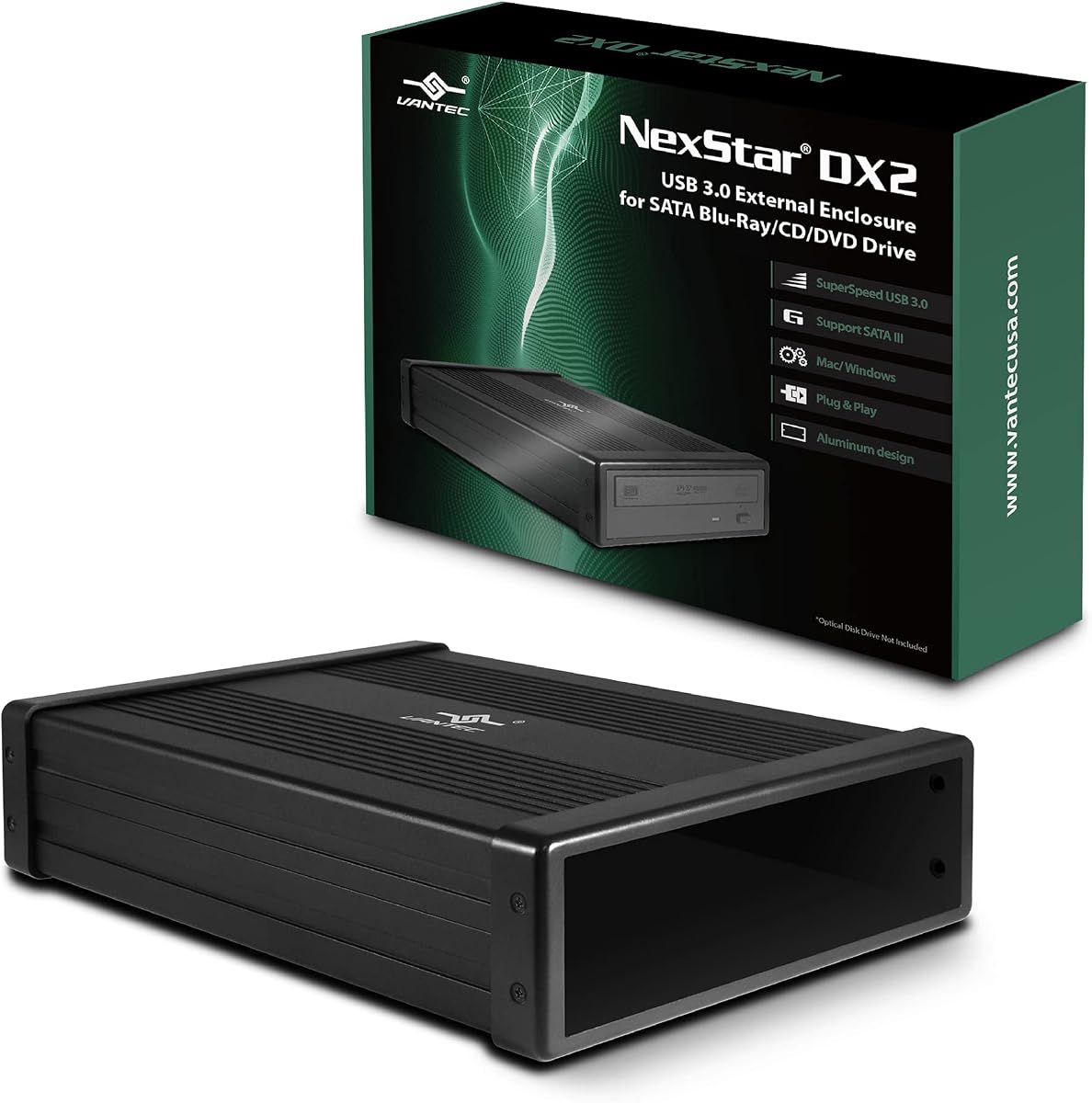
The NexStar DX2 stands out as the top choice for users needing a robust enclosure for 5.25 inch drives. It holds a solid 4.6 rating based on user feedback regarding its versatility and build quality.
We may earn a commission when you buy through this link, at no additional cost to you.
Its unique ability to fit any drive depth up to 185mm makes it incredibly adaptable for various optical drives. The aluminum alloy casing not only looks professional but also effectively reduces noise and vibration during operation.
While the included power supply is standard for desktop drives, the lack of bus power might be a minor inconvenience for portable setups. However, the flexible SATA cable mitigates connection issues for non-standard drive layouts.
If you need a reliable solution for archiving data from older desktop optical drives, this enclosure offers the best balance of features and compatibility without requiring external mounting brackets.
Unlike many enclosures limited to specific drive sizes, the DX2 accepts any depth up to 185mm ensuring your specific drive will fit without modification.
The premium aluminum alloy casing provides superior heat dissipation and protects your drive from physical damage while minimizing operational noise.
We may earn a commission when you buy through this link, at no additional cost to you.
This enclosure offers a compelling alternative for users seeking USB C compatibility alongside traditional USB A. It maintains a high 4.4 rating for its effective heat management and sturdy aluminum construction.
We may earn a commission when you buy through this link, at no additional cost to you.
The inclusion of both USB A and C ports ensures broad compatibility with modern and older computers. Its plug and play design means you can start using it immediately without installing software.
One limitation is the depth restriction which might not accommodate deeper optical drives found in some professional setups. Additionally, the absence of a drive in the box requires you to source one separately.
Ideal for users upgrading a home media center, this enclosure provides reliable performance and modern connectivity options at a competitive price point.
With support for both USB A and Type C interfaces, this enclosure ensures you can connect to a wide range of laptops and desktops without adapters.
The aluminum alloy casing efficiently dissipates heat generated during disc burning ensuring stable performance even during extended sessions.
We may earn a commission when you buy through this link, at no additional cost to you.
The Zunate enclosure is designed specifically for users looking to reuse slim laptop optical drives. It receives praise for its portability and straightforward plug and play functionality across multiple operating systems.
We may earn a commission when you buy through this link, at no additional cost to you.
Its integrated cable design allows the cable to fold neatly inside the enclosure making it truly portable. The woven cable ensures stable data transfer without signal interference during operation.
While it is limited to 9mm drives it does not support thicker desktop units. The lack of external power means it relies solely on USB power which works for most slim drives but not all.
For travelers or those with spare laptop drives, this enclosure offers a clean and functional way to keep legacy optical media accessible on the go.
The embedded cable design allows the unit to be completely self-contained making it easy to carry in a laptop bag or pocket.
The premium woven data cable minimizes signal loss ensuring reliable read and write operations even over longer USB cable lengths.
We may earn a commission when you buy through this link, at no additional cost to you.
JOTEC provides a robust enclosure that includes both USB A and C cables out of the box. It scores well for its aluminum construction which helps maintain stable temperatures during use.
We may earn a commission when you buy through this link, at no additional cost to you.
The inclusion of non-slip feet ensures the unit stays put on your desk during operation. Its ventilated design further enhances cooling which is crucial for long burn sessions.
Note that some drives may require the DC3.5 power port if they exceed USB power limits. Also it only supports SATA interfaces so older IDE drives will not work.
This model is a strong contender for users who need flexible connectivity options and a durable build without breaking the budget.
Having both USB A and Type C cables included means you are ready to connect to any computer without buying extra accessories.
The combination of aluminum alloy and ventilation keeps the drive cool reducing the risk of overheating during intensive data operations.
We may earn a commission when you buy through this link, at no additional cost to you.
The Tbest enclosure is an excellent choice for those on a tight budget who still want USB 3.0 speeds. It supports both 12.7mm and 9.5mm drives offering decent versatility for the price.
We may earn a commission when you buy through this link, at no additional cost to you.
Its auto sleep mode helps conserve energy when the drive is idle which is a thoughtful feature for battery-powered laptops. The broad OS support means it works on almost any system.
While it lacks the premium feel of aluminum enclosures it gets the job done for basic reading and writing tasks. The lower rating suggests some users may experience occasional connectivity issues.
If you need a simple and cheap way to access old discs this enclosure provides the necessary functionality without unnecessary costs.
Accommodating both 12.7mm and 9.5mm drives allows you to use various internal drives from different laptop models.
The built-in sleep mode automatically powers down the drive when idle saving energy and extending the life of the unit.
We may earn a commission when you buy through this link, at no additional cost to you.
Vantec offers a compact adapter that bridges the gap between internal SATA drives and external USB 3.0 ports. It maintains a strong 4.6 rating due to its reliability and broad SATA support.
We may earn a commission when you buy through this link, at no additional cost to you.
The inclusion of an anti-slip mat helps dampen noise and vibration which is often a concern with optical drives. Its tiny footprint makes it easy to stash away when not in use.
Users should ensure their drive does not exceed the power provided by the included adapter. For some high-demand drives you may need to source a higher amperage power supply.
This adapter is perfect for IT professionals who need to quickly connect drives for diagnostics or data recovery without a bulky enclosure.
Compatibility with SATA I II and III ensures this adapter works with a wide range of optical storage devices from various manufacturers.
The compact form factor makes it easy to keep in your laptop bag for on-the-go data recovery tasks.
We may earn a commission when you buy through this link, at no additional cost to you.
This basic enclosure is designed for users who prioritize durability and simplicity over high-speed transfer. It holds a 4.5 rating for its straightforward functionality and included power solution.
We may earn a commission when you buy through this link, at no additional cost to you.
The aluminum housing ensures your drive is well protected from bumps and scratches while keeping the unit lightweight. It includes all the necessary cables for immediate setup.
The primary drawback is the USB 2.0 speed which may feel sluggish for large file transfers or disc burning. It also does not support slim laptop drives limiting its versatility.
For occasional use or older systems without USB 3.0 this enclosure offers a reliable way to keep optical drives functional.
The included AC power adapter ensures your desktop drive has enough power to operate consistently without needing extra hardware.
The aluminum protective casing guards against physical damage ensuring a longer lifespan for your internal optical drive.
We may earn a commission when you buy through this link, at no additional cost to you.
The Bewinner enclosure targets users with 9.5mm drives needing a portable solution. It focuses on slim form factors and easy installation without tools or drivers.
We may earn a commission when you buy through this link, at no additional cost to you.
Its detachable design makes it easy to swap drives quickly when needed. The woven cable adds a layer of durability that is often missing in budget-friendly options.
However the plastic casing may not dissipate heat as well as metal models. It is also limited to 9.5mm drives so it will not work with thicker 12.7mm units.
This model is ideal for students or travelers who want a compact way to access legacy optical media on their laptops.
The detachable panel allows you to swap drives in seconds without needing screws or special tools.
The woven data cable resists bending and twisting ensuring a long lifespan for the connection.
We may earn a commission when you buy through this link, at no additional cost to you.
This enclosure is designed for users who value portability and speed with slim drives. It offers a 5Gbps transfer rate ensuring fast data access for those with 9mm drives.
We may earn a commission when you buy through this link, at no additional cost to you.
The detachable cable folds into the base keeping the package tidy for travel. The included front panel makes swapping old drives into the enclosure straightforward.
However it is restricted to 9mm drives only which limits its use for thicker units. The plastic body is lightweight but may be less durable than metal options.
For those with spare laptop drives and a need for portable access this enclosure offers a practical and efficient solution.
The foldable cable design keeps everything organized and prevents tangling when carrying the enclosure in a bag.
Supporting 5Gbps ensures that you can read and write discs at maximum speed compatible with USB 3.0 standards.
We may earn a commission when you buy through this link, at no additional cost to you.
This enclosure emphasizes ease of use with a tool-free design that simplifies drive installation. It supports both USB A and C connectors for broad compatibility with modern systems.
We may earn a commission when you buy through this link, at no additional cost to you.
The brushed finish not only looks stylish but also resists fingerprints and scratches maintaining a clean appearance over time. It delivers stable 5Gbps speeds for efficient data transfer.
It is limited to 12.7mm drives so it will not work with slim units. Users should verify their drive size before purchasing to ensure compatibility.
If you need a stylish and easy-to-use enclosure for standard laptop drives this model provides a reliable and modern solution.
The detachable panel allows you to install drives without screws making it easy to swap units quickly.
The premium brushed texture keeps the enclosure looking new even after frequent handling and transport.
We may earn a commission when you buy through this link, at no additional cost to you.
Selecting the right enclosure depends on your drive type, connection needs, and intended use. This guide breaks down the key factors to consider.
The most critical factor is ensuring the enclosure matches your drive's physical dimensions. Desktop drives are typically 5.25 inches while laptop drives are often 9.5mm or 12.7mm thick.
Always measure your drive before purchasing to avoid returns and ensure a secure fit within the enclosure casing.
USB 3.0 offers significantly faster data transfer speeds compared to USB 2.0 which is important for burning discs or large file transfers.
Look for enclosures that support USB 3.0 or higher to ensure smooth performance and future compatibility.
Some enclosures draw power directly from the USB port while others require an external power adapter for desktop drives.
Check if the product includes a power supply especially if you plan to use high-power optical drives.
Aluminum enclosures generally offer better heat dissipation and durability compared to plastic options which may crack or deform over time.
Investing in a metal case can extend the lifespan of your drive and ensure stable operation during long sessions.
If you plan to use the enclosure on the go look for slim designs with integrated or foldable cables for easy transport.
A compact size and lightweight materials make a significant difference for travelers or remote workers.
Most modern enclosures are plug and play compatible with Windows and macOS but it is wise to check for Linux support if needed.
Avoid units that require specific drivers to function as these can complicate installation and updates.
Enclosures with both USB A and Type C connectors provide the most flexibility for connecting to older and newer computers.
Consider if your laptop requires a specific connector type to avoid needing additional adapters.
Tool-free designs with detachable panels make swapping drives much easier than screwing units together.
A simple installation process saves time and reduces the risk of damaging the drive during setup.
Before installing your drive, power off your computer and carefully open the enclosure casing to insert the SATA drive. Ensure the connector is securely seated before closing the unit.
Once connected via USB, wait for the operating system to recognize the new drive automatically. Most modern enclosures do not require driver installation.
To maintain longevity, keep the enclosure in a cool dry place and avoid dropping it during operation. Regularly clean dust from the vents to prevent overheating.
Most modern external optical drive enclosures are plug and play devices that do not require additional drivers. They work automatically with Windows, macOS, and Linux systems when connected via USB.
No, desktop optical drives require external power and are physically larger than portable enclosures accommodate. You need a 5.25 inch enclosure with a dedicated power adapter for desktop drives.
USB C is generally better for modern laptops offering faster speeds and reversible connectivity. However having both options ensures compatibility with all computer models.
Only desktop-sized 5.25 inch drives require external power supplies. Slim laptop drives can typically run on power supplied directly through the USB connection.
Yes, aluminum enclosures dissipate heat better and provide superior physical protection compared to plastic. This can lead to longer drive life and more stable performance.
Yes, most enclosures support both reading and writing functions as long as the drive itself is capable of burning discs. The enclosure simply bridges the connection.
Check that the USB connection is secure and the drive is receiving power. Try a different USB port or cable to troubleshoot connection issues.
Yes, most external optical drive enclosures support hot swapping allowing you to connect or disconnect drives without restarting your computer.
Choosing the right enclosure ensures your legacy optical drives remain functional for years to come. We recommend the NexStar DX2 for desktop users and the Zunate for portable needs.
Prioritize compatibility with your specific drive size and connection type to avoid purchasing the wrong hardware. Investing in a quality enclosure protects your valuable drive data.
Always verify current pricing and availability before making your purchase as deals change frequently. This guide provides a solid starting point for your next hardware upgrade.