
Logitech Wave Keys Ergonomic Wireless Keyboard with Palm Rest – Graphite
4.2Editor score
Wavy design for natural hand position
Cushioned palm rest with memory foam
Bluetooth or Logi Bolt connectivity
Programmers spend hours typing code daily making wrist health crucial for long-term productivity. Ergonomic keyboards reduce strain by aligning hands naturally and minimizing repetitive motion injuries. Choosing the right model can transform your daily workflow and prevent discomfort over time.
We evaluated ten top-rated models based on split design, tenting options, key switches, and overall comfort. Each product was assessed for build quality, connectivity, and compatibility with major operating systems used by developers. Our analysis focuses on real-world usability for coding tasks.
Every recommendation includes detailed specs pros cons and ideal use cases for different programming needs. Prices and availability change frequently so check current listings before purchasing. We hope this guide helps you invest in a keyboard that supports your health and efficiency.
4.2Editor score

4.4Editor score

4.1Editor score
As an Amazon Associate we earn from qualifying purchases.
The following table provides a side-by-side overview of all ten models to help you compare key features at a glance. Consider your budget preferred connectivity and specific ergonomic needs when reviewing these options.




The Logitech Ergo K860 stands out as a top choice for programmers seeking comfort and reliability. With a 4.4 rating from users it delivers a curved split design that naturally aligns your wrists and forearms. The ergonomic approval from United States Ergonomics confirms its effectiveness in reducing muscle strain during long coding sessions.
We may earn a commission when you buy through this link, at no additional cost to you.
Its pillowed wrist rest features memory foam providing significant support compared to standard keyboards. Adjustable palm lift legs allow you to customize the tilt for sitting or standing setups. The perfect stroke keys match your fingertips ensuring precise and fluid typing without fatigue.
While it lacks mechanical switches which some enthusiasts prefer the membrane keys are quiet and responsive. The keyboard requires a larger footprint on your desk which might be challenging in compact workspaces. These trade-offs are minor compared to the overall ergonomic benefits it offers.
Programmers who prioritize comfort and posture will find this keyboard an excellent investment. It pairs easily via Bluetooth or USB receiver and integrates well with Logitech Options for customization. For those looking to prevent wrist strain while coding the K860 is highly recommended.
The curved split frame reduces muscle strain on wrists and forearms for more natural typing.
Plastic parts include certified post consumer recycled plastic promoting eco-friendly manufacturing.
We may earn a commission when you buy through this link, at no additional cost to you.
The KINESIS Freestyle2 offers unparalleled flexibility for programmers who need to tailor their keyboard to their body type. Its modular split design allows up to nine inches of separation enabling optimal hand and wrist positioning. This level of customization helps accommodate different arm lengths and typing preferences.
We may earn a commission when you buy through this link, at no additional cost to you.
Included VIP3 tenting accessory provides five to fifteen degrees of tenting to keep forearms neutral and wrists supported. Low-force membrane switches reduce impact and strain while offering tactile feedback. The standard Windows layout includes multimedia keys and a numeric keypad for productivity without extra software.
The keyboard is wired which limits portability compared to wireless models. Initial setup requires attaching the tenting accessory and adjusting separation which may take time to perfect. Despite these minor hurdles the ergonomic benefits are substantial for daily coding tasks.
Programmers seeking a highly adjustable ergonomic solution will appreciate the Freestyle2. It works with Windows systems out of the box and ensures comfortable typing through its thoughtful design. For those who value precise positioning this keyboard is a strong contender.
Rotate and separate key modules up to nine inches to match your body type and preferences.
VIP3 tenting accessory and palm supports included to maintain neutral forearm positions.
We may earn a commission when you buy through this link, at no additional cost to you.
The Logitech Wave Keys delivers ergonomic comfort at a budget-friendly price point making it accessible for many programmers. Its wavy design places hands wrists and forearms in a natural position reducing strain throughout the workday. Certified by United States Ergonomics it meets criteria set by leading ergonomists for comfort.
We may earn a commission when you buy through this link, at no additional cost to you.
A cushioned palm rest with memory foam provides ample support to minimize pressure on wrists. Connectivity options include Bluetooth or Logi Bolt Receiver allowing seamless switching between up to three devices. Battery life extends up to three years ensuring minimal interruptions during use.
The compact layout may not include a numeric keypad which some users rely on for data entry. Tenting options are limited compared to larger split models which could affect posture for some individuals. These limitations are offset by its affordability and portability.
Programmers looking for an entry-level ergonomic keyboard without breaking the bank should consider the Wave Keys. It integrates easily with Windows macOS and ChromeOS while maintaining a comfortable typing experience. For casual coders or those on a tight budget this is an ideal pick.
The wavy design helps place your hands wrists and forearms in a natural typing position.
Use Easy-Switch to switch between laptop tablet and phone easily and efficiently.
We may earn a commission when you buy through this link, at no additional cost to you.
The Arteck Split Ergonomic Keyboard offers a simple and affordable solution for programmers needing wrist support. Its split design positions wrists and forearms in a natural relaxed position to minimize strain. The cushioned wrist rest enhances comfort during extended typing sessions.
We may earn a commission when you buy through this link, at no additional cost to you.
Setup is straightforward with a nano USB receiver stored at the back of the keyboard. The rechargeable lithium battery lasts up to six months on a single charge based on moderate daily use. This longevity reduces the hassle of frequent battery replacements.
The keyboard lacks advanced features like programmable keys or adjustable tenting found in higher-end models. The build quality is functional but not as robust as premium brands. These trade-offs are acceptable given its low price and essential ergonomic benefits.
Programmers seeking a basic wireless split keyboard without high costs will find this model useful. It supports Windows systems and provides immediate comfort upon unboxing. For those transitioning to ergonomic setups on a budget this is a practical choice.
Simply insert the nano USB receiver and use the keyboard instantly without extra software.
The rechargeable lithium battery lasts for six months with single charge for long use.
We may earn a commission when you buy through this link, at no additional cost to you.
The ProtoArc EK01 Plus combines ergonomic design with practical features for programmers working in varied lighting. Its unique curved split-frame design reduces strain on wrists and forearms while promoting proper posture. The scooped keys fit fingertips perfectly making typing effortless and natural.
We may earn a commission when you buy through this link, at no additional cost to you.
Adjustable white LED backlighting with three brightness levels allows customization for any environment. The 2000mAh battery offers significantly longer operating time than previous models ensuring reliable performance throughout the day. Seamless device switching between three devices enhances workflow flexibility.
The full-size footprint may occupy more desk space than compact alternatives. Keeping the backlight on reduces battery life so turning it off extends usage. These are minor inconveniences compared to the keyboard's ergonomic benefits and usability.
Programmers who need a full-size keyboard with backlighting and ergonomic support will value this model. It connects via Bluetooth or USB and works with Windows Mac and Android systems. For those needing versatility and comfort the EK01 Plus is a solid option.
Soft white LED backlighting with three adjustable brightness levels for custom comfort.
The 2000mAh battery delivers four times the capacity for significantly longer operating time.
We may earn a commission when you buy through this link, at no additional cost to you.
The Logitech Ergo K860 Split for Business is tailored for IT departments needing secure and reliable wireless connections. With Logi Bolt technology it exceeds security needs with fully encrypted connections. This makes it ideal for organizations protecting sensitive data during coding tasks.
We may earn a commission when you buy through this link, at no additional cost to you.
The split curved design improves typing posture while the pillowed wrist rest reduces muscle strain. Users can connect to up to three devices and enjoy a two-year battery life ensuring consistent performance. It is tested and approved by leading ergonomists for comfort.
The price is higher than consumer versions due to enterprise features which may not be necessary for individuals. Setup for mass deployment is streamlined but adds complexity for single-user environments. These factors are balanced by the robust security and ergonomic benefits.
Programmers in corporate environments or those prioritizing security should consider this version. It delivers the same ergonomic comfort as the standard K860 with added encryption. For businesses deploying keyboards to employees this model offers peace of mind.
Logi Bolt wireless technology exceeds security needs with fully encrypted secure connections.
Certified in over one hundred countries for IT pros and business users.
We may earn a commission when you buy through this link, at no additional cost to you.
The KINESIS Advantage360 represents the pinnacle of ergonomic keyboards for serious programmers. Its patented contoured shape with concave key wells and thumb keys increases comfort and productivity. Quiet mechanical switches provide a premium typing experience with low activation force and durability.
We may earn a commission when you buy through this link, at no additional cost to you.
The keyboard is fully programmable using GitHub or a web-based GUI allowing deep customization for workflows. Adjustable tenting and separation up to ten inches accommodate any body type. It supports Windows macOS Linux and Chrome making it versatile for various environments.
The price is significantly higher than other models which may deter budget-conscious buyers. The layout requires time to learn due to its unique design and programmability. These investments pay off in reduced strain and enhanced productivity over time.
Programmers who demand maximum comfort and customization will find the Advantage360 unmatched. It offers three-year warranty and US tech support ensuring reliability. For those ready to invest in their health this keyboard is worth the premium.
Patented design features split key wells with concave shape proven to increase comfort.
Kailh Box Pink Silent stem switches offer low activation force and linear feel.
We may earn a commission when you buy through this link, at no additional cost to you.
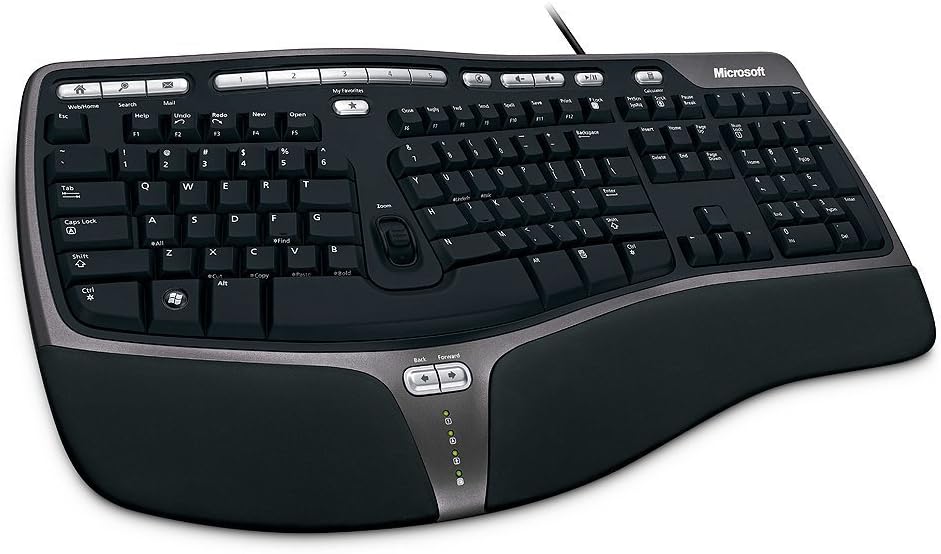
The Microsoft Wired Natural Ergonomic Keyboard 4000 is a classic choice offering dependable ergonomic benefits. Its split design encourages natural hand wrist and forearm positions to reduce strain. The cushioned palm rest promotes a neutral wrist position during typing.
We may earn a commission when you buy through this link, at no additional cost to you.
Media keys for music and video control add convenience without extra tools. A palm lift feature promotes a relaxed natural angle for wrists enhancing comfort over time. It connects via USB ensuring stable performance without battery concerns.
The keyboard lacks wireless connectivity which may limit flexibility in modern setups. The design is older compared to newer models but remains effective for daily use. These limitations are minor considering its reliability and ergonomic foundation.
Programmers who prefer wired keyboards and value simplicity will appreciate this model. It supports Windows systems and provides a comfortable typing experience without fuss. For those seeking a tried-and-true ergonomic solution this is a solid pick.
Encourages natural hand wrist and forearm positions for reduced strain.
Media keys for music and video control enhance convenience during work.
We may earn a commission when you buy through this link, at no additional cost to you.
The Microsoft Natural Keyboard Elite combines ergonomic comfort with robust multimedia features. Its ergonomic design promotes natural hand positioning while the multimedia controls simplify access to music and video files. Enhanced F-key commands allow customizable shortcuts for productivity.
We may earn a commission when you buy through this link, at no additional cost to you.
It connects via USB or PS/2 ports ensuring compatibility with various systems. The white finish adds a clean look to any workspace. These features make it a versatile choice for those needing both ergonomics and media control.
The reliance on PS/2 ports may limit use on modern computers without adapters. It lacks wireless options which could reduce flexibility. These drawbacks are offset by its durable construction and useful controls.
Programmers who need multimedia access alongside ergonomic comfort will find this keyboard useful. It is reliable and supports customizable workflows through enhanced keys. For those working on mixed systems this remains a practical option.
Easy access to music and video files with dedicated multimedia controls.
Customizable shortcuts via enhanced F-key commands for productivity.
We may earn a commission when you buy through this link, at no additional cost to you.
The Microsoft Natural Ergonomic Keyboard 4000 for Business improves on the classic design with additional features. Its split ergonomic design promotes a more natural hand wrist and forearm position for greater comfort. The plush integrated palm rest provides better support during typing.
We may earn a commission when you buy through this link, at no additional cost to you.
The improved number pad places common numeric functions above the pad for faster access. Taskbar favorites keys allow easy access to programs enhancing workflow efficiency. Media keys support music and video control for convenience.
Mac users must install IntelliType Pro and IntelliPoint software which adds setup steps. The keyboard is wired limiting mobility compared to wireless models. These factors are minor given its ergonomic benefits and business-oriented features.
Programmers in business environments needing reliable wired ergonomics will find this model suitable. It supports Windows systems well and offers practical shortcuts for daily tasks. For corporate setups this keyboard delivers comfort and functionality.
Common numeric functions placed right where you need them most above the number pad.
Access programs in the taskbar with convenient hotkeys for efficiency.
We may earn a commission when you buy through this link, at no additional cost to you.
Selecting the right ergonomic keyboard requires evaluating several factors to ensure comfort and efficiency. This section details key aspects to consider before making a purchase.
A split design separates the left and right key clusters to allow natural hand positioning. This reduces strain on wrists and shoulders by aligning them with your arms. Look for models with adjustable separation if you need customization.
Choose a split keyboard that matches your shoulder width for optimal comfort.
Tenting raises the center of the keyboard to prevent wrists from rolling inward. Adjustable tenting lets you find the ideal angle for your arms. Higher tenting degrees are beneficial for users prone to forearm strain.
Prioritize keyboards with adjustable tenting if you have wrist discomfort.
Mechanical switches offer tactile feedback and durability but can be noisy. Membrane switches are quieter and softer but may lack longevity. Consider your noise tolerance and typing style when selecting switches.
Select switches that balance comfort and performance for your needs.
Wireless keyboards provide flexibility and cleaner desks but require battery management. Wired options ensure stable connections without charging needs. Bluetooth or USB receiver connectivity depends on your device compatibility.
Decide between wireless convenience or wired reliability based on your workspace.
Full-size keyboards include numeric keypads which some coders prefer. Compact layouts save desk space but may omit certain keys. Ensure the layout supports your coding language and shortcuts.
Choose a layout that fits your desk space and typing requirements.
Cushioned wrist rests prevent pressure points during long sessions. Memory foam offers better support than hard plastic rests. Ergonomic keyboards should come with integrated or detachable palm support.
Look for soft cushioned wrist rests to reduce strain.
Verify that the keyboard works with your OS whether Windows Mac or Linux. Some models require specific software for customization. Universal compatibility ensures seamless integration with your development environment.
Confirm OS support to avoid setup issues or missing features.
Higher-priced models often include advanced features and durability. Check warranty terms to ensure protection against defects. Investing in quality can prevent health issues and frequent replacements.
Balance your budget with long-term value and warranty coverage.
Adjust the tilt legs and separation of your keyboard to match your body before typing. Sit with feet flat on the floor and forearms parallel to the desk for proper alignment. This setup maximizes ergonomic benefits and reduces strain over time.
Clean keys regularly with a soft cloth and compressed air to remove dust and debris. Avoid using harsh chemicals that may damage surface finishes. Keeping the keyboard clean ensures smooth key actuation and longevity.
Replace batteries as needed or keep cables handy for wired models. Take breaks every hour to stretch hands and wrists to prevent fatigue. Consistent care maintains comfort and reliability for daily coding tasks.
Ergonomic keyboards promote neutral wrist positions which reduce repetitive strain. While they cannot guarantee prevention they minimize factors contributing to carpal tunnel. Proper setup and regular breaks further support wrist health during coding.
Most ergonomic keyboards support macOS via Bluetooth or USB. Check the product details for specific compatibility notes. Some models require software adjustments for function keys to work correctly on Mac.
Adapting to a split layout may take a few weeks for most users. Start with a moderate separation and gradually increase comfort. Practice daily typing to build muscle memory and ease the transition.
Wireless ergonomic keyboards often last months on a single charge. Battery life varies based on backlighting usage and typing frequency. Check manufacturer specs to estimate duration for your specific model.
Most ergonomic keyboards work plug-and-play without software. Advanced customization often requires optional apps for key mapping. Basic functionality remains available even if software is not installed.
Use compressed air to blow out debris between keys and a microfiber cloth for surfaces. Avoid excessive moisture to prevent damage to electronics. Regular maintenance keeps keys responsive and extends the keyboard's lifespan.
This guide presented ten top ergonomic keyboards tailored to different programming needs. From budget-friendly options to premium mechanical models each offers unique benefits. Selecting the right one can transform your comfort and productivity.
Prioritize features like split design tenting and connectivity that match your workflow. Consider your desk space and device compatibility before purchasing. Investing in ergonomics is investing in your long-term health and efficiency.
Remember to check current prices and availability as they may fluctuate. Read user reviews to confirm comfort claims before committing. With the right ergonomic keyboard your coding sessions can become more enjoyable and sustainable.