
Eyoyo 3.5" Portable Digital Video Magnifier
4.6Editor score
2X to 25X zoom range
8 adjustable high modes
AV output for larger screens
Finding the right visual aid can transform daily independence for those with low vision. A quality digital magnifier offers clear text, adjustable contrast, and portability to handle various reading tasks at home or on the go.
We compared ten leading models based on magnification range, screen resolution, battery life, and ease of use. Each product was reviewed for its ability to support users with macular degeneration, cataracts, or general vision impairment.
This guide highlights key features, pros, and cons for every top pick so you can choose confidently. Note that prices may change due to promotions, so check current listings before purchasing your ideal digital magnifier.
4.6Editor score

4.0Editor score
4.0Editor score
As an Amazon Associate we earn from qualifying purchases.
The following table provides a side by side overview of all ten digital magnifiers reviewed in this guide. Compare screen sizes, zoom capabilities, and special features like OCR or dual lens systems to find the right fit for your needs.


This Eyoyo magnifier stands out for its compact design and strong magnification capabilities. It offers a bright screen with adjustable color modes that help users with low vision read text clearly without strain.
We may earn a commission when you buy through this link, at no additional cost to you.
Its 2X to 25X zoom range covers most daily tasks like reading menus or labels. The snapshot function allows saving important text or images, which is useful for reviewing later on the included SD card slot.
The main trade-off is the battery life and lack of HDMI connectivity. Users relying on long sessions may need to charge frequently, but the foldable bracket makes it versatile for desk or handheld use.
It is ideal for seniors or individuals seeking a reliable, affordable digital magnifier for home and travel. Choose this if you need a lightweight tool that balances performance with portability.
Eight color modes allow customization for different visual needs, helping reduce eye fatigue during extended reading sessions.
The compact size and lightweight build make it easy to carry in a bag for shopping or medical appointments.
We may earn a commission when you buy through this link, at no additional cost to you.
This model focuses on usability for users who need straightforward controls. The simplified buttons make it easier for seniors to operate without confusion, while the larger screen offers better visibility.
We may earn a commission when you buy through this link, at no additional cost to you.
With 2X to 32X zoom, it handles both close reading and wider views. The memory function saves user preferences, ensuring the device remembers settings after shutdown for consistent use.
Build quality and review volume are lower than top competitors. If you prioritize ease of use over premium features, this is a decent option for home reading tasks.
Consider it for users who struggle with complex interfaces. It provides a user-friendly introduction to digital magnification with solid zoom capabilities.
Reduced button complexity helps those with limited dexterity or visual impairment navigate the device quickly.
Preferences like zoom and color are remembered, saving time when turning the device back on.
We may earn a commission when you buy through this link, at no additional cost to you.
This magnifier is designed for comfort with its integrated foldable handle and ergonomic grip. The 5 inch screen delivers crisp visuals that make reading books or newspapers enjoyable without hunching.
We may earn a commission when you buy through this link, at no additional cost to you.
With 26 color modes and memory settings, it adapts to personal preferences automatically. The ability to connect to a TV also enhances visibility for shared viewing or larger text display.
It is heavier than compact models, which may limit portability. However, for desktop use or seated reading, it offers excellent stability and clear image quality.
It suits users who need extended comfort during reading. If you value ergonomics and high-resolution visuals, this model is worth the investment.
The ergonomic design reduces strain on hands and back during long reading sessions or stationary use.
HD LCD screen with image processing ensures text remains sharp even at higher magnification levels.
We may earn a commission when you buy through this link, at no additional cost to you.
This model delivers core magnification functions at a competitive price. Its simplified button layout and wide zoom range make it accessible for everyday reading and navigation tasks.
We may earn a commission when you buy through this link, at no additional cost to you.
With 26 color modes, it supports various visual needs effectively. The memory function ensures settings are retained, making repeated use more convenient for seniors or those with memory lapses.
Materials and battery life are average compared to premium options. It may not withstand heavy daily use, but it is suitable for occasional home tasks.
Choose this if budget is a priority but you still want essential features. It is a functional starter device for low vision support.
Simplified buttons reduce confusion and allow users to adjust zoom and color quickly without navigating menus.
Multiple color modes help users find the best contrast for their specific vision conditions.
We may earn a commission when you buy through this link, at no additional cost to you.
This magnifier stands out with its dual lens system, allowing users to switch between near and far views easily. It is useful for tasks like reading text and viewing distant signs or labels.
We may earn a commission when you buy through this link, at no additional cost to you.
With 48X zoom, it offers powerful magnification for small details. HDMI output adds versatility for projecting text onto larger screens for group use or better visibility.
User feedback suggests mixed experiences with reliability. It may suit those needing specific lens functionality, but check reviews carefully before purchasing.
Consider it for specialized needs like dual vision tasks. The extra lens and output options provide flexibility that standard models lack.
Switching between near and far lenses enhances versatility for both reading and navigation tasks.
HDMI output enables connection to TVs for a larger viewing experience during reading or meetings.
We may earn a commission when you buy through this link, at no additional cost to you.
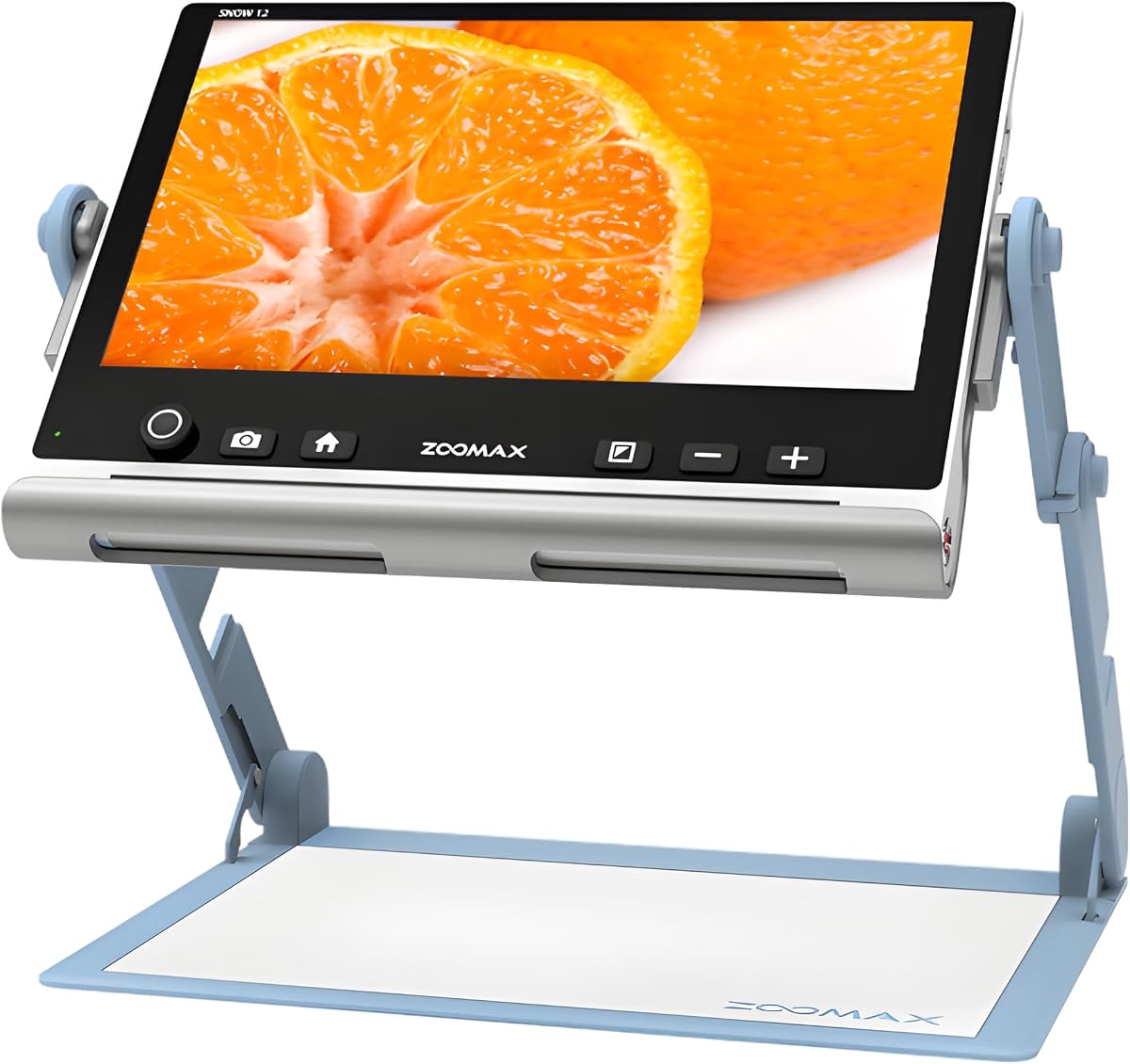
This Zoomax model offers advanced features like OCR and text to speech, making it ideal for users who prefer audio feedback. Its large 12 inch screen provides exceptional clarity for text and images.
We may earn a commission when you buy through this link, at no additional cost to you.
With support for multiple languages, it accommodates diverse user needs. The foldable stand ensures stability, while its lightweight design aids portability despite the larger display size.
The premium price is justified by its accessibility features. However, it may require external power sources for extended use, which can limit mobility.
It is best for users needing advanced text-to-speech capabilities. If you value audio feedback and large displays, this model provides top tier performance.
OCR technology converts printed text to speech, offering hands-free reading support for users with severe visual impairments.
Over 20 languages ensure global usability and inclusivity for diverse users.
We may earn a commission when you buy through this link, at no additional cost to you.
This Eyoyo model excels in battery life with a 4500mAh cell supporting over four hours of use. Its foldable handle and comfortable design make it suitable for extended reading sessions.
We may earn a commission when you buy through this link, at no additional cost to you.
With 17 color modes, it provides flexibility for different vision preferences. AV output allows connection to larger displays, enhancing usability for home or office environments.
Zoom capabilities are slightly lower than top-tier models. However, the battery performance and ergonomic design compensate well for regular home use.
It suits users who prioritize battery longevity. If you need a reliable device for long reading periods, this is a solid choice.
High capacity battery minimizes interruptions, allowing users to read without frequent recharging.
Foldable handle design improves stability and comfort during handheld or stationary use.
We may earn a commission when you buy through this link, at no additional cost to you.
This magnifier combines ergonomic design with a clear 5 inch screen. The foldable handle and integrated bracket reduce strain, making it comfortable for long reading sessions.
We may earn a commission when you buy through this link, at no additional cost to you.
With 26 color modes, it adapts to personal visual needs. Memory function ensures settings persist after shutdown, adding convenience for daily users.
It is slightly heavier than compact options, which may affect portability. For home use, it offers excellent stability and clarity.
Consider it if comfort and clear visuals are priorities. It is a reliable tool for users with macular degeneration or cataracts.
Foldable handle reduces back and hand strain, supporting comfortable reading posture.
HD color LCD ensures text remains sharp, aiding users with low vision.
We may earn a commission when you buy through this link, at no additional cost to you.
This Eschenbach magnifier is praised for its compact, lightweight build. Its 5x to 12x zoom range suits many reading needs, while image capture lets users save text or labels.
We may earn a commission when you buy through this link, at no additional cost to you.
Five viewing modes offer flexibility for different lighting or contrast preferences. The included cleaning cloth helps maintain screen clarity over time.
Zoom is limited compared to larger models, but portability is unmatched. It is ideal for travel or quick tasks where weight matters.
Choose this if you prioritize mobility and simplicity. It is a high-quality compact option for users needing basic magnification.
Lightweight design makes it easy to carry in a bag for shopping or appointments.
Image capture function allows users to save and review text or images at a later time.
We may earn a commission when you buy through this link, at no additional cost to you.
This model offers an impressive 3X to 48X zoom range, ideal for reading very small text. Simplified buttons and memory features ensure ease of use for elderly users.
We may earn a commission when you buy through this link, at no additional cost to you.
The external battery provides flexibility but requires carrying extra power. With AV output and TV connectivity, it offers versatile viewing options.
User feedback varies on build reliability. If high magnification is your priority, this model provides excellent zoom capabilities.
It suits users needing high zoom for detailed tasks. Consider this if you require maximum magnification in a handheld device.
Up to 48X zoom allows reading tiny labels or fine print clearly.
Simplified buttons help users adjust settings quickly without complex navigation.
We may earn a commission when you buy through this link, at no additional cost to you.
Selecting the right digital magnifier depends on your visual needs, budget, and intended use. This guide outlines key factors to evaluate before purchasing.
Magnification range determines how much text or objects can be enlarged. Models range from 2X to 48X zoom. Choose a model that suits your reading tasks, such as menus or detailed documents.
Higher zoom is useful for small text but may reduce screen coverage. Balance zoom with comfort and clarity.
Screen sizes vary from 3.5 to 12 inches. Larger screens improve visibility but may reduce portability. HD resolution ensures text remains sharp and clear.
Consider where you will use the device. A larger screen is better for home, while smaller sizes suit travel.
Color modes help enhance contrast and reduce strain. Look for models with at least 8 to 26 color options to match your vision needs.
Customizing colors helps users with color blindness or low vision read more comfortably.
Battery life impacts how long you can use the device unplugged. Models offer from 2 to 5 hours or more. Longer battery is crucial for travel or extended sessions.
Check if the battery is rechargeable or requires external power sources.
Weight and design affect portability. Handheld or foldable handle models are easier to carry. Consider if you need the device for shopping, office, or home.
Lightweight models are best for on-the-go use while desktop ones may offer better stability.
Features like OCR, text-to-speech, and image capture add value. AV or HDMI output allows connecting to TVs. Memory functions save settings for convenience.
Advanced features can significantly improve usability for users with severe vision loss.
Simplified controls and ergonomic design make operation easier. Look for large buttons, intuitive menus, and comfortable grips.
Ease of use is critical for elderly users or those with dexterity challenges.
Check warranty periods and customer support. Reliable brands often offer longer warranties and responsive service.
Good support ensures help if technical issues arise after purchase.
Begin by charging the device fully before first use. Press the power button to turn it on and allow the system to boot up. Adjust brightness settings to your comfort level.
Place the magnifier over text or objects and use zoom buttons to enlarge the view. Switch color modes to find the best contrast for your eyes. Use memory settings to save preferred configurations.
Clean the screen regularly with a soft cloth to avoid smudges. Store the device in a dry place when not in use. Charge the battery periodically to maintain longevity.
A digital magnifier is an electronic device that enlarges text and objects using a camera and screen. It provides adjustable zoom and contrast to help users with low vision read more easily.
It enhances text and image visibility through magnification and color adjustments. Users can zoom in on small print, adjust brightness, and save images for later review.
Many models feature simplified buttons and intuitive interfaces. Look for devices with clear labels, memory functions, and adjustable settings for ease of use.
Some models support AV or HDMI output to connect to televisions. This allows viewing enlarged text on a larger screen for better visibility.
Advanced models include OCR to convert text to speech. This feature aids users who prefer auditory feedback or need hands-free reading support.
Battery life ranges from 2 to 5 hours depending on usage. Rechargeable batteries should be maintained to ensure consistent performance over time.
Yes, lightweight handheld models are designed for portability. Choose compact options with foldable handles or cases for travel convenience.
They assist users with macular degeneration, cataracts, glaucoma, and other visual impairments. Adjustable settings help reduce strain during reading tasks.
This guide reviewed ten top digital magnifiers, highlighting strengths in zoom, portability, and accessibility. The Eyoyo 3.5 Inch and 5 Inch models offer excellent value, while the Zoomax Snow 12 Inch leads in premium features.
Prioritize factors like screen size, battery life, and color modes based on your needs. Choose models that offer ergonomic design and ease of use to enhance daily independence.
Remember that prices and availability may change. Check current listings and reviews to confirm the best fit before purchasing your digital magnifier today.