
HP Color LaserJet Pro MFP 3301cdw
3.8Editor score
Affordable refurbished option
Dual band Wi-Fi connectivity
26 ppm print speed
This guide compares the top 10 color laser MFPs for office use, evaluating speed, security, and total cost of ownership for small to medium teams.
Modern offices require reliable printing solutions that handle color documents efficiently. A color laser multifunction printer combines printing, scanning, and copying into one compact device. Choosing the right model ensures your team stays productive without unnecessary delays or high operational costs.
We evaluated ten leading color laser MFPs based on performance, connectivity, and security features. Our analysis considers print speeds, toner yields, and wireless capabilities to help you make an informed decision. Each product offers unique advantages for different office sizes and workflow requirements.
Every pick in this list highlights specific strengths like speed, budget value, or advanced security. Prices and availability change frequently so check current listings before purchasing. We focus on factual specifications and real-world performance to guide your investment in office technology.
3.8Editor score
4.4Editor score

The following table provides a side-by-side comparison of all ten models. We highlight key specifications like print speed, connectivity options, and toner yields to help you quickly identify the best fit for your office needs.


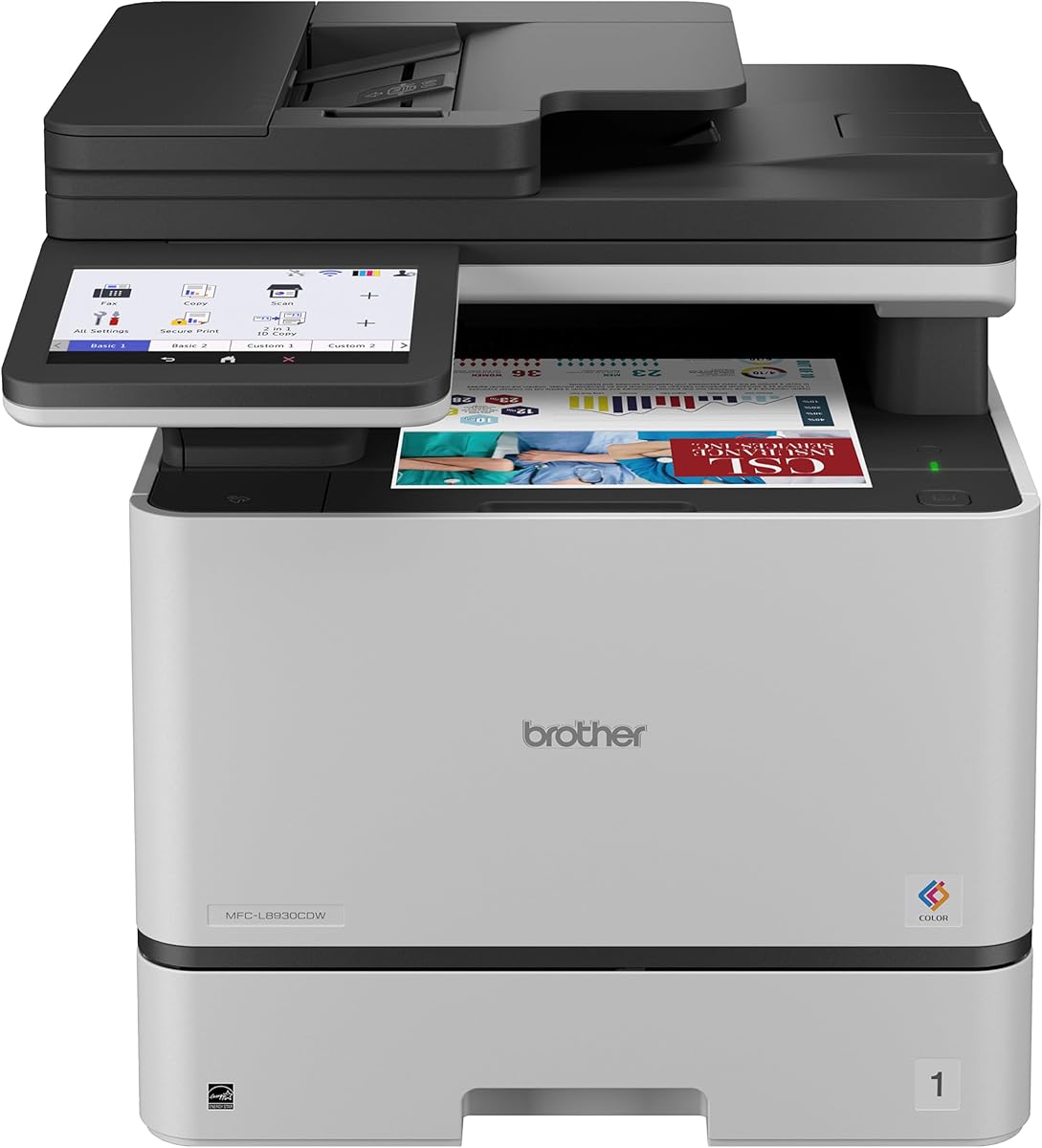
The Brother MFC-L8930CDW stands out as the top choice for businesses needing robust performance and security. With a 4.4 rating, it delivers sharp color and black prints at up to 33 pages per minute. Its compact design saves space while offering professional results suitable for demanding office environments.
We may earn a commission when you buy through this link, at no additional cost to you.
Key strengths include its high-speed scanning up to 104 images per minute and a large 80-page auto document feeder. The 7-inch color touchscreen simplifies navigation with customizable shortcuts. Advanced security features like triple-layer protection and NFC card readers ensure sensitive documents remain safe from unauthorized access.
Trade-offs involve a higher initial price point compared to entry-level models. The setup process may require more time due to extensive security configurations. However, these investments pay off through reduced operating costs and enhanced protection for your network and data over the long term.
This printer is ideal for medium-sized teams prioritizing security and efficiency. The built-in value of included toner cartridges helps lower costs early on. For offices requiring reliable, fast, and secure printing, this model offers the best balance of features and performance available today.
Included standard yield toners provide immediate printing capability while high yield options reduce long-term costs significantly.
Scan directly to cloud services and create editable Office documents to streamline workflow and reduce manual entry.
We may earn a commission when you buy through this link, at no additional cost to you.
The HP Color LaserJet Pro MFP 3301cdw offers an excellent entry point for small teams on a budget. This refurbished model carries an official warranty and retains the reliability of the original design. It provides essential multifunction capabilities including fax, scanning, and duplex printing at a competitive price point.
We may earn a commission when you buy through this link, at no additional cost to you.
Performance is solid with speeds up to 26 pages per minute for both color and black output. The self-reset Wi-Fi feature ensures consistent connectivity without frequent manual troubleshooting. Sustainable design elements like EPEAT certification appeal to environmentally conscious organizations aiming to reduce their carbon footprint.
Considerations include a slightly lower user rating compared to newer models. The refurbished status means cosmetic wear may be present though functionality remains tested. For budget-conscious buyers needing a reliable workhorse, this model delivers significant value without compromising core office printing needs.
This printer suits startups or small offices needing basic multifunction capabilities. The HP App allows easy mobile printing from smartphones. With certified parts and toner, you gain peace of mind while keeping initial costs low for your business technology investment.
Genuine parts and one-year warranties ensure refurbished units perform like new while offering substantial savings.
Print and scan directly from your smartphone using the HP App for seamless remote work capabilities.
We may earn a commission when you buy through this link, at no additional cost to you.
The HP Color LaserJet Enterprise MFP 4801f represents the pinnacle of office printing technology with advanced security and speed. Although ratings are not yet available, its features target enterprise environments requiring robust protection and high-volume output. The inclusion of quantum-resistance prepares your network for future cyber threats effectively.
We may earn a commission when you buy through this link, at no additional cost to you.
This model delivers blazing fast color output at up to 35 pages per minute ensuring quick document turnover. HP FutureSmart provides a consistent user experience across devices simplifying management for IT teams. Wired Ethernet connections ensure stable and secure data transmission without wireless interference risks.
The main trade-off is the premium price point and lack of built-in wireless connectivity. This limits flexibility for mobile printing unless additional adapters are used. However, for organizations prioritizing security and performance over convenience, the investment secures long-term operational efficiency and data safety.
Ideal for large enterprises or secure government offices, this printer ensures data integrity. Its compatibility with fleet management tools reduces administrative overhead. If you need maximum protection and speed without compromising reliability, this enterprise model sets the standard for professional office printing.
Quantum resistance technology protects against next-generation cyber threats ensuring long-term data safety.
FutureSmart platform delivers consistent features across all devices simplifying fleet-wide updates and maintenance.
We may earn a commission when you buy through this link, at no additional cost to you.
The HP Color LaserJet Pro MFP 3301sdw is a solid choice for small teams needing professional color documents. Rated 3.7 by users, it balances affordability with performance. Its TerraJet toner technology enhances color vividness making reports and marketing materials look polished and engaging for clients.
We may earn a commission when you buy through this link, at no additional cost to you.
Key features include auto two-sided printing and a 250-sheet input tray to reduce refilling frequency. The compact footprint fits well in smaller offices or shared workspaces. Wireless connectivity allows seamless printing from various devices without requiring physical cables or complex network configurations for setup.
Users note average speed ratings compared to higher-end models but acceptable for moderate workloads. The strict cartridge chip policy may limit third-party options increasing long-term supply costs. For small teams valuing simplicity and HP reliability this model provides consistent results day after day.
This printer works best for startups or remote offices needing basic scanning and copying. The award-winning reliability ensures minimal downtime during critical business periods. If you prioritize color quality and ease of use over raw speed this printer meets daily office demands effectively.
Next-generation TerraJet toner brings vivid colors to life enhancing professional document appeal.
Wireless setup and dual-band Wi-Fi keep your team connected without physical cable constraints.
We may earn a commission when you buy through this link, at no additional cost to you.
The HP Color LaserJet Pro MFP 4301fdw delivers fast color output suitable for busy small teams. With a 3.6 rating it offers quick print speeds up to 35 pages per minute. Its inclusion of Bluetooth alongside Wi-Fi provides flexible connectivity options for older devices that lack modern wireless standards.
We may earn a commission when you buy through this link, at no additional cost to you.
Wolf Pro Security protects sensitive data through customizable settings ensuring information stays secure. High yield toner options help manage costs over time despite higher upfront cartridge prices. The fax function adds versatility for offices that still require traditional document transmission methods for legal or client needs.
Trade-offs include a lower user rating likely due to connectivity setup challenges or support issues. The high cost of genuine cartridges may impact budgets over extended periods. However, for teams needing fast secure printing with fax capabilities this model offers strong functional performance.
This printer is suitable for offices needing speed and security. The ability to print from any device enhances flexibility. If you prioritize rapid document turnaround and data protection over budget-friendly supplies this printer serves your operational needs well.
HP Wolf Pro Security offers customizable settings to protect your printer and network data.
Bluetooth and Wi-Fi ensure compatibility with a wide range of mobile and desktop devices.
We may earn a commission when you buy through this link, at no additional cost to you.
The HP Color LaserJet Pro MFP 3301fdw combines essential office functions including faxing into one reliable unit. Rated 3.6 it supports small teams with up to 26 pages per minute print speeds. The self-reset Wi-Fi feature automatically detects and resolves connection issues to minimize downtime.
We may earn a commission when you buy through this link, at no additional cost to you.
Productivity is enhanced through two-sided single-pass scanning which saves time on document digitization. The auto document feeder handles multiple pages efficiently reducing manual effort. TerraJet toner ensures vivid color outputs suitable for reports and presentations without compromising on reliability over extended use.
Considerations involve average user ratings that may reflect occasional connectivity hiccups or supply costs. The fax feature adds value but requires proper setup to function correctly. For offices needing a complete all-in-one solution without enterprise complexity this model provides balanced functionality.
This printer works well for small businesses needing fax capabilities. The wireless connectivity ensures easy access from mobile devices. If you need consistent scanning and printing with fax support this printer meets the core requirements of a modern office.
Two-sided single-pass scanning reduces time spent digitizing double-sided documents significantly.
Self-reset Wi-Fi ensures your printer stays connected without constant manual reconfiguration.
We may earn a commission when you buy through this link, at no additional cost to you.
The Canon Color imageCLASS MF753Cdw II offers a streamlined all-in-one solution for small offices. With a 4.2 rating it balances performance with user-friendly features. Its compact design makes it ideal for tight spaces while supporting fax, scanning, and duplex wireless printing efficiently.
We may earn a commission when you buy through this link, at no additional cost to you.
Key strengths include quick wireless setup that gets your team printing within minutes. The 4-in-1 functionality covers all basic needs without needing separate devices. While detailed speed data is limited, Canon typically provides robust output quality for both color and monochrome documents.
Trade-offs involve limited detailed specifications in the product data compared to competitors. Toner availability should be checked before purchase to ensure cost predictability. For teams seeking a simple reliable unit that does not occupy much desk space this model is a strong contender.
This printer suits small teams prioritizing space efficiency and ease of use. The wireless duplex feature saves paper automatically. If you need a straightforward printer without complex network requirements this Canon model handles daily tasks reliably.
Compact form factor ensures this printer fits easily into smaller offices or cubicles.
Dual band Wi-Fi and duplex printing enable efficient wireless workflows without cables.
We may earn a commission when you buy through this link, at no additional cost to you.
This refurbished HP Color LaserJet Pro MFP 4301fdw offers high value for small teams needing speed. Rated 4.2 it delivers up to 35 color pages per minute with sharp details. The refurbished status reduces upfront costs while retaining essential features like Wolf Pro Security.
We may earn a commission when you buy through this link, at no additional cost to you.
Key features include wireless connectivity and mobile printing ensuring your team stays connected. The setup is designed for ease so you can start printing quickly. Security settings protect your data making this suitable for businesses handling sensitive client information without needing enterprise-level hardware.
Considerations involve potential variations in physical condition and limited warranty coverage compared to new units. You should inspect the unit upon arrival to ensure it meets your expectations. For cost-conscious buyers needing fast performance this refurbished model provides a practical solution.
This printer is ideal for small teams needing speed on a budget. The inclusion of advanced security ensures data remains safe. If you prioritize speed and affordability over a brand-new condition this refurbished unit meets your office printing needs.
Refurbished units provide significant savings while maintaining the performance standards of new printers.
Wolf Pro Security protects your data regardless of whether the unit is new or refurbished.
We may earn a commission when you buy through this link, at no additional cost to you.
The Canon Color imageCLASS MF665Cdw provides reliable color printing with a strong focus on warranty support. With a 3.9 rating it offers a three-year limited warranty for peace of mind. Its high-capacity toner options ensure you spend less time replacing consumables during busy periods.
We may earn a commission when you buy through this link, at no additional cost to you.
Key features include a 5-inch color touchscreen for intuitive navigation and mobile printing support. The automatic document feeder supports duplex scanning which saves paper and reduces manual effort. Energy Star certification and EPEAT Silver rating align with sustainability goals for environmentally conscious businesses.
Trade-offs involve average print speeds compared to higher-end models and a standard 250-sheet tray capacity. For high-volume environments you may need to reload paper frequently. However, for standard office work the warranty and toner value provide excellent long-term reliability.
This printer works best for small to medium offices needing warranty security. The high-capacity toners reduce maintenance interruptions. If you prioritize warranty coverage and ease of use this Canon model delivers consistent performance for daily tasks.
A three-year limited warranty provides extended protection beyond standard industry offers.
A 5-inch color touchscreen simplifies task access and improves user navigation.
We may earn a commission when you buy through this link, at no additional cost to you.
The HP Color LaserJet Pro MFP 4801fw combines high speed with FutureSmart functionality for seamless device work. Although rated N/A it features advanced security like quantum-resistance to protect against next-gen cyberthreats. Its 35 pages per minute speed ensures efficient handling of large print jobs.
We may earn a commission when you buy through this link, at no additional cost to you.
Key features include reliable Wi-Fi that automatically reconnects to stay online. The FutureSmart platform delivers a simple and consistent user experience across devices. Fax capabilities are included for businesses that still require traditional document transmission methods for contracts or official correspondence.
Considerations involve the high price point which may be steep for smaller teams. The lack of user ratings makes it harder to predict real-world reliability before purchase. However, for teams needing speed and future-proof security this model offers strong professional capabilities.
This printer is ideal for growing teams needing high performance. The wireless connectivity ensures seamless printing from all devices. If you prioritize speed and advanced security over budget this HP model meets the demands of a modern professional office.
Quantum-resistance ensures your printer remains secure against evolving cyber threats.
FutureSmart delivers a simple and consistent user experience across all your connected devices.
We may earn a commission when you buy through this link, at no additional cost to you.
Choosing the right multifunction printer requires evaluating several technical factors to match your specific business needs. This guide breaks down the critical elements to consider before making a purchase.
Print speed measured in pages per minute is crucial for maintaining workflow efficiency. Consider the volume of documents your office produces daily to select a model that keeps up. Higher speeds reduce waiting times and allow multiple users to share the device without bottlenecks.
Look for models with at least 26 ppm for small teams and 30+ ppm for larger groups. Always review monthly duty cycles to ensure the printer can handle your peak loads.
Operating costs often exceed the initial purchase price over the life of the printer. Analyze the cost per page by comparing toner prices and page yields. High yield cartridges may have a higher upfront cost but reduce long-term expenses significantly.
Check if the printer supports standard and high-yield options. Some models restrict third-party toners so verify compatibility before purchasing to avoid vendor lock-in issues.
Modern offices rely on flexible printing from laptops smartphones and tablets. Ensure the printer supports dual-band Wi-Fi for stable wireless connections and Ethernet for secure network integration. Bluetooth can be a useful addition for older devices without wireless capabilities.
Verify compatibility with your operating systems like Mac Windows or Linux. Mobile printing support through apps like AirPrint or Google Cloud Print ensures seamless access for remote workers.
Office printers can be entry points for cyberattacks so built-in security is essential. Look for features like automatic software updates encrypted data transmission and user authentication to restrict access. Advanced models offer threat detection that identifies malicious activity on the device.
Evaluate how the printer handles sensitive data during scanning and printing. Enterprise-grade security options protect confidential documents from unauthorized viewing or modification effectively.
Ensure the device supports the specific functions you need such as faxing high-resolution scanning and copying. Duplex printing saves paper while automatic document feeders streamline scanning multi-page documents. Confirm the glass size supports legal documents if required by your business type.
Consider the scanning destination options like cloud services or email. These features reduce manual data entry and speed up document digitization workflows significantly.
Adequate paper capacity reduces the frequency of refills and prevents workflow interruptions. Look for standard trays holding at least 250 sheets and check if they can be expanded with additional trays. A multipurpose tray is useful for printing on custom media like envelopes or cards.
Verify the supported paper sizes to match your standard formats. Proper paper handling ensures jams are minimized and output quality remains consistent across different document types.
Space constraints often dictate the choice of printer in small offices. Measure your available space and compare it with the device dimensions. Compact designs save valuable desk or floor real estate while still offering essential multifunction capabilities.
Consider the location relative to users and power outlets. Ensure there is enough clearance around the printer for ventilation and maintenance access.
A solid warranty protects your investment against hardware failures and unexpected issues. Check the duration of coverage and what it includes such as parts and labor. Extended warranties or service plans may be worthwhile for high-volume environments with constant usage.
Research customer support availability and response times. Quick access to technical help minimizes downtime and ensures your printer is fixed efficiently when problems arise.
Start by connecting the printer to your network securely using Ethernet or Wi-Fi. Install the necessary drivers on all devices to enable seamless printing and scanning functions. Use the touchscreen to set up shortcuts for frequently used tasks like scanning to email.
Regularly clean the scanner glass and rollers to maintain high output quality. Replace toner cartridges when alerts appear to prevent smudging or faded text. Keep firmware updated through the settings menu to ensure security patches are applied automatically.
Schedule periodic maintenance tasks like cleaning the interior and checking paper trays. Avoid using low-quality paper that can cause jams or damage internal components. By following these care steps you extend the lifespan and performance of your office printer.
A color laser multifunction printer (MFP) combines printing scanning copying and faxing in one device. It uses toner cartridges to produce high-quality color documents quickly. This is ideal for offices needing multiple functions without separate machines.
Operating costs vary by model and toner yield. High-yield toners reduce the cost per page significantly. While initial cartridge prices may be higher they last longer than inkjet options.
Some printers allow third-party toners but many use chips to restrict them. Check the specific model's policy before buying. Using non-compliant toners may void warranties or cause printer errors.
Modern MFPs include features like encrypted data and user authentication. Enterprise models offer advanced threat detection and automatic updates. Ensure you configure these security settings properly to protect your network.
For small teams 26 to 30 pages per minute is usually sufficient. Medium to large offices benefit from 35+ ppm models. Choose based on your daily document volume to avoid bottlenecks.
If your business still handles legal or client documents via fax yes. Most models include digital faxing over phone lines. You can also use internet fax services if traditional lines are unavailable.
Yes most MFPs support mobile printing via apps or cloud services. Look for AirPrint for iOS and Android compatibility. Ensure your Wi-Fi network allows device-to-device communication for seamless access.
Most printers come with a one-year limited warranty. Some brands like Canon offer three-year coverage on specific models. Extended warranties are available for purchase to cover long-term issues.
We reviewed ten top color laser MFPs ranging from budget-friendly options to enterprise-grade solutions. The Brother MFC-L8930CDW stands out for security and speed while the HP 3301cdw offers great value for small teams.
Prioritize features like print speed and toner costs based on your specific workflow demands. Security features are vital for protecting business data so look for models with built-in encryption and user authentication options.
Prices and availability change frequently so check current listings before finalizing your purchase. Investing in the right printer ensures your office stays efficient and secure for years to come.