
OMTech K40+ 45W Desktop CO2 Laser Engraver
4.4Editor score
45W upgraded laser performance
Compact 12×8 inch workspace
Compatible with LightBurn software
Discover the top 10 CO2 Laser Cutters for precision cutting and engraving. We compare power, workspace, speed, and safety features to help you choose the right
CO2 laser cutters offer precision and speed for cutting and engraving non-metallic materials like wood, acrylic, and leather. Whether you are a hobbyist or a small business owner, selecting the right machine depends on your workflow needs and budget constraints.
We evaluated ten top-rated models based on laser power, workspace size, engraving speed, software compatibility, and safety features. Our analysis highlights how each cutter performs in real-world scenarios to help you find the ideal tool for your creative or commercial projects.
Each pick showcases key strengths, pros, and cons to guide your decision. Prices and availability can change frequently, so verify current offers before purchasing. Use this guide to compare specifications and choose a laser cutter that matches your specific requirements.
4.4Editor score

4.5Editor score

4.8Editor score
Compare key specifications across all ten CO2 laser cutters to find the model that fits your workspace and project requirements. This side-by-side overview highlights power, dimensions, speed, and unique features for quick decision making.



The xTool P3 80W stands out as a flagship CO2 laser cutter designed for professional performance. With a 4.5 rating, it combines industrial-grade power with intelligent automation features that simplify complex engraving and cutting tasks.
We may earn a commission when you buy through this link, at no additional cost to you.
Its 80W laser power cuts through materials like wood and acrylic with exceptional speed and precision. The revolutionary ACS system includes LiDAR ranging and dual HD cameras for perfect autofocus and positioning, making setup effortless.
While the machine is powerful, the price reflects its advanced capabilities. Some accessories like the conveyor feeder are sold separately, which adds to the total investment but allows for modular expansion based on specific needs.
This laser cutter is ideal for small businesses or makers needing high productivity. If you value speed, automation, and safety, the xTool P3 is the top recommendation for serious CO2 laser projects.
The LiDAR and dual camera system ensure alignment accuracy down to 0.0079 inches for flawless results.
Integrating accessories like the MagSwap rotary and air purifier unlocks unlimited project lengths and safety.
We may earn a commission when you buy through this link, at no additional cost to you.
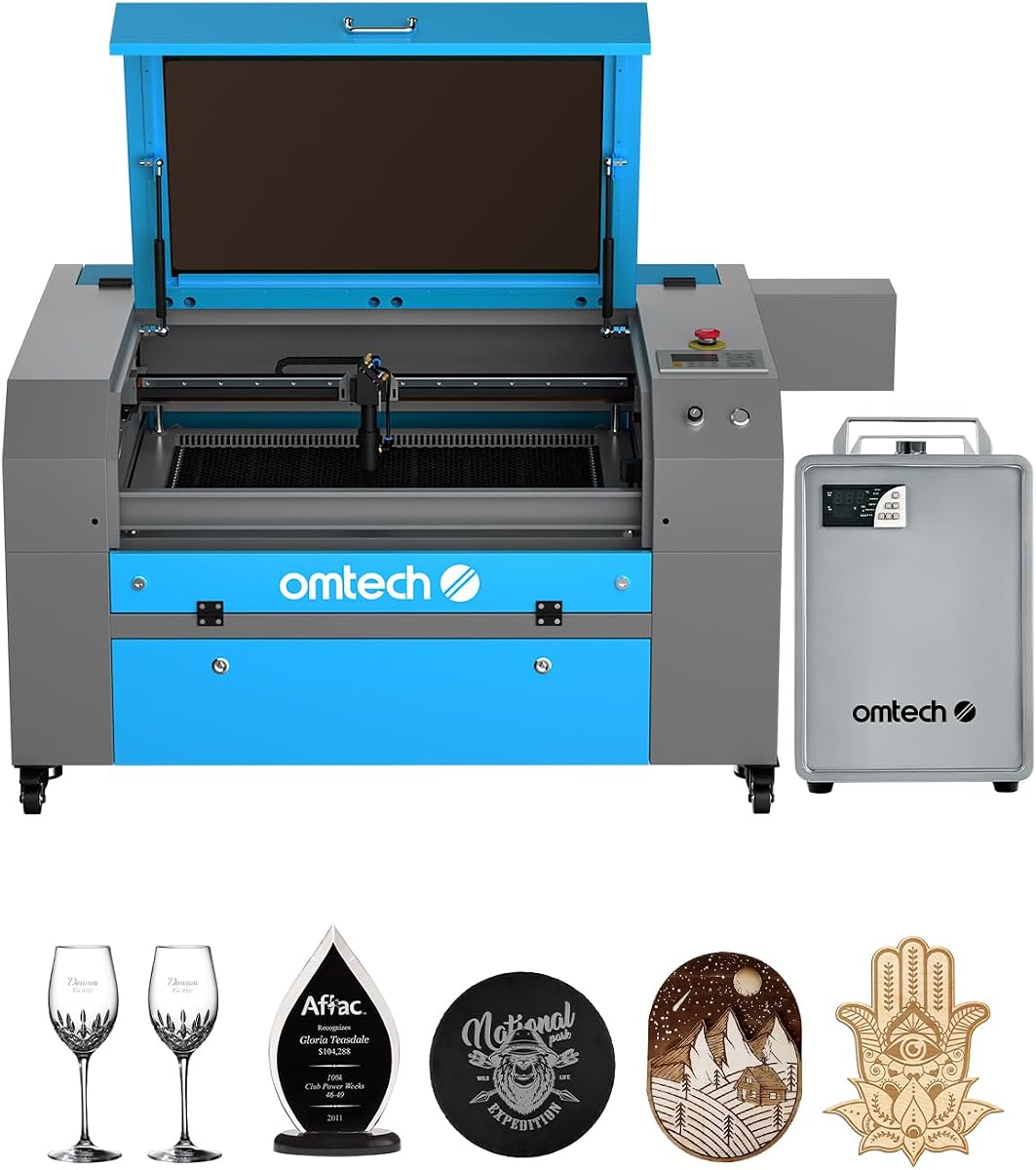
The OMTech K40+ 45W is a top pick for budget-conscious users seeking a reliable desktop CO2 laser cutter. It offers a 4.4 rating and delivers professional results for DIY makers and small businesses alike.
We may earn a commission when you buy through this link, at no additional cost to you.
With upgraded 45W power, it cuts through acrylic and wood with ease. The compact design fits smaller spaces, and compatibility with popular software like LightBurn makes it easy to start cutting quickly.
While the workspace is limited compared to larger models, it is sufficient for many projects. Manual adjustments are required, but the integrated air assist and safety features provide a solid foundation for learning.
For those starting out or needing a secondary machine, this model offers excellent value. Prioritize this if you want a balance of affordability and performance in a desktop CO2 laser cutter.
Full support for LightBurn and LaserGRBL ensures seamless control whether you are a beginner or expert.
Door protection, emergency stop, and flame-retardant panels prioritize user safety during operation.
We may earn a commission when you buy through this link, at no additional cost to you.
The OMTech Pro 130W represents the pinnacle of performance in this comparison. With a 4.8 rating, it offers industrial capabilities for professional and industrial use with precision and speed.
We may earn a commission when you buy through this link, at no additional cost to you.
Its 130W laser power and massive 35×55 inch workspace allow for large-scale projects. The built-in water chiller ensures cooling, while servo motors achieve speeds up to 1200mm/s for rapid engraving.
The high cost and large size are trade-offs for this level of power. However, the efficiency and capacity justify the investment for businesses needing high-volume production or large material handling.
This machine is perfect for professional studios or factories. If you need maximum power and workspace with reliable cooling, the OMTech Pro 130W is the premium choice for CO2 laser cutting.
The CW-5200 water chiller keeps temperatures stable for consistent performance during extended engraving sessions.
WiFi connectivity allows you to control the machine remotely using the Ruida touchscreen interface.
We may earn a commission when you buy through this link, at no additional cost to you.
The VEVOR 100W earns a perfect 5.0 rating for its impressive performance and user-friendly design. It is a solid choice for those needing a large workspace without the cost of industrial systems.
We may earn a commission when you buy through this link, at no additional cost to you.
Its 100W laser cuts through various non-metallic materials up to 0.59 inches thick. The 24×35 inch area and pass-through doors handle large projects easily, while the intelligent laser head ensures precision.
Automation is minimal compared to high-end models, but the digital control panel simplifies operation. This machine delivers excellent value for its size and power level.
Choose this if you need a large workspace and high power at a reasonable price. The VEVOR 100W is ideal for expanding your creative capabilities with a reliable mid-range laser cutter.
Works with LightBurn, CorelDRAW, and AutoCAD across Windows, Mac, and Linux platforms for flexible workflow.
Front and back pass-through doors open up possibilities for longer materials without stopping.
We may earn a commission when you buy through this link, at no additional cost to you.
The OMTech Maker 90W focuses on depth and reliability for engraving tasks. With a 90W tube and water chiller, it delivers consistent performance for commercial and personal use.
We may earn a commission when you buy through this link, at no additional cost to you.
It engraves as deep as 0.4 inches on wood and acrylic. The bundled chiller prevents overheating, and the four-way doors accommodate larger items. This model is built for steady operation.
While it lacks advanced automation, its durability and safety features are robust. The trade-off is a standard setup compared to smart cutters, but it offers solid power for the price.
If engraving depth is a priority, this machine is a strong contender. The OMTech Maker 90W is best for users needing consistent commercial results without excessive complexity.
The Yongli H2 tube provides up to 8000 hours of usage with consistent settings for long-term reliability.
Cover interlocks cut the laser beam immediately if the window is opened during operation.
We may earn a commission when you buy through this link, at no additional cost to you.
The OMTech Maker 60W offers a great bundle with LightBurn software included. Its 4.7 rating reflects smooth operation and ease of use for various engraving tasks.
We may earn a commission when you buy through this link, at no additional cost to you.
The autofocus feature removes guesswork, and the water chiller ensures steady cooling. While power is moderate, it is sufficient for detailed work on non-metallic materials.
The lack of higher power limits cutting speed but keeps costs lower. The focus is on safety and user-friendly operation for consistent daily use.
Ideal for those wanting a reliable machine without extra software costs. The OMTech Maker 60W is a smart choice for balanced productivity in a smaller workspace.
Preinstalled LightBurn software ensures intuitive navigation and consistent laser performance right out of the box.
Touch button adjustments automatically find the right focal distance to save time on setup.
We may earn a commission when you buy through this link, at no additional cost to you.
The OMTech K40+ 45W provides a compact solution for personal makers. It holds a 4.5 rating and is perfect for those with limited workspace needing reliable engraving.
We may earn a commission when you buy through this link, at no additional cost to you.
Its 12×8 inch bed handles standard materials easily. The integrated air assist improves cut quality, and compatibility with popular software allows flexible workflows.
While small, the machine offers decent power for hobby projects. The emergency stop and protection features ensure safe operation in home environments.
Buy this for personal projects or small businesses with space constraints. The OMTech K40+ 45W is the best compact option for affordable laser engraving.
24/7 global support includes local demos to ensure you get personalized care wherever you are.
The exhaust fan and auto-adjusting air assist remove smoke effectively to protect lenses.
We may earn a commission when you buy through this link, at no additional cost to you.
The OMTech Pronto 100W excels in speed with engraving up to 39.4 inches per second. This makes it a competitive choice for users needing quick production turns.
We may earn a commission when you buy through this link, at no additional cost to you.
Its 100W tube and large 40×24 inch workspace handle big projects. The autofocus and safety features like temperature alarms add to its reliability.
The price reflects its commercial capacity, but efficiency justifies it. Airflow ensures clean cuts, reducing material burn during rapid operation.
Choose this for high-volume or time-sensitive projects. The OMTech Pronto 100W is an efficient option for serious makers needing speed and power.
Revolutionary engraving speeds are 37% faster than traditional models, transforming visions into reality quickly.
Powerful air pump and fan remove smoke and dust to protect optics and enhance cut quality.
We may earn a commission when you buy through this link, at no additional cost to you.
The OMTech Pronto 130W is designed for large projects with a 51×35 inch workspace. It holds a perfect 5.0 rating and offers powerful cutting and engraving capabilities.
We may earn a commission when you buy through this link, at no additional cost to you.
Its 130W power handles thick materials, and speeds reach 1000mm/s. The autofocus ensures precision without manual adjustments, and the tube offers long usage hours.
Safety features like water protection and emergency stops prioritize user safety. The size requires a dedicated studio or workshop space.
Perfect for large-scale commercial work or detailed production. The OMTech Pronto 130W is the best for those needing massive capacity and reliability.
The large work area with pass-through doors accommodates larger and longer items with ease.
High-performance laser tube delivers 130W up to 12000 hours with extended lifespan at lower settings.
We may earn a commission when you buy through this link, at no additional cost to you.
The OMTech K40+ 45W rounds out the list as an entry-level desktop CO2 laser cutter. It provides essential features for beginners looking to explore laser engraving.
We may earn a commission when you buy through this link, at no additional cost to you.
With 45W power, it handles basic projects on wood and acrylic. The compact design fits easily on a desk, and the Class 2 safety rating ensures basic protection.
While it lacks advanced features, it offers a straightforward path into laser cutting. The price and simplicity make it accessible for hobbyists.
Consider this for your first laser machine or simple engraving needs. The OMTech K40+ 45W is a practical choice for those just starting out.
The compact design and standard safety features provide a safe learning environment for new users.
We may earn a commission when you buy through this link, at no additional cost to you.
Selecting the right CO2 laser cutter requires evaluating several technical and practical factors. This guide breaks down the most important considerations to help you make an informed decision.
Laser power determines cutting speed and material thickness capability. Higher wattage allows for faster cuts and thicker materials, while lower wattage is sufficient for light engraving tasks.
Look for at least 45W for general hobby use and 100W or more for professional cutting applications.
The workspace size limits the physical dimensions of your projects. A larger bed accommodates larger sheets or longer items without requiring repositioning.
Choose a machine with a bed that fits your largest common material size to maximize efficiency and convenience.
Speed impacts how quickly you can complete projects. Faster speeds reduce production time but must be balanced with power to maintain cut quality.
Prioritize models with high IPS or mm/s ratings if you need rapid production or high-volume output.
Compatible software affects ease of use and design flexibility. Popular options like LightBurn and LaserGRBL offer robust tools for control and design management.
Ensure the machine supports your preferred software to streamline your workflow from design to final output.
Safety features protect users from laser radiation and fires. Look for enclosure, interlocks, emergency stops, and air assist systems to minimize risks.
Prioritize models with Class 1 or Class 2 ratings and built-in protections for a safer working environment.
A cooling system maintains laser tube health during extended use. Water chillers or fans prevent overheating which can shorten tube life.
Select machines with reliable cooling like water chillers for continuous production and longevity.
Reliable support and warranty terms are critical for long-term satisfaction. Good providers offer technical guidance and accessible service for issues.
Check for 2-year service options and 24/7 global support to ensure assistance when needed.
Automation features like autofocus and cameras simplify setup and improve precision. These reduce manual effort and help avoid errors in positioning.
Invest in machines with autofocus or auto-nesting if you value time savings and professional accuracy.
Always wear appropriate safety goggles and ensure the machine is enclosed during operation to protect against laser radiation. Keep the workspace clear of flammable materials and have a fire extinguisher nearby for safety.
Regularly clean the lenses and mirrors with alcohol or a lint-free cloth to maintain optimal beam quality. Check the air assist system for clogs and ensure the water chiller is filled to prevent overheating.
Follow the manufacturer's guidelines for focal distance adjustments based on material thickness. Run test cuts on scrap material before starting full projects to verify settings and prevent material waste.
CO2 laser cutters work well on non-metallic materials like wood, acrylic, leather, cardboard, fabric, and paper. They can also engrave on glass, stone, and some plastics but generally cannot cut metals.
Yes, a water chiller is essential for continuous or high-power usage. It prevents the laser tube from overheating, ensuring consistent performance and extending the tube's lifespan.
Most modern CO2 laser cutters support standard software like LightBurn and LaserGRBL. Always check compatibility before purchasing to ensure seamless design workflow.
Use a soft lint-free cloth and 90% isopropyl alcohol to gently wipe the lenses. Avoid touching them with fingers or abrasive materials to prevent scratches.
Always wear laser safety goggles, keep the enclosure closed, and ensure ventilation is adequate. Regularly check emergency stops and interlocks to maintain safe operation.
A quality CO2 laser tube typically lasts 10,000 to 12,000 hours with proper care. Regular cooling and avoiding constant maximum power use can extend its life further.
Engraving removes a thin layer to create images or text, while cutting cuts through the material completely. Cutting requires higher power and slower speeds than engraving.
Standard CO2 lasers cannot cut metal effectively. Fiber lasers are required for cutting metals. However, you can engrave certain coated metals with a CO2 laser using marking compounds.
Choosing the best CO2 laser cutter depends on your specific needs and budget. The xTool P3 80W offers top automation, the OMTech K40+ 45W is best for budgets, and the OMTech Pro 130W leads in premium performance.
Prioritize power, workspace size, and safety features when comparing models. Ensure software compatibility and reliable support to maximize your machine's value and usability over time.
Always check current prices and availability before purchasing as costs can change. Use this guide to find a reliable CO2 laser cutter that fits your creative or commercial projects perfectly.