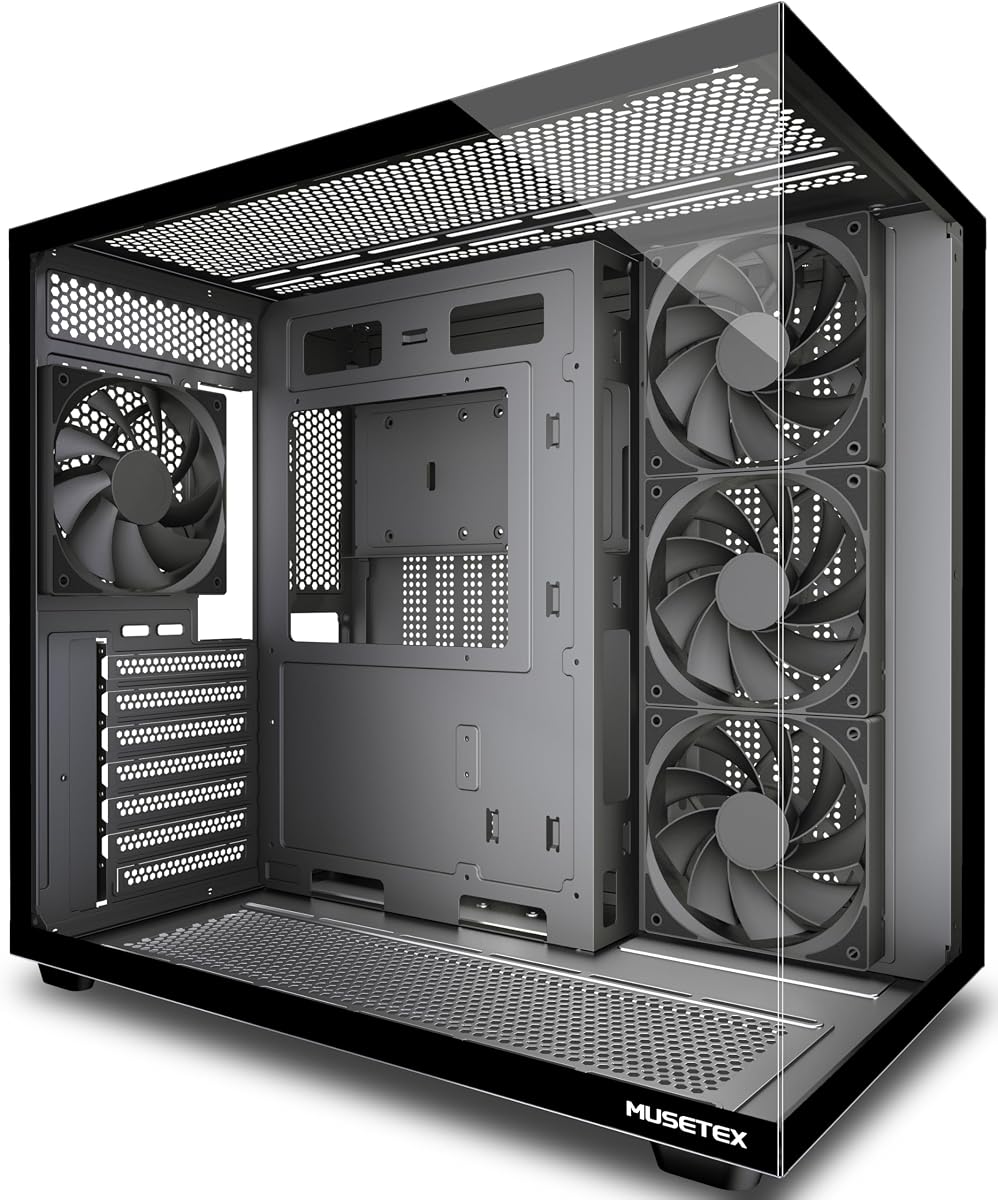
MUSETEX Y6
4.7Editor score
270-degree dual glass view
Pre-installed 4 non-LED fans
Type-C I/O port included
This guide compares the top cheap PC case options for 2026, evaluating airflow, build quality, and features to help you find the best budget-friendly tower.
Finding a cheap PC case that does not compromise on airflow or build quality is a common challenge for budget builders. A good case protects your expensive components while ensuring they stay cool under heavy loads. It also defines the visual style of your final setup.
We have analyzed ten highly rated budget towers based on user feedback and technical specifications. Our comparison focuses on airflow design, expansion slots, and compatibility with modern hardware like high-end GPUs and large coolers. This list covers the most reliable options available right now.
Each pick highlights specific strengths such as tool-less panels, included fans, or unique glass designs. Note that product availability and pricing can change frequently on major retailers. Always verify current stock before purchasing to ensure you get the best deal available today.
4.7Editor score

4.8Editor score

4.7Editor score
The following table provides a side-by-side comparison of all ten selected budget towers. It highlights key specifications like motherboard support, GPU clearance, and included accessories to help you make an informed decision quickly.


The Lian Li V100RX stands out as the top choice for builders who want premium features without breaking the bank. With a high user rating of 4.8 stars, it delivers exceptional value by including high-quality PWM ARGB fans and a dedicated lighting strip right out of the box. This saves you money on extra components while ensuring your system looks great immediately.
We may earn a commission when you buy through this link, at no additional cost to you.
Its standout quality lies in the impressive hardware compatibility and thoughtful design details. The case supports GPUs up to 420mm, which is rare for budget cases, making it future-proof for upcoming graphics cards. The tool-less mounting mechanism on both side panels makes access incredibly fast, streamlining your build process. Additionally, the integrated 26-LED ARGB strip synchronizes with motherboard software, offering vibrant lighting control without extra cables.
Despite its many strengths, there are minor trade-offs to consider. The price point is slightly higher than the most basic budget options, but the included accessories justify the cost. Setting up the daisy-chain ARGB connectivity might require some patience for beginners, but the visual payoff is significant. These factors are acceptable given the overall build quality and versatility.
This case is ideal for enthusiasts who prioritize airflow and aesthetics on a budget. If you need a chassis that handles high-end hardware and offers a polished look, the V100RX is the best recommendation available today.
The inclusion of four PWM-controlled 120mm fans ensures adaptable airflow, while the support for 360mm radiators offers powerful liquid cooling potential.
The integrated 26-LED ARGB strip provides full spectrum color control, allowing you to create a custom lighting experience that matches your style.
We may earn a commission when you buy through this link, at no additional cost to you.
The MUSETEX Y6 offers one of the most attractive viewing angles in the budget category, making it perfect for those who want to showcase their build. With a 4.7-star rating, it balances cost and functionality effectively. The 270-degree transparent dual tempered glass panels provide a wider field of view than many competitors, turning your PC into a true centerpiece.
We may earn a commission when you buy through this link, at no additional cost to you.
Its key strengths include the optimized space layout and essential connectivity options. The dual-chamber design helps separate heat sources, improving overall thermal performance without needing extra fans. You also get modern conveniences like a Type-C port and USB 3.0, which are often missing in cheaper cases. The magnetic dust filters on the top and bottom further protect your components from debris while maintaining good airflow.
However, the lack of RGB lighting on the included fans is a trade-off. If you want flashy lighting, you will need to upgrade the fans later. The cable management channels are decent but not as refined as more expensive models. These compromises are acceptable considering the low price and the excellent visual appeal of the glass panels.
Buy this case if you want maximum visibility and modern ports without spending much. It is an excellent choice for budget gamers who value style and basic performance.
The 270-degree panoramic glass panels allow you to display your high-end hardware and beloved dolls with a wider field of view than most ATX cases.
The dual-chamber design and independent ventilation channels ensure that your power supply and internal components stay cool during intensive use.
We may earn a commission when you buy through this link, at no additional cost to you.
The ASUS A31 brings a level of design sophistication rarely found in budget towers, earning its spot as the best premium option. Its 4.7-star rating reflects the high quality of its construction and unique features. The frameless, pillar-free dual-sided tempered glass panels offer a completely unobstructed view, making it ideal for showcasing clean builds.
We may earn a commission when you buy through this link, at no additional cost to you.
Its standout qualities include the BTF hidden connector design and the unique 8-degree angled base. The hidden connectors allow you to conceal modular cables behind the motherboard, resulting in a sleek, polished look. The angled base not only enhances airflow efficiency but also expands the viewing angle, making your system stand out on a desk. It supports modern hardware like RTX 5090/4090 GPUs and large AIO coolers comfortably.
The main trade-off is the higher price compared to other cheap cases. Additionally, using hidden connectors requires a compatible motherboard and more planning during the build. However, the aesthetic result is worth the effort. These issues are acceptable if you prioritize a pristine look and modern connectivity.
Choose this case if you want a flagship look without a flagship price tag. It is best for builders who value clean cable management and unique design elements.
The BTF hidden connector design allows you to conceal all modular cables behind the motherboard for a seamless and clutter-free visual experience.
Engineered for function and style, the 8-degree golden angle enhances airflow efficiency while expanding the viewing angle for an immersive showcase.
We may earn a commission when you buy through this link, at no additional cost to you.
The DARKROCK EC2 focuses on keeping your components cool with its mesh front panel design. With a solid 4.5-star rating, it offers reliable airflow for gaming setups. The mesh ensures optimal cooling performance for your components without restricting air intake, making it a practical choice for hot environments.
We may earn a commission when you buy through this link, at no additional cost to you.
Its key strength lies in its modern connectivity and straightforward design. The Type-C port ensures you can connect the latest peripherals easily. The tempered glass side panels provide a comfortable visual experience to showcase your style. The magnetic dust filters on top and bottom prevent debris entry while maintaining good heat dissipation. These features balance aesthetics and function well.
The trade-off is a somewhat basic internal layout compared to pricier models. Expansion slots are limited, and you might need to buy extra fans for maximum airflow. However, for the price, the core functionality is strong. These issues are acceptable for users who prioritize cooling over extra bells and whistles.
Buy this case if you need solid cooling and modern ports on a strict budget. It fits well for standard gaming rigs that do not require extreme expansion.
The mesh front panel is designed for efficient airflow, ensuring optimal cooling performance for your PC components during demanding tasks.
Stay in the know with Type-C ready connectivity, which features the latest options for all your modern computing needs.
We may earn a commission when you buy through this link, at no additional cost to you.
The Cooler Master Q300L is an ideal choice for those seeking a compact build without sacrificing performance. It holds a 4.5-star rating due to its versatile cooling and flexible design. Despite its smaller size, it offers ample interior space for Micro-ATX or Mini-ITX motherboards, ensuring easy expansion.
We may earn a commission when you buy through this link, at no additional cost to you.
Its standout quality is the modular I/O panel and open thermal design. You can adjust the position of your ports at the front, top, or bottom on both sides, offering unmatched flexibility. The perforated design on all sides promotes optimal airflow and heat dissipation. The unique pattern of the dust filter adds a distinctive appearance to the case, making it stand out.
The limitation is that it does not support standard ATX motherboards, which may restrict component choices. Also, the glass panel is smaller than full panoramic ones. However, for small form factor builds, these trade-offs are necessary. The low price makes it an accessible entry point for budget builders.
Choose this case if you need a small footprint with high flexibility. It is best for compact gaming setups that still want good airflow and style.
The modular I/O panel gives you the flexibility to adjust its position at the front, top, or bottom on both sides to suit your build layout.
The open thermal design with perforated panels on all sides promotes optimal airflow and heat dissipation to keep your system cool.
We may earn a commission when you buy through this link, at no additional cost to you.
The FOIFKIN F300 brings a modern cinematic feel to budget builds with its 270-degree panoramic glass panel. Its 4.5-star rating highlights the quality of this design. The fully transparent glass curtain wall provides a high-quality display platform for your components, making it a top choice for visual appeal.
We may earn a commission when you buy through this link, at no additional cost to you.
Its key strengths include the large capacity and quick access design. You can accommodate up to 400mm GPUs and 360mm coolers, ensuring you do not sacrifice cooling for the look. The tempered glass is easy to disassemble without tools, bringing convenient installation. The sound insulation properties provide great comfort for office or gaming environments.
The main trade-off is that the included fans do not have RGB lighting, which limits the visual effect for some users. Glass panels also require careful handling. However, the overall design and space are excellent for the price. These issues are acceptable for users prioritizing the view over fan lighting.
Buy this case if you want a panoramic look and maximum space. It is perfect for users who value aesthetics and hardware visibility.
The 270-degree panoramic tempered glass panel offers a wider field of vision, providing a high-quality display platform for your hardware.
The tempered glass design offers good sound insulation, providing great comfort for office or gaming environments by reducing noise.
We may earn a commission when you buy through this link, at no additional cost to you.
The Rosewill RWGC1 is a strong performer for those who need immediate cooling power. With a 4.5-star rating, it stands out for its built-in PWM fans. The case sports an airflow-focused mesh front panel equipped with 4 PWM fans to provide superior air intake right out of the box.
We may earn a commission when you buy through this link, at no additional cost to you.
Its strengths include excellent airflow and expandability for your gaming rig. The full-sized tempered glass cover with tool-free installation makes access easy. The 7 PCIE slots allow you to fully utilize your motherboard. The sleek stealth black design provides aesthetics and excellent airflow intake simultaneously.
The trade-off is that it lacks integrated RGB lighting, so you may need to add fans later for color. Cable management channels are standard but not the best. These issues are acceptable given the solid foundation and included hardware. The value remains high for budget gamers.
Choose this case if you want a reliable chassis with fans included. It is best for gamers needing immediate airflow without extra purchases.
The mid tower case is well equipped with 4 built-in 120mm PWM fans displayed in full by the mesh front panel and tempered glass side panel.
The full-sized tempered glass cover features tool-free installation for ease of access, making it simple to maintain your system components.
We may earn a commission when you buy through this link, at no additional cost to you.
The Zalman T6 is a classic choice for those valuing durability and practicality. With a 4.3-star rating, it provides solid utility for office or gaming setups. The optimized cooling performance features hairline pattern front and side mesh design, ensuring air circulation.
We may earn a commission when you buy through this link, at no additional cost to you.
Its key strengths include a versatile layout and durable construction. The chassis is made of high strength steel sheets, corrosion resistant via powder coating. You get support for 5.25 drives, which is rare in modern cases. The layout provides great workspace for building various types of PC.
The trade-off is a more traditional look without modern glass panels or RGB lighting. I/O is standard but lacks Type-C. These issues are acceptable for users prioritizing robustness and classic utility over flashy design. The low price is a major draw.
Buy this case if you need a robust workhorse for various setups. It is ideal for traditional builds that require optical drive bays.
The chassis is made of high strength steel sheets to withstand high pressure and heat, with a black powder coating applied throughout that is corrosion resistant.
The internal layout design provides great workspace for building various types of PC whether for a home workstation, office, or gaming.
We may earn a commission when you buy through this link, at no additional cost to you.
The NZXT H5 Flow is designed for compact builds that still need serious cooling. It holds a 4.5-star rating for its exceptional airflow. The ultra-fine mesh on the top, front, and side panels creates maximum airflow and filters dust effectively.
We may earn a commission when you buy through this link, at no additional cost to you.
Its standout quality is the support for large radiators in a small footprint. You can fit a 360mm radiator in front and a 240mm up top. The pre-installed two 120mm Quiet Airflow fans provide solid out-of-the-box performance. Cable management is effortless with wide channels and straps.
The trade-off is the compact size may limit GPU clearance for massive models. Also, no RGB fans are included. These factors are acceptable for those prioritizing thermal performance and clean design. The value remains high for budget builders.
Choose this case if you want reliable airflow in a compact tower. It is best for clean builds focused on performance.
The ultra-fine mesh on the top, front, and side panels creates maximum airflow and filters dust to keep components running cool.
The case supports up to a 360mm radiator in front and a 240mm radiator up top for powerful liquid cooling potential.
We may earn a commission when you buy through this link, at no additional cost to you.
The GAMDIAS GC1 ELITE is a great choice for those wanting color right out of the box. With a 4.4-star rating, it balances style and performance well. The case sports an airflow-focused mesh front panel equipped with 4 ARGB fans to provide superior air intake and lighting.
We may earn a commission when you buy through this link, at no additional cost to you.
Its strengths include the tempered glass design and expandability. The computer case showcases the inner beauty of your gaming PC system with a full-sized tempered glass cover with tool-free installation. It supports various mobo types and allows you to fully utilize your motherboard with 7 PCIE slots.
The trade-off is that the RGB controller is basic compared to premium options. The glass requires careful handling to avoid breakage. These issues are acceptable given the included lights and solid airflow. The value remains strong for gamers seeking visual flair.
Buy this case if you want ARGB fans included without extra cost. It is best for budget gamers prioritizing style and color.
The airflow-focused mesh front panel is equipped with 4 ARGB fans to provide superior air intake for cooling your system components.
The full-sized tempered glass cover with tool-free installation for ease of access showcases the inner beauty of your gaming PC system.
We may earn a commission when you buy through this link, at no additional cost to you.
Selecting the right budget tower involves balancing size, airflow, and features. This section breaks down the key factors to help you find a case that fits your build needs without overspending.
Ensure the case supports your motherboard size, whether it is ATX, Micro-ATX, or Mini-ITX. Most budget towers support ATX and smaller variants, but always check the manufacturer specs to avoid fit issues.
Always verify the motherboard size compatibility before purchasing to ensure a proper fit.
Check the maximum GPU length supported by the case. High-end cards are becoming longer, and budget cases often have lower limits. Ensure your specific model will fit comfortably inside the chassis.
Verify the maximum GPU length limits to prevent installation issues with larger graphics cards.
Look for mesh front panels and open thermal designs that allow air to enter easily. Cases with pre-installed fans save money and ensure better cooling right away. Dust filters are also essential to keep the interior clean.
Prioritize cases with mesh panels and included fans for better thermal performance.
Modern cases often include Type-C ports, which are vital for high-speed data transfer. Check the I/O panel to ensure it has enough USB 3.0 ports for your peripherals.
Make sure the case has modern ports like Type-C for faster connectivity.
Tempered glass offers a beautiful view of your hardware but may limit airflow slightly compared to full mesh. Decide if aesthetics or cooling is more important for your specific setup.
Choose glass for looks and mesh for maximum airflow based on your priorities.
Good cable management channels and hooks behind the motherboard tray make building easier. Tool-less panels also help with maintenance and access to components.
Look for tool-less panels and ample routing space for cleaner builds.
Some budget cases include fans, dust filters, or even ARGB lighting. This can significantly reduce your total build cost. Check what comes in the box before buying.
Verify included accessories like fans to save money on extra purchases.
Even budget cases should have sturdy steel construction and reliable hinges. Check the warranty period to ensure the manufacturer stands by their product quality.
Inspect build quality and warranty terms to ensure durability and support.
When installing your hardware, plan your cable routes before plugging anything in. Use the hooks and straps inside the case to hide wires behind the motherboard tray for a clean look.
Clean your PC regularly by using compressed air to blow dust out of the filters and fans. This maintains airflow and prevents overheating during long gaming sessions.
Handle tempered glass panels with care when removing them for maintenance. Use tools or your hands to unscrew screws evenly and avoid applying pressure to the corners.
Cheap cases can affect performance if they lack proper airflow or have poor cooling. However, many budget options now include mesh panels and fans to ensure components stay cool. Always check reviews to confirm thermal performance.
Buying a case with pre-installed fans is usually better for budget builders. It saves money and ensures you have the basic cooling needed right away. You can always upgrade fans later if needed.
ATX cases support larger ATX motherboards and often have more room for components. Micro-ATX cases are smaller and cheaper but only support smaller motherboards. Choose based on your motherboard size.
Yes, most budget cases come with mounting points for standard fans. You can add more fans for better airflow. Just ensure you buy the correct size and type for the slots.
Tempered glass is designed to be strong and resistant to impacts. However, it is still glass and should be handled with care. Avoid dropping the panel or hitting it hard during transport.
Many modern budget cases support radiators up to 360mm or 240mm. Always check the specific clearance for top and front panels before buying. Support varies by model and design.
We have explored ten of the best budget towers available in November 2026. From the Lian Li V100RX to the MUSETEX Y6, each option offers unique strengths for different needs.
Prioritize airflow and component clearance to ensure your system runs smoothly. While price is important, do not compromise on basic build quality or cooling features.
Remember to check current prices and availability before purchasing as they can change frequently. With the right case, your build will look great and perform well for years to come.