
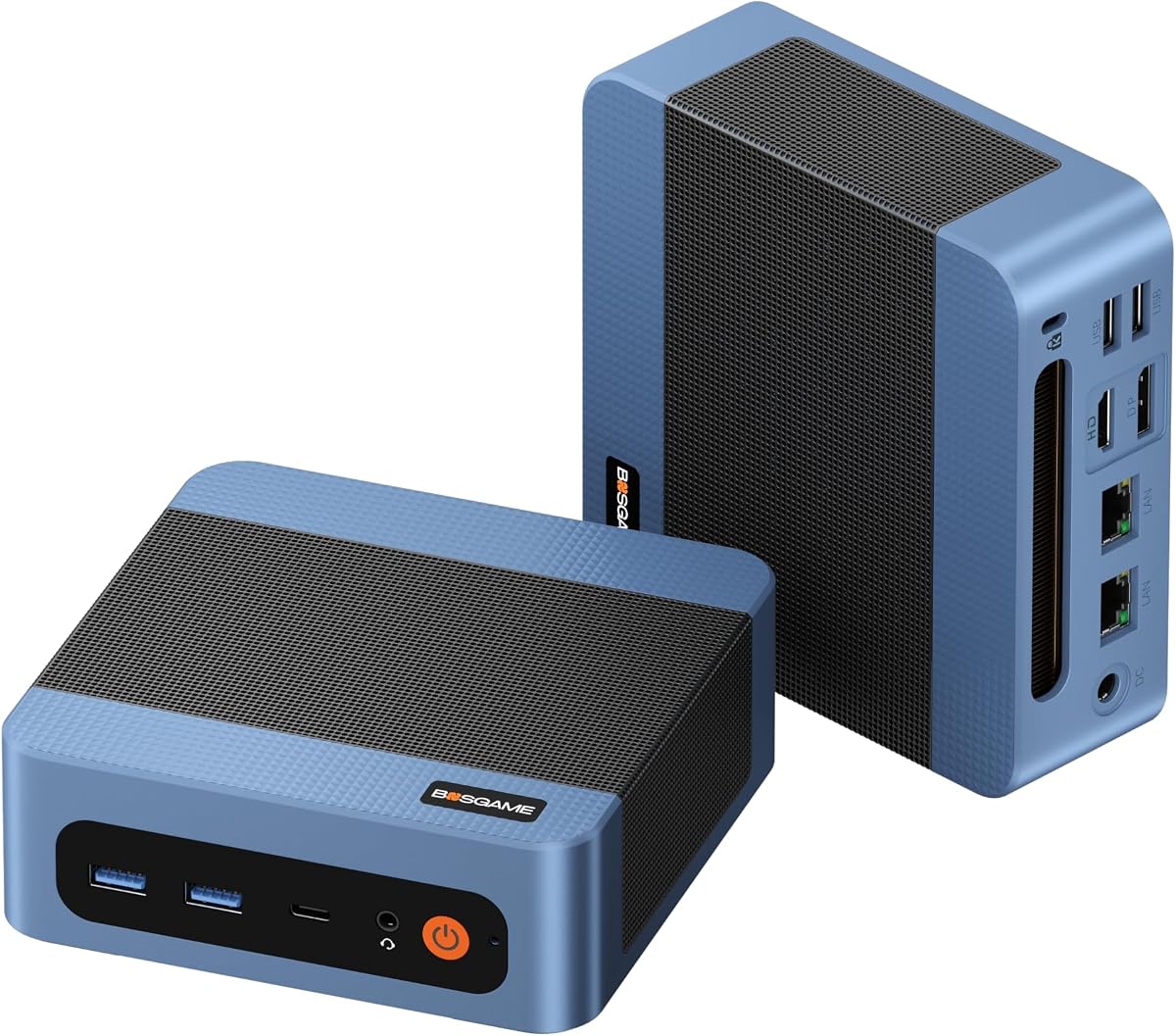
BOSGAME E5 Plus Mini PC
4.4Editor score
AMD Ryzen 5 5400U Processor
Expandable Up to 64GB RAM
Triple 4K Display Output Support
This guide compares the best cheap mini PCs for gaming, evaluating performance, graphics, and value to help you choose the right compact gaming system today.
Finding a cheap mini PC for gaming requires balancing compact size with powerful performance. These small systems can handle casual titles and retro gaming effectively while saving desk space and reducing energy consumption for everyday users seeking efficiency.
We compared ten real products based on processor power, graphics capabilities, memory, and storage options. Our analysis focuses on value, expandability, and connectivity to ensure each pick meets diverse gaming needs without breaking the bank for budget-conscious gamers.
Each pick highlights specific strengths and trade-offs to guide your decision. Prices fluctuate frequently due to sales and inventory changes, so verify current listings before purchasing to secure the best deal available for your specific gaming requirements.
4.4Editor score

4.6Editor score

4.3Editor score
This side-by-side comparison highlights key specifications across all ten affordable mini PCs to help you identify the best fit for your gaming style and budget constraints efficiently.




The ACEMAGICIAN S3A stands out as a powerful desktop-class mini PC with its AMD Ryzen 7 H 255 processor and Radeon 780M graphics. It delivers exceptional multitasking and smooth performance for modern casual titles and content creation tasks alike.
We may earn a commission when you buy through this link, at no additional cost to you.
Its 16GB LPDDR5 RAM running at 6400MT/s ensures rapid app launches and fluid gameplay without lag. The 512GB PCIe 4.0 SSD provides fast storage access, while the dual-fan cooling keeps temperatures stable even during extended gaming sessions or video rendering workloads.
While priced higher than basic models, the S3A justifies the cost with superior raw power and expandable storage up to 4TB. The only trade-off is its bulkier form factor compared to ultrathin designs, but this supports better airflow and sustained performance.
Ideal for gamers who need a compact yet potent system capable of running indie games and emulators comfortably. Its robust build and premium features make it a top recommendation for users seeking long-term value in a tiny desktop package.
The Radeon 780M graphics with RDNA 3 architecture handle modern game engines better than most integrated GPUs found in this category today.
Support for three 4K displays via HDMI 2.0, DP 2.0, and USB4 Type-C ports enhances productivity for coding, streaming, or multitasking efficiently.
We may earn a commission when you buy through this link, at no additional cost to you.
The BOSGAME E5 Plus offers incredible value for budget-conscious gamers seeking a compact system for light gaming and daily tasks. Powered by the Ryzen 5 5400U, it handles indie titles and retro games with surprising smoothness despite its low cost.
We may earn a commission when you buy through this link, at no additional cost to you.
Its expansion options are a major highlight, allowing memory upgrades to 64GB and additional storage slots for future growth. The triple 4K display support and full-function Type-C port make it highly versatile for both office work and entertainment setups alike.
The main trade-offs are the SATA SSD base and lower initial RAM, which may require upgrades for heavy multitasking. However, these limitations are easily addressed with minimal investment, keeping the overall cost competitive for entry-level users.
Perfect for students or casual gamers needing a small, energy-efficient PC that does not sacrifice display flexibility. With reliable connectivity and a quiet cooling system, it proves that affordable mini PCs can still deliver solid everyday performance.
Dual M.2 slots let you add fast NVMe storage later, extending the PC's lifespan and capability without buying a new unit entirely.
Its tiny size and low noise levels under 25dB make it ideal for shared spaces where desk clutter and fan noise are concerns.
We may earn a commission when you buy through this link, at no additional cost to you.
The ACEMAGIC K1 combines premium specs in a small chassis with its Ryzen 7 7735HS processor and Radeon 680M graphics. It delivers significantly better performance than standard mobile chips, making it suitable for more demanding casual games and creative workflows.
We may earn a commission when you buy through this link, at no additional cost to you.
With 24GB of fast LPDDR5 memory, it handles multitasking seamlessly, supporting many browser tabs and apps simultaneously without slowdowns. The dual-outlet cooling design maintains stable operation under load, ensuring that the system remains reliable during extended use or rendering tasks.
While its price places it above budget options, the K1 justifies this with top-tier internal components and included Windows 11 Pro. The limitation is that it still cannot match dedicated GPUs for AAA titles, but it excels within its mini PC class.
Recommended for users seeking a powerful all-in-one desktop replacement that fits on any desk. Its blend of raw power, efficient cooling, and robust connectivity makes it a standout choice for those who demand performance in a compact form factor.
The dual-outlet cooling structure with large heatsink fins and high-speed fans keeps internal temperatures low even during intensive workloads.
Having 24GB of onboard RAM prevents bottlenecks in heavy multitasking or light virtual machine workloads that would stall lesser systems.
We may earn a commission when you buy through this link, at no additional cost to you.
The KAMRUI Pinova P2 is designed for efficiency and productivity with its AMD Ryzen 7 330U processor and robust 16GB RAM. It excels at handling multi-window workflows and light media tasks while maintaining cool and quiet operation during daily use.
We may earn a commission when you buy through this link, at no additional cost to you.
Its integrated Radeon Graphics based on modern Vega architecture deliver smooth visuals for casual gaming and 4K video playback. The triple 4K display support via HDMI, DP, and USB-C ensures versatile connectivity for immersive setups or multi-monitor office environments.
The main limitation is its 256GB base storage, which fills up quickly with games and media. However, expansion slots allow adding up to 4TB total. which mitigates this issue without needing to replace the entire unit when needs grow.
Great for home offices or entertainment centers requiring silent performance and flexible screen layouts. With its compact silver case and lifetime technical support, it balances affordability with reliable connectivity and professional features for everyday tasks.
The 6 CUs Vega graphics outclass older Intel iGPUs, providing smoother playback and casual game performance at low power draw levels.
An improved cooling system keeps noise minimal even under load, making it perfect for quiet workspaces or media rooms without distraction.
We may earn a commission when you buy through this link, at no additional cost to you.
The C4 SE Mini PC provides stable computing power through its Ryzen 5 3500U processor and dual-channel DDR4 memory. It is ideal for office work, casual gaming, and 4K video playback, delivering responsive performance for everyday computing tasks reliably.
We may earn a commission when you buy through this link, at no additional cost to you.
Its triple 4K@60Hz display support via HDMI, DP, and USB-C makes it excellent for multitasking and productivity. Dual Gigabit LAN ports add networking flexibility, allowing setups like soft routers or home servers for users needing advanced connectivity options.
While 8GB RAM and PCIe3.0 storage are standard for this class, expansion slots enable future upgrades up to 32GB and additional NVMe SSDs. This balance ensures longevity and adaptability for growing storage or memory demands over time.
Suited for remote management, digital signage, or home entertainment setups requiring robust connectivity. The inclusion of Wake-on-LAN and RTC Wake further enhances its utility as a low-maintenance system for consistent operation in diverse environments.
Dual Gigabit LAN ports enable advanced configurations like network monitoring, load balancing, or virtual routing without external hardware.
Features like Auto Power On and Wake-on-LAN simplify remote access, making it perfect for kiosks or unattended operations easily.
We may earn a commission when you buy through this link, at no additional cost to you.
The BOSGAME E5 11 Pro Mini PC offers reliable performance with its Ryzen 3 5300U processor and 256GB NVMe SSD. It handles daily office work, casual gaming, and 4K media playback smoothly while supporting Linux Ubuntu for tech enthusiasts seeking flexibility.
We may earn a commission when you buy through this link, at no additional cost to you.
Its dual 2.5GbE LAN ports provide fast wired network transmission speeds up to 2500Mbps, ideal for home NAS servers or software routers. The triple 4K display output allows for immersive multitasking without constant window switching for efficient workflow management.
The main trade-off is the 8GB RAM baseline, which may require upgrades for heavier multitasking scenarios. However, the upgradeable SODIMM slots allow expansion up to 64GB ensuring smooth operation when demands increase over time or with added apps.
Perfect for small businesses or home offices requiring stable connectivity and flexible display options. With pre-installed Windows 11 Pro and a clean system free of bloatware, it delivers a professional experience right out of the box for productive use.
Dual 2.5GbE Ethernet ports support advanced networking setups like pfSense or OpnSense without needing external hardware adapters.
A full-function Type-C port supports data transfer, video output, and PD 3.0 power delivery for simpler single-cable setups.
We may earn a commission when you buy through this link, at no additional cost to you.
The GMKtec M5S Gaming PC delivers capable visual performance for lightweight gaming and daily office tasks with its Ryzen 3 5400U and 16GB DDR4 RAM. Its 512GB PCIe SSD provides ample storage space, reducing boot times and ensuring smooth app launches for productivity.
We may earn a commission when you buy through this link, at no additional cost to you.
Next-generation WiFi 6 and Bluetooth 5.2 offer ultra-fast internet speeds and instant peripheral connections, improving overall responsiveness. The dual 2.5G RJ45 ports support high-speed data transmission up to 2500Mbps ideal for gaming, large file transfers, or server applications.
While integrated Radeon graphics may not handle modern AAA titles well, they suffice for retro gaming and indie titles. Expanding RAM to 128GB is possible but requires investment; otherwise the system balances cost and performance well for entry-level casual gaming.
Ideal for users needing a small, energy-efficient system that supports multi-monitor productivity and basic gaming. Its robust connectivity and modern wireless standards make it a solid mid-range option for office or home entertainment use.
WiFi 6 ensures low-latency internet suitable for online gaming or streaming, while BT5.2 connects peripherals faster and more reliably.
Dual 2.5G Ethernet ports enable advanced networking without external hardware, useful for local file servers or virtual routing setups.
We may earn a commission when you buy through this link, at no additional cost to you.
The KAMRUI Gaming Mini PC features a powerful Ryzen 7 7730U processor with 16GB LPDDR4X RAM, providing strong single and multi-threaded performance. It handles video editing, image processing, and immersive gaming experiences smoothly without overheating under typical workloads.
We may earn a commission when you buy through this link, at no additional cost to you.
Its 8-core AMD Radeon graphics deliver high-definition 4K@60Hz visuals across three displays via HDMI, DP, and Type-C ports. This enables immersive visual effects and efficient multitasking, making it suitable for both creative workflows and casual gaming setups alike.
Storage expansion is limited compared to some rivals with one SATA and one PCIe slot supporting up to 4TB total. While priced higher than entry-level models, its performance and premium features justify the cost for users demanding more power and connectivity.
Perfect for users seeking a compact desktop replacement with strong productivity and entertainment capabilities. The quiet cooling system and included VESA mount ensure a tidy workspace, while extensive ports support diverse peripherals seamlessly for daily tasks.
The 8-core 16-thread CPU with 16MB L3 cache ensures smooth operation for complex software and multitasking without lag or slowdowns.
Dual 2.5GbE LAN and WiFi 6 provide ultra-low latency connections ideal for online gaming and large data transfers efficiently.
We may earn a commission when you buy through this link, at no additional cost to you.
The KAMRUI E3B Mini Gaming PC features a Ryzen 7 7730U processor paired with 16GB LPDDR4X RAM and a spacious 1TB SSD. This ample storage ensures smooth software startup and seamless multitasking, making it ideal for users with large media libraries or software collections.
We may earn a commission when you buy through this link, at no additional cost to you.
Its 8-core Radeon graphics deliver powerful processing for complex design software and triple display output via HDMI, DP, and Type-C ports. The built-in cooling fan operates quietly while maintaining stable performance even during extended gaming or rendering sessions.
While offering robust specs, the price is higher than entry models and storage expansion may require replacing existing drives. However, the two M.2 slots support up to 4TB total capacity, mitigating this concern for future needs without hardware swaps.
Recommended for users needing a mini PC with substantial out-of-the-box storage and strong multi-monitor capabilities. The inclusion of WiFi 6 and BT5.2 ensures fast connectivity and seamless peripheral pairing for both office and entertainment applications.
A 1TB SSD reduces the immediate need for external drives, providing ample room for games and applications without extra purchases.
WiFi 6 delivers speeds up to 2400 Mbps with lower latency for stable online gaming and streaming experiences.
We may earn a commission when you buy through this link, at no additional cost to you.
The Glorlin Mini PC offers smooth performance for daily work and multitasking with its Ryzen 5 3501U processor and 16GB DDR4 RAM. It handles everyday tasks like office work and browsing reliably, serving as a compact alternative to larger desktop systems efficiently.
We may earn a commission when you buy through this link, at no additional cost to you.
Its triple 4K display support allows easy workspace expansion across multiple screens, improving workflow efficiency for study or work. The inclusion of WiFi 6 and Bluetooth 5.3 ensures fast internet speeds and instant connections for modern wireless peripherals without lag.
While the processor is older compared to newer chips, the generous RAM and SSD help offset this for general use. It is not ideal for heavy gaming but excels in light tasks and provides solid value with a 1-year worry-free warranty.
Suitable for students or home offices needing a small PC that supports multiple monitors and reliable connectivity. The compact design and flexible ports make it easy to integrate into various desktop setups without consuming excessive space.
Having 16GB of RAM ensures multiple apps and browser tabs run smoothly without slowdowns or system lags.
Bluetooth 5.3 and WiFi 6 enable faster pairing with peripherals and more stable wireless connections compared to older standards.
We may earn a commission when you buy through this link, at no additional cost to you.
Choosing the right mini PC for gaming requires evaluating processor power, graphics capabilities, memory, and storage to ensure smooth performance within your budget constraints.
Focus on modern CPUs like AMD Ryzen 5 or 7 series with Zen3 or newer architecture for better single and multi-threaded performance. Higher core counts help multitasking and casual gaming but ensure thermal design power matches your usage needs.
Prioritize processors with boost clocks above 3.5GHz for responsive gaming and smoother gameplay without lag or stuttering.
Integrated Radeon Graphics with more cores or newer architectures handle indie games and emulators better than basic Intel UHD graphics. Check clock speeds and core counts when comparing models to ensure adequate visual processing for your desired titles.
Look for systems with higher GPU clock speeds and dedicated graphics cores to avoid bottlenecks in light gaming scenarios.
At least 16GB of RAM is recommended for smooth multitasking and modern casual games while 8GB may suffice for very light use. Higher speed LPDDR5 or DDR4 memory improves responsiveness and reduces load times significantly.
Ensure the model allows easy RAM expansion to 32GB or more if your workload increases over time or for heavy multitasking.
NVMe SSDs provide faster boot times and quicker game loading compared to SATA SSDs, so prefer PCIe SSD options when available. A minimum of 512GB storage accommodates operating systems and multiple modern games comfortably without filling up quickly.
Select models with extra M.2 slots to add more storage later if needed without replacing the entire system internally.
Triple 4K display support via HDMI and USB-C enables immersive gaming or productive multitasking setups across multiple monitors. Verify output resolutions match your monitors to avoid compatibility issues when expanding your workspace.
Prioritize HDMI 2.0 or DP 1.4 ports to support higher refresh rates and resolutions for better visual clarity.
WiFi 6 and Bluetooth 5.2 or higher standards reduce latency for online gaming and ensure stable connections with peripherals. Gigabit or 2.5GbE Ethernet ports are essential for stable wired connections where wireless interference could disrupt gameplay.
Check for sufficient USB ports to connect controllers, keyboards, and external drives without needing hubs.
Effective thermal design prevents throttling during long gaming sessions, so look for dual-fan systems or optimized airflow designs. Quiet cooling under 35dB ensures distractions are minimized during focused gameplay or work sessions.
Verify noise levels and cooling solutions to avoid overheating issues that may reduce system longevity.
Systems with expandable RAM and storage options extend lifespan and adapt to future needs without replacing the whole unit. A warranty of at least 1 year protects against defects and ensures reliable support for technical issues.
Prioritize models with clear expansion paths and reliable manufacturer support for long-term use and peace of mind.
Set up your mini PC in a well-ventilated area away from direct sunlight or heat sources to prevent overheating during gaming or extended work sessions.
Use external monitors and peripherals via HDMI or USB-C to maximize display options and input flexibility without cluttering your workspace.
Regularly update your system drivers and operating system to ensure optimal performance, security patches, and compatibility with new games.
Most cheap mini PCs are designed for casual and indie gaming rather than AAA titles, as they rely on integrated graphics. While lightweight or retro games run smoothly, demanding AAA games may require a dedicated GPU or higher-end workstation setup.
Many budget mini PCs support triple 4K displays via HDMI, DisplayPort, and USB-C connections, enabling immersive multitasking or gaming setups. Verify the specific model supports the resolution and refresh rate your monitors require.
Most mini PCs allow RAM and storage expansion via SODIMM or M.2 slots but CPU and GPU are usually soldered. Check the product details to confirm upgradeability before purchasing if future improvements are important.
Many models include Windows 10 or 11 pre-installed but some require you to install an OS yourself. Always verify whether Windows is included or needs to be licensed separately when buying a mini PC.
Mini PCs are energy-efficient with power consumption typically between 15W to 65W depending on workload and configuration. This results in lower electricity costs compared to traditional desktop PCs while delivering sufficient performance.
Most budget models use quiet fans designed to manage heat efficiently under normal loads. For intensive gaming, ensure airflow is unobstructed and avoid placing the PC in enclosed spaces to prevent overheating.
The ACEMAGICIAN S3A, BOSGAME E5 Plus, and ACEMAGIC K1 lead our picks for combining performance, value, and compact design suitable for various gaming needs.
Prioritize RAM capacity and GPU architecture when choosing to balance budget constraints with future-proofing your setup for casual or light gaming.
Always verify current prices and warranty terms before buying since promotions and stock levels change frequently affecting availability and overall value.