
Intel Core i5-14400F Desktop Processor
4.8Editor score
Ten cores for multitasking
Up to 4.7 GHz speed
Supports DDR4 and DDR5
Discover the best cheap Intel processor options for budget builds. This guide compares performance, compatibility, and value across ten top Intel CPU models.
Finding the right central processing unit is crucial for any computer build. Budget-conscious shoppers need reliable performance without breaking the bank. This guide highlights affordable Intel processors that deliver value.
We evaluated ten distinct Intel CPU models based on core counts, clock speeds, and chipset compatibility. Our analysis focuses on price-to-performance ratios for everyday tasks and gaming needs.
Each pick shows key specifications and real-world capabilities. Note that prices change frequently due to market demand. Always verify current listings before making your final purchase decision.
4.8Editor score

4.5Editor score

4.2Editor score
This side-by-side comparison outlines the key differences between ten selected Intel processors. It helps you choose the right model for your specific budget and performance requirements.
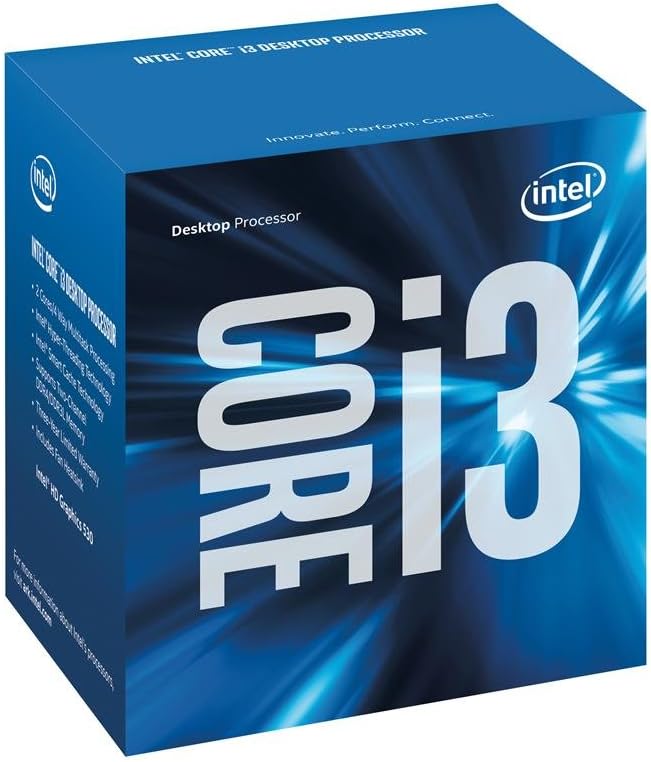


This 7th Gen Core processor offers a stable foundation for budget builds. It holds a solid rating among users who need basic computing power without extra costs.
We may earn a commission when you buy through this link, at no additional cost to you.
Its standout quality is the inclusion of HD Graphics 630. This means you do not need a separate GPU for light tasks or media playback. Turbo Boost 2.0 helps maintain responsiveness.
Trade-offs include limited support for newer standards. It uses DDR4 memory and older chipsets. This is acceptable if you already have compatible parts or want to save money.
Buy this if you need a cost-effective CPU for office work or light gaming. It provides reliable performance for its price point.
The HD Graphics 630 allows for immediate use without additional hardware purchases. This saves significant upfront costs for budget-conscious buyers.
Designed with energy efficiency in mind, this processor runs cool. It helps maintain lower electricity bills over time.
We may earn a commission when you buy through this link, at no additional cost to you.
This processor brings modern hybrid architecture to the budget segment. With a high rating, it is popular among gamers seeking raw power without spending premium prices.
We may earn a commission when you buy through this link, at no additional cost to you.
Its strength lies in the mix of Performance and Efficient cores. This allows it to handle background tasks while prioritizing gaming workloads. The 20MB cache improves data access speed.
The lack of integrated graphics is a trade-off. You must buy a separate graphics card. This is acceptable for most gamers who plan to use a GPU anyway.
It is ideal for building a high-performance PC on a budget. The speed and core count offer great long-term value.
The P-cores handle heavy tasks while E-cores manage background processes. This ensures smooth multitasking during gaming sessions.
Support for DDR5 and PCIe 5.0 means this CPU works well with future upgrades. You will not outgrow it quickly.
We may earn a commission when you buy through this link, at no additional cost to you.
This i3 processor is a classic choice for entry-level builds. It maintains a strong reputation for reliability in simple computing scenarios.
We may earn a commission when you buy through this link, at no additional cost to you.
Its key strength is the inclusion of Hyper-Threading on two cores. This gives it four threads for better multitasking than older dual-core chips. The box cooler simplifies installation.
The main trade-off is limited raw performance. Heavy applications will struggle compared to newer models. This is acceptable for web browsing and document editing.
Choose this if you need the lowest cost option for a functional PC. It handles basic daily tasks with ease.
By allowing two threads per core, this CPU manages more tasks simultaneously. It improves responsiveness during basic use.
The boxed cooler ensures you have a fan for heat dissipation. You do not need to buy extra cooling components.
We may earn a commission when you buy through this link, at no additional cost to you.
This Celeron model focuses on minimal power consumption. It is rated well for users who need a simple system for basic media and office work.
We may earn a commission when you buy through this link, at no additional cost to you.
Its strength is the efficient design that draws only 58W. This means less heat and lower power costs. It fits well with low-cost motherboards.
The trade-off is the lack of Turbo Boost. Speeds stay fixed at 3.4 GHz. This is acceptable if you do not need high clock speeds for gaming.
Buy this for a dedicated home theater PC or office terminal. It offers quiet operation and low energy costs.
Running at 58W ensures minimal heat generation. You can use smaller power supplies for your build.
Intel Optane Memory support allows for faster storage access. This improves system responsiveness on slow drives.
We may earn a commission when you buy through this link, at no additional cost to you.
This 7th Gen Celeron is designed for simple tasks. It maintains a good rating for reliability in basic system builds.
We may earn a commission when you buy through this link, at no additional cost to you.
Its strength is the included HD Graphics 610. This allows for display output without extra hardware. The processor runs cool under typical loads.
Trade-offs include very limited processing power. It is not suitable for heavy applications. This is acceptable for web browsing and document editing.
Choose this for a home PC or office station. It offers a functional experience at a low cost.
With HD Graphics 610, you can connect a monitor directly. This reduces the total cost of your build significantly.
Designed to run cool, this processor requires minimal cooling. It is perfect for silent small form factor cases.
We may earn a commission when you buy through this link, at no additional cost to you.
This Celeron offers support for older motherboards. It is rated well for users needing an affordable upgrade for legacy systems.
We may earn a commission when you buy through this link, at no additional cost to you.
Its key strength is Quick Sync Video for faster conversion. Rapid Storage Technology also improves drive speed. These features help in older setups.
The trade-off is the older 1150 socket. You must use older RAM and motherboards. This is acceptable if you already own compatible parts.
Buy this to upgrade an old PC for basic tasks. It provides extra performance without a full system rebuild.
Quick Sync Video enables faster media processing. This helps when converting video files on older hardware.
Works with Z87 and Z97 boards. This allows existing owners to upgrade cost effectively without new parts.
We may earn a commission when you buy through this link, at no additional cost to you.
This i3 processor brings new architecture to entry-level buyers. It holds an excellent rating for performance in gaming and multitasking.
We may earn a commission when you buy through this link, at no additional cost to you.
Its strength lies in the high clock speed of 4.7 GHz. The integrated UHD Graphics 730 handles light gaming. This makes it versatile for general use.
The trade-off is the lower core count. Heavy workloads may bottleneck compared to i5 models. This is acceptable for casual users.
Choose this for a budget gaming PC that does not need many cores. It balances speed and cost well.
High clock speeds ensure smooth gameplay in older titles. Games that rely on single-core speed run well.
With UHD Graphics 730, you save on GPU costs initially. You can add a dedicated card later.
We may earn a commission when you buy through this link, at no additional cost to you.
This Ultra 9 processor represents the top tier of the lineup. It is rated highly for users who need maximum computational power.
We may earn a commission when you buy through this link, at no additional cost to you.
Its strength is the 24 cores and 5.7 GHz speed. This handles rendering and streaming effortlessly. The included graphics add versatility.
The trade-off is the high cost and cooling needs. You must buy a premium cooler. This is acceptable for professional workstations.
Buy this if you need the highest performance available. It is ideal for professional video editing.
Eight P-cores and sixteen E-cores provide unmatched multitasking. This handles complex production workflows.
Despite high performance, the design focuses on efficiency. This helps reduce heat compared to older high-end chips.
We may earn a commission when you buy through this link, at no additional cost to you.
This i7 processor offers high-end gaming power. It holds a solid rating among users who prioritize smooth frame rates.
We may earn a commission when you buy through this link, at no additional cost to you.
Its strength is the 20 cores and high Turbo Boost. This ensures rapid responsiveness in games. Integrated graphics allow for display without a GPU.
The trade-off is high power consumption. You need a strong cooling system. This is acceptable for gaming enthusiasts.
Choose this for a high-end gaming PC. It balances productivity and gaming capabilities well.
Turbo Boost Max 3.0 prioritizes single-core performance. This ensures the best frame rates in games.
DDR4 and DDR5 support cuts load times significantly. You spend less time waiting for levels to load.
We may earn a commission when you buy through this link, at no additional cost to you.
This i9 processor is the flagship of the lineup. It has a strong reputation for extreme performance in professional and gaming scenarios.
We may earn a commission when you buy through this link, at no additional cost to you.
Its strength is the 6.0 GHz speed and 24 cores. This provides maximum power for rendering. Integrated graphics ensure display readiness.
The trade-off is the high cost and heat. You need top-tier cooling. This is acceptable for those who need the absolute best.
Buy this if you need the fastest CPU available. It handles the most demanding professional tasks.
With speeds up to 6.0 GHz, this CPU delivers rapid responsiveness. You will see high frame rates in games.
Thirty-two threads allow for simultaneous heavy tasks. This is perfect for streaming while gaming.
We may earn a commission when you buy through this link, at no additional cost to you.
Selecting the right Intel CPU requires understanding core needs and budget limits. This guide outlines the key factors to consider before making a purchase.
Core count determines how many tasks your PC can handle simultaneously. High thread counts improve multitasking and productivity. Look for at least four cores for modern applications.
Prioritize core count based on your workload. Gamers can accept lower counts if clocks are high.
The CPU socket must match your motherboard. Different generations use different sockets like LGA 1151 or 1200. Always check your board's supported CPU list.
Verify the socket before buying. Incompatibility will prevent your system from functioning.
Integrated graphics allow your PC to display output without a GPU. Models without 'F' suffixes typically include graphics. This is vital for office PCs.
Choose models with graphics if you do not have a dedicated card. This saves initial costs.
Cache size acts as fast temporary storage for the CPU. Larger cache reduces latency for frequent data. Higher numbers improve game and app speeds.
Prioritize larger cache for better overall performance. It helps smooth out frame times.
Power consumption affects heat and electricity costs. Lower wattage means less cooling needed. This is important for small case builds.
Check the power rating for your needs. Efficient chips are cheaper to run.
Unlocked models allow you to increase clock speeds manually. This offers potential performance gains. It requires extra cooling and power.
Only choose unlocked chips if you need to overclock. Otherwise, locked models are cheaper.
Newer CPUs support DDR5 memory while older ones use DDR4. DDR5 is faster but more expensive. Ensure your board matches your RAM type.
Plan your budget for RAM based on the CPU. Compatibility is essential.
Newer generations often offer better efficiency. Older models are cheaper but lack modern features. Consider how long you plan to use the PC.
Balance generation with price. Sometimes older chips still offer enough power.
Install the CPU carefully by aligning the triangle marker with the socket. Lower the lever gently to secure the processor. Avoid touching the pins to prevent damage.
Apply a small amount of thermal paste to the center of the CPU. Place the cooler on top and secure it firmly. Ensure the fan connects to the motherboard header.
Keep your system clean by dusting the fan regularly. Monitor temperatures in BIOS. Ensure airflow is adequate to prevent overheating.
The Intel Core i5-14400F is an excellent choice for budget gaming. It offers a high core count and fast speeds. Just ensure you pair it with a dedicated graphics card for the best results.
Not all Intel processors include integrated graphics. Models ending with 'F' typically do not have graphics. Check the product description to confirm if graphics are included before buying.
Yes, you can upgrade later if the motherboard supports it. Ensure the socket matches the new CPU. Older motherboards may need BIOS updates for new processors.
An unlocked processor is better only if you plan to overclock. It costs more and requires extra cooling. For standard budget builds, a locked processor is more cost-effective.
Cheap Intel processors typically use between 58W to 125W. Lower wattage models consume less power. This affects your electricity bill and cooling needs.
Most cheap Intel processors come with a stock cooler. You only need a special cooler if you overclock or want quieter operation. The stock cooler is usually sufficient for basic use.
P-cores handle heavy tasks while E-cores manage background workloads. This hybrid design improves efficiency. It ensures smooth multitasking without extra costs.
Older processors are worth buying for very basic tasks. They are often cheaper but lack modern features. They can be a good option for home office builds.
We reviewed ten distinct Intel processors for budget builders. The i5-14400F stands out as the best value for modern gaming.
Prioritize core count and socket compatibility. These factors ensure your PC runs smoothly. Balance these needs against your specific budget.
Always check current prices before making a purchase. Prices fluctuate frequently due to demand. This ensures you get the best deal for your money.