
Corded Landline Phones for Seniors
4.2Editor score
Photo speed-dial buttons
110dB loud ringer
No battery required
This guide compares the best captioned telephone models for hearing impaired users, covering real-time captioning, amplified sound, and senior-friendly
Finding the right captioned telephone can transform how you communicate with loved ones. These devices combine voice clarity with real-time text to ensure no word is missed during important calls.
We analyzed ten top-rated models based on user feedback, technical specifications, and ease of use. Our comparison highlights devices that excel in accessibility, sound amplification, and intuitive design for all ages.
Each pick includes detailed insights into features like photo dialing, voice commands, and internet requirements. Keep in mind that product details and availability may change over time.
4.2Editor score

4.3Editor score
4.5Editor score
The following table provides a side-by-side look at the key specifications of each model to help you quickly identify which device fits your specific hearing and accessibility needs.


The Hamilton CapTel 2400iSPNBT stands out as a top choice for users who need to read conversations in real-time. With a 4.3-star rating, it delivers confidence through clear captions on a large touchscreen.
We may earn a commission when you buy through this link, at no additional cost to you.
This model offers flexibility with both automatic captioning and assisted options with live operator support. The volume goes up to 40dB, making it suitable for those with significant hearing loss who also need visual cues.
While it requires a high-speed internet connection and is limited to US residents, the benefit of free nationwide captioning service is substantial. Users appreciate that voicemail messages are also captioned on the screen.
It is an excellent investment for seniors or hearing-impaired individuals who want to ensure they do not miss any part of a phone call. The combination of sound and text ensures clarity every time.
The large touchscreen displays captions clearly while the amplified sound helps those who still rely on auditory cues to understand conversation.
Voicemail captions allow users to review messages at their own pace, removing the stress of trying to recall spoken details.
We may earn a commission when you buy through this link, at no additional cost to you.
This corded landline phone is ideal for seniors who struggle to remember numbers. With a 4.2-star rating, it focuses on simplicity through photo buttons that let users dial family members with a single touch.
We may earn a commission when you buy through this link, at no additional cost to you.
The high-volume receiver and adjustable ringtone ensure that calls are never missed. Additionally, the visual indicator light provides an extra alert for those with severe hearing loss.
A major advantage is that it runs on a standard phone line without batteries, meaning it works even during power outages. However, it does not offer the digital features like voicemail found in other models.
If you need a reliable, no-fuss device that keeps communication open without complexity, this phone is a strong contender. It is particularly useful for homes with dementia or memory impairments.
Photo dialing removes the need to memorize numbers, making it effortless for seniors with cognitive challenges to stay connected.
Because it does not rely on batteries or Wi-Fi, this phone remains functional during storms or power failures.
We may earn a commission when you buy through this link, at no additional cost to you.
The VTech SN5147 offers a hybrid system that combines the reliability of a corded base with the mobility of a cordless handset. It has a 4.0-star rating and is designed specifically for seniors and hard-of-hearing users.
We may earn a commission when you buy through this link, at no additional cost to you.
Features like a 90dB ringer and 50dB audio assist ensure that sound is loud and clear. The photo dial slots allow for quick access to favorite contacts, while the call blocker reduces unwanted interruptions.
Although it is more expensive than basic models, the ability to expand to four handsets and have a digital answering machine adds significant value. It suits households where mobility is a concern.
For users who need to move freely around the house without losing contact, this phone provides a balanced solution. The spoken Caller ID and visual alerts make it highly accessible.
The cordless handset lets users answer calls from anywhere in the home, which is vital for those with limited range or strength.
Built-in blockers and spoken caller IDs help protect seniors from scams and ensure they know who is calling before answering.
We may earn a commission when you buy through this link, at no additional cost to you.
This device is unique because it allows users to answer, dial, and hang up using only voice commands. It is designed for individuals who have difficulty pressing buttons due to mobility or vision issues.
We may earn a commission when you buy through this link, at no additional cost to you.
The phone is always on and ready to listen for commands, ensuring that users can make calls without physical strain. This makes it a strong candidate for those with arthritis or hand tremors.
While the data does not provide a specific rating, the feature set addresses specific accessibility needs that traditional phones do not. It uses a standard home phone line, so no extra cellular signal is needed.
If physical interaction with the phone is a barrier, this voice-activated option offers a way to stay connected independently. It represents a modern approach to accessibility in telephony.
By removing the need to touch any buttons, this phone simplifies the process of making calls for those with physical limitations.
The active listening technology ensures that commands are recognized clearly, reducing frustration during daily use.
We may earn a commission when you buy through this link, at no additional cost to you.
This big button phone is designed with clarity and stability in mind. It features adjustable volume up to 40dB and picture buttons that make dialing intuitive for seniors with low vision.
We may earn a commission when you buy through this link, at no additional cost to you.
The wall-mountable design ensures the phone stays accessible and does not fall over. Even if the line is unplugged, stored phone numbers are protected so data is not lost.
It is a practical device for homes where a cordless setup might be too complex or where a fixed location is preferred. The large buttons reduce the likelihood of misdials.
For those who need a sturdy, simple phone that stays within reach and offers amplified sound, this model is a reliable choice. It is especially suited for users with arthritis or hand stiffness.
The wall-mount capability and non-slip base make this phone stable and easy to access without worrying about it sliding off tables.
Picture buttons allow users to call contacts by recognizing faces rather than numbers, simplifying the process for memory impairment.
We may earn a commission when you buy through this link, at no additional cost to you.
This VoIP phone stands out with customizable image keys that allow seniors to insert photos for easy dialing. It has a perfect 5-star rating, which highlights user satisfaction with its safety and accessibility features.
We may earn a commission when you buy through this link, at no additional cost to you.
The dedicated help key provides instant access to emergency assistance, while the bright red light ensures users know when a call is incoming. The amplified sound up to 110dB is ideal for noisy environments.
However, buyers must note that this requires an active VoIP service and does not work with traditional analog phone lines. It is a specialized device meant for internet-based telephone setups.
For households already using VoIP, this phone adds a layer of comfort and safety through familiar faces on the dial keys. It is particularly useful in nursing homes or assisted living facilities.
Inserting photos into keys helps users recall who they are calling, reducing stress and confusion during dialing.
The dedicated help key offers a direct path to assistance, which is crucial for individuals living alone or with health risks.
We may earn a commission when you buy through this link, at no additional cost to you.
The Serene Innovations phone emphasizes high-definition audio to ensure that conversations are clear. With a 3.5-star rating, it positions itself as a performance-focused device for hearing-impaired users.
We may earn a commission when you buy through this link, at no additional cost to you.
While there is less detailed data available compared to other models, the focus on sound quality suggests it is meant for those who need maximum audio clarity. It is a simpler device without many smart features.
Users who prioritize sound over digital features may find it adequate. However, the lower rating suggests that there may be areas where it does not meet all expectations compared to other top models.
It is worth considering if you are looking for a dedicated amplified phone without complex settings. For specific needs, checking the latest user reviews would provide more insight.
This phone is built primarily to deliver clear sound, which is the core requirement for many hearing-impaired individuals.
The performance design implies that the device is optimized for the core task of voice transmission without extra bells and whistles.
We may earn a commission when you buy through this link, at no additional cost to you.
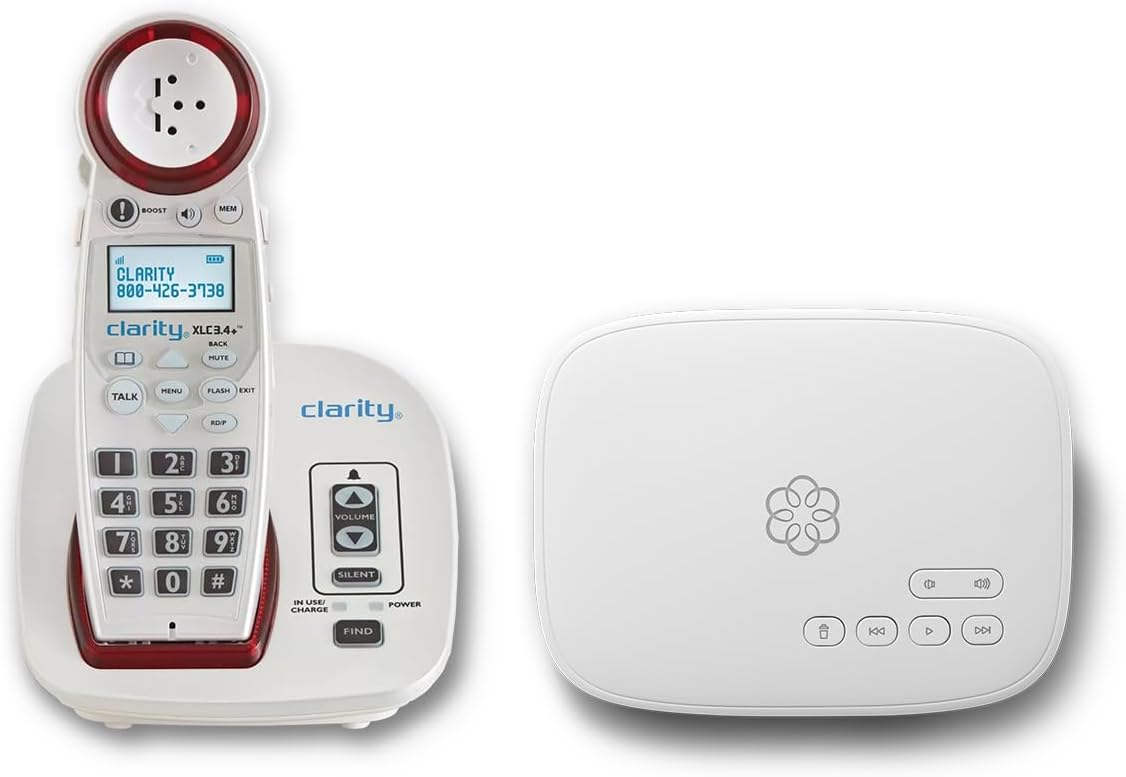
This bundle from Ooma includes both the phone service and a cordless handset designed for hearing loss. With a 4.5-star rating, it offers a complete package with robust support and safety features.
We may earn a commission when you buy through this link, at no additional cost to you.
Users benefit from visual ringers and adjustable volume for the hearing impaired. The ability to send text alerts when 911 is dialed provides peace of mind for families living in the area.
The service requires a subscription, but it includes unlimited calls to the US, Canada, and Mexico. Call blocking features also protect against scams, which is a critical safety benefit.
For those who want a service plan and hardware combined with safety features, this bundle is a strong option. It is suitable for households that prefer a comprehensive telecommunications solution.
Text alerts and visual ringers ensure that emergencies and incoming calls are noticed immediately by those who might not hear a traditional ringer.
The 24/7 concierge plan ensures that users can get help whenever they encounter setup or service issues.
We may earn a commission when you buy through this link, at no additional cost to you.
This phone offers voice dialing and a talking caller ID to support users with vision or mobility challenges. However, with a 2.1-star rating, it has faced criticism from users in the past.
We may earn a commission when you buy through this link, at no additional cost to you.
It allows up to 17 voice memories and has a visual LED ring for incoming calls. The hands-free volume control is a useful feature for those who cannot hold the handset easily.
Despite its useful features, the low rating suggests that reliability or usability may be an issue compared to newer models. It is important to check current reviews before purchasing to ensure expectations are met.
For those who specifically need voice memory options, it may still be relevant. However, newer phones often offer more intuitive interfaces and better performance for similar use cases.
The voice dialing feature allows users to make calls without physical input, though performance may vary.
The visual LED ring and talking caller ID provide clear signals when a call is incoming or when identifying the caller.
We may earn a commission when you buy through this link, at no additional cost to you.
This model features nine photo memory keys for one-touch dialing and has a 4.2-star rating. It is designed specifically for those with dementia or memory impairments who need visual cues.
We may earn a commission when you buy through this link, at no additional cost to you.
The ringer reaches over 110dB and includes an LED flash alert for incoming calls. The hands-free calling option makes it easy for bedridden patients or those with arthritis to use without holding the handset.
It does not require batteries, making it reliable during power outages. However, it lacks modern features like voicemail or internet connectivity. This simplicity can be a benefit for users who want a straightforward device.
For families who want to keep communication open for seniors with memory loss, this phone offers an easy and reliable solution. The photo keys serve as a familiar bridge to loved ones.
The photo memory keys allow users to dial by recognizing images, which simplifies the process and reduces memory load.
The loud ringer and LED flash ensure that even those with severe hearing loss can detect when a call is coming in.
We may earn a commission when you buy through this link, at no additional cost to you.
Selecting the right phone requires balancing features like amplification, captioning, and ease of use with your specific needs and living situation.
If you need real-time text during calls, ensure the device supports captioning services. Many options require a high-speed internet connection and may be restricted to US residents.
Check if the service is free or requires a subscription before buying to avoid unexpected costs.
Look for adjustable volume levels that go up to 40dB or higher. This ensures the phone can match your hearing needs without distortion.
Models with speakerphone options provide extra volume for group calls or hands-free listening.
For seniors with memory impairments, photo dialing is a critical feature. It lets you call contacts by pressing a button with a face photo instead of numbers.
Ensure the photo memory is stored locally or backed up so contacts are not lost during power outages.
Visual ringers like flashing lights or LED alerts are essential for those who might not hear a traditional tone. They provide a clear cue that a call is incoming.
Some models also have visual displays for voicemail, allowing you to read messages without playing them.
Corded phones powered by the phone line work during power outages, making them more reliable than battery-powered cordless units.
If you live in an area with frequent power issues, consider a model that does not require external electricity.
Hands-free capability allows users to answer calls without holding the receiver, which is vital for those with arthritis or weak grip.
Voice control features offer a higher level of accessibility for those who cannot press buttons at all.
Caller ID with visual or spoken announcements helps users know who is calling before they pick up. Safety features like SOS buttons add a layer of security.
Robocall blocking can protect seniors from scams and unwanted interruptions.
Verify whether the phone requires a standard analog line or an internet-based VoIP service. Traditional landline phones plug directly into wall jacks while VoIP phones need an internet connection.
Choosing the wrong type can lead to compatibility issues that require additional equipment.
Start by placing the phone on a stable surface or mounting it securely on the wall. Make sure the cord is not tangled and is close enough to your main seating area for easy reach.
Program your contacts by following the manufacturer instructions. For photo dialing, insert clear images of family members or caregivers. Test the volume settings to ensure they are comfortable for your hearing level.
Regularly clean the device with a soft, dry cloth to keep the screen and buttons functional. Avoid exposing it to moisture or extreme temperatures to maintain its performance.
Not all models require internet. Only those that display real-time captions typically need a high-speed connection. Traditional amplified phones work with standard phone lines without internet access.
Yes, many models include photo dialing and large buttons designed specifically for seniors with dementia. These features help users make calls by recognizing faces rather than memorizing numbers.
Most modern captioned and amplified phones are hearing aid compatible. Look for T-coil compatibility labels to ensure the device works with your specific hearing aid settings.
If you do not have a traditional line, you may need a VoIP model. These connect to your internet router. Ensure you have a VoIP provider set up before purchasing a VoIP phone.
Corded phones powered by the phone line continue to work during power outages. Cordless models usually rely on power and will stop functioning unless they have backup batteries.
To set up photo speed dial, find the designated buttons on the phone and follow the programming steps in the manual. Place your chosen photos on the card slot or save the image if digital.
Some models include a built-in answering machine for recording messages. Check the specs to see if this feature is included, as some simpler models may not have it.
Many captioning services are provided at no cost by the service provider. However, the initial phone purchase may have a higher price point compared to standard phones.
We have reviewed ten top models ranging from advanced captioning units to simple photo dialing phones. The Hamilton CapTel 2400iSPNBT offers the best balance of features for those who need real-time text.
If you prioritize simplicity and budget, the Corded Landline Phones for Seniors provide excellent reliability with photo buttons. For those seeking a complete service bundle, the Ooma Telo setup is a strong premium option.
Remember that your choice should depend on your specific hearing and memory needs. Check current availability and details before making your purchase to ensure it matches your home setup.