
Acer Gadget Auto Face Tracking Tripod for iPhone
4.6Editor score
No app needed face tracking
Detachable remote control included
Built-in ring light with modes
Modern content creators need tools that deliver cinematic quality without bulky gear. An AI gimbal with tripod combines intelligent tracking, stable footage, and versatile mounting options to simplify your workflow. These devices are essential for vloggers, streamers, and anyone wanting professional results on mobile.
We evaluated ten leading models based on stabilization quality, AI features, battery life, and portability. Our analysis focuses on real-world usability, app compatibility, and build durability to help you find the right fit. Each product offers unique strengths for different shooting styles and environments.
Every pick includes detailed specs, pros, cons, and usage scenarios to guide your decision. Note that prices and availability change frequently, so check current listings before purchasing. This guide ensures you invest in technology that elevates your content creation journey effectively.
4.6Editor score

4.4Editor score

4.6Editor score
As an Amazon Associate we earn from qualifying purchases.
The following table provides a side by side view of key specifications and capabilities across all ten models. This helps you quickly identify which device matches your specific needs for stability, tracking, and extra features.




The Insta360 Flow 2 Pro AI Tracker Bundle White stands out as a top-tier mobile gimbal with a 4.4 rating. It offers industry-first features like active zoom tracking and broad iOS app compatibility via Apple DockKit, making it ideal for professional creators seeking precision and flexibility.
We may earn a commission when you buy through this link, at no additional cost to you.
Its standout qualities include the ability to track fast movement even at 15x zoom, perfect for sports or performances. The multi-person tracking ensures groups stay framed, while the built-in tripod and selfie stick eliminate the need for extra gear during solo shoots.
Trade-offs exist mainly in the zoom feature which is restricted to specific iPhone Pro models, and the higher cost compared to basic options. However, the inclusion of AI-powered editing and a 10-hour battery life justifies the investment for serious content creators.
Buyers who need reliable tracking across many apps and want advanced cinematic tools should choose this model. It delivers smooth, professional results with minimal setup, ensuring you capture every moment with clarity and stability.
The unique active zoom tracking allows precise focus on fast-moving subjects even when zoomed in, enhancing sports and performance videography significantly.
With Apple DockKit support, this gimbal works seamlessly with over 200 iOS apps, providing unparalleled native tracking for calls, streams, and social media.
We may earn a commission when you buy through this link, at no additional cost to you.
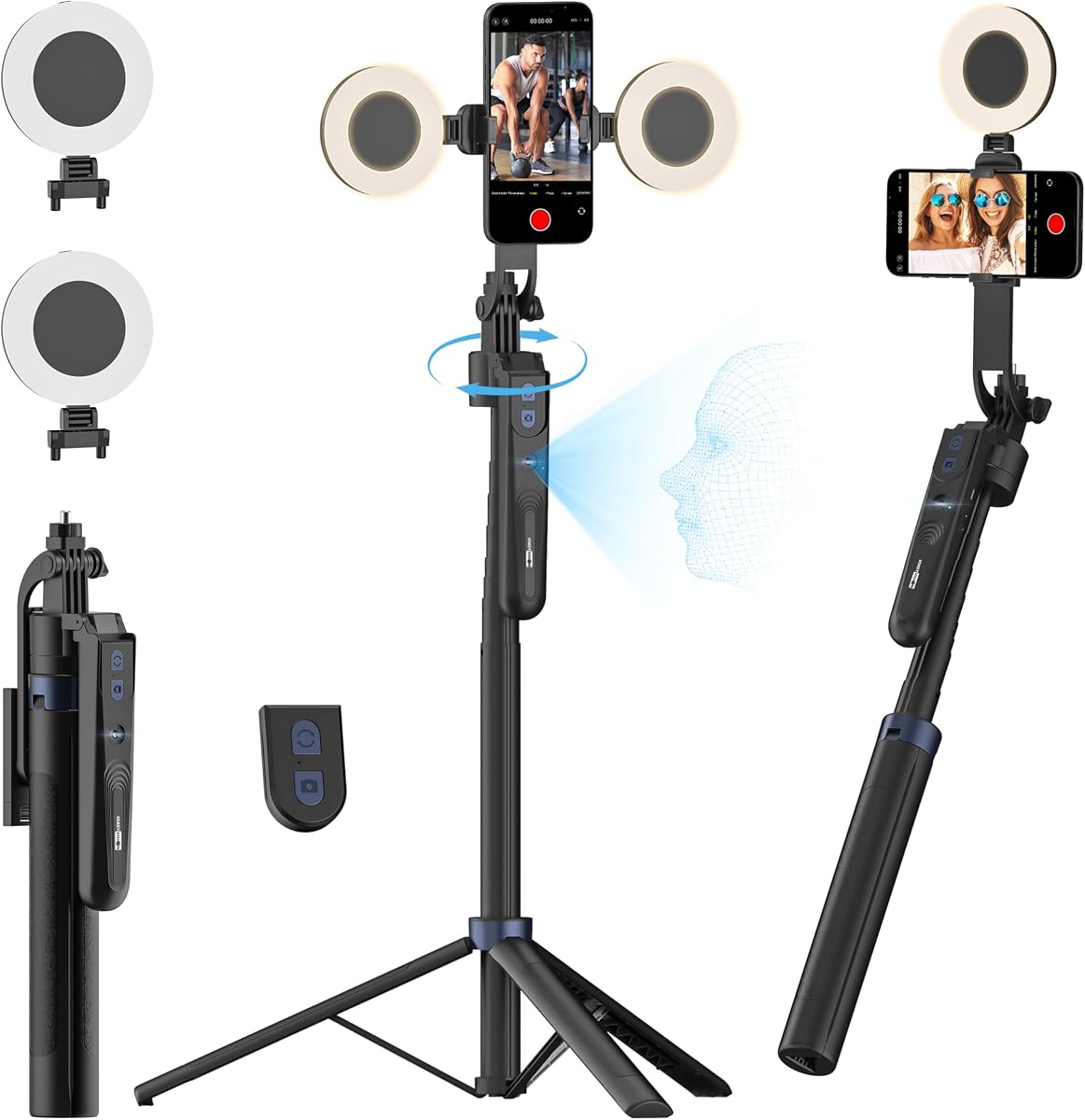
The Acer Gadget Auto Face Tracking Tripod earns a 4.6 rating as the best budget option in our list. It combines AI face tracking with a versatile tripod design, allowing creators to capture content without needing complex apps or expensive hardware.
We may earn a commission when you buy through this link, at no additional cost to you.
Key strengths include its ability to track faces and bodies automatically, adjusting angles to keep you centered. The detachable remote and included ring light add convenience for live streaming and selfies, while the quadpod legs provide excellent stability even when fully extended.
While it lacks the advanced 3-axis stabilization of premium gimbals, it serves well for static or slow-moving shots. The trade-off is primarily in motion smoothness, but for the price, the functionality and ease of use are highly satisfactory for casual users.
This tripod is perfect for beginners, vloggers on a budget, or anyone needing a reliable stand for video calls and social media posts. It simplifies content creation by removing technical barriers and offering essential tools in one compact device.
Unlike many competitors, this device works without installing extra apps, making it instantly ready for use on any compatible smartphone.
The integrated ring light offers three color modes, ensuring you look well-lit in any environment without needing separate lighting gear.
We may earn a commission when you buy through this link, at no additional cost to you.
The DJI Osmo Mobile 8 + Mic Mini Transmitter bundle is rated 4.6 and represents the best premium choice for creators wanting an all-in-one solution. It integrates audio reception and lighting into a robust gimbal, delivering studio-quality results for mobile production.
We may earn a commission when you buy through this link, at no additional cost to you.
Its standout qualities include seamless tracking with audio and lighting, ensuring sharp focus and proper illumination. The 3-axis stabilization guarantees smooth footage, while the 10-hour battery life with phone charging keeps you recording through long events without interruption.
Trade-offs include the higher cost and reported app compatibility issues on Android platforms. However, the included mic transmitter adds significant value for live streams and interviews, making it a comprehensive tool for professional workflows.
Investors looking for top-tier performance and minimal accessories needed should select this bundle. It offers unmatched convenience and quality, perfect for vloggers, live streamers, and filmmakers who demand reliability and polished output.
The included Mic Mini Transmitter allows for high-quality audio capture, eliminating the need for separate microphones during shoots.
With a ten-hour battery that also charges your phone, this gimbal supports extended recording sessions ideal for festivals and travel.
We may earn a commission when you buy through this link, at no additional cost to you.
The Insta360 Flow 2 Plus AI Tracker Bundle carries a 4.2 rating and excels in pet content creation with dedicated animal tracking. It provides a foldable design with AI tracking compatible with any app, making it versatile for various shooting scenarios.
We may earn a commission when you buy through this link, at no additional cost to you.
Key strengths include the ability to track dogs, cats, and even horses, ensuring pets remain in focus during play. The remote smartphone control turns any device into a remote, adding flexibility for group shoots or solo recording sessions.
Trade-offs include fewer advanced zoom features compared to the Pro model. However, the inclusion of a teleprompter and broad app compatibility make it a strong contender for creators focusing on dynamic subjects like animals and families.
Pet owners and family vloggers will appreciate this model's specialized tracking and portability. It simplifies capturing lively moments with ease, delivering smooth footage and creative tools without requiring complex setups.
The animal tracking mode automatically follows pets, ensuring every playful leap and movement is captured with precision and smoothness.
Second screen control allows you to use another phone as a remote, providing flexibility for framing and starting shots easily.
We may earn a commission when you buy through this link, at no additional cost to you.
The AOCHUAN Smart V3 Gimbal Stabilizer earns a 4.5 rating for its impressive height and flexibility. It features a telescopic rod extending over 50 inches, allowing for full-body and group shots without additional equipment.
We may earn a commission when you buy through this link, at no additional cost to you.
Its standout qualities include app-free AI tracking and gesture controls, enabling hands-free operation for vloggers. The detachable remote lets you control shots from a distance, and the integrated fill light ensures visibility in low-light conditions.
Trade-offs involve its bulkier design compared to pocket-friendly gimbals, which may reduce portability. However, the added height and smart features make it ideal for outdoor sports and event coverage where elevation is beneficial.
Users needing height and remote control at a reasonable price should consider this model. It balances functionality and cost, providing smooth stabilization and creative flexibility for dynamic recording environments.
The built-in extension rod allows unique angles and full-body framing without needing separate stands or tripods.
App-free gesture recognition simplifies shooting, making it accessible for beginners and efficient for quick content creation.
We may earn a commission when you buy through this link, at no additional cost to you.
The Insta360 Flow 2 Pro Gimbal Stabilizer Grey holds a 4.2 rating and offers broad compatibility including Android devices. It provides AI tracking and active zoom, making it a versatile choice for diverse smartphone ecosystems.
We may earn a commission when you buy through this link, at no additional cost to you.
Key strengths include its ability to track subjects across 200 plus apps and its integrated lighting for professional results. The infinite pan tracking ensures smooth movement, and the built-in selfie stick and tripod offer all-in-one convenience.
Trade-offs involve the cost compared to simpler tripods and potential app variations. However, the dual OS support and advanced features make it a robust option for creators needing reliability across platforms.
Android users seeking premium stabilization and tracking features will find this gimbal valuable. It delivers smooth, professional footage with ease, supporting both solo and group content creation effectively.
Supporting both Android and iPhone ensures no user is left out, providing consistent performance across different smartphone brands.
Integrated professional lighting enhances video quality, ensuring vlogs and streams look polished even in challenging lighting conditions.
We may earn a commission when you buy through this link, at no additional cost to you.
The USKEYVISION 70.9 Auto Face Tracking Tripod has a 4.4 rating and serves as an affordable alternative to complex gimbals. It combines AI tracking with dual detachable lights, offering a practical solution for streaming and recording.
We may earn a commission when you buy through this link, at no additional cost to you.
Its standout qualities include a 3-in-1 design usable as a desktop, selfie stick, or floor stand. The rechargeable remote and 1/4 inch thread allow accessory expansion, making it adaptable for various setups and heights.
Trade-offs include less smooth stabilization compared to motorized gimbals. However, for static shots or slow movements, the stability and lighting features provide excellent value for creators prioritizing function over budget.
This tripod is ideal for streamers and hobbyists needing reliable tracking without high costs. It delivers clear, well-lit content with simple operation, ensuring professional results without technical complexity.
Two detachable ring lights offer flexible illumination options, reducing shadows and improving video clarity in any setting.
The standard 1/4 inch thread allows connection to microphones and additional lights, expanding the tripod's capabilities easily.
We may earn a commission when you buy through this link, at no additional cost to you.
The DJI Osmo Mobile 7P Gimbal Stabilizer earns a 4.5 rating for its integration of editing tools and tracking. It offers robust stabilization and a multifunctional module that simplifies the shooting and editing workflow.
We may earn a commission when you buy through this link, at no additional cost to you.
Key strengths include dual-lens tracking for precision and one-tap editing via the DJI Mimo app. The magnetic design allows quick setup, and the built-in extension rod supports creative angles for vlogs and group shots.
Trade-offs include reported app availability issues on some platforms. However, the stability and ease of use make it a strong choice for creators who value streamlined production and reliable performance.
Users seeking a balance of tracking and editing convenience will appreciate this gimbal. It ensures cinematic quality footage with minimal post-production effort, ideal for quick content creation on the go.
One-tap editing tools in the app help craft professional videos instantly, saving time after recording sessions.
Two lenses work together for smarter tracking, keeping subjects in sharp focus even during fast movements.
We may earn a commission when you buy through this link, at no additional cost to you.
The Insta360 Flow 2 Grey holds a 4.2 rating and focuses on portability and essential smart features. It is foldable and includes active zoom and animal tracking, making it a versatile tool for travelers and casual creators.
We may earn a commission when you buy through this link, at no additional cost to you.
Its standout qualities include the compact design and gesture control, allowing hands-free recording easily. The built-in tripod and selfie stick offer flexibility, while the remote control adds convenience for self-shooting.
Trade-offs include fewer accessories compared to premium bundles and limited zoom compatibility. However, its light weight and comprehensive features make it an excellent choice for everyday use and travel.
Those prioritizing portability without sacrificing core AI capabilities should choose this model. It delivers smooth stabilization and creative options in a small package, perfect for spontaneous content creation.
The foldable form factor ensures easy storage in bags, making it ideal for on-the-go recording without bulk.
Simple hand gestures start and stop recording, offering a convenient way to control shots without touching the device.
We may earn a commission when you buy through this link, at no additional cost to you.
The DJI Osmo Mobile 8 Gimbal Stabilizer is rated 4.3 and excels in native tracking with integrated audio. It provides a comfortable grip and built-in tripod, ensuring smooth footage for various content types.
We may earn a commission when you buy through this link, at no additional cost to you.
Key strengths include seamless 360 pan rotation and long battery life with phone charging. The multifunctional module adds lighting and audio capabilities, making it a powerful tool for vloggers and live streamers.
Trade-offs involve app availability issues and potential module variations. However, the stabilization quality and intuitive design make it a reliable option for users seeking professional results.
Content creators needing robust tracking and comfortable handling should consider this model. It supports dynamic shooting and offers easy editing tools, ensuring high-quality videos with minimal effort.
The ergonomic grip reduces wrist strain, allowing extended shooting sessions without fatigue for creators.
Lighting and audio reception in one unit streamline production, ensuring well-lit and clear content consistently.
We may earn a commission when you buy through this link, at no additional cost to you.
Selecting the right AI gimbal with tripod involves considering several key factors to match your specific content needs and budget.
Look for models with robust 3-axis stabilization to ensure smooth footage during movement. Premium options offer advanced algorithms that reduce shake significantly, which is crucial for professional-looking video.
Choose a gimbal with proven stabilization performance to avoid jittery clips.
AI tracking should support your subject type, whether face, body, or animal. Check if the system works app-free or requires specific software that aligns with your workflow.
Prioritize gimbals with versatile tracking that fits your recording style.
Long battery life ensures uninterrupted recording. Models with 10+ hours and phone charging capabilities are ideal for travel and events.
Select a device that lasts through your typical shooting sessions.
Ensure the gimbal works with your phone OS and apps. Apple DockKit or broad third-party support expands usability significantly.
Verify compatibility before buying to avoid limitations.
A foldable and lightweight design makes transport easier. Durability matters for outdoor use, so check materials and warranty.
Balance build quality with portability for your needs.
Extras like lighting, remotes, or teleprompters add value. Consider what accessories you need separately versus integrated.
Choose models that include essential tools you use regularly.
Higher price often means better features. Assess if advanced zoom or audio features justify the cost for your use.
Invest in value rather than just the lowest price.
Simple setup and intuitive controls save time. Good apps and tutorials help beginners get started quickly.
Opt for user-friendly designs that reduce friction.
Start by balancing your phone securely on the clamp before powering on the gimbal. Follow the manufacturer's instructions to fold out legs or attach accessories like lights or remotes.
Use the AI tracking feature by selecting the subject type in the app or via gestures. Keep the device steady at first, then move smoothly to allow the stabilizer to adjust.
After use, clean the gimbal with a soft cloth and store it in a dry place. Avoid exposure to extreme temperatures to prolong battery life and maintain performance.
Many modern gimbals support app-free tracking via gestures or built-in sensors. Others require apps like DJI Mimo or Insta360. Check the product specs to see if it works with your preferred apps or operates independently.
Yes, most models like the Insta360 Flow 2 Pro support both iOS and Android. Some offer native tracking across 200+ apps regardless of OS, ensuring compatibility for all users.
Most top models offer 10 hours of battery life on a single charge. Some also allow pass-through charging so your phone stays powered while you shoot.
Built-in tripods are generally stable for flat surfaces. For uneven terrain, look for models with wider leg spreads or quadpod designs to prevent tipping during recording.
Yes, select models include dedicated animal tracking features to follow pets during play. This helps capture dynamic moments without manual adjustment.
Use a soft microfiber cloth to wipe surfaces gently. Avoid liquids and extreme temperatures, and store the device in a protective case to prevent dust buildup.
Our top picks include the Insta360 Flow 2 Pro for advanced tracking, the Acer Gadget for budget-friendly tracking, and the DJI Osmo Mobile 8 bundle for premium features.
Prioritize stabilization quality and AI features that match your content style. Consider battery life and portability to ensure you can shoot anywhere without interruption.
Check current prices and availability before buying since offers may change. This guide helps you make an informed decision to elevate your mobile video production.