
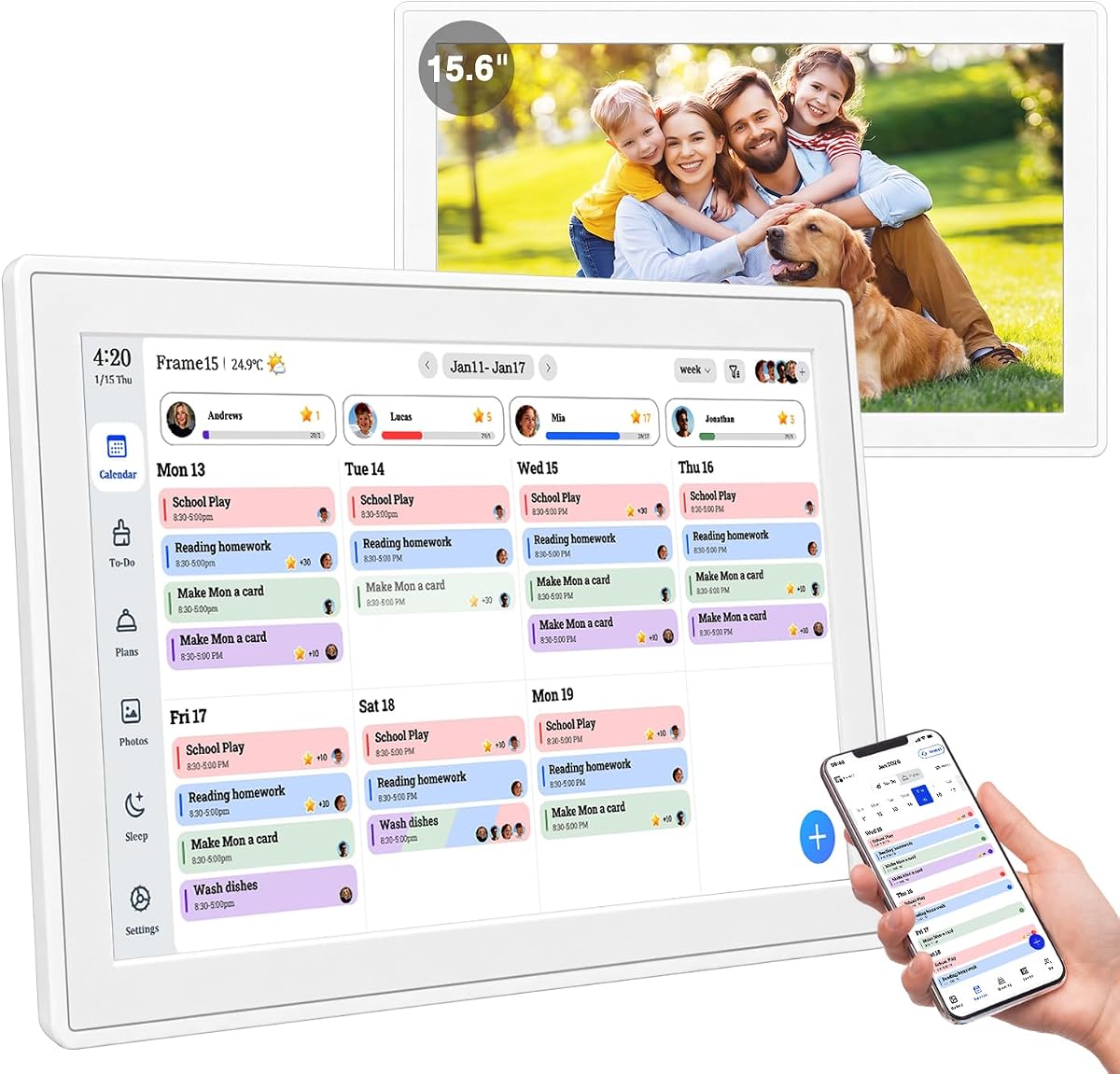
15.6" Smart Digital Calendar
4.7Editor score
Tool-free thumb nut mounting
No monthly subscription fees
Instant tap-to-create events
AI Digital Smart Calendars are revolutionizing how modern families organize their daily lives. These devices combine scheduling, chore tracking, and photo sharing into one central hub. They reduce clutter and keep everyone connected without relying on paper planners.
We evaluated ten leading models based on screen quality, syncing versatility, and family-friendly features. Our analysis focuses on ease of use, subscription requirements, and the effectiveness of built-in tools like meal planning and reward systems for children.
Each pick highlights unique strengths to match different household needs and budgets. While prices may fluctuate due to sales or inventory changes, the core features remain consistent. Check the current listings for the most up-to-date pricing before you buy.
4.7Editor score

4.5Editor score

4.6Editor score
As an Amazon Associate we earn from qualifying purchases.
This side-by-side comparison highlights the key specifications of each model. From screen size to syncing options, these details help you understand what sets each device apart in a crowded market.
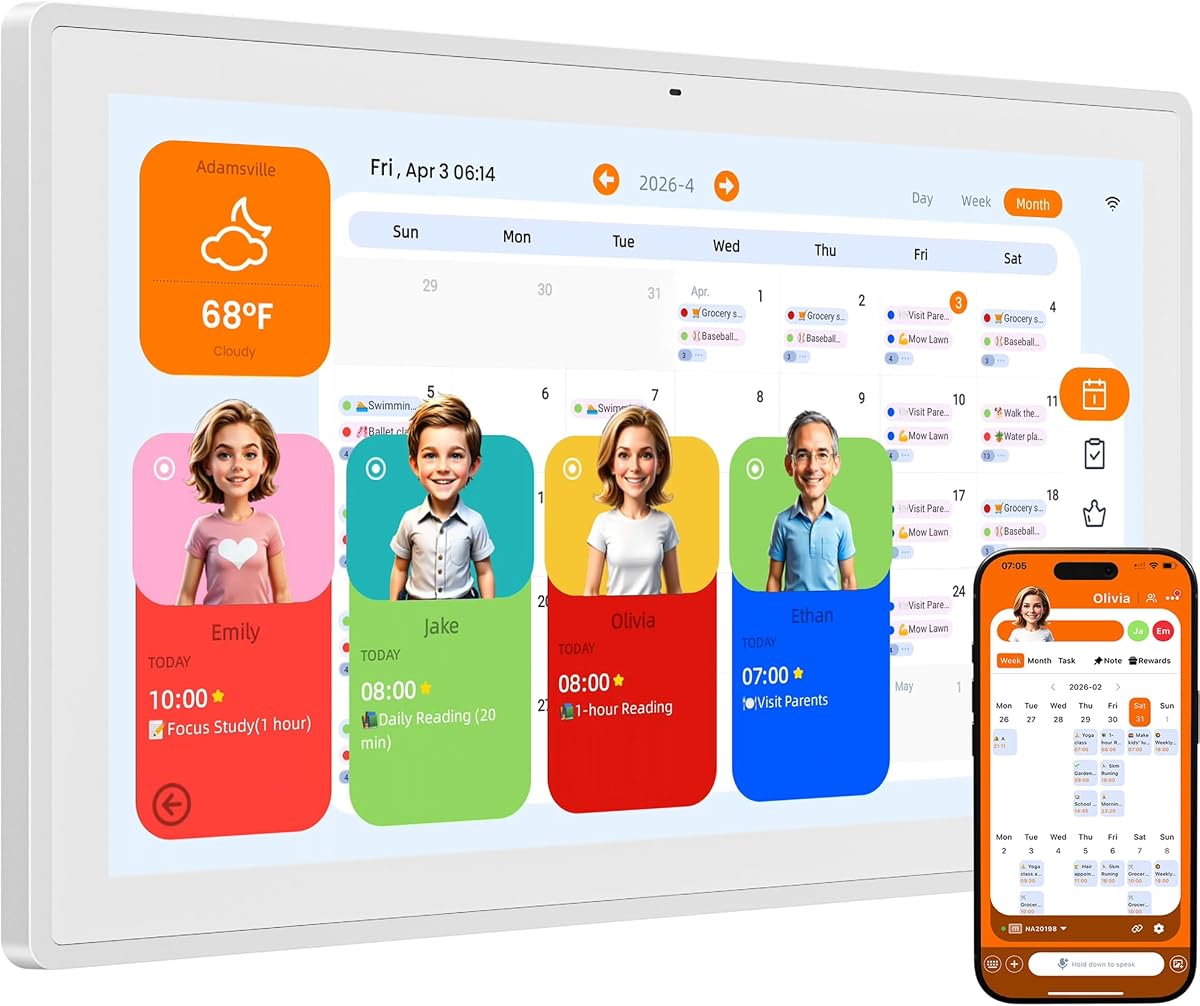


The NORI Family Hub stands out as a top contender in the AI Digital Smart Calendar space. With a 4.5-star rating, it delivers a robust platform for managing household schedules. The color-coded interface makes it easy to distinguish between family members at a glance.
We may earn a commission when you buy through this link, at no additional cost to you.
Its standout quality lies in the depth of its planning tools. The meal planning feature is particularly strong, allowing you to shape weekly menus around preferences and nutrition. This goes beyond simple scheduling to address daily household needs directly.
While the AI upgrade is optional, the core functionality remains comprehensive. The main trade-off is the price point, which is higher than entry-level options. However, the value provided by the built-in tools justifies the investment for busy families.
This device is ideal for households needing more than just date tracking. If you want to manage meal prep alongside appointments, this hub offers the necessary tools. It effectively centralizes family operations into one reliable system.
Each family member gets a distinct color, reducing confusion when viewing shared schedules and tasks.
The built-in planner helps shape menus around preferences, cutting down on daily decision fatigue.
We may earn a commission when you buy through this link, at no additional cost to you.
This model offers an exceptional entry point into the world of AI Digital Smart Calendars. With a high 4.7-star rating, it proves that you do not need to spend a fortune to get organized. The setup process is remarkably fast, taking under thirty seconds.
We may earn a commission when you buy through this link, at no additional cost to you.
The primary strength is its commitment to transparency. There are no monthly fees or hidden costs for core functions. Users can manage up to twenty family members on one shared screen without worrying about recurring bills.
While it lacks some of the advanced AI capabilities found in pricier models, it covers the essentials perfectly. The tap-to-create feature simplifies adding events, making it accessible for all ages. It trades complexity for straightforward usability.
For budget-conscious families looking for a reliable digital planner, this is a top choice. It provides the essential tools for coordination without the financial burden of subscriptions. It is an excellent gift for those new to smart home organization.
The tool-free thumb nut design allows instant mounting on walls or desks without any drilling.
Everything is included after purchase, with no paywalls locking essential calendar features behind a fee.
We may earn a commission when you buy through this link, at no additional cost to you.
The Cozyla Calendar Plus 2 delivers a premium experience with its expansive 24-inch display. It earns a strong 4.6-star rating by offering unmatched versatility for large households. The ability to access the Google Play Store sets it apart from standard smart calendars.
We may earn a commission when you buy through this link, at no additional cost to you.
Its standout quality is the level of customization available. Users can drag and drop widgets to create a dashboard tailored to their specific needs. This flexibility turns the device into a truly personalized command center for the home.
The trade-off involves the investment required. It is positioned as a high-end option, which may be a barrier for some buyers. Additionally, the large size requires careful placement to ensure it fits your available wall or desk space comfortably.
This is the perfect choice for families who want a central entertainment and organization hub. If you value screen real estate and app versatility, this model delivers significantly. It transforms routine planning into a more engaging and interactive experience.
Accessing the Google Play Store allows you to download favorite apps to expand functionality.
The device rotates effortlessly between portrait and landscape orientations to fit your specific layout needs.
We may earn a commission when you buy through this link, at no additional cost to you.
This digital calendar combines organizational tools with a powerful photo framing experience. It achieves a 4.4-star rating by focusing on visual appeal and family coordination. The AI restoration feature enhances stored memories, making them look vibrant on the screen.
We may earn a commission when you buy through this link, at no additional cost to you.
Its primary strength lies in the memory management capabilities. With 32GB of expandable storage, families can cycle through countless images without running out of space. This turns the device into a living gallery that celebrates family moments daily.
The main trade-off is the dependency on external power. The unit does not include batteries, so it requires a consistent power source. However, this ensures the screen remains bright and responsive during all usage times.
This model is ideal for families who cherish visual memories alongside scheduling. If you want a device that serves as both a planner and a photo frame, this fits the bill. It brings warmth to your home organization.
Enhanced AI technology automatically cycles through and improves family memories on display.
Included hardware supports both wall mounting and desktop placement for versatile placement in any room.
We may earn a commission when you buy through this link, at no additional cost to you.
The Kairos AI integration in this model provides a unique hands-free experience. It holds a 4.4-star rating for its ability to listen and act on your behalf. This reduces the friction often associated with entering tasks manually into a calendar.
We may earn a commission when you buy through this link, at no additional cost to you.
Its standout feature is the precision of the voice interaction. You can dictate tasks or scan photos to create events instantly. This capability makes it easy to stay organized even when your hands are busy with other activities.
While the voice assistant is powerful, it is not the only way to interact. The touchscreen remains responsive for those who prefer manual input. The adaptive brightness ensures the display is comfortable to view at any time of day.
For busy parents who need to add events quickly, this voice-first approach is a huge help. It transforms the calendar into an active assistant rather than just a display. This device bridges the gap between digital planning and daily interaction.
The Kairos app listens to commands and records tasks instantly without needing manual typing.
Brightness adjusts automatically to light conditions, ensuring comfort for your eyes day and night.
We may earn a commission when you buy through this link, at no additional cost to you.
This variant of the Cozyla Calendar focuses on connectivity and ecosystem integration. With a 4.3-star rating, it appeals to users who value seamless synchronization across multiple platforms. The companion app allows for editing and sharing events from anywhere in the world.
We may earn a commission when you buy through this link, at no additional cost to you.
Its main advantage is the access to a broader range of applications. By leveraging the Google Play Store, you can customize the dashboard to show exactly what you need. This flexibility ensures the device adapts to your specific workflow.
The main drawback is the potential learning curve for new users. Navigating the various widgets and settings might take time. However, the support team is available around the clock to help resolve any questions you might have.
If you need a calendar that grows with your digital lifestyle, this model is a strong choice. It offers the tools to keep your digital life organized and connected. It is a versatile hub for modern household management.
Drag and drop widgets like weather or media players to create your own electronic calendar layout.
Seamlessly syncs with Google, Apple, and Outlook to ensure everyone sees the latest changes instantly.
We may earn a commission when you buy through this link, at no additional cost to you.
This device offers a unique approach to display management with its multiple modes. It holds a 4.4-star rating for its ability to shift between planning and entertainment seamlessly. The Art Gallery mode provides a calming visual experience when the calendar is idle.
We may earn a commission when you buy through this link, at no additional cost to you.
Its standout capability is the Cloud Photo Album feature. You can instantly transmit high-resolution photos to the screen from your smartphone. This makes sharing memories effortless and keeps the display vibrant with personal content.
The main trade-off is the lack of advanced AI tools found in other models. It focuses on core functionality without extra features that might complicate the user experience. This simplicity ensures the device remains reliable and easy to use.
For households that want a clean display with minimal distraction, this model works well. It balances utility with aesthetic appeal effectively. It serves as a practical organizer and a beautiful picture frame at the same time.
Switch between Schedule, Art Gallery, and Cloud Photo modes to fit your current need perfectly.
USB Type-C and Wi-Fi support ensure reliable syncing and easy data transfer options.
We may earn a commission when you buy through this link, at no additional cost to you.
The Westsee calendar emphasizes simplicity and habit formation for families. It earns a 4.4-star rating for its straightforward approach to task management. The system encourages participation through clear and fun task planning and rewards.
We may earn a commission when you buy through this link, at no additional cost to you.
Its primary strength is the ease of tracking daily routines. Children can check off chores and earn points, which motivates consistent participation. The Zical App ensures that changes made on one device are reflected instantly across all others.
The main limitation is that some advanced tools may require a subscription in the future. While core functions remain free, the premium features might add cost down the line. Users should review the current terms before purchase.
This device is a solid choice for families focused on routine and structure. It simplifies the planning process and removes unnecessary complexity. It helps establish productive habits without overwhelming the user with too many options.
Assign chores to specific family members with unique colors and avatars for a personalized experience.
Navigate views on-screen or in the app for instant updates across devices and family members.
We may earn a commission when you buy through this link, at no additional cost to you.
The Skylight Calendar is designed with a premium look that fits well in modern homes. With a 4.4-star rating, it combines aesthetics with functionality effectively. The HD smart display ensures that everything looks sharp and professional on the wall.
We may earn a commission when you buy through this link, at no additional cost to you.
Its standout feature is the exclusive Disney Mode. This allows families to engage with animations and avatars that make planning more fun for children. It is a unique addition that adds a layer of entertainment to daily tasks.
The main trade-off is the optional Plus Plan for certain advanced features. While basic scheduling is free, some perks like Magic Import require a subscription. This keeps the base model affordable while offering upsell opportunities.
For those who prioritize design and family engagement, this calendar is a great fit. It integrates smoothly into various layouts and spaces. It makes the process of organizing family life feel less like a chore and more like an activity.
Engage children with 16 iconic characters and animations designed for family planning tasks.
The sleek design mounts easily to walls or sits beautifully on a countertop or desk.
We may earn a commission when you buy through this link, at no additional cost to you.
This model stands out by integrating communication tools directly into the calendar interface. It holds a 4.1-star rating for its utility as a family communication hub. The ability to make voice and video calls from the screen adds a unique layer of connectivity.
We may earn a commission when you buy through this link, at no additional cost to you.
Its main advantage is the inclusion of weather updates and class schedules. It keeps everyone informed about external factors that impact daily planning. The mobile app control ensures that you can manage tasks even when away from the home.
The primary limitation is the smaller screen size. At 12.3 inches, it offers less visual space for complex charts compared to larger models. This makes it better suited for smaller spaces or secondary locations.
For families who want a compact device that helps them stay in touch, this is a viable option. It balances communication with organization efficiently. It is a practical choice for keeping everyone connected without needing extra hardware.
Built-in voice and video calling help you stay connected beyond just scheduling appointments.
Smaller screen fits well in bedrooms or offices while still providing essential planning features.
We may earn a commission when you buy through this link, at no additional cost to you.
Selecting the right calendar requires understanding your specific household needs and technical preferences. This guide breaks down the critical factors to help you find the best fit.
Screen size determines how much information you can view at once. Larger screens like 24 inches are great for kitchens, while smaller ones fit desks better. Resolution impacts clarity, so look for HD options to ensure text is easy to read.
Choose a size that fits your space and viewing distance. HD quality ensures details are sharp even from a distance.
Effective syncing is essential for a family calendar to work. Check if the device supports Google, iCloud, and Outlook. Real-time syncing ensures everyone sees changes immediately without manual updates.
Prioritize models that sync across multiple platforms to avoid data silos.
For families with children, built-in chore charts are invaluable. Look for systems that track progress and offer rewards to motivate participation. Color-coding helps distinguish tasks for each member easily.
Ensure the system is intuitive for kids to use without constant parental supervision.
Many calendars offer core features for free but require subscriptions for advanced tools. Check if AI assistants or premium photo features are behind a paywall. Total cost of ownership matters more than the initial price.
Select a device with transparent pricing and minimal hidden fees.
Placement affects usability significantly. Wall mounting keeps devices visible in common areas like kitchens. Some models offer flexible mounting or desktop stands for versatility. Consider if you need a stand or wall kit included.
Ensure the device comes with the necessary hardware for your preferred installation method.
AI assistants can automate task entry and event creation. Voice commands allow hands-free updates which are useful when cooking or cleaning. However, ensure these features are reliable before paying extra for them.
Prioritize AI tools that simplify daily workflows rather than adding complexity.
If you plan to use the calendar as a photo frame, storage capacity matters. Some models offer 32GB internal storage while others expand via SD cards. Connectivity options like Wi-Fi and USB ensure smooth data transfer.
Look for sufficient storage to avoid managing space constantly.
Tech devices benefit from strong support. Look for warranties ranging from one to two years. Access to customer service helps resolve setup or syncing issues quickly.
Check if support is available 24/7 to ensure help when you need it most.
Begin by connecting the device to your Wi-Fi network during setup. This allows it to sync with existing calendars and pull updates automatically. Follow the on-screen prompts to link accounts like Google or iCloud securely.
Use the touchscreen to add events manually or via voice commands. Assign colors to family members to keep tasks distinct. Customize the dashboard to show only the widgets you use daily for a cleaner interface.
Clean the screen with a soft microfiber cloth to avoid scratches. Do not use chemical cleaners that could damage the display. If it is wall mounted, check the mounting bracket occasionally to ensure it remains secure over time.
Most models offer core features without any monthly fee. However, advanced AI tools or specific photo enhancements may require a subscription. Always check the product details to confirm if your desired features are free.
Yes, most devices support syncing with Google, iCloud, and Outlook simultaneously. This ensures all family schedules are visible in one central location. Real-time updates keep everyone informed of changes instantly.
Basic functionality like viewing stored events usually remains available offline. However, syncing with external services will pause until the connection is restored. Some models store data locally so you do not lose your plans.
Yes, many models include kid-friendly interfaces and reward systems. Parents can assign tasks and view progress without children accessing sensitive data. The content is designed to be safe and encouraging for all ages.
Most of these devices feature a photo frame mode for idle times. You can upload photos to the device or sync them from your phone. This allows the calendar to display memories when not showing schedules.
Use a dry microfiber cloth to wipe the screen gently. Avoid using paper towels or liquid cleaners that could damage the surface. Dust regularly to maintain the clarity of the display.
We have reviewed ten excellent options for organizing your household digitally. The NORI Family Hub, the 15.6-inch Budget option, and the Cozyla 24-inch Premium stand out for their unique strengths. Each offers a distinct approach to scheduling and family coordination.
Prioritize syncing capabilities and ease of use when making your decision. Ensure the device fits your physical space and matches your budget requirements. Consider whether you need advanced AI features or if basic tools will suffice.
Prices for these devices can change frequently based on market trends. Always check current listings before purchasing to ensure you get the best deal. Investing in the right calendar can significantly improve your daily organization and family harmony.