
Zalman GigaMax 700W Power Supply
4.4Editor score
80+ Bronze certified efficiency
Active PFC system included
Five year warranty coverage
This guide compares the top 700W ATX power supplies for reliability, efficiency, and features to help you choose the right unit for your PC build.
Choosing the right power supply is critical for system stability. A quality 700W ATX unit provides consistent energy while protecting components from voltage fluctuations during operation.
We evaluated ten models based on efficiency ratings, connector types, noise levels, and protection features. Our selection covers various needs from budget builds to modern gaming rigs.
Each pick highlights key strengths and trade-offs to guide your decision. Note that availability and pricing fluctuate frequently so verify details before purchasing your next component.
4.4Editor score

4.6Editor score

4.6Editor score
The following table provides a side-by-side overview of key specifications for each unit reviewed in this guide to simplify your comparison process.



The Zalman GigaMax 700W is a reliable choice for budget-conscious builders seeking stable power delivery. It holds a 4.4 star rating and features 80+ Bronze certification to ensure efficient energy use.
We may earn a commission when you buy through this link, at no additional cost to you.
Its active PFC system delivers a power factor of 99 percent ensuring consistent energy output. The unit includes comprehensive protection against overcurrent and overvoltage conditions to safeguard your components.
Cables are not modular which may limit airflow in smaller cases but all wires are sleeved for easier management. The fan runs quietly thanks to its sleeved bearing design during normal operation.
This unit suits entry-level gaming PCs or home offices needing basic reliability. If you prioritize cost and standard protections without needing premium features this model offers solid value.
The 80+ Bronze certification means it converts up to 87 percent of wall power into usable electricity reducing heat output.
Multiple protection mechanisms including OCP and OVP protect your hardware from electrical surges and unstable power conditions.
We may earn a commission when you buy through this link, at no additional cost to you.
The Smart W3 Series supports the ATX v3.1 specification making it ready for newer system configurations. It earns a 4.3 star rating and delivers reliable power through its DC to DC design.
We may earn a commission when you buy through this link, at no additional cost to you.
Its high amperage +12V rail design ensures stable power delivery for modern graphics cards and processors. The flat black cables help maintain a clean look inside your PC case.
While not modular the unit includes robust industrial grade protection features to prevent damage from electrical faults. The 120mm FDB fan provides effective cooling with low noise levels.
This PSU is ideal for builders planning future upgrades who need compatibility with new standards. It balances modern specs with cost-effective construction for mainstream desktop systems.
Full compliance with ATX v3.1 ensures it works seamlessly with next generation motherboards and power requirements.
The DC to DC high amperage design stabilizes voltage for critical components reducing risk of system instability.
We may earn a commission when you buy through this link, at no additional cost to you.
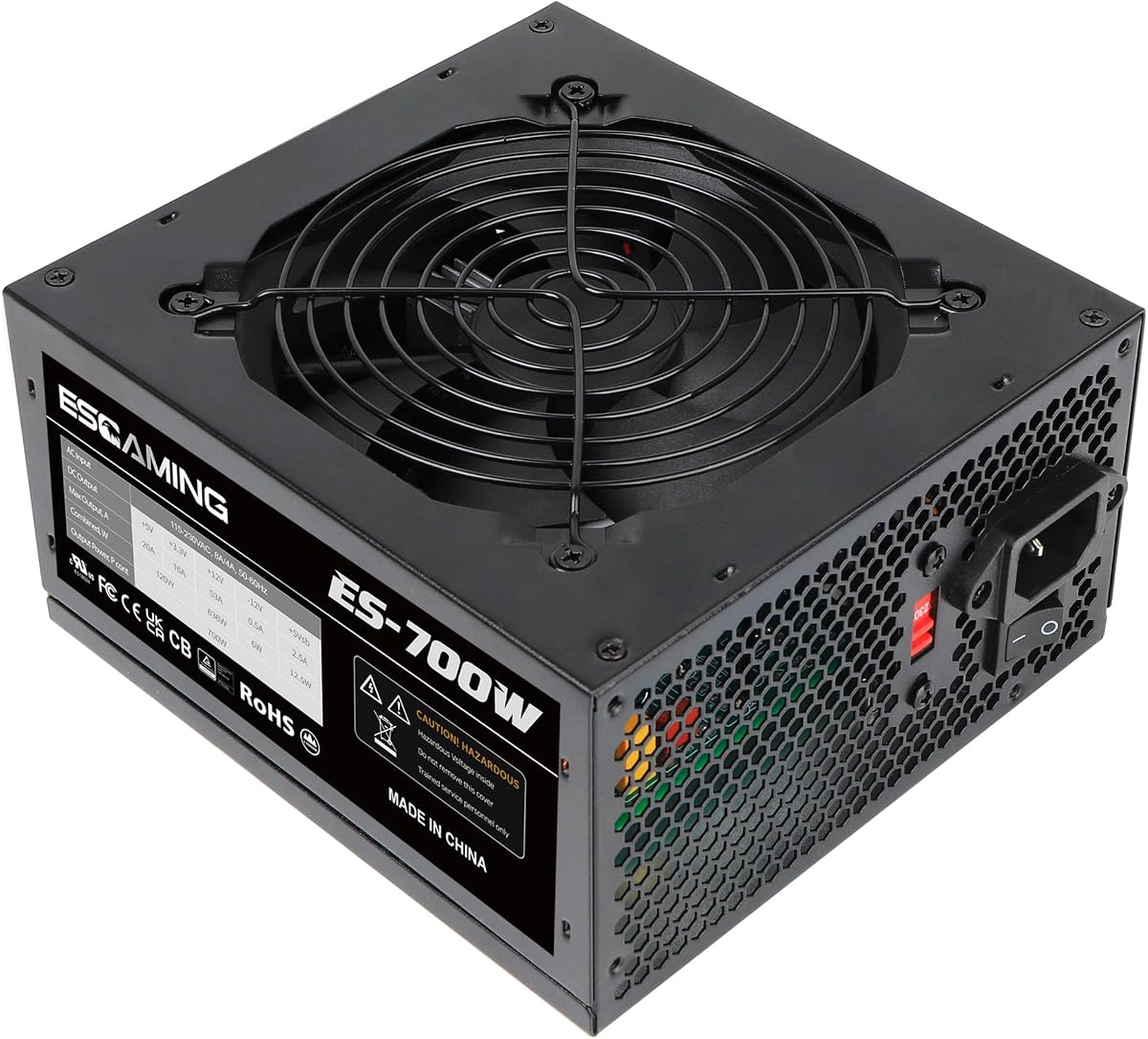
This generic 700W ATX unit offers global voltage input support making it useful for international builds. It holds a 4.2 star rating and includes an auto-thermally controlled fan for temperature management.
We may earn a commission when you buy through this link, at no additional cost to you.
It provides essential connectors including 4+4 pin CPU and PCI-E options for mid-range GPUs. The heavy-duty protections cover short circuit and over-temperature risks to keep your system safe.
Cables are fixed which can limit airflow but the unit includes connectors for SATA and PATA drives. The red button allows switching between 115 and 220V input voltages easily.
Best for basic systems needing universal voltage compatibility and standard connectors. It is a practical choice for budget builds where premium features are not required.
The manual switch supports 115 to 220V input allowing use in various regions without needing a separate converter.
Built-in protections guard against common electrical failures including over voltage and short circuit events.
We may earn a commission when you buy through this link, at no additional cost to you.
The MSI MAG A750GL PCIE5 stands out with its ATX 3.1 and PCIe 5.1 readiness making it a top pick for modern gaming builds. It holds a 4.6 star rating and features 80+ Gold efficiency.
We may earn a commission when you buy through this link, at no additional cost to you.
Its fully modular design allows you to connect only needed cables reducing clutter. The native 12V-2×6 cable supports next-generation GPUs without requiring adapters for better stability.
A compact chassis fits easily in many cases while maintaining strong power delivery. The 10 year warranty reflects confidence in its long-term reliability and build quality.
Ideal for gamers needing future-proof power without excessive cost. This unit balances performance modern features and warranty coverage better than many competitors.
Native 12V-2×6 connector ensures safe and direct power delivery to PCIe 5.1 graphics cards.
80+ Gold certification means lower power waste and reduced heat output during heavy gaming sessions.
We may earn a commission when you buy through this link, at no additional cost to you.
The CORSAIR RM750e combines modern standards with quiet operation earning a 4.6 star rating. It supports ATX 3.1 and PCIe 5.1 with a fully modular design for clean builds.
We may earn a commission when you buy through this link, at no additional cost to you.
Its rifle bearing fan runs quietly even at full load due to a specially calculated fan curve. The 105C-rated capacitors ensure steady electrical performance under stress.
Modern standby compatibility allows for fast wake-from-sleep times improving daily usability. The fully modular cabling lets you route only what your system needs.
Recommended for users prioritizing silence and reliability in high-end systems. It delivers premium features with a long warranty for peace of mind.
The rifle bearing fan and optimized fan curve keep noise levels low during both idle and gaming loads.
High temperature rated capacitors extend lifespan and maintain stability in warmer environments.
We may earn a commission when you buy through this link, at no additional cost to you.
The ASRock PRO 750G delivers strong efficiency with ATX 3.1 compliance for a 4.6 star rating. It features a native 12V-2×6 connector for modern GPU support.
We may earn a commission when you buy through this link, at no additional cost to you.
Its low-noise fan ensures quiet operation while managing thermal performance effectively. The 90 percent energy efficiency reduces power waste and operating costs over time.
Standard ATX form factor ensures it fits most cases easily. While the warranty is shorter than premium brands the unit offers reliable performance for mid-range builds.
Good for builders wanting future-ready specs without paying top tier prices. It provides essential modern features with a focus on stable power delivery.
Gold certification and optimized circuits keep energy loss low which helps reduce electricity bills.
Native 12V-2×6 connector supports high-wattage graphics cards without needing separate adapters.
We may earn a commission when you buy through this link, at no additional cost to you.
The Thermaltake Toughpower GX1 is a trusted unit with 80+ Gold efficiency and a 4.6 star rating. It features a single +12V rail design to meet modern GPU demands.
We may earn a commission when you buy through this link, at no additional cost to you.
Its dynamic bearing fan provides superior cooling while remaining ultra quiet. The DC to DC design ensures stable and reliable power delivery for all components.
Non modular connectors may add some cable clutter but the unit includes ample connectors for multiple drives. Industry-grade protections safeguard against over voltage and short circuits.
Suitable for users who value reliability and efficiency in a proven design. It balances performance with a solid warranty at a reasonable price point.
Optimized for C6 and C7 states to help systems save power during idle times.
Multiple safety features including OPP and OVP protect your hardware from electrical spikes.
We may earn a commission when you buy through this link, at no additional cost to you.
The be quiet! Pure Power 13 M offers exceptional efficiency and silence with a 4.6 star rating. It supports ATX 3.1 and includes a native 12V-2×6 connector.
We may earn a commission when you buy through this link, at no additional cost to you.
Its semi-passive cooling allows the fan to stop at low loads for zero noise operation. The fully modular design helps create a clean build with optimized airflow.
Efficiency reaches up to 94.3 percent reducing power waste and heat output. LLC topology provides best-in-class voltage regulation for stable system performance.
Perfect for quiet home theaters or high-end gaming PCs. This unit sets a high bar for efficiency and acoustic performance in the market.
The fan remains off during light loads eliminating noise entirely when performance demands are low.
Near 95 percent efficiency reduces heat generation and lowers electricity costs significantly.
We may earn a commission when you buy through this link, at no additional cost to you.
The Rosewill VMG 750W supports ATX 3.0 and 3.1 with a fully modular design for a 4.3 star rating. It features a compact chassis 35 percent smaller than standard units.
We may earn a commission when you buy through this link, at no additional cost to you.
Japanese electrolytic capacitors ensure high reliability and consistent performance over time. The unit handles high power excursions suitable for next-gen graphics cards.
A six-protection suite ensures complete system security against electrical faults. The 120mm FDB fan runs silently while providing effective thermal management.
Best for small form factor builds needing modern GPU power delivery. It combines compact size with high-end protection and efficiency features.
The smaller chassis allows flexible integration in tight cases without sacrificing power output.
Supports up to 235 percent power excursions ensuring stability during sudden GPU power spikes.
We may earn a commission when you buy through this link, at no additional cost to you.
The Thermaltake Toughpower GT supports ATX 3.1 with a Smart Zero fan for a 4.6 star rating. It includes a native 12V-2×6 connector for modern GPUs.
We may earn a commission when you buy through this link, at no additional cost to you.
The Smart Zero fan adjusts speed based on load minimizing noise during light tasks. Fully modular design with flat black cables improves airflow and aesthetics.
High amperage single +12V rail delivers reliable power for gaming and workstation builds. The 90 percent efficiency reduces energy consumption and heat output.
Ideal for builders seeking modern standards with smart cooling. It offers a good balance of features and warranty coverage at a mid-range price.
Fan speed adjusts automatically to reduce noise during low load periods without sacrificing cooling.
Low profile flat black cables make routing easier and improve internal airflow in your case.
We may earn a commission when you buy through this link, at no additional cost to you.
Selecting the right power supply involves understanding key specifications and features that match your system needs.
Efficiency ratings like 80+ Bronze or Gold indicate how well the unit converts AC to DC power. Higher efficiency means less wasted energy as heat which improves system stability and reduces power bills.
Look for at least 80+ Bronze certification to ensure efficient energy use without excessive heat generation.
Modular PSUs allow you to connect only the cables you need reducing clutter and improving airflow. Non modular units have fixed cables which may limit space in smaller cases.
Choose fully modular if you want a clean build with better airflow management.
Ensure the PSU has enough connectors for your components including 24pin, CPU, and PCIe slots. Modern GPUs may require native 12V-2×6 connectors for safe power delivery.
Verify connector counts match your graphics card and motherboard requirements.
Safety protections like OCP OVP and SCP prevent damage from electrical surges or shorts. A PSU with comprehensive protection shields your expensive hardware from power failures.
Always select a unit with multiple protection mechanisms for peace of mind.
Warranties vary from three to ten years indicating manufacturer confidence in build quality. A longer warranty often means better components and reliability over time.
Prioritize units with at least a five year warranty for better long-term support.
Noise levels depend on fan design and bearing type. Silent fans or semi-passive modes reduce noise during light loads improving overall user experience.
Check decibel ratings and fan features to ensure quiet operation.
Newer standards like ATX 3.1 support modern GPUs and transient power demands. Compatible units handle power excursions without risking system shutdowns.
Ensure your PSU meets the latest ATX specs for future compatibility.
Capacitor quality and internal design affect reliability and lifespan. Units using high-grade Japanese capacitors often last longer and perform better.
Inspect component specs to confirm high-quality internals.
Install the PSU securely in your PC case ensuring all screws are tightened properly to prevent vibration and maintain airflow.
Connect only the cables your system needs if using a modular unit to reduce clutter and improve cooling efficiency.
Keep the intake vents clean from dust regularly to maintain optimal thermal performance and extend the unit lifespan.
A 700W unit is sufficient for most mid-range gaming systems with single GPU setups. High-end multi-GPU configurations may require more wattage to ensure stable performance.
Gold certification offers higher energy efficiency around 90 percent compared to Bronze at 85 percent. Higher efficiency means less wasted energy and lower operating costs.
Modular PSUs improve airflow and aesthetics by allowing you to use only necessary cables. Non modular units are cheaper but can create more cable clutter inside the case.
Look for reputable brands with strong warranty periods and high customer ratings. Ensure it has multiple protection features against electrical faults for better hardware safety.
Yes a 700W unit works for most workstation builds provided it meets your components wattage requirements. Check your CPU and GPU power needs before deciding.
Prioritize OCP OVP and SCP protection to guard against current spikes overvoltage and short circuits. These features prevent damage to your motherboard and components.
This guide highlighted ten solid 700W ATX power supplies ranging from budget to premium options. Each unit offers distinct strengths whether you need efficiency noise or modern standards.
Prioritize efficiency ratings and connector types to match your build needs. A longer warranty and comprehensive safety features add value over the long term.
Verify availability and current details before purchasing since product specs can change. Selecting the right PSU ensures stable and efficient power for your PC.