
OMTech 50W Fiber Laser Marking Machine
4.2Editor score
5.9 inch by 5.9 inch work area
Lightburn and EzCad2 software included
Dual red dot locator for precision
Finding the right 50W fiber laser engraver can transform your business by enabling precise metal marking and deep engraving on a variety of surfaces with professional results.
We evaluated ten leading models based on laser source quality, working area size, software compatibility, and user feedback to compile this expert ranked list for buyers.
Each selection highlights key features and performance metrics so you can make an informed decision while keeping in mind that availability and pricing may change over time.
4.2Editor score

4.4Editor score

5.0Editor score
As an Amazon Associate we earn from qualifying purchases.
The following table provides a side-by-side overview of the key specifications and capabilities for each of the ten 50W fiber laser engravers featured in this guide.


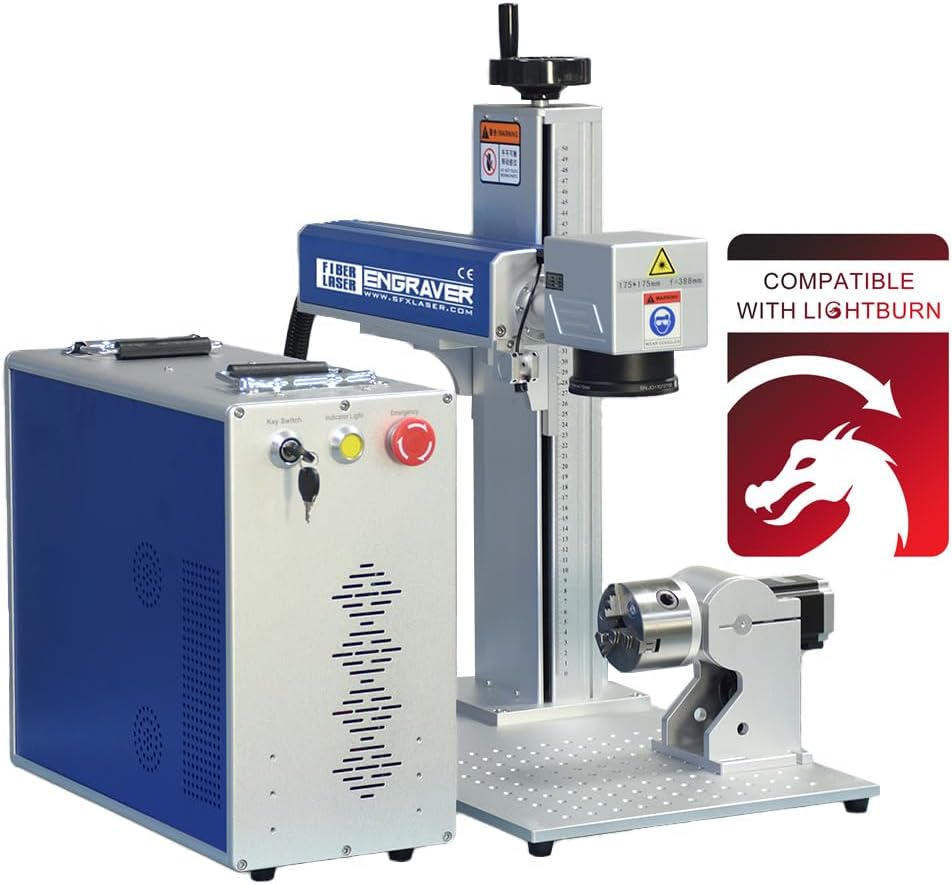
The OMTech 50W Fiber Laser Marking Machine stands out as an excellent entry point for those seeking professional grade metal engraving without a massive upfront investment. It holds a strong rating from users who appreciate its balance of cost and capability.
We may earn a commission when you buy through this link, at no additional cost to you.
This unit delivers precision through a 0.01mm spot diameter and supports speeds up to 10000 mm/s which is impressive for its class. The included Lightburn software makes it accessible for designers who prefer familiar interfaces over proprietary options.
While the 5.9 by 5.9 inch area limits larger projects, the dual red dot locator ensures you get accurate placement every time. The solid metal body contributes to stability during long engraving sessions.
If you need a reliable machine for jewelry or small parts production and budget is a concern this model offers the performance you need to get started quickly. The 2 year support adds peace of mind for new buyers.
The 0.01mm precision allows for fine details in logos and text which is crucial for high value items like jewelry and custom tools.
Support for Lightburn means you can use familiar design tools rather than learning complex proprietary software from scratch.
We may earn a commission when you buy through this link, at no additional cost to you.
The GWEIKE G2 Max earns its Editor's Choice badge by offering features that push the boundaries of what desktop fiber laser engravers can do. It is highly rated for its speed and ability to create color effects on metals.
We may earn a commission when you buy through this link, at no additional cost to you.
With an engraving speed reaching up to 15000 mm/s you save significant time on batch jobs. The ability to produce over 90 colors on metals like stainless steel opens up creative marketing and custom branding opportunities.
The electric lift column removes the guesswork from focusing which improves consistency across multiple parts. While the Class 4 safety level demands proper protection it ensures powerful performance for deep engraving.
This machine is ideal for businesses that need high throughput and want to expand their service offerings with colored metal engraving. The large working area accommodates bigger items than many other desktop units.
The high speed galvanometer system ensures quick job completion which directly translates to better productivity and faster turnaround times for customers.
Creating vibrant colors on metal without paint or dye adds significant value to products and differentiates your offerings in competitive markets.
We may earn a commission when you buy through this link, at no additional cost to you.
The OMTech 50W Fiber Laser Engraver with LightBurn is a premium choice for those who need to engrave larger items regularly. It holds a flawless 5.0 rating from users who value precision and versatility.
We may earn a commission when you buy through this link, at no additional cost to you.
Its spacious 7.9 by 7.9 inch workspace is significantly larger than standard desktop units allowing you to mark bigger panels or multiple pieces in one pass. The included rotary axis makes it easy to work on cylinders.
The 0.1mm accuracy ensures consistent results across different project sizes. While it is not the fastest on this list the reliability and ease of use make it a favorite for professional jewelers.
Investing in this machine means you can take on a wider variety of jobs without worrying about size limitations. The 5.0 rating reflects customer satisfaction with both performance and support services provided.
A larger working area means you can process more parts at once or handle larger items like tool plates and signs efficiently.
The included rotary axis expands what you can engrave by allowing you to mark cylindrical objects like rings or pens easily.
We may earn a commission when you buy through this link, at no additional cost to you.
The Cloudray 50W machine is designed for portability and flexibility making it perfect for makers who need to move their setup around. It maintains a perfect 5.0 rating thanks to its versatile package contents.
We may earn a commission when you buy through this link, at no additional cost to you.
It comes with two different lenses allowing you to switch between high detail small area marking and slightly larger work areas without buying extra parts. The 360 degree rotary axis lets you engrave rings or bottles seamlessly.
The 4.3 by 4.3 inch work area is compact but sufficient for small jewelry or tags. Its lightweight design means you can store it away easily when not in use.
If you need a machine that offers value through included accessories like rotary and extra lenses this model fits the bill. The compatibility with Lightburn software ensures you are not locked into one ecosystem.
Having two lenses in the box means you can optimize your engraving settings for different tasks without purchasing additional hardware separately.
The lightweight build allows you to transport the machine easily to trade shows or different workspaces without needing heavy lifting equipment.
We may earn a commission when you buy through this link, at no additional cost to you.
The ComMarker B4 offers a unique dual mode design that lets you use it as a traditional desktop engraver or a handheld tool for on site work. It has a mixed rating but offers distinct functionality.
We may earn a commission when you buy through this link, at no additional cost to you.
Its ability to switch between desktop and handheld modes provides flexibility for jobs where the object cannot be brought to the machine. The included foot switch makes marking operations easier by removing the need to press buttons manually.
Speeds up to 15000 mm/s are achievable which helps in batch production. The two included lenses allow you to tailor the spot size to your specific project needs immediately.
While the rating suggests some users face a learning curve this machine is a great choice if you need mobility. It is particularly useful for field service or marking parts in place.
The hybrid design allows you to tackle stationary jobs with precision and on-site jobs with mobility using the same core device.
A foot switch lets you keep both hands on the product during marking which improves safety and consistency in manual setups.
We may earn a commission when you buy through this link, at no additional cost to you.
This US Stock model stands out for its use of a JPT laser source which is highly respected in the industry for reliability and consistency. It holds a perfect 5.0 rating from users who appreciate its robust build.
We may earn a commission when you buy through this link, at no additional cost to you.
The marking speed reaches up to 7 meters per second which ensures rapid production cycles. The 175 by 175mm lens area provides a generous working space for standard engraving needs.
Having a rotary axis included in the package adds immediate value for cylindrical marking tasks. The US based support team ensures you get timely help if you encounter any setup issues.
This machine is ideal for shops that demand consistent performance and reliable support. The JPT source is a strong selling point for those who prioritize longevity and stable output over time.
The JPT source is known for stable performance and long life which reduces downtime and maintenance costs over the years.
Having support teams in the US means you can resolve technical questions quickly without waiting for international responses or shipping delays.
We may earn a commission when you buy through this link, at no additional cost to you.
The OMTech 50W Autofocus model is designed to remove the most tedious part of laser engraving which is manual focusing. It has earned a 5.0 rating for its user friendly features.
We may earn a commission when you buy through this link, at no additional cost to you.
Pressing a button to trigger autofocus ensures every mark is crisp and precise without wasting time on trial and error. This feature alone saves significant effort during high volume production runs.
The machine runs quietly and fits in smaller spaces which makes it suitable for office environments. The 5.9 by 5.9 inch area covers most standard small items effectively.
If you want a machine that just works without needing constant manual tweaking this is a great choice. The included safety goggles add to the convenience of the package.
Autofocus ensures consistent depth and sharpness on every part which reduces errors and improves overall quality of finished products.
Running quietly means it can be used in shared spaces without disturbing others which is a benefit for hybrid offices.
We may earn a commission when you buy through this link, at no additional cost to you.
The Monport 50W Pro is a strong contender for those looking to add dimension to their engraving projects. It combines a reputable JPT laser source with features designed for detail work.
We may earn a commission when you buy through this link, at no additional cost to you.
It specifically supports 3D relief engraving which allows you to create textured surfaces that pop. The one touch autofocus ensures the focus is always correct for these detailed tasks.
Accuracy down to 0.01mm is critical for fine line work and small text. The custom tuned field mirror helps maintain power consistency at the edges of the working area.
Although there are no user ratings yet the specs suggest a high quality machine. It is a solid option for those who need advanced capabilities like 3D effects.
Creating 3D reliefs adds depth and tactile feel to products which can make them stand out as premium custom items.
High precision mirrors and lenses ensure that details are crisp even at the edges of the work area.
We may earn a commission when you buy through this link, at no additional cost to you.
The Dereklaser model offers a large working area at a competitive price point making it a great value for those who need space. It uses the Raycus 50W source which is widely trusted.
We may earn a commission when you buy through this link, at no additional cost to you.
The 7.8 by 7.8 inch bed gives you more room to work than many competitors in this price range. The laser is ready to use right out of the box with local US inventory.
Lightburn compatibility ensures you have a friendly interface to work with. Manual focus is the only trade-off but it is easy to manage with the included wheel.
This machine is a great choice for shops that need a larger bed without spending a premium. The Raycus source ensures reliable performance for long term use.
A larger bed lets you process more items at once or handle bigger custom orders efficiently.
The Raycus source is known for stability which helps in maintaining consistent quality across many jobs.
We may earn a commission when you buy through this link, at no additional cost to you.
This final entry is unique because it operates as a Class 1 laser system which means it is safe to operate without goggles inside the enclosure. It is a high end option for safety conscious buyers.
We may earn a commission when you buy through this link, at no additional cost to you.
The JPT source ensures quality engraving results and the D80 rotary axis allows for easy marking on cylindrical parts. It can reach speeds of up to 7 meters per second for efficiency.
While it is more expensive than other models the safety features alone make it worth considering for certain environments. The US based support team helps smooth out any technical details.
This machine is perfect for environments where laser safety is a top priority. It combines the reliability of the JPT source with a safer operating profile.
Operating as a Class 1 system means no special eyewear is needed during use which improves comfort and workflow.
The included D80 rotary axis allows for marking on round objects which is a valuable feature for many types of products.
We may earn a commission when you buy through this link, at no additional cost to you.
Selecting the right 50W fiber laser engraver requires understanding several key factors that impact performance and value for your specific business needs.
The brand of the laser source can greatly impact the reliability and longevity of your machine. High quality sources like JPT or Raycus are known for stable output and long lifespans which reduces maintenance costs over time.
Always prioritize machines with reputable sources to ensure consistent engraving quality and minimize downtime for repairs.
Your typical project size will dictate the working area you need. Smaller desktop units usually offer a 5.9 by 5.9 inch area which is fine for small items. Larger areas like 7.9 by 7.9 inch give you more flexibility.
Choose a size that fits your largest common item to avoid needing to split jobs or buy multiple machines.
Many engravers come with proprietary software that can be complex. Ensure the machine supports Lightburn or EzCad2 for a smoother workflow. Lightburn is particularly popular for its ease of use.
Software flexibility allows you to use familiar design tools and reduces the learning curve for new operators.
Engraving speed affects your throughput while precision affects the quality of your marks. Look for speeds above 7000 mm/s for productivity and precision below 0.1mm for detail.
Balancing speed with accuracy ensures you can complete jobs quickly without sacrificing the quality of the final product.
Some packages come with rotary axes or extra lenses which adds significant value. Others may require you to buy these separately. Check what is included before buying to avoid hidden costs.
A complete package saves you money upfront and gets you started on more types of projects right away.
Safety levels vary from Class 1 to Class 4. Class 1 systems are safer but cost more. Ensure the machine has safety goggles and an emergency stop button regardless of class.
Prioritize safety features to protect yourself and others in your workspace from accidental laser exposure.
Good after sales support is critical when working with technical equipment. Look for companies that offer warranties of at least one year and accessible technical support in your region.
Strong support means you can resolve issues quickly and get back to work with minimal interruption.
Always wear the provided safety glasses when the enclosure is open to protect your eyes from the 1064nm laser beam which is invisible but harmful.
Keep the work area clean and free of dust which can settle on the lens and reduce efficiency. Clean the lens regularly with a recommended optical cleaner.
Run a test engraving on a scrap piece of your material to calibrate your focus and power settings before starting a final job.
Yes but it works best on dark or opaque plastics like ABS. Transparent plastics often reflect the beam and may not engrave well. Always test on a scrap piece first.
Fiber lasers use a solid state source and are best for metals. CO2 lasers use gas and are better for wood acrylic and glass. They cannot work on all materials.
Yes even with an enclosure. If you need to open the machine during operation you must wear goggles rated for 1064nm to prevent eye damage.
Most fiber sources last over 100000 hours. This means you can use the machine for years before needing a replacement which reduces long term operating costs.
Yes with a rotary axis attachment. Many 50W models come with a rotary axis which allows you to engrave rings or bottles easily.
Most models in this guide are compatible with Lightburn. Check the product description to confirm software support before you buy to avoid compatibility issues.
The top picks like the GWEIKE G2 Max and OMTech models offer a balance of speed and precision that suits most professional needs today.
Focus on laser source quality and software support to ensure your machine remains productive and easy to use for years.
Prices change frequently so check the latest offers before buying to make sure you get the best deal possible on your new machine.