
Logitech Brio 101 Full HD 1080p Webcam for Streaming and Meetings – Black
4.4Editor score
Auto-Light Balance technology
Privacy with a Slide cover
Built-In Mic included
This guide compares the top 1080p webcams for streaming and meetings, evaluating image quality, microphone performance, privacy features, and compatibility.
Choosing the right 1080p webcam ensures clear video quality for work meetings and live streaming sessions. A good webcam delivers sharp images, reliable autofocus, and clear audio to keep your audience engaged without technical interruptions during important calls.
We evaluated ten leading models based on video resolution, lens quality, microphone performance, and ease of setup. Each product was assessed for compatibility with major platforms like Zoom and Teams, along with privacy features and overall build durability for daily use.
Every pick below highlights specific strengths like low-light correction or wide field of view to help you match a camera to your setup. Note that availability and pricing may change frequently, so check current listings before making your final purchase decision today.
4.4Editor score

4.6Editor score

4.4Editor score
The following table provides a side-by-side comparison of all ten selected webcams, detailing their core specifications such as field of view, connection type, and key audio or video features to help you make an informed choice.




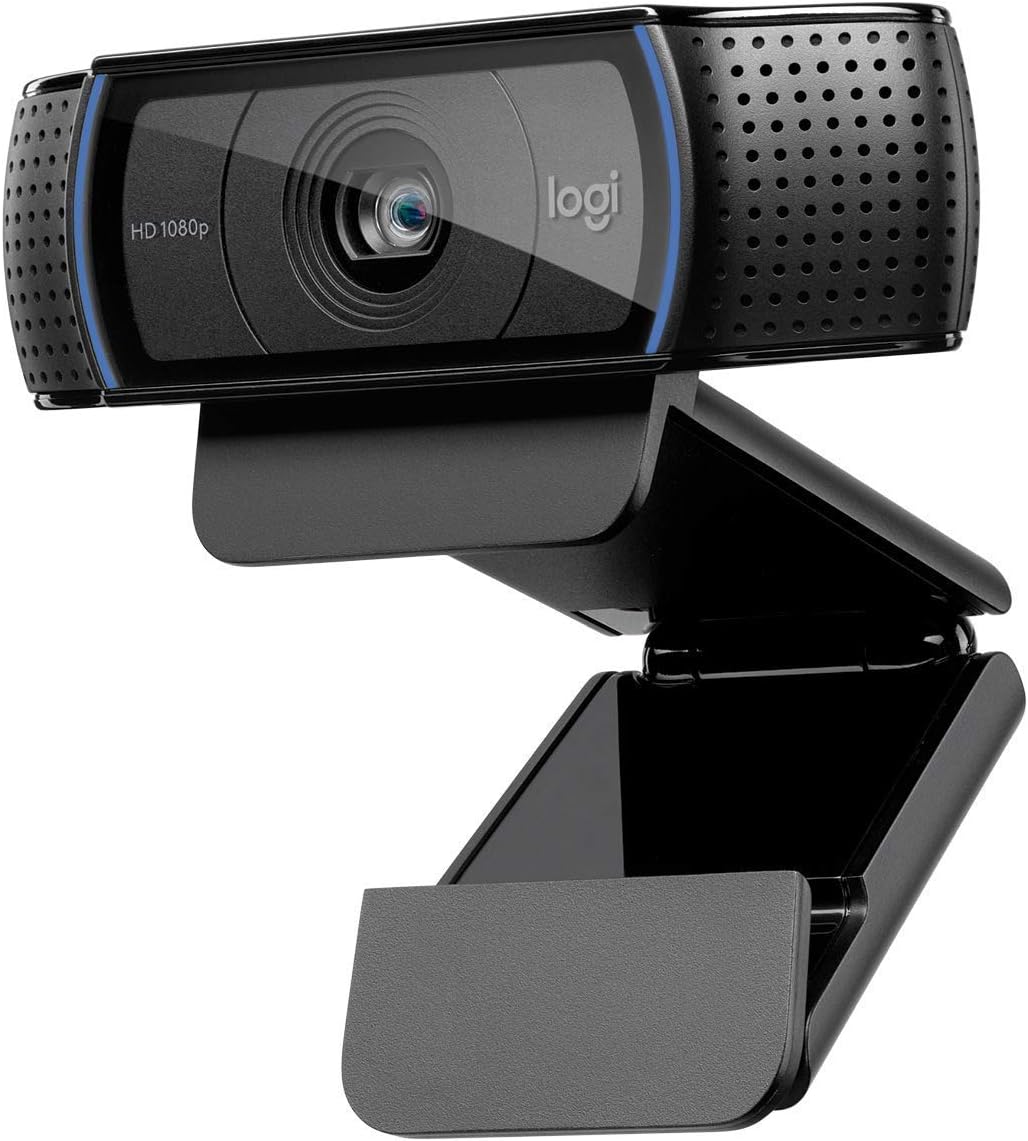


This Logitech webcam stands out as a top performer for professionals seeking reliable video quality. With a high rating and proven track record, it delivers crisp 1080p video that makes you look professional in meetings. Its autofocus and light correction ensure you remain sharp and visible regardless of your room lighting conditions.
We may earn a commission when you buy through this link, at no additional cost to you.
The dual microphone setup provides natural sound reproduction, reducing the need for external audio equipment. Users report that the HD lighting adjustment produces bright, razor-sharp images even in less than ideal settings. This makes it an ideal choice for streaming or frequent video conferencing where image clarity matters.
While it lacks a built-in privacy shutter, the advanced capture software offers background blur features that enhance privacy. The clip is sturdy enough for monitors but might feel large on smaller laptops. These trade-offs are acceptable given the overall quality and compatibility with Windows 11 and major calling apps.
Anyone looking for a dependable webcam that balances performance and ease of use should consider this model. It is particularly suitable for those who prioritize video fidelity and audio clarity over extra accessories. Its reputation for consistency makes it a safe investment for home offices and classrooms.
The HD autofocus and light adjustment work together to keep your face sharp and well-lit during calls.
Stereo audio with dual mics captures your voice clearly without needing a separate microphone setup.
We may earn a commission when you buy through this link, at no additional cost to you.
The Brio 101 offers exceptional value for those needing a reliable 1080p camera without breaking the bank. It delivers clear video suitable for daily meetings and streaming sessions. The Auto-Light Balance feature boosts brightness significantly, helping you look your best even in shadowed environments.
We may earn a commission when you buy through this link, at no additional cost to you.
Privacy is a key focus with the integrated slide cover that lets you physically block the lens when not in use. The built-in mic ensures you are heard clearly during calls, and the plug-and-play nature means no driver hassles. Its use of recycled plastic also appeals to eco-conscious buyers.
While it may not have the advanced controls of higher-end models, it covers all the essentials effectively. The USB A cable is fixed, which limits placement options compared to detachable cords. For most home users, these limitations are minor compared to the cost savings and core functionality provided.
This webcam is ideal for students or remote workers who need a straightforward solution. It pairs well with Microsoft Teams, Zoom, and Google Meet out of the box. Its simplicity and reliability make it a strong contender for budget-conscious shoppers seeking quality video.
RightLight boosts brightness by up to 50% so you stay visible in darker rooms.
The integrated webcam cover gives you total control over when the lens is active.
We may earn a commission when you buy through this link, at no additional cost to you.
The EMEET S600 distinguishes itself with a Sony sensor that supports both 4K and high-frame-rate 1080p streaming. Its PDAF autofocus is significantly faster and more precise than standard models, making it perfect for active streamers. This ensures smooth visuals without blur even when you move during content creation.
We may earn a commission when you buy through this link, at no additional cost to you.
Audio clarity is enhanced by proprietary algorithms that filter background noise effectively. The FOV adjustment at 1080p allows you to customize your framing based on the scene. The rugged design ensures stability, and the integrated privacy cover protects the lens from accidental exposure.
Setup is plug-and-play, but advanced customization requires EMEETLINK software. While the price is higher than basic options, the sensor and autofocus justify the cost for serious creators. The durability and flexibility make it a reliable long-term investment for professional use.
This webcam is best for those who need top-tier visual quality and stability. It works seamlessly with OBS and other broadcasting tools. If you want crisp details and reliable performance for streaming, this model delivers premium features that exceed standard expectations.
PDAF autofocus offers faster speed and higher precision for clear visuals in any scene.
Adjustable FOV at 1080p lets you focus on yourself or include your surroundings easily.
We may earn a commission when you buy through this link, at no additional cost to you.
The C920S builds on the classic design with a built-in privacy shutter for added security. It maintains the high rating of its predecessors by delivering crisp 1080p video and clear stereo audio. This model is ideal for users who want reliability without needing extra accessories.
We may earn a commission when you buy through this link, at no additional cost to you.
HD autofocus and light correction ensure your image remains sharp and bright in any setting. The glass lens captures detailed colors, making recorded videos look vibrant. Audio capture is natural, thanks to the dual microphone setup, so your voice comes through clearly without background noise.
Unlike other models, it does not include the XSplit VCam license, meaning you might need third-party software for background effects. However, the core video and audio performance remain top-notch. This trade-off is minor for those who prioritize privacy and solid hardware over bundled software.
This webcam suits professionals and educators who need consistent performance daily. Its privacy shutter gives peace of mind when stepping away from the desk. If you value proven quality and essential features, this model is a smart choice for your setup.
A snugly fitting privacy shutter puts you in control of when the lens is active.
Glass lens and full HD ensure your recorded videos are crisp and color-accurate.
We may earn a commission when you buy through this link, at no additional cost to you.
The C920e is designed specifically for business environments where seamless integration is critical. It is certified for Zoom and Microsoft Teams, ensuring reliability for corporate meetings. The 78-degree field of view balances individual framing with enough room to share projects visually.
We may earn a commission when you buy through this link, at no additional cost to you.
Integrated omnidirectional microphones capture audio clearly from a distance, making it great for small conference setups. The attachable privacy screen adds a layer of security, and the sturdy clip fits securely on various monitors. Tripod threads provide versatility for mounting on different stands.
While the privacy screen is not integrated like a slider, it offers a professional approach to privacy. The Sync device management software helps IT teams keep devices updated, which is a unique benefit for larger organizations. Home users might find these features extra but still useful.
This model is perfect for enterprise users and serious remote professionals. It handles high-volume usage well and integrates smoothly with workplace tools. If you need a camera that ensures compatibility and stable performance in business settings, this is a strong option.
Certified for Zoom and Teams, this camera integrates seamlessly with enterprise workflows.
A 78-degree field of view allows you to share documents without leaving the frame.
We may earn a commission when you buy through this link, at no additional cost to you.
The EMEET C960 offers a 90-degree wide angle that is excellent for including more participants or background in your frame. Its automatic light adjustment ensures a balanced image even when lighting is tricky. This camera is versatile, working well with Windows and macOS systems.
We may earn a commission when you buy through this link, at no additional cost to you.
Dual omnidirectional microphones provide clear voice capture, and the privacy cover can be removed automatically for convenience. The 5-layer anti-glare lens helps deliver smooth video by reducing reflections. It supports multiple platforms, making it a flexible choice for various video calling apps.
One trade-off is the fixed focus, which means close-up details might not be as sharp as with autofocus models. Also, it lacks built-in speakers, so external audio output is necessary. These are minor issues for a budget-friendly camera with such broad compatibility.
This model suits remote workers who need to show a bit more of their environment. It is easy to set up and works well for daily calls. If you want a wide view and reliable performance without complexity, this webcam delivers good value.
A 90-degree FOV captures more participants without needing frequent adjustments.
Exposure optimization helps keep your image stable and balanced in varying light.
We may earn a commission when you buy through this link, at no additional cost to you.
The NexiGo N60 delivers crisp 1080p video using a 3.6mm glass lens optimized for indoor use. It is ready to use in under a minute with no extra drivers needed. The privacy cover offers basic security and the noise-cancelling mic reduces background distractions.
We may earn a commission when you buy through this link, at no additional cost to you.
This camera works across many operating systems including Linux and Chrome OS, making it a versatile pick. The glass lens ensures sharp images at fixed distances, which works well for standard desk setups. It is suitable for students and casual users needing reliable video quality.
Fixed focus limits flexibility if you move around a lot, but it simplifies the user experience. The software control is functional but not advanced. However, for simple plug-and-play needs, these constraints are acceptable. The price point also makes it an attractive budget option.
If you need a webcam that just works without fuss, this is a solid choice. It handles common apps like Zoom and Teams well. For basic video conferencing and streaming, it provides clear images and sound without requiring technical setup.
Works with Windows, Mac, Linux, and Chrome OS without additional drivers.
Built-in noise-canceling enhances sound quality for clearer conversations.
We may earn a commission when you buy through this link, at no additional cost to you.
The Logitech HD Pro C920 is a legendary model known for dependable video performance. It delivers full HD 1080p for clear calls and recordings. Many users trust its consistent quality across desktop and laptop setups. It remains a popular choice for those who prefer tried-and-true hardware.
We may earn a commission when you buy through this link, at no additional cost to you.
Its widescreen capabilities ensure your video frame matches standard viewing formats. The HD recording quality captures vibrant colors and detail suitable for presentations. Despite being an older model, it continues to perform well with modern software and platforms.
However, it lacks newer features like privacy shutters found in updated versions. You might need to rely on software masking if privacy is a priority. Still, the core video and audio performance are robust, making it a safe bet for general use.
This camera is great for those upgrading from lower resolution devices. It offers a significant leap in visual clarity and reliability. If you prioritize classic design and solid performance over modern extras, this model meets those needs effectively.
This classic model has a long history of stable performance across many users.
Compatible with most major video calling platforms and operating systems.
We may earn a commission when you buy through this link, at no additional cost to you.
The Brio 105 brings business-grade reliability to a more accessible price point. It offers clear video and an integrated privacy cover for added security. The RightLight 2 technology automatically improves image quality in poor lighting conditions.
We may earn a commission when you buy through this link, at no additional cost to you.
Certified for Google Meet, it works seamlessly with Chromebook systems and major operating systems. The plug-and-play setup ensures you can start calls quickly without configuration. It supports remote deployment via Sync software which is useful for IT teams.
While it lacks advanced audio features, it handles standard calls well. The privacy cover is fixed and does not slide like newer models but provides protection. For organizations needing cost-effective solutions, this model balances features and budget efficiently.
This webcam is ideal for small businesses and educational institutions. It ensures employees look professional without high costs. If you need a certified, reliable webcam for daily work, this is a practical and economical choice.
Certified for Google Meet ensures smooth compatibility with enterprise tools.
RightLight 2 automatically improves image quality in suboptimal lighting.
We may earn a commission when you buy through this link, at no additional cost to you.
The Brio 100 renewed offers certified quality at a lower cost than new units. It delivers 1080p video and a wide 58-degree field of view for clear calls. The built-in microphone simplifies your setup by providing audio without extra gear.
We may earn a commission when you buy through this link, at no additional cost to you.
Renewed items are tested for functionality which ensures you receive a working camera. The plug-and-play USB connection works seamlessly with popular conferencing apps. It is designed for ease of use making it accessible for those with minimal technical experience.
A privacy shutter is not included so you must manage privacy through software or external covers. Since it is renewed, physical condition may vary though functionality is guaranteed. This is a reasonable trade-off for the savings compared to buying new.
This webcam suits budget-focused buyers who still want reliable performance. It is good for general video calls and online learning. If you want a certified product that works well without paying full price, this model is a smart option.
Renewed products are tested to ensure they function correctly and meet standards.
Simple USB connection works seamlessly with popular video conferencing apps.
We may earn a commission when you buy through this link, at no additional cost to you.
Selecting the right webcam involves considering several technical and practical factors. This guide breaks down the key elements to help you find a model that fits your specific needs and budget.
While many cameras now offer 4K, 1080p remains the standard for most video calls. It provides enough clarity for professional interactions without requiring high bandwidth. Ensure the camera supports at least 30fps for smooth motion during movement.
Look for 1080p with at least 30fps for smooth streaming. Higher resolutions can strain your connection if not needed.
Autofocus is crucial if you move around during meetings. A model with PDAF or standard autofocus keeps you sharp as you gesture or shift positions. Fixed focus is cheaper but limits your mobility within the frame.
Prioritize autofocus if you value movement. Fixed focus is acceptable for static desk use only.
Field of view (FOV) determines how much of your room appears in the video. A wider angle like 90 degrees is great for including guests. A standard 78-degree angle focuses more on the individual speaker.
Choose a wide angle for group calls. Narrower angles suit individual professional profiles.
Built-in microphones vary greatly in performance. Models with noise-canceling tech ensure your voice is clear despite background sounds. Dual mics often provide better stereo separation for a natural sound.
Check for noise-canceling features if your environment is noisy. Stereo mics add depth to audio.
Privacy is a major concern for many users. Physical cover slides are the most secure method as they block the lens mechanically. Software shutters work but require trust in the operating system.
Always choose a webcam with a physical cover for safety. It offers reliable peace of mind.
Light correction software like RightLight helps balance shadows and highlights. If you often work in dim rooms, this feature is essential. Good sensors also handle noise better in low-light conditions.
Look for auto-light balance technology if you lack bright lighting. It improves image clarity significantly.
Ensure the webcam works with your operating system and video apps. Most modern cameras support Windows and macOS but check specific details for Chrome OS or Linux. Certification for apps like Zoom can simplify setup.
Verify compatibility with your preferred platforms before buying. Certified models often have fewer issues.
Standard clips work for monitors but tripods offer more stability. Check if the camera has standard threads for mounting. Adjustable clips prevent the camera from sliding or tipping.
Ensure the mount is sturdy enough for your setup. Tripod support adds versatility for placement.
Position your webcam at eye level to create a natural perspective for viewers. Avoid placing the lens too low as it can cast unflattering shadows on your face. Use a stable surface to prevent the camera from shifting during use.
Clean the lens regularly with a soft microfiber cloth to remove smudges. Avoid harsh chemicals that could damage the glass or coating. Ensure the lens remains dry to prevent moisture damage over time.
Keep your software updated to maintain compatibility with the latest video platforms. Restart the application if you experience connectivity issues. Proper care extends the lifespan of your device significantly.
Most modern 1080p webcams are compatible with Zoom and Teams by default. However, checking for certification ensures seamless integration without driver issues. Look for official compatibility badges in the product details to confirm support.
Autofocus is generally better for meetings where you might move or gesture. It keeps your image sharp automatically. Fixed focus works well if you sit still at a desk and prefer a simpler device.
Use a webcam with noise-canceling microphones to reduce background sound. Ensure your room is quiet and close to the device. External speakers or headphones can also help manage echo during conferences.
A field of view between 78 and 90 degrees suits most home offices. It balances focus on you with enough background context. Wider angles are better if you often have guests join your frame.
Most webcams are plug-and-play and require no extra software. Some models offer advanced apps for fine-tuning settings. Basic functions like calling work immediately after connecting to your computer.
Use a physical privacy cover to block the lens when not in use. Ensure your operating system permissions restrict access to unauthorized apps. Regular software updates help maintain security and prevent unauthorized access.
We have explored ten top-rated 1080p webcams that balance performance with affordability. The Logitech C920x HD Pro leads our list for its superior autofocus and audio. Budget shoppers will appreciate the value of the Logitech Brio 101.
When choosing a model, prioritize features like low-light performance and privacy covers based on your workspace needs. Ensure compatibility with your primary video platforms to avoid technical friction. Investing in a reliable camera enhances your digital presence.
Please verify current availability and pricing as details may change over time. Check specific requirements before buying to ensure the webcam meets your setup needs. This guide aims to help you make a confident and informed purchase.