
Newmen GM326
4.4Editor score
Affordable price point
Hot-swap capable
RGB backlighting modes
This guide compares the top 75 percent mechanical keyboards for performance, build quality, and features to help you find the perfect compact typing solution.
The 75 percent mechanical keyboard layout offers a perfect balance between compactness and functionality. It retains essential arrow keys and function rows while saving valuable desk space for mouse movement and comfort.
We evaluated ten leading models based on build quality, switch performance, connectivity options, and customization features. Our analysis focuses on real-world usability for gamers, programmers, and office workers seeking efficiency.
Each pick highlights unique strengths like gasket mounting, hot-swap compatibility, and multi-device connectivity. Note that availability and pricing fluctuate frequently so verify current details before purchasing your ideal setup.
4.4Editor score

4.6Editor score

4.6Editor score
This side-by-side comparison highlights the core specifications and unique selling points of each model to help you quickly identify the best fit for your specific workflow and budget requirements.




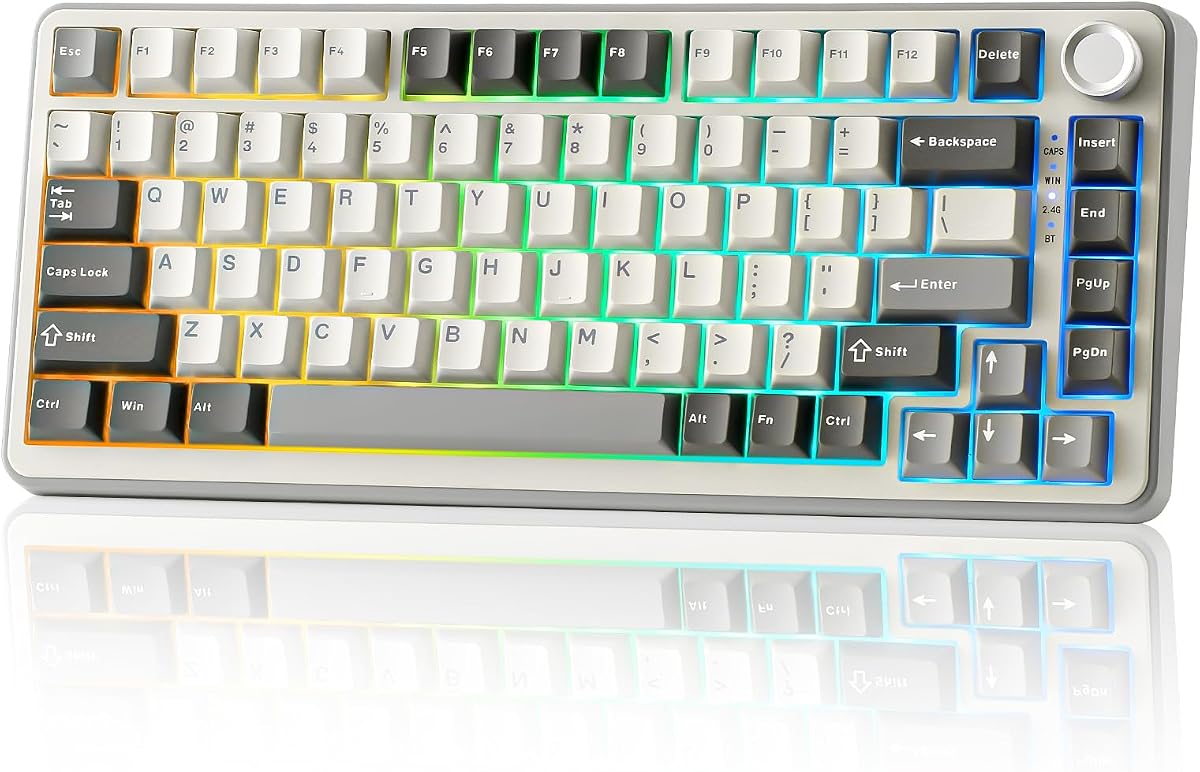

The AULA F75 Pro stands out as a top contender in the 75 percent mechanical keyboard market with its impressive combination of features and build quality. It earns a high rating for its tri-mode connectivity and premium switch performance out of the box.
We may earn a commission when you buy through this link, at no additional cost to you.
Its hot-swap PCB allows for easy customization while the gasket mount design delivers a satisfyingly soft and thocky typing experience. The side-printed PBT keycaps provide a unique aesthetic that complements the RGB lighting perfectly.
The multi-function knob is a standout feature allowing quick volume or backlight adjustments without reaching for software shortcuts. While the driver is Windows-only the keyboard functions well as a plug-and-play device for most users.
This keyboard is ideal for users who want a professional-grade wireless gaming keyboard without breaking the bank. It balances aesthetics and performance well making it a strong recommendation for daily use.
Five layers of silencer foam eliminate hollow cavity noise resulting in a deep solid thock with every keystroke.
Connect up to five devices simultaneously via Bluetooth 5.0 or 2.4GHz wireless ensuring seamless switching across your workspace.
We may earn a commission when you buy through this link, at no additional cost to you.
RK Royal Kludge delivers a compelling wireless experience with the R75 offering premium features like gasket mounting and hot-swap capability at a budget-friendly price point. Its creamy switches make it a joy to type on.
We may earn a commission when you buy through this link, at no additional cost to you.
The CNC metal knob adds a touch of elegance and functionality allowing precise volume control. South-facing LEDs ensure compatibility with aftermarket keycaps which is a huge plus for enthusiasts.
Users might notice battery life decreases significantly when RGB is fully active though turning it off extends usage to over a week. The build quality is surprisingly robust for the price category.
This model is perfect for budget-conscious gamers and typists seeking wireless convenience without sacrificing tactile feel. It is a reliable choice for those entering the custom keyboard scene.
Hot-swap sockets support both 3-pin and 5-pin switches allowing endless switch swapping without soldering tools.
PBT keycaps resist shine and wear over time ensuring legends remain crisp even after months of heavy daily use.
We may earn a commission when you buy through this link, at no additional cost to you.
The AULA S75 PRO distinguishes itself with an integrated LCD screen that displays system stats and GIFs making it a highly personalized gaming peripheral. Its wireless performance matches wired stability seamlessly.
We may earn a commission when you buy through this link, at no additional cost to you.
The screen offers instant feedback on battery and connection status reducing the need for software checks. Combined with the robust gasket mount this keyboard offers a luxurious typing experience.
While the driver requires Windows and a wired connection for initial setup the daily usage is entirely wireless. The price reflects these extra features but is justified for power users.
This keyboard is best for users who want to showcase their setup style with visual flair. It combines high-end features with reliable performance for modern workstations.
View real-time battery info volume levels and custom GIFs directly on the built-in screen for instant system awareness.
Switch easily between up to five connected devices using the side button for efficient multitasking across platforms.
We may earn a commission when you buy through this link, at no additional cost to you.
This retro-styled wired keyboard delivers a surprisingly premium typing experience thanks to its five-layer padding and gasket mount design. It offers high value for those who prefer a simple cable connection.
We may earn a commission when you buy through this link, at no additional cost to you.
The creamy switches are ready out of the box requiring no break-in period. The minimalist design fits well in both modern and vintage setups without distracting from the workspace.
Macro programming is fully supported allowing for complex workflows and shortcuts during work or gaming sessions. The lack of wireless is a trade-off but ensures zero latency.
Ideal for office environments where noise reduction and reliability are priority this model is a solid pick for those needing a focused wired setup.
Internal padding absorbs key bottoming noise making it suitable for quiet office environments or shared workspaces.
Full macro support lets you assign complex commands to single keys improving productivity for developers and power users.
We may earn a commission when you buy through this link, at no additional cost to you.
The MageGee MK-STAR is a reliable entry-level option for those new to mechanical keyboards. Its sturdy build and anti-ghosting features ensure accurate inputs during intense gaming sessions.
We may earn a commission when you buy through this link, at no additional cost to you.
The blue LED backlight provides clear visibility in low light without being distracting. The red switches are smooth and linear making them suitable for both gaming and general typing.
ABS keycaps are prone to shine over time but at this price point replacement is easy. It remains a popular choice for students or secondary setups.
This keyboard is perfect for buyers seeking a no-fuss reliable tool at the lowest possible cost. It performs its basic functions well without unnecessary complexity.
No driver installation required as all functions work instantly via standard USB plug-and-play connectivity.
Saving space with a compact 75 percent layout helps keep your desk clean and organized for better ergonomics.
We may earn a commission when you buy through this link, at no additional cost to you.
This model prioritizes acoustic quality with sound-absorbing pads included in the gasket mounting design. It delivers a quiet and solid typing experience out of the box.
We may earn a commission when you buy through this link, at no additional cost to you.
PBT keycaps are included which is rare at this price point ensuring durability and a better texture. The hot-swap feature allows for future customization as your preferences evolve.
While the RGB software is basic the visual customization is still sufficient for most users. The wired connection ensures stable performance for fast-paced gaming.
It is an excellent choice for users who value a clean sound profile and durable materials. It offers a refined typing experience without excessive gimmicks.
Textured PBT keycaps resist oils and scratches ensuring a premium feel that lasts longer than standard ABS materials.
Hot-swap sockets allow you to experiment with different switches easily without needing soldering skills or tools.
We may earn a commission when you buy through this link, at no additional cost to you.
Keychron continues to lead the Mac compatibility market with the K2 V2 offering a layout designed specifically for macOS functionality. It connects seamlessly to Apple devices while supporting Windows.
We may earn a commission when you buy through this link, at no additional cost to you.
Bluetooth 5.1 ensures stable connection with up to three devices switching instantly via hotkeys. The Super Red switches provide consistent linear action for both gaming and productivity.
The white LED backlight is classic but limits color options compared to RGB models. However battery life is exceptional making it ideal for mobile work.
This keyboard is the top recommendation for Apple ecosystem users needing a reliable mechanical keyboard. Its build quality and compatibility make it a timeless choice.
Includes dedicated Mac function keys and layout ensuring full access to system controls without remapping.
Compact 75 percent form factor makes it easy to carry in a backpack for work or travel.
We may earn a commission when you buy through this link, at no additional cost to you.
YUNZII offers a distinctive aesthetic with the B75 PRO combining a modern grey case with creamy beige keycaps for a warm look. The switches are tuned for a smooth tactile feel.
We may earn a commission when you buy through this link, at no additional cost to you.
Gasket mounting delivers a bouncy and soft typing experience preferred by enthusiasts. Tri-mode connectivity ensures you can stay connected to both PC and phone efficiently.
While it lacks a physical knob the software allows for deep customization. The switch choice provides a satisfying typing sound that is neither too loud nor too quiet.
This keyboard is perfect for users who prioritize style and sound over flashy lights. It is a refined choice for modern minimalist desktops.
The Cocoa Cream V2 switches offer a unique texture that feels smooth and premium under the fingertips.
The two-tone grey and beige design fits seamlessly into both professional and creative workspace setups.
We may earn a commission when you buy through this link, at no additional cost to you.
The GM326 proves you do not need to spend much to get a functional 75 percent keyboard. Its hot-swap capability is a rare find at this price point.
We may earn a commission when you buy through this link, at no additional cost to you.
The multi-function knob adds usability allowing volume control without software. Rainbow LED backlighting provides basic but effective illumination for night typing.
Build quality is functional with ABS caps that will wear but remain usable. It is an excellent secondary keyboard or gift for beginners.
This model is ideal for budget buyers seeking essential mechanical features. It delivers value and functionality without unnecessary complexity.
Packed with features like hot-swap sockets at a fraction of the cost of competitors in the market.
Two-stage adjustable legs allow you to tilt the keyboard for a comfortable typing angle.
We may earn a commission when you buy through this link, at no additional cost to you.
Womier impresses with a vibrant color screen that shows custom GIFs and system info. It merges the benefits of a multimedia board with a mechanical layout.
We may earn a commission when you buy through this link, at no additional cost to you.
Gasket mounting ensures a premium sound and feel while RGB customization is deep. The music sync mode adds a dynamic lighting element for entertainment.
Software setup requires a wired connection but the wireless performance is stable. The display is easy to read at an angled position.
This keyboard is best for media lovers and gamers wanting visual feedback on their peripherals. It stands out as a highly personalized gaming tool.
Customize your display with images and system stats for a truly personalized interface.
Music syncing lets your lighting respond to audio creating an immersive gaming environment.
We may earn a commission when you buy through this link, at no additional cost to you.
Selecting the right mechanical keyboard involves weighing several factors that impact comfort longevity and daily usability.
The 75 percent layout typically includes around 80 to 84 keys retaining arrows and function rows while removing the numpad. This saves desk space while keeping essential shortcuts accessible.
Ensure the keyboard fits your workspace and you do not need the missing numpad for data entry tasks.
Switches determine typing feel and sound. Linear switches are smooth and quiet ideal for gaming. Tactile switches provide a bump and click for feedback which aids typing accuracy.
Choose a switch type that matches your preference for noise and resistance levels.
Hot-swap sockets allow you to change switches without soldering. This future-proofs your keyboard and lets you experiment with different switch brands or types.
Look for PCBs supporting both 3-pin and 5-pin switches for maximum compatibility.
Gasket mounts use flexible pads between the plate and case creating a softer and more isolated feel. Plate mounts are stiffer and transmit more vibration but are cheaper to produce.
Gasket mounts generally offer a more comfortable and premium typing experience for long sessions.
Wireless options like Bluetooth or 2.4GHz offer convenience and cable management but require battery monitoring. Wired connections ensure zero latency which is critical for competitive gaming.
Decide based on whether you prioritize portability or consistent performance.
PBT keycaps are more durable and texture-rich than ABS caps which tend to shine over time. Metal cases and stabilizers add weight and stability reducing unwanted movement.
Prioritize PBT caps and solid construction for long-term satisfaction and better aesthetics.
RGB lighting allows personalization but consumes more battery on wireless models. Software quality varies widely and affects how easy it is to program macros or custom layouts.
Check if the software supports your operating system and offers the customization you need.
Wireless keyboards rely on battery capacity measured in mAh. Larger batteries last longer especially if RGB is off. Consider how often you are willing to recharge the device.
Look for keyboards with at least 4000mAh for extended wireless usage.
Begin by cleaning the surface and checking the USB or wireless connection before use. Ensure your operating system recognizes the device correctly and install any necessary drivers for macros or RGB control.
Regularly dust the keycaps with a compressed air can to remove debris between keys. This prevents unregistered keystrokes and extends the lifespan of the switches.
For wireless models keep the keyboard in power-saving mode when not in use to extend battery life. Always store it in a dry environment away from direct sunlight or moisture.
A 75 percent keyboard is generally better for productivity because it retains arrow keys and the function row. A 60 percent keyboard saves more space but requires layer switching for essential keys.
Hot-swapping allows you to change mechanical switches without soldering. This matters because it lets you customize your typing feel later without buying a new keyboard.
Not necessarily. Gasket mounts feel softer and reduce noise but standard mounting works fine for gaming. Focus on switch speed and anti-ghosting features instead.
Modern 2.4GHz wireless keyboards have minimal lag comparable to wired models. Bluetooth may have slight delay but is suitable for office work and casual use.
Tactile switches like Browns or Creams are often preferred for typing because they provide feedback on actuation. Linear switches are faster but offer less physical confirmation.
Use a keycap puller to remove caps and wash them in warm soapy water. Blow out the board with compressed air and let it dry fully before reassembly.
Yes most models support both Windows and Mac via software or key legends. Keychron models include native Mac support and extra keycaps for seamless integration.
N-key rollover ensures every key press is registered even if multiple keys are pressed simultaneously. This prevents missed inputs during intense gaming or fast typing.
The AULA F75 PRO stands out as the top pick for its balance of premium features and wireless performance. The RK Royal Kludge R75 offers an excellent alternative for budget-conscious buyers.
Prioritize gasket mounting and hot-swap capability if you want a keyboard that ages well. Connectivity needs will dictate whether you choose a wired or wireless solution.
Remember to verify current prices and availability before finalizing your purchase. Small changes in inventory can affect the best value available at any given time.