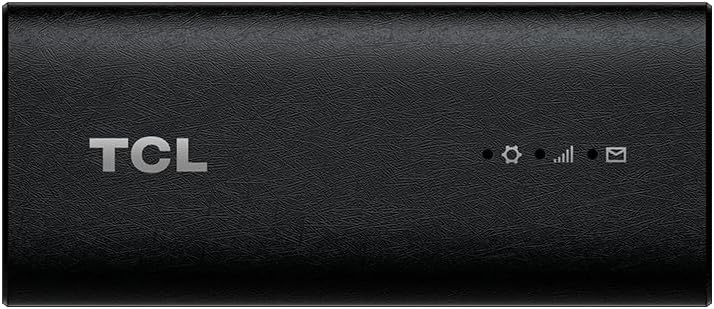
TCL LINKPORT IK511
4.0Editor score
Plug-and-Play USB-C Connection
Portable Slim Design
Supports Windows and macOS
This guide compares the top 5G modems for laptops available in 2026, evaluating speed, compatibility, and reliability for remote work and travel needs.
Connecting your laptop to high-speed internet anywhere is essential for modern professionals. 5G modems for laptops offer a reliable alternative to public Wi-Fi or tethering to a phone. They provide secure, fast, and always-on connectivity for travelers and remote workers.
We evaluated ten leading 5G modem solutions based on performance, compatibility, and ease of use. Our analysis focuses on USB dongles, internal modules, and portable routers. We considered real-world speed potential, carrier support, and device compatibility to compile this definitive list.
Each selection highlights specific strengths for different use cases. From budget-friendly dongles to enterprise-grade modules, there is a choice for every need. Please note that availability and features can change over time. Always verify the latest specifications before purchasing your next mobile solution.
4.0Editor score

3.1Editor score

4.2Editor score
The following table provides a side-by-side comparison of all ten selected 5G modem products. Each entry lists the primary name, an image for visual reference, the direct purchase link, and key technical specifications. This layout helps you quickly identify the model that best fits your specific laptop and network requirements.


The Tri Cascade VOS 5G USB Modem ranks as our top pick for users seeking a reliable portable internet solution. It offers download speeds up to 2.5Gbps, ensuring smooth streaming and video conferencing. The device includes a T-Mobile SIM and supports activation online without store visits.
We may earn a commission when you buy through this link, at no additional cost to you.
Its standout feature is the secure private internet access. By not broadcasting an SSID, it prevents Wi-Fi hacking apps from targeting your connection. The package also includes a SIM card, making it ready to use out of the box for Windows and macOS devices.
One trade-off is the specific carrier reliance on T-Mobile. While the speed is excellent, users in areas with poor T-Mobile coverage may face connectivity issues. Additionally, the pricing is higher than some competitors. However, the security and ease of use justify the cost for business travelers.
This modem is ideal for professionals who prioritize security and speed while on the move. If you need a plug-and-play solution that works seamlessly with your existing laptop and offers robust data protection, this is the recommended choice.
The device does not broadcast an SSID, preventing unauthorized access and hacking attempts in public spaces.
It supports Windows, macOS, Linux, and iPadOS, ensuring flexibility across different operating systems.
We may earn a commission when you buy through this link, at no additional cost to you.
The TCL LINKPORT IK511 offers an accessible entry point for those needing 5G connectivity on a budget. It features a slim, portable design that fits easily into a laptop bag. The USB-C connection ensures easy compatibility with modern laptops without needing extra adapters.
We may earn a commission when you buy through this link, at no additional cost to you.
Its main strength is the plug-and-play functionality. Users can connect it directly to their device and start browsing quickly. It supports Windows, macOS, and other systems, making it versatile for different work environments. The secure single-point access adds a layer of safety.
The limitation lies in its carrier restriction to T-Mobile. This may not suit users outside T-Mobile's coverage area. Additionally, it lacks advanced features found in premium models. However, for basic travel needs within T-Mobile zones, it provides reliable performance at a lower cost.
We recommend this device for casual travelers or students needing simple 5G access. If you want a cost-effective, no-fuss solution for your laptop and are covered by T-Mobile, this dongle is a practical choice.
The slim profile makes it easy to carry in a laptop bag or pocket without adding bulk.
No driver downloads are required, allowing for immediate internet access upon connection.
We may earn a commission when you buy through this link, at no additional cost to you.
This renewed version of the TCL LINKPORT IK511 provides the same connectivity features as the new model at a lower price. It is a suitable choice for those looking to save money while still getting 5G access for their laptop. The physical specifications remain identical to the standard unit.
We may earn a commission when you buy through this link, at no additional cost to you.
It retains the plug-and-play USB-C connection and support for Windows and macOS. The secure single-point access feature ensures that your data transmission remains private. This option is particularly useful for short trips or occasional use where budget is a primary concern.
Users should be aware that being a renewed product, it might have minor cosmetic signs of previous use. However, functionality remains the priority. The main drawback remains the carrier limitation to T-Mobile. If you are comfortable with refurbished electronics, this is a smart alternative.
Choose this model if you need a reliable 5G connection for your laptop on a tight budget. It delivers the essential performance needed for web browsing and email without the expense of a brand-new device.
Buying renewed allows you to access 5G features at a fraction of the cost of a new unit.
Despite being renewed, the device undergoes checks to ensure it meets basic performance standards.
We may earn a commission when you buy through this link, at no additional cost to you.
The Gen 2 5G Dongle combines the Qualcomm Snapdragon X62 modem with a TRITOM 5G SIM for enterprise-grade performance. It is designed for professional users who need consistent speeds even in crowded areas. The T-Priority network slicing ensures better access during peak times.
We may earn a commission when you buy through this link, at no additional cost to you.
This combo eliminates the need for driver downloads or complex configurations. It supports Windows, macOS, and Linux with zero-config setup. The SIM card included ensures you can start using the high-speed connection immediately without waiting for carrier verification.
The main drawback is the higher price point compared to consumer dongles. Additionally, to fully utilize its potential, you must subscribe to the compatible TRITOM service plan. If you are a business traveler requiring reliability, these costs are often justifiable.
This device is perfect for field professionals needing a stable, high-speed connection. If your work depends on reliable data access regardless of location or crowd density, this enterprise-grade option is highly recommended.
Access to T-Priority ensures better speeds in crowded places like stadiums or airports.
Plug it in and it works immediately on Windows, macOS, and Linux without extra steps.
We may earn a commission when you buy through this link, at no additional cost to you.
This router is designed for stationary indoor use like home offices or small businesses. It supports WiFi 6 technology, which offers improved efficiency and speed for multiple connected devices. The eight antennas help provide strong signal coverage throughout a room.
We may earn a commission when you buy through this link, at no additional cost to you.
It accepts a SIM card directly, turning cellular data into a Wi-Fi network for your laptop and other devices. The dual-band NSA SA support ensures compatibility with most modern 5G networks. It also supports seamless roaming to maintain connection stability.
The limitation is that it is not a portable dongle. It needs to stay near a power outlet and is intended to act as a central hub. However, if your goal is to replace a standard internet line with cellular for a fixed location, this works well.
We recommend this for setting up a reliable internet connection in a fixed office or home. If you need to connect several devices simultaneously and want faster speeds than a standard modem, this router is an excellent solution.
Dual frequency and multiple streams allow many users to connect without slowing down the network.
Uses the latest WiFi standard for better speed and efficiency in crowded wireless environments.
We may earn a commission when you buy through this link, at no additional cost to you.
The GL.iNet GL-X3000 is a premium cellular gateway that functions as a full 5G router. It supports dual-SIM cards for automatic failover, ensuring you stay connected even if one network drops. This is perfect for RVs or areas with varying signal strength.
We may earn a commission when you buy through this link, at no additional cost to you.
It runs on OpenWrt firmware, allowing advanced users to customize settings and install plugins. The built-in VPN support encrypts traffic, providing privacy when using public networks. Its detachable antennas allow you to boost signal by connecting external ones.
The device is larger than a USB dongle and comes with a higher price tag. It requires a power source and space to sit. However, the reliability and feature set are unmatched. It acts as a complete network center for laptops and other devices.
For travelers or remote workers needing robust internet security and speed, this is a top-tier choice. If you want control over your network and redundancy for your connection, this premium router offers the best performance.
Automatic failover between two SIM cards ensures you never lose internet connectivity.
Built-in OpenVPN and WireGuard keep your data safe from prying eyes on public networks.
We may earn a commission when you buy through this link, at no additional cost to you.
The WayPonDEV RM520N-GL is a 5G module designed for internal installation in laptops or industrial devices. It connects via Mini PCIe or M.2 slots, freeing up USB ports for other peripherals. Its high rating reflects its reliability and technical performance.
We may earn a commission when you buy through this link, at no additional cost to you.
It supports both NSA and SA modes, ensuring compatibility with current and future networks. The integrated GNSS receiver provides accurate location tracking without extra hardware. It is built to withstand wider temperature ranges, making it suitable for demanding environments.
Installation requires opening your device and having basic technical skills. Not all laptops have the necessary slot or support. However, for those who can install it, the performance is seamless and integrated. It avoids the bulk of external dongles entirely.
Choose this if you are comfortable with internal upgrades and want a clean look. It is perfect for industrial laptops or custom builds where saving space is critical and high reliability is needed for continuous operation.
Installing this internally frees up USB ports and keeps your workspace clean.
Built-in GPS supports accurate location data for navigation or asset tracking applications.
We may earn a commission when you buy through this link, at no additional cost to you.
This dongle features dual USB-C ports allowing for data transfer and power pass-through simultaneously. It is designed to charge your laptop while maintaining a high-speed 5G connection. This feature is crucial for long presentations or travel days.
We may earn a commission when you buy through this link, at no additional cost to you.
Powered by the Qualcomm Snapdragon SDX62 chipset, it supports advanced MIMO technology for better signal strength. It falls back to 4G LTE if 5G is unavailable, ensuring consistent connectivity. It supports both NSA and SA network modes.
The cost is higher than standard dongles, reflecting its enterprise features. It might be overkill for casual users who do not need pass-through charging. However, for kiosks or digital signage, the dual port design simplifies cabling and power management.
This is a great choice for professionals who need uninterrupted power and data. If you plan to run your laptop all day without an outlet, this modem provides both the internet connection and charging in one unit.
The second USB-C port lets you charge your laptop while using the modem for internet.
Designed for demanding uses like kiosks, ensuring stable uptime for digital displays.
We may earn a commission when you buy through this link, at no additional cost to you.
The Sanpyl DW5931e is an internal module intended for laptops or desktops with M.2 slots. It offers high download speeds up to 4.67Gbps under optimal conditions. The 4×4 MIMO technology helps maintain a stable connection in busy signal environments.
We may earn a commission when you buy through this link, at no additional cost to you.
It includes a GNSS modem for location services and supports both Windows and Linux operating systems. This makes it versatile for developers or power users building custom network solutions. The wide frequency band support aids in international travel.
User feedback indicates that setup can sometimes be tricky compared to plug-and-play dongles. The rating reflects this complexity. However, once configured correctly, it provides robust performance. It is a strong option for those willing to tweak settings for better results.
This module is best for tech-savvy users who want to build a 5G-enabled system internally. If you need a high-speed internal connection and are comfortable with configuration, this module offers great value and performance.
Multiple input and output antennas help boost speed and stability in crowded signal areas.
Supports Windows and Linux, making it suitable for diverse computing environments.
We may earn a commission when you buy through this link, at no additional cost to you.
The Rhino D2 5G RedCap is designed for government and enterprise use. It is TAA compliant, making it eligible for US government procurement. The device also supports CBRS bands for private enterprise networks, adding flexibility for secure internal data.
We may earn a commission when you buy through this link, at no additional cost to you.
It features an IP54 rating, offering protection against dust and water splashes. This makes it durable for field work or outdoor environments. It supports eSIM and pSIM, allowing you to switch carriers easily based on availability.
General consumer ratings are lower, possibly due to its specialized target market. Regular users might find the features unnecessary or the setup complex. However, for specific industrial or government needs, the compliance and durability are unmatched.
This modem is ideal for field service workers or government contractors. If you require a rugged, compliant device for secure and reliable connection in tough environments, this is the most suitable option available.
Meets US government standards for procurement, suitable for official use.
IP54 rating ensures it can withstand dust and water splashes during field work.
We may earn a commission when you buy through this link, at no additional cost to you.
Selecting the right 5G modem involves understanding your specific needs for speed, coverage, and portability. This guide breaks down the key factors to help you make an informed decision.
Not all modems work on all networks. Ensure the device supports the bands used by your preferred carrier. Some are locked to specific providers like T-Mobile, while others support multiple operators.
Always check that your modem supports the correct frequency bands for your region to avoid slow speeds.
USB dongles are highly portable and ideal for travel. Internal modules save space but require installation. Routers offer more power but need a power source and are less mobile.
Choose a dongle for travel and a router for home or office use.
Max speed depends on both the modem and your data plan. High-speed models are useless with a throttled plan. Verify that your carrier offers unlimited or high data to match the modem's potential.
Match your hardware capabilities with a data plan that supports consistent high-speed access.
Most modern modems support Windows and macOS. Some may require drivers for Linux or older systems. Check compatibility before buying to ensure your laptop can connect without issues.
Confirm that the device has drivers available for your specific operating system.
Some modems offer private connections or built-in VPN support. This is crucial for business users handling sensitive data. Look for models that hide your SSID or offer encryption.
Prioritize security features if you work with confidential information in public spaces.
Using a phone as a hotspot drains battery quickly. Dedicated dongles often use USB power without draining your laptop. Some even offer pass-through charging to keep your laptop powered.
Look for devices with pass-through charging to avoid draining your laptop battery while connected.
Field workers need rugged devices. Look for IP ratings like IP54 to ensure the modem can withstand dust and water. Standard consumer models are not built for harsh environments.
Choose a rugged model if you work in construction, outdoor, or industrial settings.
Some modems use a SIM slot, while others use eSIM. Dual-SIM routers allow switching between carriers for better coverage. This flexibility is vital for travelers visiting different regions.
Opt for dual-SIM support if you travel frequently to ensure you always have the best signal.
To use your modem, insert a SIM card if it is not pre-installed. Connect the USB cable to your laptop and ensure the device is recognized. Follow the activation steps provided by the manufacturer.
Keep the device clean and dry. Avoid exposing it to moisture or extreme temperatures to maintain performance. Store it in a protective case when not in use to prevent damage.
Regularly update your drivers to ensure optimal performance. If you notice slow speeds, check your data usage or try restarting the device. Proper care ensures a longer lifespan for your hardware.
Not all 5G modems work on all carriers. Many are carrier-locked to specific networks like T-Mobile or AT&T. Always check the device specifications and confirm with your carrier before purchasing.
Yes, a dedicated 5G modem often provides better speeds and stability. It does not drain your phone battery and usually has better antennas. It is also more secure for business use.
Yes, but only if the modem supports the frequency bands used in that country. International roaming on your data plan must also be enabled. Check band compatibility before traveling.
You need a data plan that supports 5G connectivity. Some plans are specific to mobile hotspots. Ensure your carrier plan is compatible with external modems to avoid throttling.
Speeds vary based on location and plan. Many devices support speeds up to 2.5Gbps or higher. Actual speeds depend on signal strength and network congestion. Always check test reports for real-world performance.
5G is generally secure. However, public networks can still be targeted. Use a modem with built-in security features or a VPN for maximum protection. Keep your device updated against vulnerabilities.
It can drain battery if your laptop does not have pass-through charging. Choose a modem that charges your laptop while connected to avoid power loss. This prevents draining the laptop battery during use.
Some modems support Linux, but driver availability varies. Check the product description for Linux support before buying. Most major brands have community or official support for common distributions.
We reviewed ten 5G modems to help you find the right connectivity for your laptop. From portable dongles to rugged enterprise solutions, there is an option for every scenario. The Tri Cascade VOS and TCL LINKPORT stand out for ease of use.
When choosing, prioritize speed, carrier compatibility, and security. If you travel frequently, a durable modem with pass-through charging is essential. For stationary work, a router might offer better value for multiple devices.
Remember that technology evolves quickly. Always check current availability and features before buying. Selecting the right modem ensures you stay connected and productive no matter where your work takes you.