
Monitor Light Bar, Eye-Care USB Computer Monitor Lamp
4.2Editor score
Ultrawide 15.7 inch LED coverage
Stepless dimming with three color temps
Patented counterweight clip design
Finding the right light behind monitor for eye care is essential for anyone who spends long hours at a desk. These specialized lamps reduce glare and strain while improving focus and comfort during work or gaming sessions.
We evaluated ten top-rated monitor light bars based on eye-care technology, glare reduction, build quality, and user feedback. Each product offers unique features designed to protect your vision and enhance your desk setup.
Each pick highlights key strengths and ideal use cases to help you decide. Remember that prices and availability change frequently, so check current listings before making your final purchase decision today.
4.2Editor score

4.6Editor score

4.7Editor score
As an Amazon Associate we earn from qualifying purchases.
Compare the features and specifications of the ten leading monitor light bars to find the perfect match for your desk setup and eye care needs.


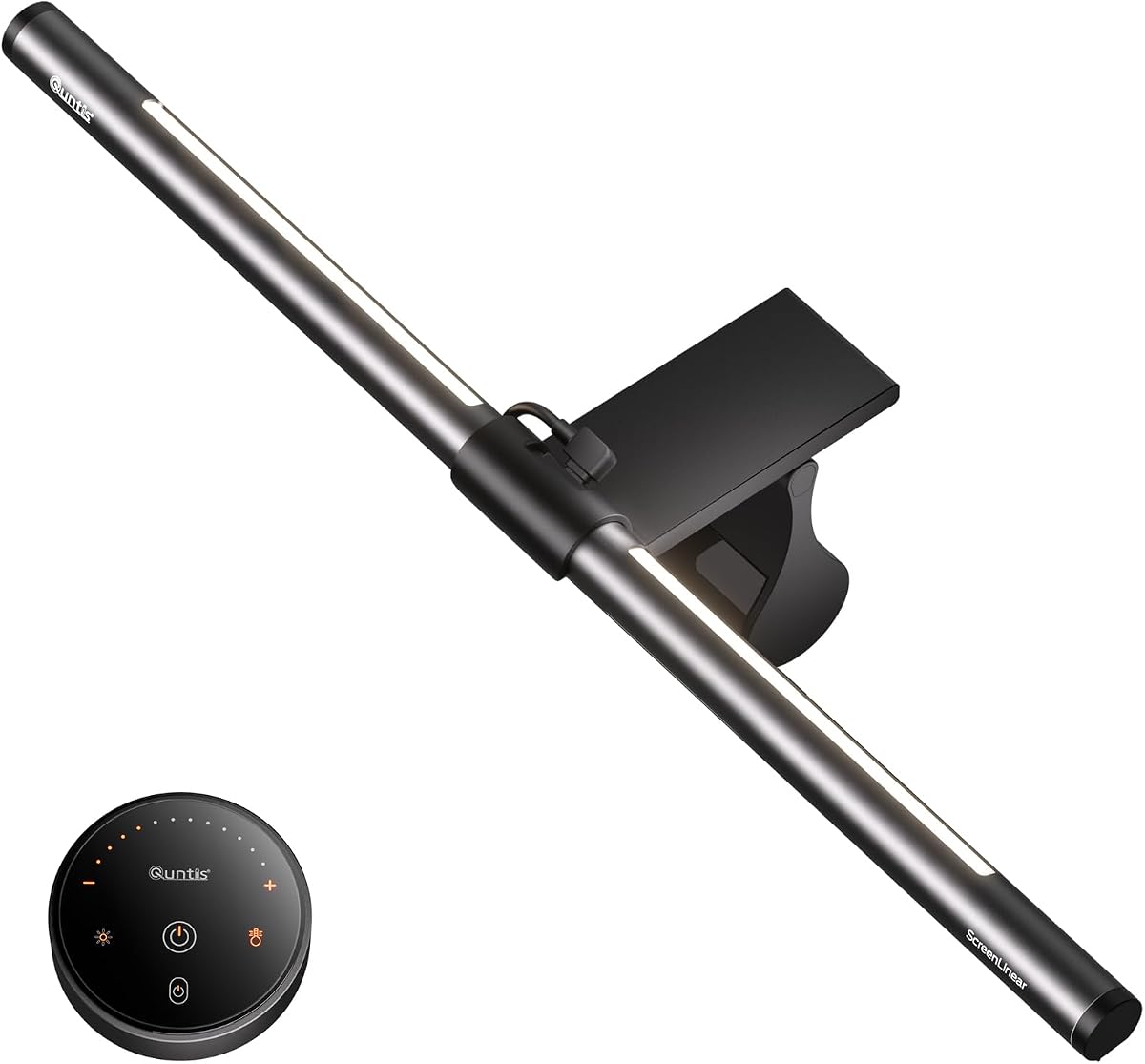
The Quntis Computer Monitor Lamp ranks as our Editor's Choice for its exceptional eye-care technology. With a strong 4.6 rating, it stands out for eliminating harmful blue light and flicker issues.
We may earn a commission when you buy through this link, at no additional cost to you.
Its auto-dimming sensor adjusts brightness based on ambient light to maintain optimal 900 lux levels. The asymmetrical optical design ensures no glare reflects on your screen while lighting your desk effectively.
Though priced higher than basic models, the Ra98 color rendering index ensures accurate colors for designers. This trade-off delivers professional-grade lighting that supports long-term eye health and comfort.
Choose this lamp if you prioritize eye protection and color accuracy for work. It is an ideal investment for professionals and students seeking reliable and comfortable desk illumination.
Certified to meet IEC standards for blue light safety and flicker-free operation, this lamp reduces irritation during extended use.
The built-in ambient light sensor continuously monitors surroundings to prevent visual fatigue from excessive or insufficient lighting.
We may earn a commission when you buy through this link, at no additional cost to you.
The BenQ ScreenBar Halo 2 is the top premium choice for those seeking advanced features. Its 4.7 rating reflects excellent build quality and innovative lighting technology.
We may earn a commission when you buy through this link, at no additional cost to you.
The wireless controller with a built-in display allows precise adjustments without touching the lamp. The enhanced backlight reduces contrast between screen and surroundings for relaxed viewing.
Motion sensor automation turns lights on or off with your monitor, adding convenience. While expensive, the tested lifespan of 50,000 hours and high CRI justify the investment.
Buy this for a professional setup requiring precision and automation. It suits photographers, designers, and executives who value premium lighting performance and durability.
The wireless dial controls brightness and color temperature with a display showing precise values for easy fine-tuning.
Wide adjustable ambient backlight reduces contrast between your screen and dark surroundings to help eyes stay relaxed.
We may earn a commission when you buy through this link, at no additional cost to you.
This Monitor Light Bar is our Best Budget option, offering excellent value for money. With a 4.2 rating, it delivers essential eye-care features without a high cost.
We may earn a commission when you buy through this link, at no additional cost to you.
The 15.7 inch ultrawide LED light covers large screens and desks evenly. Patented asymmetric lighting prevents glare while stepless dimming ensures flexible brightness control.
Memory function recalls your last settings, adding convenience to daily use. It lacks premium automation but provides solid performance for students and casual users.
Choose this if you need reliable eye-care lighting on a budget. It is perfect for home offices or gaming setups where cost-effectiveness is key.
Delivers 900 lux central brightness across a 35 by 25 inch area to eliminate dark spots and uneven shadows.
Mechanical switch on the right side allows short press to turn light on or switch color temperature and long press to adjust brightness.
We may earn a commission when you buy through this link, at no additional cost to you.
The RGB Monitor Light Bar offers a unique dual-mode lighting experience. With a 4.1 rating, it combines task lighting with vibrant ambient backlighting for gaming.
We may earn a commission when you buy through this link, at no additional cost to you.
The front light eliminates screen glare and lights the desk evenly. The 9-mode RGB backlight creates immersive atmospheres for movies or relaxation sessions.
USB-C power ensures flexible placement with laptops or adapters. Independent buttons allow precise control over both lighting modes simultaneously.
Buy this for a versatile setup combining focus and ambiance. Gamers and streamers will appreciate the customizable RGB effects alongside essential eye-care lighting.
Front light eliminates glare while RGB backlight casts vibrant colors behind your screen to create the perfect ambient atmosphere.
Left button manages RGB backlight modes and right button handles front light on off color temperature and brightness control.
We may earn a commission when you buy through this link, at no additional cost to you.
YEELIGHT Monitor Light Bar delivers premium build quality with RG0 certified blue light safety. Its 4.4 rating reflects high user satisfaction and reliable eye-care performance.
We may earn a commission when you buy through this link, at no additional cost to you.
The full metal body aids heat conduction and durability. Its 250 lumen output ensures bright and even illumination for long sessions.
Stepless dimming and touch control offer precise adjustments. It adapts to various monitor shapes and saves desk space effectively.
Choose this for durable and safe lighting. Programmers and designers will appreciate the high color rendering and sleek metallic design.
Protects your vision by filtering out harmful blue light with the highest standard for blue light safety certification.
Features a premium full-metal body offering durability and effective heat conduction to keep it cool during prolonged use.
We may earn a commission when you buy through this link, at no additional cost to you.
The Lymax Monitor Light Bar features an intuitive wireless remote. Its 4.5 rating highlights ease of use and effective glare-free lighting for desks.
We may earn a commission when you buy through this link, at no additional cost to you.
Gravity damper bracket ensures stable mounting without wobbling. The metal enclosure dissipates heat and adds longevity to the design.
Remote control allows easy switching of color modes and brightness. It supports multiple lamps with one remote for larger setups.
Buy this for convenient control and reliable performance. Ideal for users seeking a hassle-free experience without complex wiring.
The wireless remote is small and exquisite using disposable button battery for easy control of color modes and brightness.
Gravity damper bracket base fits screens from 0.2 to 1.8 inches without wobbling and saves valuable desk space.
We may earn a commission when you buy through this link, at no additional cost to you.
This 16.14 Monitor Light Bar provides solid eye-care performance with a 4.5 rating. It focuses on reducing glare and strain during work or study.
We may earn a commission when you buy through this link, at no additional cost to you.
Its asymmetric optical design effectively avoids screen glare. The memory function saves your last settings for consistent lighting every time.
Premium metallic finish ensures durability and heat dissipation. It is compact and portable for users needing flexibility.
Choose this for a reliable and simple solution. Students and casual users will find it effective for daily desk illumination.
Adopts asymmetric optical and anti-blue light design to effectively avoid screen glare and reduce fatigue from long computer use.
Built-in memory function saves your last setting automatically so you can enjoy consistent lighting every time you power on.
We may earn a commission when you buy through this link, at no additional cost to you.
The Pzloz Led Desk Lamp offers flexible architectural design for various tasks. It stands out with 25 light modes and adjustable swing arms.
We may earn a commission when you buy through this link, at no additional cost to you.
360 degree standing rotation allows precise positioning for drafting or reading. The wireless remote adds convenience to mode switching.
Energy-efficient LED technology ensures even illumination without flicker. It is versatile for both monitor and desk work.
Buy this if you need adaptable lighting for multiple tasks. Drafters and creators will appreciate the flexibility and remote control.
With 360 degree standing and 180 degree foldable swing arms this lamp ensures suitable lighting coverage for workspaces.
Offers 25 light combination modes with five color temperatures and five brightness levels catering to various lighting needs.
We may earn a commission when you buy through this link, at no additional cost to you.
This Quntis Monitor Light Bar features 24 RGB modes for immersive gaming. Its 4.5 rating reflects a balance of gaming ambiance and eye-care lighting.
We may earn a commission when you buy through this link, at no additional cost to you.
The dual light setup includes a front task light and RGB backlight. Smart memory restores settings instantly after powering on.
High CRI ensures accurate colors for design tasks. Asymmetric design eliminates glare while lighting your desk effectively.
Choose this for a setup combining gaming and work. Gamers who also need professional lighting will love this versatile bar.
Features an independent RGB backlight that projects a vibrant glow onto your wall to create an immersive gaming environment.
The front light offers 5 preset brightness levels and stepless color temperature to transition seamlessly from warm to crisp.
We may earn a commission when you buy through this link, at no additional cost to you.
The Quntis Monitor Light Bar Glow offers advanced control with a smart remote. With a 4.6 rating, it combines eye-care with immersive ambient lighting.
We may earn a commission when you buy through this link, at no additional cost to you.
Dual protection design prevents glare on screen and eyes. Patented sliding weighted clip ensures secure installation on curved monitors.
Stepless dimming allows exact brightness preferences. Smart memory restores settings after power cuts for consistent comfort.
Buy this for premium dual-mode lighting control. Professionals and enthusiasts will appreciate the remote convenience and glare-free design.
Features a dual protection design combining optical design with textured cover and eye care hood to prevent glare on screen.
Remote utilizes smart touch technology with precise response and gentle orange glow buttons for easy customization day or night.
We may earn a commission when you buy through this link, at no additional cost to you.
Choosing the right monitor light bar requires considering several factors to ensure eye comfort and desk compatibility.
Look for lamps offering dual modes including front task lighting and optional RGB backlights. These provide focus during work and ambiance during gaming or relaxation.
Prioritize models with independent control for both modes to customize your environment easily.
Asymmetric optical designs direct light downward only avoiding reflections on your screen. This is crucial for reducing eye strain during long sessions.
Check for anti-glare features and hood designs that shield your eyes from direct light exposure.
Stepless dimming and adjustable color temperatures allow you to tailor brightness to time of day. Look for ranges spanning warm to cool tones for flexibility.
Models with memory functions save your preferred settings for quick daily setup.
Metal bodies dissipate heat better and last longer than plastic alternatives. Premium finishes also enhance desk aesthetics and durability.
Ensure the clip design is sturdy and fits your monitor thickness securely.
High Color Rendering Index (CRI) values ensure true-to-life colors on your desk and screen. This matters for designers and color-sensitive work.
Lamps with Ra95 or higher provide accurate illumination for professional tasks.
Certifications like RG0 or IEC standards confirm low blue light hazard and flicker-free performance. These protect your vision from long-term damage.
Always verify certifications before purchase to ensure safety claims are valid.
USB-C or USB-A power ensures compatibility with laptops and adapters. Wireless remotes add convenience but may require battery replacements.
Check power consumption to avoid overloading your setup.
Light bars mounted on monitors free up desk space compared to traditional lamps. Counterweight clips and retractable arms simplify installation.
Choose models compatible with curved monitors if you use them to ensure stability.
Attach the monitor light bar securely to your screen top using provided clips ensuring it is level and stable before powering on.
Adjust brightness and color temperature to match ambient room lighting reducing eye strain during work or evening sessions.
Clean the lamp surface regularly with a soft dry cloth to maintain optimal performance and appearance over time.
A light behind monitor reduces contrast between bright screens and dark environments easing eye strain. Asymmetric lighting minimizes glare on screens preventing discomfort during long sessions.
RGB backlights create ambient lighting to reduce contrast but do not directly replace task lighting. Use them for atmosphere while relying on front light for focused work.
Warm tones around 3000K are better for evening use to avoid disrupting sleep. Cooler tones near 6500K suit focused daytime work.
Many models feature adjustable clips designed for both flat and curved screens. Check the clamp width compatibility before purchasing to ensure stability.
Use a soft dry cloth to wipe surfaces avoiding harsh chemicals that could damage coatings. Never spray liquid directly on the lamp or its connectors.
Look for RG0 for zero blue light hazard and IEC standards for flicker-free operation. These confirm reduced risk of eye strain and damage.
We highlighted ten top monitor light bars including the Quntis and BenQ ScreenBar for premium quality and budget options.
Prioritize glare reduction certifications and dimming features to protect your vision and enhance workspace comfort effectively.
Always check current prices and stock before purchasing to secure the best deal for your specific needs today.