
Hyperkin Trooper 2 Premium USB Game Controller
4.1Editor score
Ergonomic premium design
Quiet movement joystick
Mappable buttons
Discover the top Mac game joysticks for 2026. This guide compares flight sticks, arcade controllers, and retro pads for macOS gaming.
Finding the right Mac game joystick can transform your gaming experience on macOS. Whether you prefer flight simulators, retro arcade classics, or modern controller setups, compatibility and precision matter most.
We evaluated ten top-rated controllers based on build quality, platform support, and user feedback. Our selection covers budget-friendly retro sticks and premium flight sim gear designed for Mac users.
Each pick highlights key features, pros, and cons to help you choose wisely. Prices and availability may change, so verify details before purchasing to ensure the best value for your setup.
4.1Editor score

4.3Editor score

4.0Editor score
This side-by-side comparison highlights the key specifications of all ten controllers. Each entry includes compatibility details, sensor types, and unique features to help you distinguish between options quickly.




The Hyperkin Trooper 2 is a classic USB game controller designed for emulation on Windows, macOS, and Linux. With a solid 4.1 rating, it offers an authentic Atari feel complemented by modern upgrades like 4-way joystick movement and six mappable buttons.
We may earn a commission when you buy through this link, at no additional cost to you.
Its ergonomic design features chamfered corners and grips that provide increased comfort during long gaming sessions. The durable construction includes a solid base and soft rubber grommet to ensure long life. The quiet movement joystick and responsive buttons deliver smooth and precise inputs for video games and arcade titles.
While it lacks advanced features like wireless connectivity or vibration, its simplicity is a strength for retro enthusiasts. The 10-foot USB cable ensures flexibility in desk setups. These trade-offs are acceptable given the focus on classic gameplay accuracy and comfort.
This controller is ideal for users seeking a reliable, affordable option for retro gaming on their Mac. It strikes a balance between nostalgia and modern usability. We recommend it for anyone looking to play old school arcade games without breaking the bank.
The chamfered corners and ergonomic grips reduce hand fatigue, making it suitable for hours of gameplay.
The 4-way joystick and quiet movement ensure accurate inputs essential for classic arcade and console emulation.
We may earn a commission when you buy through this link, at no additional cost to you.
The Thrustmaster T-Flight Stick X is an ergonomic flight sim joystick recognized immediately by systems with zero driver headaches. It features adjustable resistance and a solid weighted stability base to keep your stick planted during critical moments.
We may earn a commission when you buy through this link, at no additional cost to you.
Enjoy a complete flight control system with an integrated throttle lever and rotating handle for rudder control. The twelve reprogrammable buttons and exclusive mapping button allow customization for different aircraft profiles. This saves desk space by eliminating the need for separate pedals.
Although marketed for PC, users on Mac may need to verify compatibility for specific simulator software. The resistance tuning is a standout feature for sim pilots. These limitations are outweighed by the precision and stability offered.
Flight sim enthusiasts should consider this stick for its professional-grade features. It delivers razor sharp responsiveness for dogfights and gentle banking alike. We recommend it for serious pilots who prioritize control fidelity.
The heavily weighted base prevents tipping, ensuring confidence during aggressive inputs in high-speed combat.
Internal memory stores configurations for different aircraft, allowing instant switching between sim profiles.
We may earn a commission when you buy through this link, at no additional cost to you.
The abxylute C6 offers unparalleled precision with Dual Hall Effect Joysticks and Triggers, preventing stick drift and dead zones. It supports 1000Hz polling in wired and Bluetooth dongle modes for ultra-low latency gaming on Mac.
We may earn a commission when you buy through this link, at no additional cost to you.
Features include a rechargeable 600mAh battery delivering up to 18 hours of gameplay, 4-level vibration, and gyro motion sensing in Switch games. Turbo modes allow rapid-fire attacks, freeing your fingers to dominate opponents effortlessly during competitive sessions.
While the USB dongle mode is best for low latency, Bluetooth wireless offers flexibility. Compatibility extends across PC, iOS, Android, and Mac. These trade-offs are minor compared to the performance and battery life benefits provided.
This controller is perfect for users seeking a versatile, durable option across multiple platforms. Its anti-drift technology ensures long-term reliability. We recommend it for competitive gamers needing precise inputs.
Hall Effect joysticks and triggers offer an extended lifespan by eliminating physical contact and reducing wear.
Supports PC, Mac, iOS, and Android seamlessly, allowing you to switch devices without reconnecting.
We may earn a commission when you buy through this link, at no additional cost to you.
The MAYFLASH F300 is an arcade fight stick compatible with Switch, Xbox, PS, and macOS. With a high 4.5 rating, it supports Sanwa Denshi buttons and joystick, which are perfect for customization and tournament-quality performance.
We may earn a commission when you buy through this link, at no additional cost to you.
It supports XINPUT and DINPUT on PC and includes Turbo functions with different speed settings. The F300 is compatible with PS5 via a MAYFLASH Magic-S Ultimate adapter, extending its utility beyond standard console support. This flexibility is rare at its price point.
Users note that it does not come with USB cables included in all cases, requiring minor setup. However, the build quality and modding potential make it worth the effort. These small hassles are acceptable for the level of control provided.
Competitive fighters and retro enthusiasts should pick this stick for its solid foundation and upgrade path. It balances portability with performance. We recommend it for players wanting arcade quality at home.
Designed with Sanwa compatibility, it allows easy swapping of parts to suit your playstyle or repair needs.
Turbo functions with different speed settings give you control over attack speeds without software overhead.
We may earn a commission when you buy through this link, at no additional cost to you.
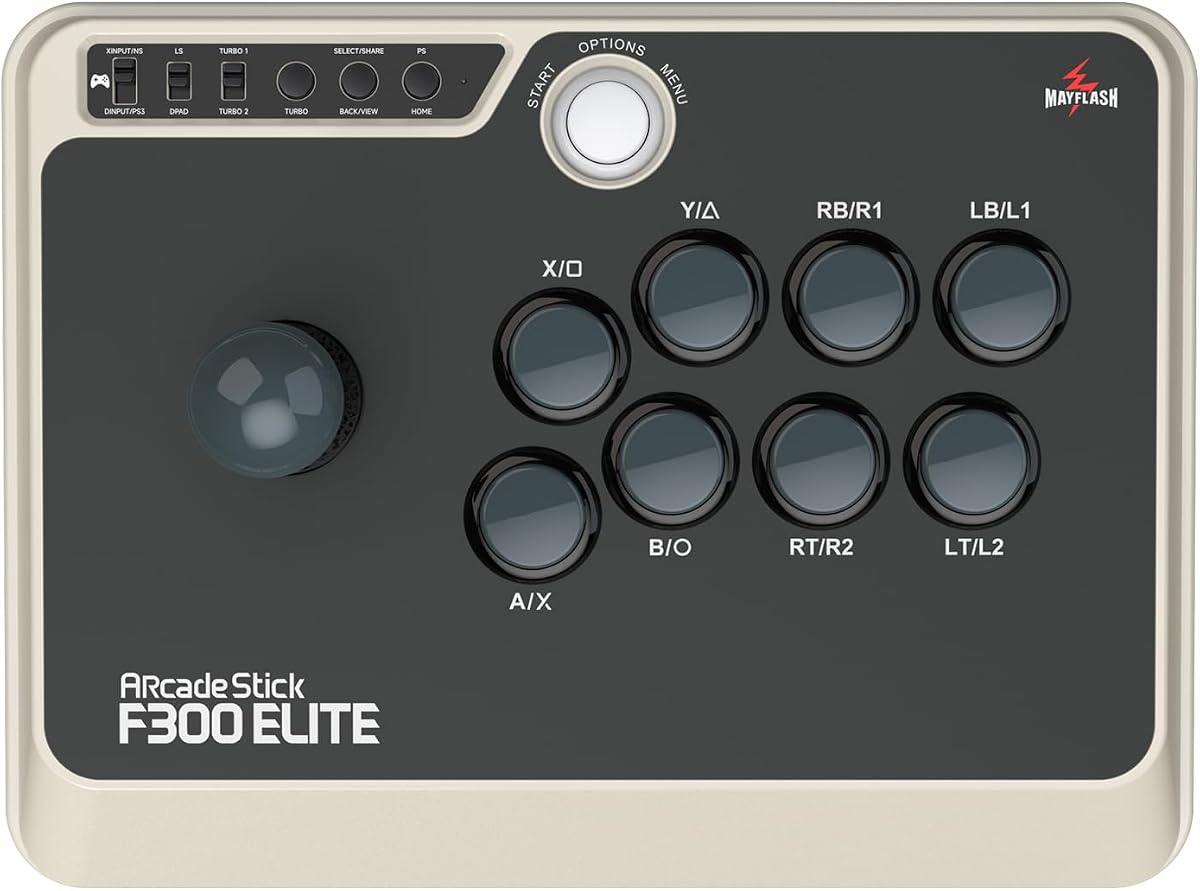
The MAYFLASH Arcade Stick F300 Elite uses premium quality Sanwa components, including 9 highly responsive buttons and a precision 4-way joystick. It offers peak performance and reliability for gaming after game on Mac or other platforms.
We may earn a commission when you buy through this link, at no additional cost to you.
Built for modding enthusiasts, the inside is accessible for further customization. It supports XINPUT and DINPUT on PC and includes Turbo features. All products are tested before shipping, and warranty begins immediately upon order placement.
It is slightly pricier than the standard F300, but the pre-installed Sanwa parts save time and money on upgrades. Users appreciate the solid tactile feel. These costs are acceptable given the durability and ease of use.
Competitive players and enthusiasts should choose the Elite version for its ready-to-use premium parts. It offers the highest performance out of the box. We recommend it for those serious about fighting games.
The Sanwa buttons and precision 4-way joystick deliver the exact tactile feedback needed for tournament play.
Full warranty begins upon ordering, with a service team ready to help with any operating questions.
We may earn a commission when you buy through this link, at no additional cost to you.
The Thrustmaster SimTask FarmStick is designed specifically for Farming Simulator 25 on PS5 and PC. It features a realistic 3-axis joystick for heavy machinery simulation and Hall Effect magnetic sensors for ultra-accurate performance without drift.
We may earn a commission when you buy through this link, at no additional cost to you.
With up to 33 programmable inputs, you can manage every function without relying on a keyboard. The ambidextrous design allows flexible setups with racing wheels or dual joysticks for a complete farming simulator cockpit.
Note that a racing wheel is required to be used in conjunction with the stick for full functionality. This limits standalone use but ensures immersion. These constraints are acceptable for dedicated farming simulation players.
Farming simulators seeking authentic machinery control should invest in this specialized stick. It delivers lifelike operation for tractors and loaders. We recommend it for niche simulation enthusiasts.
The 3-axis joystick offers precise, smooth control for operating tractors and construction equipment realistically.
With 33 programmable inputs, you can map complex functions to buttons, thumbwheels, and rocker switches.
We may earn a commission when you buy through this link, at no additional cost to you.
The 8Bitdo Ultimate 2 Wireless Controller features TMR Joysticks for higher sensitivity and durability. It uses 8BitDo Exclusive Wireless Technology for a stable 2.4G connection with latency under 1ms, ensuring rock-solid reliability for gaming on PC or Apple devices.
We may earn a commission when you buy through this link, at no additional cost to you.
A Trigger Mode Switch allows you to switch between linear Hall Effect triggers and non-linear tactile triggers for different scenarios. It includes 2 Pro back paddle buttons, extra R4/L4 bumpers, and a multifunctional charging dock for seamless connectivity.
The white color may show wear over time compared to black models. However, the anti-interference and 10m range make it robust. These cosmetic issues are minor compared to the performance benefits offered.
Users seeking a premium wireless experience on Mac should choose this controller. Its precision and dock integration set it apart. We recommend it for high-end setups.
The 2.4G connection delivers under 1ms latency, vital for competitive titles where split seconds count.
Switch between linear and tactile triggers easily to match your preference across racing or shooter games.
We may earn a commission when you buy through this link, at no additional cost to you.
The Moonag Wireless PC Controller features Hall Effect Joysticks that effectively prevent stick drift and wear. It supports up to 1000Hz polling rate in both 2.4GHz wireless and wired modes for ultra-fast response and minimal input lag.
We may earn a commission when you buy through this link, at no additional cost to you.
Dynamic RGB lighting creates an immersive atmosphere, and a built-in 800mAh battery supports playing while charging via cable. It includes turbo functions and dual vibration feedback for racing and shooting. The ergonomic shape reduces fatigue during extended sessions.
It is incompatible with Xbox and PS consoles, which limits cross-platform use. However, PC and mobile compatibility remains strong. These restrictions are acceptable for users focused on Windows and Mac gaming.
Gamers wanting premium features at a budget price should pick this controller. Its anti-drift tech ensures long-term reliability. We recommend it for immersive gaming.
Dynamic RGB lighting around joysticks and buttons creates a vibrant atmosphere matching your gaming rig.
Textured non-slip grip and balanced weight reduce fatigue, ideal for long gaming hours.
We may earn a commission when you buy through this link, at no additional cost to you.
The Logitech G X56 H.O.T.A.S offers military-grade Space and Flight Sim Precision. It features customizable options, including all control surface options required to achieve the exact performance level that aspiring combat pilots demand.
We may earn a commission when you buy through this link, at no additional cost to you.
New Mini Analog Stick Control Surfaces allow you to control pitch, roll, yaw, and other vectors directly. Fully featured with accurate 16-bit axes and hall-effect sensors, it includes twin throttles with friction adjusters. RGB backlighting lets you match colors to your gaming rig.
It requires a Windows PC for full functionality with specific system requirements. The cost is high compared to standard controllers, but the customization is unmatched. These constraints are acceptable for serious sim enthusiasts.
Aviation enthusiasts should choose this for its detailed control surface options. It places controls perfectly under your fingers. We recommend it for high-fidelity flight simulation.
New Mini Analog Stick Control Surfaces allow control of gimballed weapons separately from main spacecraft axes.
The Advanced 4-Spring System allows you to tune stick force to match your specific flying style.
We may earn a commission when you buy through this link, at no additional cost to you.
The SPEEDLINK SL-650212-BKRD is a digital USB joystick for PCs and Android devices. It takes its nostalgic design from the Original Competition Pro's Arcade Machine Stick, offering a true retro experience for arcade and retro games.
We may earn a commission when you buy through this link, at no additional cost to you.
The Anniversary Edition includes a games collection with 20 retro games for download. This adds immediate value upon unboxing. Its simplicity is a feature for purists who want the classic arcade feel without modern complications.
Digital inputs may feel different compared to modern analog sticks, requiring adjustment. The build is simple but functional. These trade-offs are acceptable given the specific retro use case targeted.
Retro gaming enthusiasts seeking nostalgia should pick this joystick. It brings back the arcade cabinet experience. We recommend it for classic gamers.
Includes a download of 20 retro games so you can start playing classic titles immediately on setup.
Design taken from the original Competition Pro machine offers a familiar feel for veteran players.
We may earn a commission when you buy through this link, at no additional cost to you.
Choosing the right controller requires understanding your gaming habits and technical needs. This guide outlines key factors to consider before purchasing a Mac-compatible joystick.
Ensure the product explicitly supports macOS. Some flight sticks or arcade sticks are Windows-only or require specific adapters. Check if the manufacturer offers drivers or plug-and-play functionality for Mac OS.
Verify that the joystick works natively on your Mac version. This saves frustration and ensures smooth gaming without complex workarounds.
Decide between USB wired, Bluetooth, or 2.4G wireless. Wired offers the most stable connection, while wireless provides convenience. Wireless models need reliable battery life to avoid interruptions.
For competitive gaming, wired or low-latency 2.4G dongles are preferred. Casual gaming can benefit from standard Bluetooth connectivity.
Look for Hall Effect sensors or TMR joysticks if possible. These technologies prevent stick drift and increase durability compared to traditional resistive analog sticks.
High-quality sensors ensure precision inputs and longevity. This is critical for flight sims or competitive titles where accuracy matters.
Check for materials like rubber grips, weighted bases, and reinforced construction. A solid build prevents wear and tear during extended sessions. Durable joysticks withstand aggressive inputs without degrading.
Investing in a well-built unit pays off over time. Look for reviews mentioning longevity and sturdiness.
Choose a design that fits your hand shape comfortably. Ergonomic grips and balanced weight reduce fatigue. Consider thumb placement and button spacing for ease of access.
Comfort is key for long gaming sessions. A poor design can lead to strain and reduced performance.
Some controllers allow remapping buttons or using modding kits. Programmable inputs offer flexibility for different games. Check if software supports custom profiles.
Advanced users benefit from customizable layouts. This allows tailoring the controller to specific game mechanics.
Controllers range from affordable retro sticks to high-end sim rigs. Set a budget that matches your needs. Higher prices often reflect better sensors and build quality.
Balance cost with required features. You do not need premium features if you play simple games.
Confirm the manufacturer provides software for configuration. Mac support for configuration apps is rare, so check availability. Native plug-and-play works best for Mac users.
Good software enhances usability. Without it, advanced features like RGB or macros may be inaccessible.
Plug the joystick into your Mac using USB or pair via Bluetooth settings. Check System Settings to ensure Bluetooth is enabled if using wireless. Most modern controllers are recognized automatically.
Calibrate the joystick using the manufacturer software if available. For Mac, check game settings to map buttons correctly. Some games require specific input adjustments for flight or arcade controls.
Keep the joystick clean and dry. Avoid dust accumulation on buttons and sticks. Regularly check cables for wear and ensure batteries are charged for wireless models to maintain performance.
Many flight sticks support Mac via plug-and-play or specific drivers. Check the product description for macOS compatibility. Some may require third-party software to map functions correctly on OS X.
A Hall Effect joystick uses magnetic sensors to detect movement instead of physical contacts. This prevents stick drift and wear, offering a longer lifespan and more precise inputs than traditional analog sticks.
Go to System Settings > Bluetooth on your Mac and enable Bluetooth. Pair the controller by holding its sync button. Ensure it is in pairing mode and select it from the device list.
Many arcade sticks are compatible if they support generic protocols like XINPUT or DINPUT. Verify with the manufacturer. Some games may require configuration to recognize the joystick as a standard controller.
Stick drift occurs due to worn-out potentiometers or dust. Hall Effect sensors reduce this issue. If using analog sticks, try cleaning around the base or consider a replacement unit.
Most modern games support multiple inputs but may prioritize one device. Check in-game settings to select the preferred joystick. You might need to disable keyboard inputs for full control.
We covered ten top Mac game joysticks, ranging from retro pads to advanced flight sticks. The abxylute C6 stands out for versatility and Hall Effect precision, while the Logitech G X56 offers unmatched sim control for dedicated pilots.
Prioritize compatibility and sensor quality when choosing. A high-quality controller enhances immersion and performance significantly. Whether budget or premium, selecting a reliable unit ensures longevity and satisfaction.
Always check current prices and availability before purchasing. Deals change frequently, and stock may vary. Verify specs against your Mac setup to ensure the best match for your gaming needs.