
GuileKeys GK-18 Leverless Arcade Stick
4.3Editor score
18 key all-button layout
Hot-swappable switches and keycaps
Ultra-low latency input modes
This guide compares the top arcade sticks for PS5 including licensed options and budget picks to help you choose the best fight stick for competitive gaming.
Finding the right arcade stick for PS5 can transform your fighting game experience. A quality fight stick offers precise inputs and durability that standard controllers cannot match for serious players.
We compared ten top-rated arcade sticks based on build quality, compatibility, and features. Our analysis covers official licensed products and versatile third-party options suitable for various budgets.
Each pick highlights key strengths and potential trade-offs to guide your decision. Remember that availability and pricing may change so check current listings before purchasing your new controller.
4.3Editor score

4.6Editor score
4.5Editor score
The following table provides a side-by-side comparison of all ten arcade sticks evaluated in this guide. Review the specifications and key features to find the model that best fits your needs.


The HORI PlayStation 5 Fighting Stick Alpha stands out as a top choice for serious gamers seeking reliability. With a rating of 4.6 stars this fight stick delivers tournament-grade performance straight out of the box.
We may earn a commission when you buy through this link, at no additional cost to you.
Its standout qualities include proprietary Hayabusa buttons and a joystick that offer exceptional responsiveness. The unit opens easily for maintenance allowing you to swap parts without specialized tools.
While the price is higher than budget alternatives the durability and precision justify the investment for competitive play. The officially licensed status ensures full compatibility with PS5 games.
This model is ideal for players who prioritize performance and build quality over cost. It is a strong recommendation for anyone looking to elevate their fighting game setup.
The Hayabusa parts provide a tactile feel that enhances input accuracy during intense matches.
Built to withstand rigorous use this stick maintains performance over time without degradation.
We may earn a commission when you buy through this link, at no additional cost to you.
The Nacon Daija Arcade Fight Stick offers a compelling mix of professional features and customization options. Rated at 4.2 stars it appeals to players who want to tailor their controller to specific preferences.
We may earn a commission when you buy through this link, at no additional cost to you.
Key strengths include Sanwa joystick and action buttons which are standard in competitive tournaments. The ability to switch between joystick heads and customize the front plate adds significant versatility.
One trade-off is the reliance on PC software for button mapping which may be less convenient for console-only users. However the intuitive interface makes setup manageable for most players.
This stick is best for enthusiasts who enjoy tweaking their setup for different games. It balances performance with personalization options that enhance the overall experience.
Two included joystick heads allow you to adjust feel and height for optimal comfort.
Create custom game profiles easily using the user-friendly Nacon software on your computer.
We may earn a commission when you buy through this link, at no additional cost to you.
The MAYFLASH Arcade Stick F700 is a versatile choice for players who game across multiple systems. With a rating of 4.5 stars it offers reliable performance on PS5 and many other platforms.
We may earn a commission when you buy through this link, at no additional cost to you.
Its main strength lies in the three-way connection support including Bluetooth and 2.4G wireless which adds convenience for setup. The unit is designed to work with Sanwa components for easy upgrades.
A potential downside is the lack of an official Sony license which might affect some users. However compatibility with fighting games on PS5 is confirmed and works well for most titles.
This model is perfect for gamers who want a multi-system controller without breaking the bank. It provides excellent flexibility and solid performance for competitive play.
Enjoy freedom of movement with stable wireless connections using Bluetooth or the included receiver.
Keeping firmware updated ensures compatibility with the latest consoles like Switch 2.
We may earn a commission when you buy through this link, at no additional cost to you.
The Qanba N3 Drone 2 provides an accessible entry point for PS5 fighting game enthusiasts. Rated at 4.5 stars it delivers essential features without unnecessary complexity or high cost.
We may earn a commission when you buy through this link, at no additional cost to you.
Its primary advantages include official Sony licensing and authentic Qanba buttons that ensure reliable input. The microphone input with mute button adds utility for online multiplayer sessions.
While it lacks wireless connectivity and advanced customization its straightforward design makes it easy to use. This is a practical option for beginners transitioning from a standard controller.
This stick is recommended for those seeking a dependable licensed controller at a reasonable price. It covers all the basics needed for effective play on PlayStation 5.
Direct audio support allows clear communication with teammates during online matches.
No complex software is required to get started with this licensed peripheral.
We may earn a commission when you buy through this link, at no additional cost to you.
The MAYFLASH Arcade Stick F700 Elite builds on the success of the standard F700 with upgraded components. With a rating of 4.6 stars it offers a premium feel suitable for serious competitors.
We may earn a commission when you buy through this link, at no additional cost to you.
Key strengths involve the inclusion of premium Sanwa components that deliver precise and responsive inputs. The anti-slip rubber mat ensures the stick stays stable during intense sessions.
While it costs more than the base model the enhanced build quality justifies the expense for many players. It remains a versatile choice for various consoles and platforms.
This model is ideal for players who want top-tier performance across multiple gaming systems. It balances high-quality internals with broad compatibility effectively.
The anti-slip mat prevents movement on smooth surfaces during aggressive play.
Premium buttons and joystick provide a superior tactile experience compared to standard models.
We may earn a commission when you buy through this link, at no additional cost to you.
The MAYFLASH F500 Arcade FightStick Bundle is designed for gamers who play on both PlayStation and Xbox. Rated at 4.0 stars it offers a budget-friendly way to access arcade controls on multiple systems.
We may earn a commission when you buy through this link, at no additional cost to you.
Its main advantage is the included Magic Boots adapter which enables use on PS5 without a controller. It also supports Xbox Series S/X with a wired controller connection for maximum compatibility.
The trade-off is the need for a wired Xbox controller when using Xbox consoles which adds complexity. Additionally the button quality is functional but not as premium as higher-end options.
This bundle is best for casual players who want broad compatibility at a low cost. It is a practical solution for those with mixed console setups.
This adapter simplifies connection to PS5 allowing you to skip using a controller dongle.
Adjustable turbo speeds help execute rapid combos with less physical effort.
We may earn a commission when you buy through this link, at no additional cost to you.
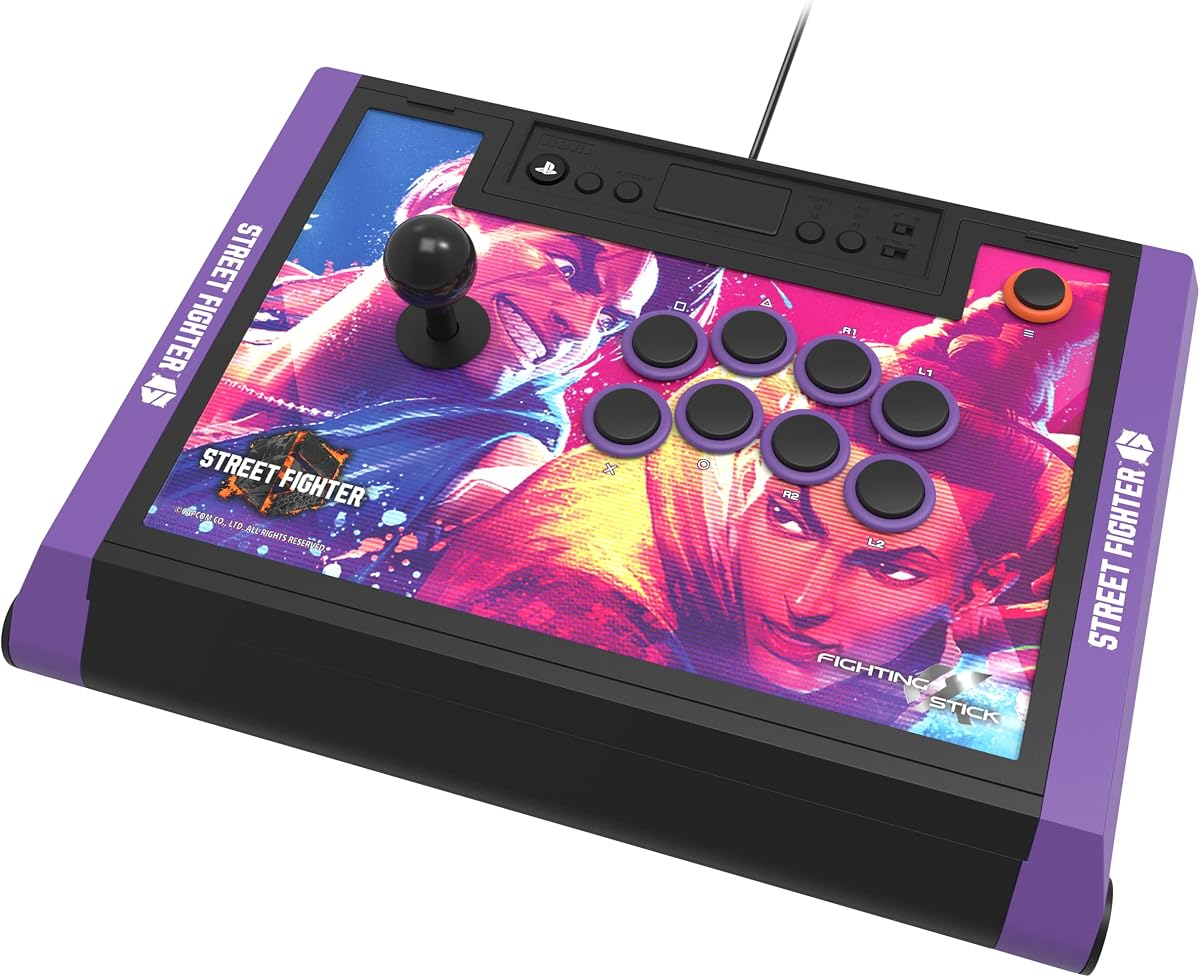
The HORI PlayStation 5 Fighting Stick Alpha Street Fighter 6 Edition is a visually stunning controller for fans of the series. With a rating of 4.5 stars it maintains the high performance standards of the Alpha line.
We may earn a commission when you buy through this link, at no additional cost to you.
Its standout feature is the dedicated Street Fighter 6 artwork which includes downloadable hi-res images for customization. The licensed partnership with Capcom adds authenticity and style to the unit.
While the thematic design may not appeal to all players the underlying hardware remains tournament grade. It offers the same reliability as the standard Alpha with a unique look.
This stick is perfect for Street Fighter enthusiasts who want a personalized and high-performance controller. It combines visual appeal with serious competitive functionality.
Access a library of character art to personalize the top panel to your liking.
Official Capcom and Sony licensing ensures quality and compatibility with official events.
We may earn a commission when you buy through this link, at no additional cost to you.
The Qanba Q7 Obsidian 2 offers a robust wired experience for PS5 and PC users. Rated at 4.3 stars it is designed for reliability and ease of use across different platforms.
We may earn a commission when you buy through this link, at no additional cost to you.
Key strengths include a dedicated switch to change between PS5 PS4 and PC modes which simplifies setup. The unit includes swappable Sanwa joystick tops for quick adjustments to feel.
One trade-off is the lack of wireless connectivity which may be a drawback for some users. However the wired connection ensures stable and lag-free performance which is critical for fighting games.
This model is ideal for players who prioritize a stable connection and official licensing. It provides a solid foundation for competitive play on PlayStation systems.
Quickly toggle between console modes without reconnecting cables or adapters.
Swappable tops allow for fine-tuning the joystick feel to your preference.
We may earn a commission when you buy through this link, at no additional cost to you.
The HORI PlayStation 5 Fighting Stick Alpha Tekken 8 Edition caters specifically to fans of the Tekken series. With a rating of 4.6 stars it delivers the same high performance as the standard Alpha model.
We may earn a commission when you buy through this link, at no additional cost to you.
Its standout feature is the Tekken 8 top panel artwork along with downloadable alternative artwork for printing. This attention to detail makes it a collectible item for fans.
While the specific theme may limit its appeal to other game fans the hardware remains tournament ready. It offers the same reliability and customization potential as other Alpha variants.
This stick is perfect for Tekken players who want a controller that matches their favorite game. It combines style with the serious performance needed for competitive play.
Download and print custom designs to refresh the look of your fight stick anytime.
Official licensing ensures that the design accurately represents the game's aesthetic.
We may earn a commission when you buy through this link, at no additional cost to you.
The GuileKeys GK-18 Leverless Arcade Stick offers a unique all-button design for fighting game enthusiasts. Rated at 4.3 stars it provides an affordable entry into leverless controls with extensive customization options.
We may earn a commission when you buy through this link, at no additional cost to you.
Key strengths include hot-swappable switches and RGB lighting which allow for personalization of both function and look. The input latency is under 1ms ensuring rapid response during gameplay.
A notable trade-off is the requirement for an additional converter to work on PS5 which adds to the total cost. There is also a learning curve for those used to traditional sticks.
This model is best for budget-conscious players who want to experiment with leverless controls. It offers a customizable and responsive experience at a very competitive price point.
Easily replace switches and keycaps without soldering to adjust the feel of your controller.
Fast input response ensures that your actions register instantly in game.
We may earn a commission when you buy through this link, at no additional cost to you.
Selecting the right arcade stick for PS5 involves understanding several key factors that affect performance and usability.
An officially licensed product ensures full compatibility with PS5 games and system updates. Non-licensed options may require adapters or firmware workarounds which can lead to connectivity issues.
Look for the PlayStation logo on the packaging to confirm official authorization.
The internal components such as buttons and joystick significantly influence input accuracy and durability. High-quality parts like Sanwa or Hayabusa are preferred for their tactile feel and longevity.
Prioritize models that use proven tournament-grade components for the best experience.
Wired connections offer the most stable input with zero latency which is ideal for competitive play. Wireless options provide convenience but should have low latency modes to avoid input lag.
Choose wired for tournaments and wireless for casual home use.
The ability to customize panels buttons or joystick types allows you to tailor the controller to your playstyle. Look for sticks that open easily and support common part standards.
Customization options add long-term value to your purchase.
If you play on multiple systems verify that the stick supports them without extra hardware. Some sticks require converters or specific modes to function correctly on different consoles.
Ensure the stick supports PS5 officially to avoid connection problems.
A sturdy construction withstands the rigors of intense gaming sessions. Look for reinforced joints quality materials and a stable base that does not slide around.
Durable builds ensure your investment lasts longer.
Many modern sticks include a 3.5mm audio jack for direct headset connection. This feature is useful for online chat and game audio without unplugging your controller.
Check if a mic input is included if you play multiplayer games.
Higher price often correlates with better materials and components but does not always mean better for your needs. Balance the cost with the features you truly require.
Determine your budget early and look for the best specs within that range.
To get started connect the arcade stick to your PS5 using the included USB cable. If the stick requires adapter modes switch to the correct setting using the mode switch or software.
Regularly clean the buttons and joystick with a soft dry cloth to maintain responsiveness. Avoid using liquids directly on the surface to prevent damage to internal electronics.
For long-term care store the stick in a cool dry place when not in use. If your model allows open the unit occasionally to remove dust and check for loose screws.
Most modern arcade sticks connect directly to the PS5 without needing an extra controller. However some older models or non-licensed sticks may require an adapter or controller dongle to function properly.
Yes many arcade sticks designed for PS5 are also compatible with PC. Check the product specifications to ensure support for Windows or macOS and verify if any software is needed for configuration.
Wireless connectivity is convenient for reducing cable clutter but wired connections generally offer lower latency. For competitive gaming a wired connection is often preferred to ensure precise input timing.
Use a soft dry cloth to wipe the surface of the buttons and joystick. Avoid using water or liquid cleaners directly on the unit. For deep cleaning open the case carefully and use compressed air.
Licensed sticks guarantee compatibility and support from the console manufacturer. They often have better build quality and fewer connectivity issues compared to unlicensed third-party options.
Many modern sticks allow you to map buttons using software on PC or directly via the controller settings. Check if the stick supports software mapping or hardware remapping for your PS5 games.
A lever stick uses a joystick for directional inputs while a leverless stick uses separate buttons. Leverless sticks can reduce input errors for some players but require a learning curve.
Most PS5 compatible sticks are plug and play and do not require drivers. Some advanced customization may need software on PC but the stick should work directly on PS5 out of the box.
Choosing the right arcade stick for PS5 depends on your budget and whether you prioritize official licensing or customization. The top picks offer a range of options from budget-friendly to premium tournament-grade units.
Focus on component quality and compatibility to ensure a smooth gaming experience. A stick that fits your playstyle will improve performance and enjoyment in fighting games.
Before purchasing always check current availability and specifications to confirm compatibility with your setup. Prices and stock levels change so verify details on the product page.