
SILVIP 2 Set HOTAS Desk Mount
4.5Editor score
Affordable two-pack pricing
Wide platform compatibility
Compact storage design
This guide compares the top 10 joystick hotas mounts for flight simmers, evaluating compatibility, stability, adjustability, and build quality to help you find
Flight simulation enthusiasts know that having the right equipment can make or break an immersive gaming session. A sturdy and reliable mount is essential for keeping your joystick and throttle secure during intense maneuvers. Without proper support, controls can wobble or shift, disrupting your focus and reducing realism in the cockpit environment.
We have carefully evaluated ten leading options available on the market today. Each product was assessed based on its construction quality, ease of installation, range of adjustment, and compatibility with popular flight control systems. Our goal is to provide a clear picture of what each mount offers to serious sim pilots.
This guide details the strengths and weaknesses of every pick so you can choose confidently. Keep in mind that availability and pricing may change over time due to market demand and seasonal promotions. We recommend verifying current stock and deals before making your final purchase decision online.
4.5Editor score

4.6Editor score

4.4Editor score
Below is a side-by-side comparison of all ten mounts included in this guide. We highlight key specifications for each to help you quickly identify which model fits your specific hardware and desk configuration needs.


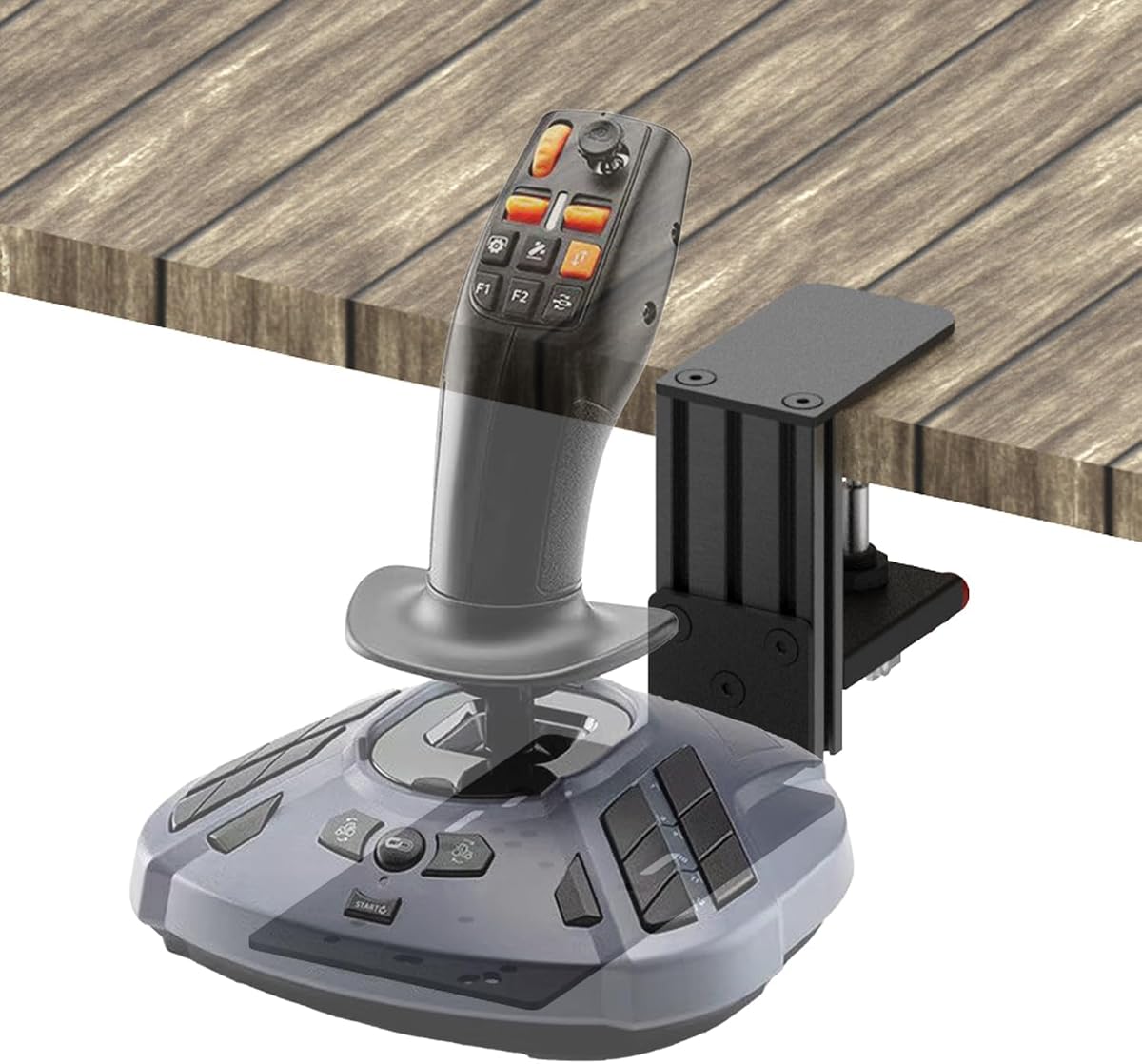

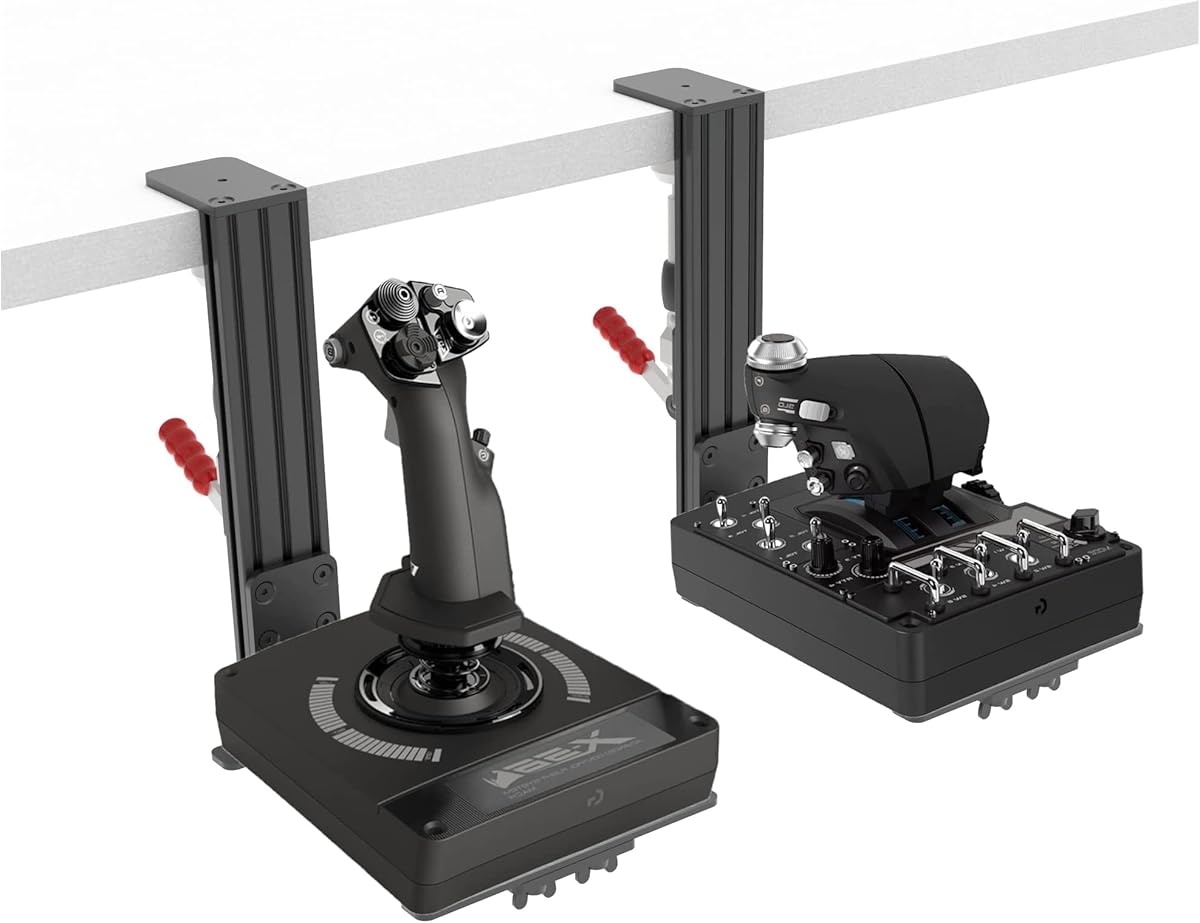
The Hikig 2 Set Desk Mount earns our top ranking for its robust design and broad compatibility. With a solid rating from users, it delivers a stable platform for most flight control hardware. This model supports nearly all major joystick and throttle configurations, making it a versatile choice for any sim enthusiast looking to upgrade their station.
We may earn a commission when you buy through this link, at no additional cost to you.
Its standout feature is the powerful 91N.m clamp force, which secures the mount firmly to desks of varying thickness. The ability to adjust height between -175mm and +175mm plus forward and backward positioning helps you achieve a comfortable reach without straining your arms. This level of customization significantly enhances immersion during long simulation sessions.
While generally reliable, some pilots note slight movement if aggressive maneuvers are performed on lighter desks. This is a minor trade-off given the price point and overall performance. The non-slip pads help protect your surface, but ensuring a flat and sturdy table edge will maximize effectiveness.
We recommend this mount for anyone seeking a balance of affordability and performance. It works well with Logitech, Thrustmaster, and VKB systems out of the box. For those building a dedicated flight station, this two-pack offers excellent value by allowing both stick and throttle to be positioned optimally.
The height and depth adjustment options let you align controls with your natural hand position. This reduces fatigue and allows you to focus more on flying and less on reaching for buttons.
Whether you use X56, T.16000M, or Warthog, this mount adapts to your setup. Its design avoids proprietary locking mechanisms, ensuring future hardware changes won't require new brackets.
We may earn a commission when you buy through this link, at no additional cost to you.
RACGTING offers a compelling budget option without sacrificing core functionality. This two-pack is designed to get your cockpit ready quickly while maintaining solid stability during gameplay. Users appreciate the near-zero-wobble performance that comes from the durable aluminum clamp system locking firmly onto your desk edge.
We may earn a commission when you buy through this link, at no additional cost to you.
The foldable feature is a major plus for shared spaces or offices where desk real estate is valuable. You can collapse the mounts in seconds to reclaim your work area after a flight session. Installation is straightforward and requires minimal tools, making it accessible even for beginners setting up their first rig.
One limitation is the need to check desk thickness carefully, as anything over 5.7 inches will not fit. Additionally, the metal clamps can leave marks if not used with the included pads. Taking these precautions ensures your furniture stays pristine while enjoying the ergonomic benefits of the mount.
For pilots on a tight budget who still want reliability, this model is an excellent pick. It pairs well with mainstream controllers like X52 and Warthog. The value gained from two units means you can position both throttle and stick independently for a balanced cockpit feel.
The ability to fold away makes this ideal for temporary setups. You can set it up in the morning and remove it by evening without hassle.
The aluminum clamp provides a rigid grip that resists shifting. This stability is crucial for precise control inputs during complex flight maneuvers.
We may earn a commission when you buy through this link, at no additional cost to you.
DIWANGUS stands out in the premium segment with superior adjustability and a robust build. This two-pack is engineered to fit a wider range of desk thicknesses up to seven inches, accommodating even sturdy executive tables. The 90% preassembled design reduces time spent fiddling with small parts before you can fly.
We may earn a commission when you buy through this link, at no additional cost to you.
Key strengths include the six-point-five-inch height adjustment and nearly six inches of front-to-back reach. These dimensions allow you to position controls exactly where your hands rest naturally. The iron and aluminum mix ensures durability without being overly bulky on smaller desks.
Although sturdy, the weight of the mount means it is not ideal for floating shelves or very light furniture. Some users have noted variations in bolt quality across different shipments. Ensuring all components are present before starting assembly will prevent delays and frustration.
We suggest this for serious simmers who want flexibility and longevity in their hardware. It handles Logitech X52 and Thrustmaster T.16000M with ease. The investment in this premium setup pays off in comfort and reduced strain during long simulation marathons.
Adjusting reach independently helps reduce awkward posture. This reduces shoulder and wrist strain significantly over time.
Most parts arrive pre-connected to save time. You only need to attach crossbars and your controller to begin using the mount immediately.
We may earn a commission when you buy through this link, at no additional cost to you.
Reashy focuses on combining lightweight construction with a comfortable user experience. The aluminum body keeps the profile clean and easy to handle while maintaining enough strength for typical gaming sessions. The enlarged rotary knob clamp design simplifies installation and disassembly compared to traditional screw mechanisms.
We may earn a commission when you buy through this link, at no additional cost to you.
One of its best features is the pre-assembly, which saves you from tedious work. You unfold the mount, install the bar type bracket, and you are ready to go. The height and distance adjustments allow you to tune the fit perfectly for your desk height and chair position.
Over time, the rotary knob may require occasional tightening if you frequently fold the mount. This is a common trait with quick-release designs but is easy to manage with a quick check. The included anti-slip pads help secure the clamp and protect your desk surface from scratches.
This mount is ideal for users who value ease of use and portability. It supports X52 and Warthog systems well. If you often set up and take down your rig, the quick-release mechanism makes this a strong contender for your setup needs.
Using aluminum reduces overall weight while keeping strength high. This makes moving the mount around easier without sacrificing durability.
The rotary knob allows fast clamping and unclamping. You can remove the bracket in seconds when switching to general desk use.
We may earn a commission when you buy through this link, at no additional cost to you.
SILVIP provides an affordable route into professional-style mounting with this two-pack set. It allows you to mount both throttle and joystick without occupying valuable desktop space. While some assembly is required, the process is manageable and the cost savings are significant compared to premium alternatives.
We may earn a commission when you buy through this link, at no additional cost to you.
The product claims compatibility with X52 and X52 Pro, but note that current X56 versions may need updates. Despite this, it supports a wide range of Thrustmaster and VKB hardware. The clamp design helps free up room for other peripherals like headsets or phones during your session.
Assembly can be a slight hurdle for those without tools or mechanical aptitude. Packaging size and transport costs influenced this design choice. Following the included instructions carefully will ensure your mount remains steady during active flying sessions.
This pick is best for budget-conscious pilots who still want a dedicated cockpit layout. It works well with Windows and console platforms alike. If you are willing to invest a few minutes in assembly, you get a clean and functional flight station at a low price.
Getting two mounts in one box saves money. This enables a full HOTAS setup without separate purchases for stick and throttle.
The mounts work across PC Xbox and PlayStation systems. This flexibility allows you to switch gaming consoles without buying new hardware mounts.
We may earn a commission when you buy through this link, at no additional cost to you.
The Meza Mount is built specifically for heavy-duty systems like the Thrustmaster Warthog. Its reinforced metal plates and aluminum profiles ensure that even high-end hardware does not cause shaking or shifting. This makes it a top choice for pilots who demand stability during aggressive maneuvering and combat simulation.
We may earn a commission when you buy through this link, at no additional cost to you.
The set includes two mounts to cover both stick and throttle independently. Height and position adjustments allow you to place controls where your hands feel most natural. This helps reduce clutter on your desk and improves access to critical buttons during intense scenarios.
Given the heavy-duty nature, it requires a desk that can support the extra weight. The price is higher than standard options but reflects the robust build quality. If you have a large desk or a dedicated desk space, this stability is worth the investment.
We recommend this for users with high-end gear who need absolute reliability. It is engineered to handle the stress of flight sim sessions without flexing. For those serious about immersion and hardware integrity, this model delivers the structural support needed.
Metal plates and profiles add significant rigidity. This ensures your heavy controls stay fixed in place even under stress.
Two mounts allow optimal placement for both stick and throttle. You can adjust each independently for a balanced cockpit feel.
We may earn a commission when you buy through this link, at no additional cost to you.
The Quick Release Desk Mount is designed for speed and versatility in setup. Its quick-release mechanism means you can clamp and unclamp the mount without tools. This is perfect for users who move their controls frequently between sessions or want to switch quickly from gaming to work.
We may earn a commission when you buy through this link, at no additional cost to you.
Crafted from metal alloy with a high-strength body, it ensures the mount holds up during active play. The included anti-slip stickers and screws make installation straightforward and secure. It supports several popular joysticks including Extreme 3D Pro and Turtle Beach VelocityOne.
A key limitation is the desk thickness constraint. If your table is thicker than 2.36 inches, this model will not clamp effectively. This excludes many executive or thick wooden desks. Check your edge thickness before purchasing to avoid fit issues.
This mount is best for those prioritizing flexibility and ease of use. If you have a thin to medium desk, the quick-release feature saves you minutes each day. It keeps your desktop clear and your controls steady while flying.
Installation happens without needing screwdrivers. The quick clamp locks in place firmly without requiring additional tools or effort.
Using metal alloy ensures longevity and rigidity. This prevents bending or warping over time under consistent use.
We may earn a commission when you buy through this link, at no additional cost to you.
This two-piece set stands out for its upgraded dual-clamp design that locks firmly from the top. Users have praised its outstanding stability, noting that it keeps your controls steady even during heavy use. The vertical adjustment ensures you can match the height to your seating position comfortably.
We may earn a commission when you buy through this link, at no additional cost to you.
The package includes two mounts allowing you to cover both throttle and stick. Compatibility includes X52, T.16000M, and VKB Gladiator models. You can optionally choose to attach anti-slip pads depending on your desk material for better grip or to avoid marks.
Be sure to check your desk thickness as anything over 2.36 inches will not work. Some users found the instructions brief but the assembly intuitive. Ensuring a flat edge on your desk will help the dual clamps perform their best.
We recommend this for those seeking stability and value in a two-pack. It is particularly effective for shared desks where quick setup and teardown is needed. The dual clamp structure offers a reliable grip that enhances your overall flight simulation experience.
The dual-clamp system holds the mount tight on all sides. This prevents shifting or sliding during active gameplay.
You can choose to use or skip the pads. This gives you control over how the mount grips your specific desk surface.
We may earn a commission when you buy through this link, at no additional cost to you.
This Hikig model uses a push-pull quick clamp that offers exceptional holding capacity up to 386kg. This strength means you can mount heavy setups without worrying about slippage. The design supports dual-handed users, meaning left or right-handed pilots can position the controls as they prefer.
We may earn a commission when you buy through this link, at no additional cost to you.
The bracket is adjustable vertically to suit desks between 0.2 to 5.3 inches thick. This flexibility helps fit a wider range of tables compared to rigid alternatives. Non-slip feet protect your surface while ensuring a firm grip during use.
Installing the clamp requires careful alignment to ensure the push-pull action locks fully. Users report it can feel stiff until correctly seated. Once set up, the stability is strong and reliable for most flight simulation needs without wobble.
We suggest this for users who prioritize holding strength and versatility. It works well with X56 and Warthog models. If you have a heavy setup and want to keep your hands free from holding the device, this clamp provides the security you need.
The 386kg capacity ensures your gear stays put. This is ideal for heavier throttle sticks or combined setups.
Vertical adjustment helps you match chair height. This improves comfort by reducing arm strain during flights.
We may earn a commission when you buy through this link, at no additional cost to you.
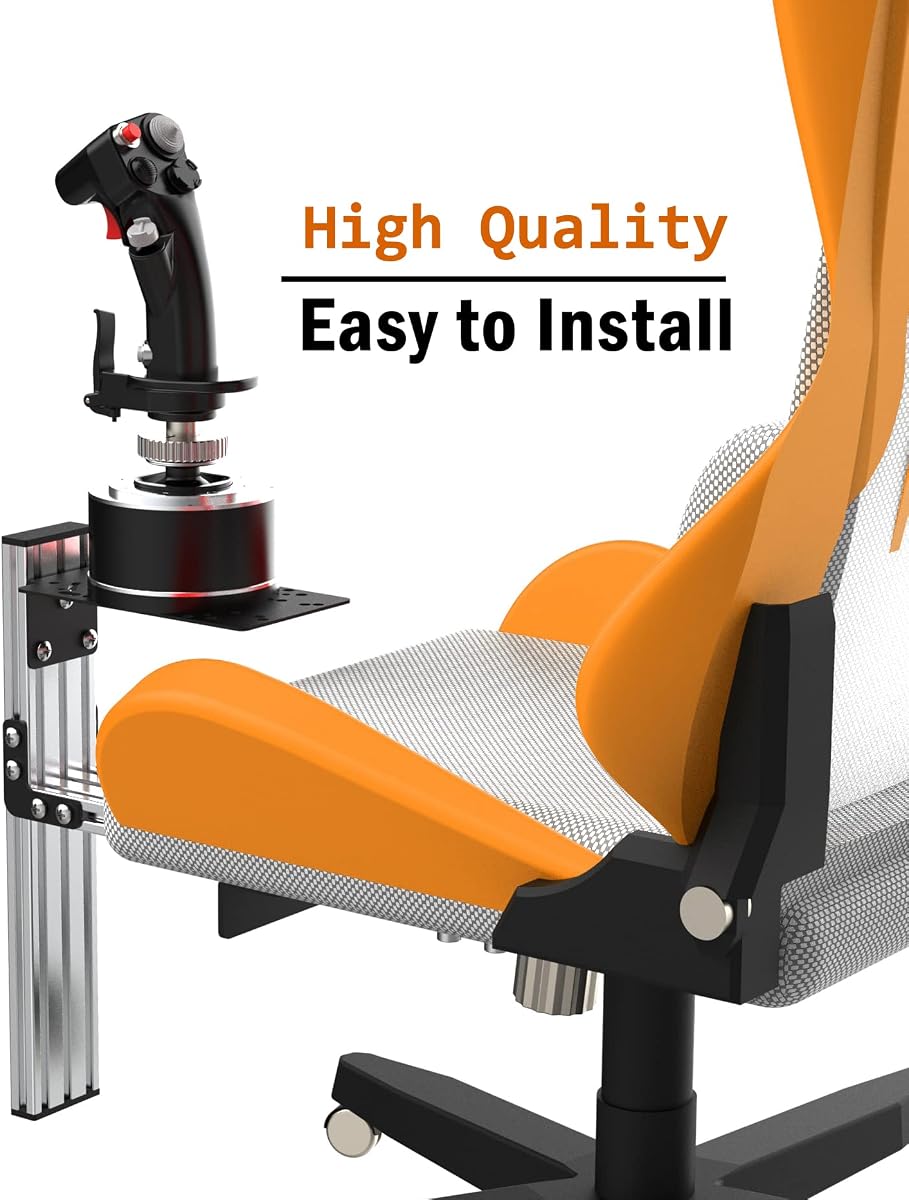
Fosiya offers a unique chair mount solution for those who prefer not to clamp to a desk. This mount connects to your chair bars using M8 heavy duty screws, providing a secure anchor point for your joystick. It works well with T-Flight Warthog and VKB Gunfighter models.
We may earn a commission when you buy through this link, at no additional cost to you.
You can adjust the height and left-right position to match your seating habits. This helps create a personalized cockpit feel that follows your movement. The design ensures you do not need to hold the stick, as it is firmly fixed to your seat.
Not all chairs are suitable. You need a chair with metal bars or a structure that can accept the screws. Check your chair compatibility before buying. Assembly involves following the manual and video steps carefully to ensure safety and stability.
We recommend this for pilots building a true chair cockpit setup. It offers a distinct experience compared to desk clamps. If you want controls that move with you and reduce desk clutter, this chair mount provides a solid foundation.
Mounting to the chair lets you fly without desk clutter. This creates a more organic and connected flying experience.
You can tweak position to suit your chair. This adaptability helps maintain comfort and control alignment.
We may earn a commission when you buy through this link, at no additional cost to you.
Selecting the right mount depends on your hardware and desk environment. Below are key factors to evaluate before you buy.
Ensure the mount supports your specific joystick and throttle models. Most mounts list brands like Logitech, Thrustmaster, and VKB, but you should verify exact fits like X52 or Warthog. Using an incompatible mount can lead to loose connections or inability to attach the hardware securely.
Look for a broad compatibility list to allow future upgrades.
The clamp mechanism must hold your gear firmly. Check for high clamping force or holding capacity ratings such as 386kg. A weak clamp may shift during aggressive maneuvers, causing distractions. A strong clamp ensures your stick stays in place under pressure.
Prioritize metal or reinforced clamps over plastic ones for reliability.
Measure your desk edge thickness before purchasing. Most mounts fit between 0.2 to 5.7 inches. Some budget models may be limited to 2.36 inches. Ensure your table edge is flat and sturdy enough to support the weight of the mount and controller.
Select a model that matches your desk dimensions to avoid return issues.
A good mount should offer height and reach adjustments. This allows you to align controls with your hands and eyes naturally. Adjustable brackets help reduce strain during long sessions. Look for vertical height and front-to-back positioning options.
Higher adjustability provides better comfort for diverse users.
Materials like aluminum and metal profiles indicate durability. Lightweight aluminum saves space but metal offers strength. Avoid cheap plastics that may bend under the load. Quality construction ensures the mount lasts through repeated use and folding.
Choose metal components for heavy-duty flight setups.
Some mounts are preassembled or foldable for quick setup. If you share a desk, a foldable or quick-release design helps you reclaim space. Avoid models requiring complex tools or multiple steps if you value simplicity. Check if screws are included in the kit.
Fast assembly saves time and reduces frustration during initial setup.
Non-slip pads are important to prevent scratches on your desk. Look for models that include rubber or silicone pads. Some designs allow you to remove pads for better grip on certain surfaces. This ensures your furniture stays protected while maintaining a secure hold.
Always use protective pads to avoid cosmetic damage to your table.
Review what is included in the box. Some 2-packs may require partial assembly of crossbars or brackets. If you lack technical skills, a fully preassembled option is better. Check instructions and videos to estimate your setup time before buying.
Preassembled products offer a smoother start for non-technical users.
To install your mount, first ensure your desk edge is clean and flat. Use the included pads to protect the surface. Position the clamp near the edge and tighten it until secure. Do not overtighten as this may damage the table or clamp threads over time.
Attach your joystick or throttle to the mount using the provided hardware. Verify that all screws are snug but not stripped. Adjust the height and position so your hands rest naturally. Test for wobble before starting a flight session to ensure stability.
Regularly check the clamp and screws for looseness. If your mount includes a quick-release knob, inspect it for wear. Clean the metal parts with a dry cloth to prevent dust buildup. Folding or disassembling the mount when not in use helps maintain its mechanical integrity.
Yes, many models support heavy throttles like the Warthog. Look for high clamping force and metal construction. Some mounts explicitly state compatibility with such systems. Verify weight capacity before purchase to ensure stability.
Most mounts fit desks between 0.2 to 5.7 inches thick. Budget options may limit to 2.36 inches. Measure your edge carefully before buying. A flat and sturdy edge ensures the best performance.
Many include all necessary screws. Some designs allow tool-free installation. However, basic tools may speed up the process. Check product details for required tools.
Some models offer dual-handed support. Others have adjustable positioning. If you are left-handed, verify the clamp orientation. Flexible designs work for both hands.
Non-slip pads usually protect surfaces. Some designs allow you to remove pads for grip. Use the included accessories to avoid scratches. Ensure the surface is clean before clamping.
Foldable designs exist for space saving. Check if your model supports folding. Folding helps store the mount quickly. Ensure it locks properly when in use.
Most mounts list T.16000M compatibility. Check the product description to confirm. Many support Thrustmaster systems well. Verify exact model numbers before buying.
Check screws regularly for tightness. Avoid excessive force during adjustment. Replace worn parts if needed. Periodic checks ensure continued stability.
We have reviewed ten excellent mounts ranging from affordable options to heavy-duty builds. The Meza Mount stands out for heavy hardware, while SILVIP offers great value. Each pick caters to different needs and desk configurations.
When choosing, prioritize stability and compatibility. Ensure your desk thickness matches the clamp limits. Adjustable features and quality materials will improve your long-term experience. Select a model that fits your flight hardware and space.
Please note that prices and availability fluctuate. We recommend checking current listings before making your purchase. This ensures you get the best deal and that the model remains in stock. Happy flying with your new cockpit setup.