
GE BigEZ OneTouch Big Button Universal TV Remote
4.3Editor score
Backlit buttons for visibility
Colorblind-friendly design
Support included
This guide compares the best Easy to Use TV Remote for Seniors options focusing on large buttons, simple layouts, and accessibility features for elderly users.
Finding the right television control can be challenging for older adults who struggle with small buttons or complex menus. A good remote should offer large tactile keys, clear labeling, and straightforward functionality to reduce frustration during daily use.
We analyzed ten top-rated models designed specifically for seniors and those with limited dexterity or vision. Our comparison focuses on ease of setup, button layout, compatibility with major TV brands, and overall user feedback from caregivers and elderly users.
Each pick below highlights key strengths and potential limitations to help you choose the right device for your needs. Please note that product availability and pricing can change over time so verify details before purchasing.
4.3Editor score
4.2Editor score

4.4Editor score
The following table provides a side-by-side overview of key specifications and features for each of the ten remotes reviewed in this guide to help you compare them quickly.


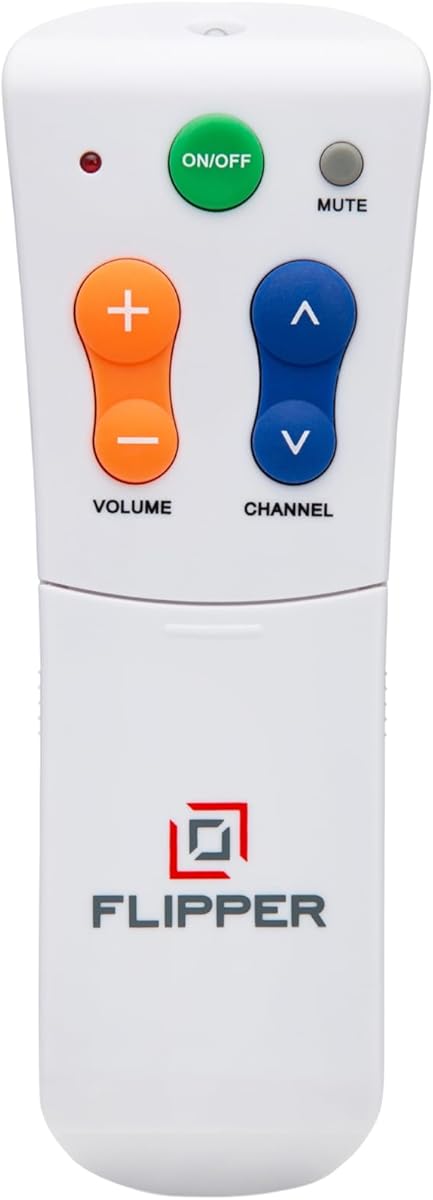
The Flipper remote stands out as a top choice for seniors who need a simplified viewing experience. With a 4.2 rating from users, it offers a unique four-button design that eliminates the confusion of standard remotes.
We may earn a commission when you buy through this link, at no additional cost to you.
Its large color-coded buttons for power, volume, channel, and mute make it easy to see and press even with low vision or arthritis. The ability to program up to twenty-five favorite channels means users can cycle through shows without remembering numbers or navigating menus.
While it does not support streaming app navigation which limits its use for smart TV users, this limitation ensures simplicity for traditional broadcast or cable setups. The hidden buttons allow caregivers to customize the experience without cluttering the main face.
This remote is ideal for caregivers seeking to restore independence to elderly loved ones with cognitive or physical challenges. It prioritizes core functions and reduces frustration making daily entertainment accessible and stress-free.
The four main buttons reduce cognitive load allowing seniors to operate the TV without confusion or memory strain.
Hidden slide buttons let family members preset favorite channels ensuring quick access to preferred content.
We may earn a commission when you buy through this link, at no additional cost to you.
The GE BigEZ remote offers excellent value for those seeking a reliable and affordable solution. With a 4.3 rating, it features large white buttons that are easy to locate and fully backlit for low light visibility.
We may earn a commission when you buy through this link, at no additional cost to you.
Its colorblind-friendly design uses blue for volume and orange for channels ensuring clear distinction without relying solely on text labels. The OneTouch setup process simplifies programming by allowing users to select their TV brand quickly.
Though it supports only five major TV brands and Roku the coverage includes the most common models found in homes today. The inclusion of U.S.-based technical support adds peace of mind for users needing assistance.
This remote is a strong recommendation for budget-conscious buyers who need a straightforward replacement for standard TVs. It balances cost functionality and accessibility effectively for everyday use.
Fully illuminated buttons allow easy use in dark rooms without needing a separate light source.
Preset buttons for common brands remove the need for complex code entry during setup.
We may earn a commission when you buy through this link, at no additional cost to you.
This Samsung-specific remote delivers premium convenience with its self-illuminating buttons that stay lit for thirty seconds after pressing. With a 4.4 rating it eliminates the struggle of finding keys in the dark making it ideal for night viewing.
We may earn a commission when you buy through this link, at no additional cost to you.
The remote works right out of the box without any pairing or programming which saves time and reduces setup frustration. It includes a soft silicone protective cover to prevent drops and spills along with a wall mount hook for easy storage.
While its functionality is limited to Samsung smart TVs it offers robust features like a long range and fast response time for seamless control. The ergonomic design ensures a comfortable grip for users with limited hand strength.
This is the best choice for Samsung owners who want a high-end accessible remote with minimal hassle. The included accessories and lighting features provide added value and protection for daily use.
Buttons light up when pressed to provide visibility without needing manual activation or external lights.
No programming steps are required allowing immediate use once batteries are inserted.
We may earn a commission when you buy through this link, at no additional cost to you.
The EZclicker remote emphasizes physical feedback to help users confirm presses without looking. It holds a 4.2 rating and features large buttons with a textured surface that provides clear sensation when pressed.
We may earn a commission when you buy through this link, at no additional cost to you.
Its compact dimensions make it easy to hold and store which is helpful for seniors with limited grip strength or small hands. Programming is straightforward requiring only a simple button hold sequence to pair with the TV.
Although it lacks lighting and does not support streaming devices it remains a reliable tool for basic television control. The focus on tactile feedback benefits those who rely on touch rather than sight to operate devices.
This remote is recommended for users who prioritize physical feedback and portability over advanced features. It serves as a straightforward accessible option for everyday TV usage.
Physical button response helps users confirm actions without needing to see the keypad clearly.
Small and light construction makes it easy to carry or store when not in use.
We may earn a commission when you buy through this link, at no additional cost to you.
This version of the EZclicker simplifies the experience further by focusing on essential functions with a clean layout. It maintains a 4.2 rating and is designed for those who find standard remotes too cluttered to manage.
We may earn a commission when you buy through this link, at no additional cost to you.
The remote provides tactile feedback on buttons to assist users with vision loss or cognitive decline. Its small size ensures it fits comfortably in the hand and does not add bulk to furniture surfaces.
Users should verify TV compatibility as it works on top brands but excludes streaming sticks and boxes. Despite this limitation it remains a solid choice for traditional television setups needing simplicity.
Ideal for seniors with cognitive challenges this remote reduces confusion through streamlined design. It supports independence by allowing straightforward control without overwhelming options.
Fewer buttons reduce visual clutter and help users focus on core functions like power and volume.
The simplified interface helps individuals with dementia or memory issues operate the TV independently.
We may earn a commission when you buy through this link, at no additional cost to you.
This remote stands out by working right out of the box without requiring any setup steps or code entry. With a 4.4 rating users appreciate the convenience of inserting batteries and immediately controlling their television.
We may earn a commission when you buy through this link, at no additional cost to you.
It supports a wide range of TV brands including Samsung LG and Sony making it versatile for many households. The extra-large enter button adds an accessible feature for navigation tasks that might otherwise be difficult.
While it does not support streaming devices or offer backlighting its universal compatibility and simplicity make it practical for daily use. The tactile feel ensures that button presses are registered reliably.
This remote is an excellent option for users who want a no-fuss replacement with broad brand coverage. It simplifies the process of setting up a new remote significantly.
Batteries inserted and ready to use without any pairing or configuration steps.
Works with many major TV brands ensuring it fits most standard home entertainment setups.
We may earn a commission when you buy through this link, at no additional cost to you.
This remote is designed with a focus on visibility and comfort for low vision users. It has earned a 4.4 rating due to its large clearly marked buttons that reduce the chance of accidental presses.
We may earn a commission when you buy through this link, at no additional cost to you.
The layout is straightforward with essential controls grouped logically to prevent confusion. The body is lightweight and ergonomic which helps those with arthritis or limited hand mobility use it comfortably.
It works with most major TV brands but is intended for traditional sets rather than streaming devices. The sturdy build ensures it can withstand daily handling over time.
Recommended for seniors who need a highly visible and easy to hold remote this model delivers on simplicity. It helps reduce stress during daily viewing by making buttons easy to find.
Large buttons with clear labels help users with low vision identify functions quickly.
Lightweight and shaped design fits comfortably in the hand for extended use without strain.
We may earn a commission when you buy through this link, at no additional cost to you.
The Philips BigEZ remote offers a blend of accessibility and functionality with a backlit keypad. It holds a 3.8 rating and supports five major TV brands alongside basic streaming device control.
We may earn a commission when you buy through this link, at no additional cost to you.
Its OneTouch setup simplifies the pairing process while colorblind-friendly buttons help distinguish between functions visually. The remote allows control of additional devices like soundbars or set-top boxes which adds versatility.
Some users report a steeper learning curve compared to simpler models so caregivers may need to assist with initial setup. However the backlit feature and brand support make it useful for varied setups.
This remote is a good middle-ground for households needing both TV and simple streaming control. It balances accessibility with extra features though it may require more effort to configure.
Simplified pairing process reduces the time and effort needed to get the remote working.
Illuminated keypad helps users see buttons in low light without external assistance.
We may earn a commission when you buy through this link, at no additional cost to you.
This remote focuses on delivering a no-frills accessible replacement for standard TVs. It has a 3.0 rating and features oversized buttons that are easy to identify and press for everyday use.
We may earn a commission when you buy through this link, at no additional cost to you.
The layout is simplified to reduce confusion which benefits those with memory challenges or limited vision. It works with many major TV brands and offers basic functions without extra complexity.
Users note it lacks lighting or streaming support so it is best suited for traditional television viewing. The low price and basic design make it a practical option for specific needs.
Ideal for those who need a simple accessible remote without advanced features this model provides reliable control. It helps reduce daily frustration by offering a clear and straightforward interface.
Fewer buttons help minimize confusion and focus on essential viewing tasks.
Low cost makes it accessible for buyers needing a basic remote without high expense.
We may earn a commission when you buy through this link, at no additional cost to you.
The Anderic remote is distinguished by its glow-in-the-dark keys which aid use in dark environments. With a 4.0 rating it offers a minimalist control set that avoids unnecessary complexity.
We may earn a commission when you buy through this link, at no additional cost to you.
It includes a learning function that allows copying commands from existing remotes which can be useful for adding specific inputs. The design focuses on core functions like power volume and channels to reduce errors.
Setup can sometimes require assistance for less familiar brands but once configured it operates reliably. The lack of RF or Bluetooth compatibility limits use with newer streaming devices.
This remote is well suited for users who need visibility in low light and a simple control scheme. It provides a practical solution for basic television control without advanced connectivity needs.
Buttons absorb light and glow in dark rooms making them easy to locate without external light.
Can learn commands from other remotes to add specific functions like input switching.
We may earn a commission when you buy through this link, at no additional cost to you.
Selecting the right remote involves considering vision needs, dexterity, and the types of devices used at home.
Look for remotes with large tactile buttons that are spaced apart to prevent accidental presses. Clear labeling and high contrast colors help users with vision impairment identify functions quickly.
Choose models with a simple layout that avoids cluttered menus or unnecessary options.
Remotes with preset brand buttons or automatic pairing save time and reduce frustration during installation. Avoid models requiring complex code entry unless supported by caregivers.
Prioritize options with clear instructions or U.S. support to resolve issues easily.
Backlit or glow-in-the-dark keys are essential for seniors who watch TV in low light conditions. These features eliminate the need for a separate lamp when changing channels.
Ensure the lighting stays on long enough to be useful after a button press.
Verify that the remote works with your specific TV brand and any cable or satellite boxes. Some models are universal for TVs only while others may support basic cable functions.
If using streaming devices ensure the remote supports navigation or accept that traditional functions may be limited.
Check whether the remote uses AA or AAA batteries and how long they typically last. Remotes with efficient power management reduce the frequency of changes.
Models with low battery indicators help prevent unexpected power loss during use.
A lightweight and comfortable shape helps users with limited grip strength or arthritis hold the remote securely. Rounded edges and textured grips prevent slipping.
Consider weight and balance to ensure the device does not strain the hand during long sessions.
Some remotes offer customizable favorite channels or protective covers which add value for specific needs. Evaluate whether extra functions simplify or complicate the user experience.
Choose features that match the daily habits of the intended user to enhance utility.
Reading feedback from other caregivers and seniors provides insight into real-world usability and common issues. Reliable customer support can help troubleshoot problems effectively.
Look for brands with a reputation for accessibility and responsive service to ensure long-term satisfaction.
Start by inserting fresh batteries and testing the power button to confirm the remote is working. Point the remote directly at the TV and press buttons firmly to ensure proper signal transmission.
Keep the remote in a consistent location such as a side table or dedicated holder to avoid losing it. If the remote includes a protective cover or hook use these accessories to prolong its life.
Clean the buttons regularly with a dry cloth to remove dust or oils that could interfere with tactile feedback. Store it away from direct sunlight and moisture to maintain performance over time.
Most models in this guide are designed for traditional TVs and do not support streaming app navigation. Some like the GE BigEZ can control Roku devices for basic functions but cannot navigate menus. Always check product specifications before buying.
Yes some models like the Flipper allow programming favorite channels to simplify access. Other remotes offer basic button presets to avoid complex menu navigation. Customization depends on the specific model chosen.
A few options support basic cable or satellite control alongside the TV but many are TV only. The Flipper remote for example works with both TV and cable boxes. Confirm compatibility before purchase.
Most models use either AA or AAA batteries which are typically not included. Check the product description to see which type is needed before purchasing. Battery life varies by usage frequency.
Several options like the Backlit Big Button and Philips BigEZ include backlit keys for dark rooms. These features help users see buttons without turning on a separate light. Look for models with this specific function if lighting is a concern.
Many remotes feature simple setup processes like OneTouch or automatic pairing to minimize effort. Some may still require initial help from a caregiver especially for brand selection. Instructions are usually clear and step-by-step.
The top picks including the Flipper, GE BigEZ, and Backlit Samsung Remote offer excellent solutions for different needs ranging from simplicity to lighting features. Each model brings unique strengths tailored to enhance accessibility and independence for seniors.
Prioritize features that match the user's specific challenges such as vision loss or limited dexterity. A remote that balances simplicity with the necessary functionality will provide the most value over time.
Always check current product details and reviews before making a final decision to ensure compatibility and availability. The right remote can greatly improve daily entertainment by reducing frustration and simplifying control.