
ASRock Intel Arc Pro B60 Creator 24GB Graphics Card
3.9Editor score
24GB GDDR6 Memory
Intel Xe2-HPG Architecture
PCIe 5.0 Support
This guide compares the top ten GPUs for large language models, evaluating memory capacity, architecture, and performance for local AI inference and training
Choosing the right GPU for large language models is critical for developers and enthusiasts. You need sufficient memory and architecture to handle massive datasets efficiently without bottlenecks during inference.
We analyzed ten top products based on architecture, memory capacity, and cooling. Our team reviewed specifications and user feedback to identify the most capable cards for running LLMs locally and effectively.
Each pick highlights key strengths and trade-offs for your specific workflow. Prices and availability change frequently, so verify current details before purchasing to ensure you get the best value for your setup.
3.9Editor score

4.6Editor score

4.3Editor score
The following table compares key specifications across all ten GPUs to help you evaluate memory, architecture, and connectivity options for your AI workload requirements.


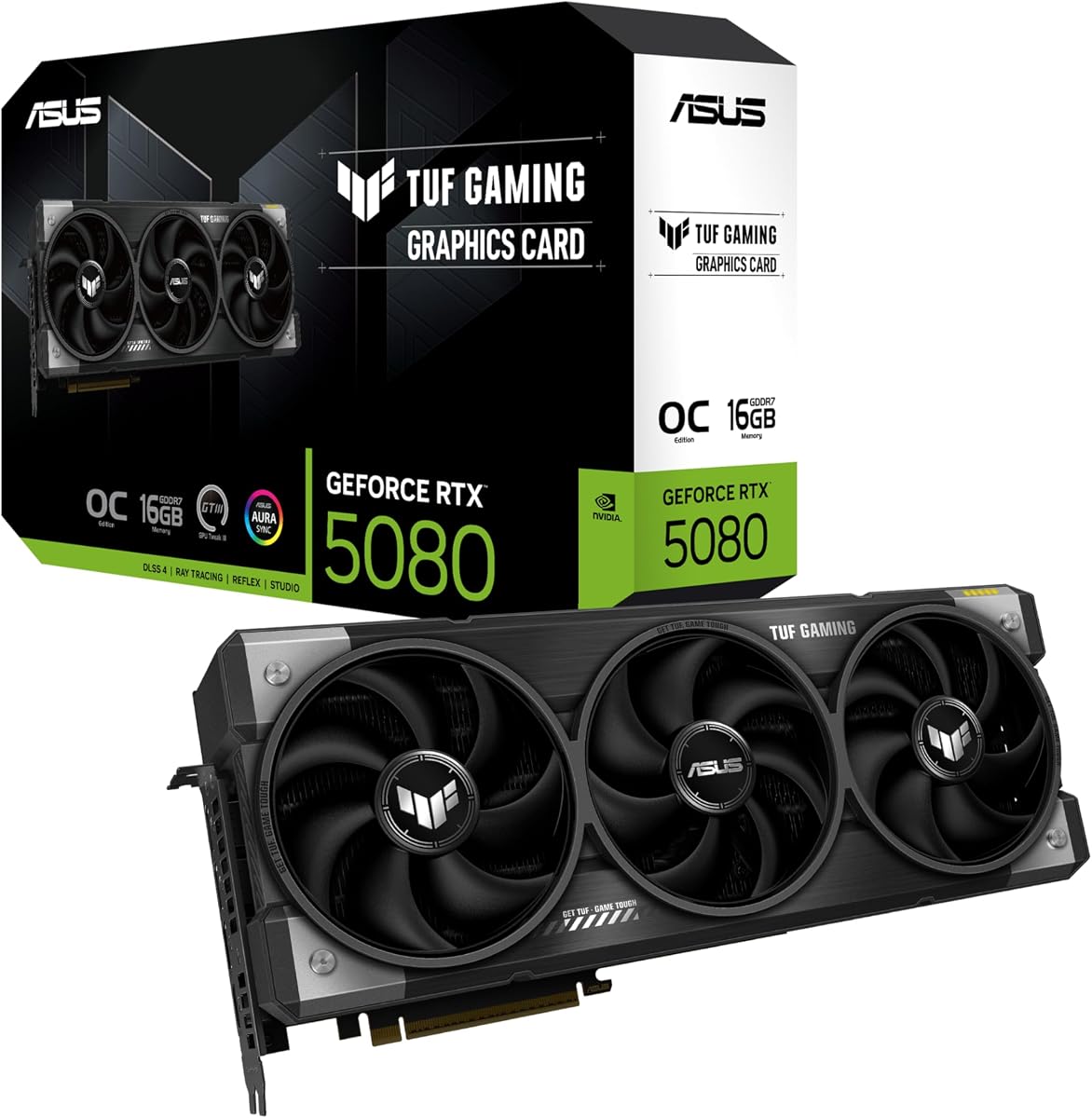


This GPU stands out as a top choice for local AI tasks. It offers high performance with strong ratings from users who need reliable inference speed for their models.
We may earn a commission when you buy through this link, at no additional cost to you.
The NVIDIA Blackwell architecture provides significant improvements in AI throughput. With 16GB of GDDR7 memory, you can load larger models without frequent offloading to system RAM, which maintains smooth operations.
Some users note that the card draws more power than previous generations, requiring a robust power supply. The cooling system is effective but can be audible under heavy sustained loads.
If you prioritize speed and compatibility with mainstream AI frameworks, this card delivers. It is an excellent choice for developers who need consistent performance without building a custom cluster.
New tensor cores and architecture updates boost throughput significantly for transformer-based models and real-time inference tasks.
The WINDFORCE cooling system keeps thermal throttling at bay during long inference sessions while maintaining reasonable noise levels for office environments.
We may earn a commission when you buy through this link, at no additional cost to you.
This card offers compelling value for those needing large memory on a budget. Its 24GB VRAM allows you to run moderately sized models locally without needing expensive high-end alternatives.
We may earn a commission when you buy through this link, at no additional cost to you.
The Xe2-HPG architecture includes XMX engines designed for AI acceleration. While it may not match NVIDIA's raw efficiency yet, it provides a viable entry point for experimenting with local inference.
Software compatibility continues to improve but may require manual configuration for some open-source tools. Users should verify driver support for their specific AI frameworks before purchasing.
Ideal for hobbyists and small labs looking to scale memory capacity cost-effectively. It is a solid choice if you prioritize VRAM size over peak benchmark scores.
At 24GB, this card offers more VRAM per dollar than many competitors, making it ideal for loading larger context windows without extra hardware.
Optimized for Linux multi-GPU deployments, allowing users to chain multiple cards for increased capacity when running larger models in parallel.
We may earn a commission when you buy through this link, at no additional cost to you.
Designed for professional AI workloads, this card delivers robust performance with significant memory capacity. It is built to handle sustained inference loads in workstation environments reliably.
We may earn a commission when you buy through this link, at no additional cost to you.
The 32GB GDDR6 memory enables you to load larger quantized models directly into VRAM. Combined with RDNA 4 AI accelerators, it supports efficient computation for local tasks.
Users may find driver tools less mature compared to other mainstream brands. The blower cooler is efficient for multi-GPU setups but may run louder than traditional fans.
Best suited for professionals who need large VRAM and stable operation for daily tasks. It is a strong contender for workstations where reliability and capacity are key.
Enterprise-grade thermal solutions ensure the GPU maintains stable performance during extended training or inference sessions without throttling.
PCIe 5.0 and modern outputs ensure rapid data movement between CPU and GPU, reducing bottlenecks when loading large model weights.
We may earn a commission when you buy through this link, at no additional cost to you.
This card balances performance and cost for general computing tasks. While primarily a gaming card, it offers enough power to handle smaller AI models effectively.
We may earn a commission when you buy through this link, at no additional cost to you.
The WINDFORCE cooling system ensures the card stays cool under load. Server-grade thermal gel helps maintain efficiency during long periods of active inference or computation.
AI-specific accelerators are less pronounced than dedicated workstation cards. You may need to tweak settings to optimize performance for non-gaming workloads.
If you already use this card for gaming, it doubles well for light AI tasks. It is a practical choice for enthusiasts who want versatility without buying separate hardware.
Advanced thermal conductive gel ensures heat moves away from the core quickly, maintaining clock speeds during sustained usage.
Suitable for both creative tasks and local inference, making it a flexible addition to multi-purpose workstation builds.
We may earn a commission when you buy through this link, at no additional cost to you.
Known for robust construction, this card is built to withstand heavy use. It delivers consistent performance for AI inference with a focus on reliability and longevity.
We may earn a commission when you buy through this link, at no additional cost to you.
Military-grade components and protective PCB coating help prevent damage from dust or moisture. This ensures stability in environments where conditions may vary over time.
The card requires significant clearance and power due to its 3.6-slot design. Verify your case fits before purchasing to avoid installation issues.
Ideal for users who prioritize hardware durability in high-usage workstations. It is a dependable option for teams needing reliable performance over multiple years.
Protective coatings and military-grade components extend the lifespan of the card, making it suitable for 24/7 operation.
Phase-change thermal pads outlast traditional paste, ensuring consistent cooling performance throughout the card's lifecycle without degradation.
We may earn a commission when you buy through this link, at no additional cost to you.
This card is explicitly designed for running LLMs locally. It provides ample memory and accelerators to handle complex models without offloading to system RAM.
We may earn a commission when you buy through this link, at no additional cost to you.
Diecast shrouds help lower memory temperature by significant margins, keeping clocks steady during long training runs. The phase-change thermal pad ensures consistent heat transfer.
While powerful, some users report driver compatibility issues with certain frameworks. Checking community reports before buying can prevent potential setup headaches.
Best for developers who need dedicated local clusters for inference. It offers a practical path to scaling AI workloads on a desktop server.
PCIe 5.0 and 2-slot design support dense multi-GPU builds, allowing you to combine multiple cards for massive model sizes.
Wave-pattern cooling and phase-change pads reduce memory temperatures significantly, maintaining performance during extended inference periods.
We may earn a commission when you buy through this link, at no additional cost to you.
Ideal for small form factor PCs, this card fits easily in tight chassis. It offers surprisingly high memory for its size, enabling small-scale local AI experiments.
We may earn a commission when you buy through this link, at no additional cost to you.
The 0dB technology allows silent operation during light tasks. Dual BIOS lets you toggle between performance and quiet modes depending on your current needs.
Performance is limited compared to larger cards. You may need to quantize models aggressively to run them comfortably within the memory constraints.
Best for users with space constraints who still need AI capabilities. It is a practical choice for edge devices or small office setups.
At 2.5 slots, this card maximizes cooling efficiency in small cases, making it perfect for compact workstations.
0dB technology stops fans at low loads, ensuring silent operation when running light inference tasks in quiet environments.
We may earn a commission when you buy through this link, at no additional cost to you.
This accelerator is built for datacenter environments where reliability is key. The massive VRAM allows you to run large models without complex distributed training setups.
We may earn a commission when you buy through this link, at no additional cost to you.
Without display outputs, it relies on CPU rendering for monitoring. It requires specific server chassis and power configurations to function correctly.
Users should ensure their infrastructure supports PCIe accelerator cards. It is not designed for consumer desktop cases without modification.
Best for enterprises needing dedicated AI hardware for inference clusters. It offers the memory density required for heavy enterprise workloads.
Designed for high-density racks, this card supports large-scale inference clusters requiring massive aggregate memory.
Optimized for deep learning workloads, providing consistent performance for complex AI tasks over long periods.
We may earn a commission when you buy through this link, at no additional cost to you.
This workstation GPU offers massive capacity for local AI models. The 96GB memory allows you to run huge models with full precision without complex workarounds.
We may earn a commission when you buy through this link, at no additional cost to you.
ECC memory ensures data integrity for critical data science tasks. The Max-Q design fits standard desktops while maintaining high performance levels.
It is a significant investment requiring specialized procurement. You must verify export compliance if you are outside the US.
Best for research labs needing desktop-level access to massive models. It bridges the gap between server power and workstation convenience.
ECC memory prevents data corruption during long training runs, ensuring accuracy for mission-critical research and data science projects.
Eliminates the need for cloud resources for massive models, enabling local execution and full data sovereignty.
We may earn a commission when you buy through this link, at no additional cost to you.
Representing the peak of workstation performance, this card enables multiple isolated GPU instances for concurrent workloads. It is designed for teams needing secure resource isolation.
We may earn a commission when you buy through this link, at no additional cost to you.
The 96GB memory allows complex multi-modal models to run natively. Universal MIG lets you partition the card into smaller instances for different users.
Requires strict export compliance checks before ordering. Packaging is bulk OEM, meaning no retail accessories are included with the card.
Ideal for enterprises needing the highest compute density and isolation. It is the ultimate choice for professional AI development and simulation teams.
MIG support allows multiple users to access the GPU securely, partitioning resources into isolated instances for concurrent workflows.
With 5th Gen Tensor cores and 1.8 TB/s bandwidth, this card delivers unmatched speed for the most demanding AI tasks.
We may earn a commission when you buy through this link, at no additional cost to you.
Selecting the right GPU involves balancing memory, architecture, and budget. This guide breaks down the critical factors to help you make an informed decision.
VRAM capacity is the most critical factor for running LLMs. If a model exceeds available VRAM, it must offload to system RAM, which drastically slows down inference. Aim for at least 16GB for entry-level work, and 32GB or more for larger models.
Prioritize GPUs with the highest memory capacity within your budget to ensure smooth model loading and faster token generation.
The underlying architecture determines AI efficiency. Modern NVIDIA Tensor cores and AMD AI accelerators are optimized for matrix multiplication tasks found in transformers. Newer generations offer better precision support and throughput.
Choose cards with dedicated AI accelerators to maximize throughput and minimize latency during inference tasks.
Bandwidth affects how quickly the GPU can access stored data. Higher bandwidth reduces bottlenecks when loading large model weights. GDDR7 and high-speed GDDR6 offer significant advantages over older memory types.
Select GPUs with wide bus widths and fast memory interfaces to support rapid data transfer for complex models.
PCIe 5.0 offers double the bandwidth of PCIe 4.0, reducing bottlenecks when moving data between CPU and GPU. This is crucial for large models that require frequent data swaps.
Ensure your motherboard supports the PCIe version of your chosen card to maximize potential throughput and reduce latency.
AI inference can run continuously for hours. Proper cooling prevents thermal throttling and ensures consistent clock speeds. Blower coolers are better for multi-GPU setups while axial fans are quieter for single GPU use.
Consider your chassis size and airflow needs when choosing between blower and axial fan designs to maintain stable performance.
Software maturity matters. NVIDIA has extensive support for mainstream AI libraries, while other architectures may require more configuration. Check if your required frameworks are optimized for the GPU.
Verify software compatibility with your specific frameworks before purchasing to avoid complex installation hurdles.
High-end cards draw significant power. Ensure your PSU has the required wattage and the correct connectors. Insufficient power can cause instability during heavy loads.
Check your power supply specifications and connector types to ensure they match the card's requirements.
Physical dimensions matter for workstation builds. Some high-performance cards occupy up to four slots, which may not fit in compact cases. Multi-GPU builds require extra spacing.
Measure your case clearance and slot availability to ensure the card fits correctly within your existing hardware setup.
Begin by installing the latest drivers from the manufacturer's website to ensure compatibility with modern AI frameworks. Verify that your system BIOS supports PCIe 5.0 and that your power supply has the necessary wattage.
Monitor GPU temperatures and clock speeds using tools like GPU Tweak. Adjust fan curves to maintain safe temperatures during long inference runs. Keep your workspace dust-free to prevent overheating.
Regularly update your AI frameworks and CUDA libraries to leverage the latest optimizations. Periodically check for new driver releases that may improve performance for specific models.
For entry-level models, 16GB is a good starting point. If you plan to run larger or multimodal models, aim for 24GB to 32GB minimum. Models exceeding your VRAM will offload to system RAM, which slows down inference significantly.
Yes, many gaming GPUs support local AI inference through community tools. However, workstation GPUs offer better stability and larger memory capacities for heavy professional workloads.
Yes, PCIe 5.0 provides double the bandwidth of PCIe 4.0. This helps reduce bottlenecks when transferring large model weights between CPU and GPU, especially in high-throughput workflows.
ECC memory corrects errors in data transfer. While helpful for scientific accuracy in training, it is less critical for casual inference but beneficial for mission-critical data science tasks.
Consult the model documentation for supported hardware architectures. Use tools like Hugging Face to check compatibility lists and ensure your drivers are up to date before running tests.
Cards like the ASRock Intel Arc Pro B60 offer significant memory at lower price points. They are ideal for experimenting with local inference without a major hardware investment.
The NVIDIA RTX 5080 and ASRock Intel Arc Pro B60 offer strong starting points for different budgets. Whether you need raw speed or memory capacity, the right card ensures smooth inference for your models.
Prioritize VRAM capacity and architecture efficiency when choosing a card. These factors directly impact which models you can run locally and how fast they perform in real-world scenarios.
Always check current availability and specifications before purchasing. Prices and stock fluctuate quickly so confirming details ensures you get the performance you need.