
K70 CORE RGB
4.0Editor score
Pre-lubed MLX Red switches
Aluminum top plate build
Multi-function media dial
This guide compares the top ten Corsair mechanical keyboards for gaming and typing, highlighting key features like switch types, polling rates, and layout
Finding the right Corsair mechanical keyboard can transform your gaming and typing experience significantly. These devices offer precision, durability, and aesthetic appeal that elevate any desktop setup with advanced technology.
We evaluated ten distinct models based on switch quality, build materials, customization options, and user feedback. Our analysis focuses on performance metrics like polling rates and actuation points alongside overall value.
Each pick highlights specific strengths for different needs, from budget-friendly options to premium flagship models. Note that prices and availability change frequently, so verify current details before making a final purchase decision.
4.0Editor score

4.5Editor score

3.8Editor score
This side-by-side comparison outlines the core specifications and unique attributes of each model to help you identify the best fit for your specific usage patterns and budget constraints.


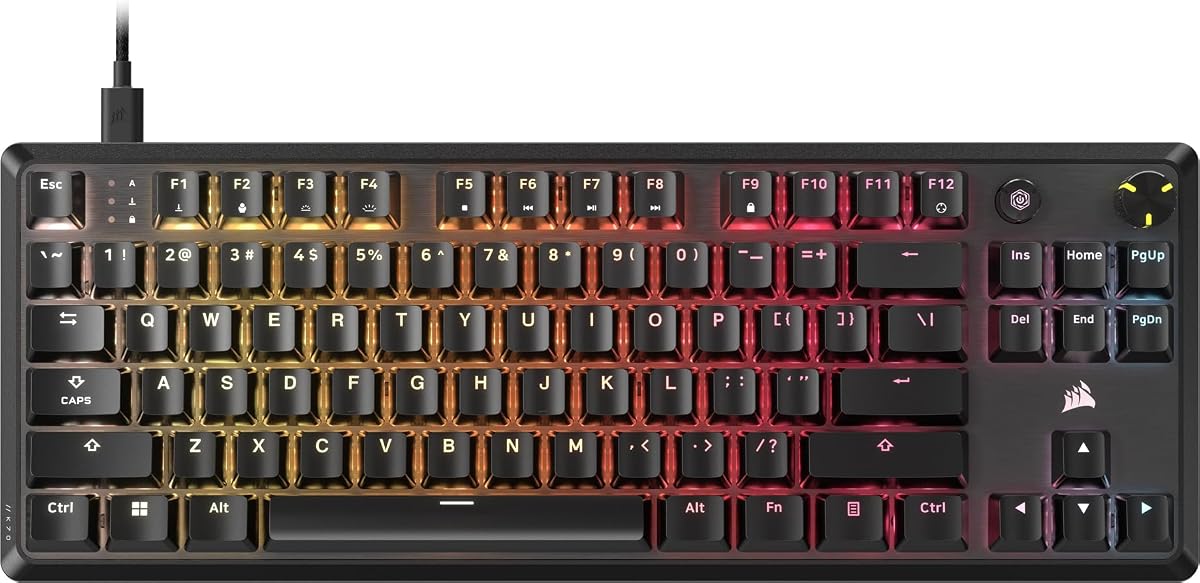


The CORSAIR K70 CORE RGB stands out as an accessible entry point into high-quality mechanical keyboards. With a strong user rating, it delivers a solid mechanical experience without breaking the bank for budget-conscious gamers.
We may earn a commission when you buy through this link, at no additional cost to you.
Its pre-lubricated MLX Red linear switches provide smooth and responsive keystrokes that are enhanced by two layers of sound dampening. This combination ensures a satisfying typing feel while keeping noise levels low during intense gaming sessions.
While the ABS double-shot keycaps are durable, they may develop a shine over time compared to PBT alternatives. Additionally, the feature set is more basic than flagship models, but it covers all essential functions effectively.
This keyboard is ideal for gamers seeking a reliable mechanical layout with a detachable palm rest and robust build quality. It offers excellent value for those who prioritize performance and durability over advanced customization options.
The pre-lubed MLX Red switches reduce friction and scratchiness for a cleaner keystroke experience.
An aluminum top plate provides stability and style while ensuring the keyboard remains steady during use.
We may earn a commission when you buy through this link, at no additional cost to you.
The CORSAIR K100 RGB is widely considered the flagship option for enthusiasts who demand the best performance available. Its AXON Hyper-Processing Technology delivers unmatched speed and precision for competitive gaming scenarios.
We may earn a commission when you buy through this link, at no additional cost to you.
Powered by OPX optical-mechanical switches, this keyboard registers keypresses up to four times faster than standard mechanical alternatives. The durable PBT double-shot keycaps ensure long-lasting legends and resistance to wear over time.
Although the price is significantly higher than other models, the inclusion of a programmable control wheel and dedicated macro keys justifies the investment for power users. The large size may be a drawback for those with limited desk space.
This model is perfect for streamers and competitive gamers who need every millisecond advantage and advanced macro capabilities. It combines cutting-edge technology with premium materials to create a top-tier typing experience.
Native 4000Hz hyper-polling and scanning provide instant response times for critical in-game actions.
Six programmable macro keys integrate with Elgato Stream Deck software for seamless content creation workflows.
We may earn a commission when you buy through this link, at no additional cost to you.
The CORSAIR Galleon 100 SD represents the pinnacle of gaming keyboard innovation with its integrated five-inch dynamic LCD screen. This device offers real-time control over your gaming setup without requiring additional peripherals or desk space.
We may earn a commission when you buy through this link, at no additional cost to you.
Its Elgato Stream Deck integration allows for precise command over apps like Discord and Spotify directly from the keyboard. The 8000Hz hyper-polling ensures ultra-responsive inputs that give you a competitive edge in fast-paced titles.
The high price tag reflects the advanced features, but the complexity of setting up custom animations and macros may deter casual users. This keyboard is designed for those who want to centralize their entire streaming and gaming workflow.
For streamers and enthusiasts looking for a one-stop solution for control and monitoring, this model is unmatched. It transforms the keyboard into a command center that enhances both productivity and entertainment experiences.
The five-inch screen displays custom animations system specs and notifications for enhanced situational awareness.
Customizable Stream Deck keys and dials provide precise real-time command of your entire desktop setup.
We may earn a commission when you buy through this link, at no additional cost to you.
The CORSAIR Vanguard 96 RGB optimizes desk space with its nine-six percent layout that fits essential keys into a smaller frame. This design keeps arrow keys and a numpad without the bulk of a full-sized keyboard.
We may earn a commission when you buy through this link, at no additional cost to you.
Its vibrant full-color LCD screen allows users to display custom animations and system stats, adding a unique touch to the setup. The virtual Stream Deck integration maps functions directly to programmable G-keys for enhanced productivity.
While the compact size is beneficial for smaller desks, it can reduce mouse movement area for large-arm users. The inclusion of an LCD screen adds complexity and cost compared to standard mechanical keyboards in this category.
This keyboard suits users who need a full keyboard layout in a compact footprint while wanting some advanced customization features. It balances space-saving design with modern tech features effectively.
The 96% layout saves desk space while maintaining a full keyboard with arrow keys and numpad.
An integrated 1.9-inch LCD screen displays animations and system specs for a personalized look.
We may earn a commission when you buy through this link, at no additional cost to you.
The CORSAIR K70 CORE RGB offers a reliable mechanical experience with onboard storage for your customized settings and RGB profiles. This feature ensures your preferences are saved directly to the keyboard without needing constant software connection.
We may earn a commission when you buy through this link, at no additional cost to you.
Pre-lubricated MLX Red linear switches provide smooth keystrokes enhanced by sound dampening layers for a pleasing acoustic experience. The sturdy double-shot keycaps are built to resist cracking under pressure during intense gaming sessions.
This model is a strong choice for users who want consistent performance without relying on external software for profiles. However, the lack of an included palm rest may be a consideration for those who prefer full ergonomics.
Ideal for gamers who prioritize portability and independent functionality, this keyboard maintains high quality at a reasonable price. It delivers essential features like media controls and a robust aluminum frame for long-term use.
Save up to five profiles directly onboard so your settings persist even when disconnected from software.
Two layers of sound dampening reduce unwanted noise for a more pleasant and immersive gaming atmosphere.
We may earn a commission when you buy through this link, at no additional cost to you.
The CORSAIR K70 CORE TKL is designed for gamers who need more mouse room while retaining a robust mechanical feel. Its tenkeyless layout omits the numpad to create a compact footprint that fits perfectly in tighter setups.
We may earn a commission when you buy through this link, at no additional cost to you.
Pre-lubed MLX Red v2 switches deliver smooth and stable keystrokes with enhanced brightness and sound dampening layers that reduce unwanted pings. This ensures a subdued typing experience that is pleasant during long sessions.
While removing the numpad saves space, it may not suit those who require frequent number entry for work or specific games. The included detachable palm rest adds ergonomic comfort that is not always standard in TKL designs.
This keyboard is ideal for competitive gamers who prioritize mouse movement space and quiet operation. It balances high-quality materials with essential features to support focused and comfortable gameplay.
The tenkeyless footprint fits tight setups and leaves more room for sweeping mouse movements without compromising performance.
Two sound dampening layers made from premium foam temper unwanted pings and clacks for quieter typing.
We may earn a commission when you buy through this link, at no additional cost to you.
The CORSAIR K55 RGB PRO offers an affordable entry into RGB gaming keyboards with features typically found on higher-end models. While it uses membrane switches, it delivers a solid typing experience suitable for casual gamers and general use.
We may earn a commission when you buy through this link, at no additional cost to you.
Its IP42-rated design guards against dust and spills, making it resilient against accidental accidents on the desk. The six dedicated macro keys allow for quick activation of shortcuts or streaming commands via Elgato software.
Compared to mechanical options, the membrane switches may not offer the same level of tactile feedback or longevity over time. However, the low price and durable design make it a practical choice for those with limited budgets.
This keyboard is best for casual users who want RGB lighting and macro features without a high price tag. It provides reliable performance and essential comfort features like a detachable palm rest for extended sessions.
IP42-rated protection keeps your keyboard running smoothly by guarding against dust and liquid spills effectively.
Six dedicated macro keys can be set up through iCUE software for instant streaming commands or shortcuts.
We may earn a commission when you buy through this link, at no additional cost to you.
The renewed version of the K70 CORE RGB offers a high-rated option for budget-conscious buyers seeking reliable performance. With a strong user rating, it suggests consistent quality and functionality despite being a renewed unit.
We may earn a commission when you buy through this link, at no additional cost to you.
Pre-lubricated CORSAIR Red linear switches deliver smooth and responsive keystrokes enhanced by sound dampening layers. The absence of a palm rest keeps costs down while maintaining the core mechanical experience and RGB capabilities.
While renewed products can vary in condition, the high rating indicates good reliability for this specific listing. The onboard profile storage ensures you can save your settings without relying on software for basic configuration.
This choice is ideal for buyers who want a proven keyboard design at a reduced price point. It provides the essential features of a mechanical keyboard without the premium packaging or accessories.
Renewed options provide a lower cost alternative for users seeking quality mechanical performance without new pricing.
Despite being renewed, the model retains its mechanical switches and onboard storage for consistent daily use.
We may earn a commission when you buy through this link, at no additional cost to you.
The renewed Vanguard 96 offers a high-performance compact mechanical keyboard with an impressive user rating. It provides the core features of a full keyboard in a super-compact frame that fits into smaller desktop setups.
We may earn a commission when you buy through this link, at no additional cost to you.
Its vibrant full-color LCD screen allows for display of custom animations and system specs on a 1.9-inch display. The MLX Quantum switches and 8000Hz polling ensure ultra-responsive inputs that eliminate input lag for competitive play.
While the iCUE support is noted as coming soon, the hardware remains capable of advanced customization through other means. The absence of a wrist rest is a standard trade-off for renewed units in this model line.
This keyboard suits users looking for a high-tech compact option at a reduced price. It brings advanced polling rates and LCD features to a broader audience through the renewed market.
Ultra-responsive 8000Hz hyper-polling eradicates input lag for the fastest possible response times in-game.
A luminous integrated LCD screen displays animations and system specs to personalize your keyboard visually.
We may earn a commission when you buy through this link, at no additional cost to you.
The CORSAIR K60 RGB TKL combines compact design with high-speed optical switch technology for a fast and reliable typing experience. Its brushed aluminum frame delivers a rugged build that withstands daily wear and gaming intensity.
We may earn a commission when you buy through this link, at no additional cost to you.
Exclusive OPX optical-mechanical switches offer hyper-fast input with a 1.0mm actuation distance guaranteed for 150 million keystrokes. This speed is complemented by 8000Hz hyper-polling to get actions into the game as quickly as possible.
Polycarbonate keycaps provide a smooth feel but may wear differently than PBT options over long periods. The detachable USB-C cable adds convenience for portability and easy cable management during travel.
This model is perfect for gamers who want optical speed in a space-saving layout without breaking the bank. It offers excellent durability and modern connection options for a streamlined setup experience.
Exclusive OPX switches provide hyper-fast input with 1mm actuation and 150 million keystroke guarantees.
8000Hz hyper-polling transmits inputs up to eight times faster for minimal latency during play.
We may earn a commission when you buy through this link, at no additional cost to you.
Selecting the right keyboard depends on your specific gaming style, budget, and desired features. Here are the key factors to consider.
Mechanical keyboards offer linear, tactile, or clicky switches that change how keys feel and sound. Linear switches like MLX Red provide smooth strokes while tactile switches give a bump to indicate actuation.
Choose linear for gaming speed and tactile for typing feedback to match your personal preference and workflow needs.
Full-size layouts include a numpad while tenkeyless models save space for mouse movement. Compact 96% layouts keep function keys in a smaller footprint.
Select a layout that fits your desk space and ensures you have the number keys you need for work or games.
Polling rate determines how often the keyboard reports input to the computer. Higher rates like 8000Hz reduce input lag significantly for competitive play.
Prioritize high polling rates if you play fast-paced games where every millisecond counts for your performance.
Aluminum frames offer durability and stability while plastic builds are lighter but less robust. Double-shot keycaps prevent legends from wearing off over time.
Look for a sturdy top plate and durable keycaps to ensure the keyboard lasts through years of heavy usage.
Software like iCUE allows deep customization of RGB lighting and macros. Some keyboards support onboard profile storage to save settings without software.
Decide if you need advanced software features or prefer simple plug-and-play functionality for your setup.
Features like media dials, LCD screens, and detachable cables add convenience and functionality. Wired USB-C connections offer stable performance for gaming.
Choose features that enhance your specific workflow such as macro keys for streaming or media controls for convenience.
Prices range significantly based on switches and features. Budget models may lack premium materials but still offer solid mechanical performance.
Balance your cost against the features you truly need to avoid paying for extras you will not use daily.
Palm rests reduce strain during long sessions while adjustable feet help set the perfect typing angle. Noise dampening improves comfort for quiet environments.
Consider ergonomic accessories and sound dampening if you type or game for extended periods daily.
Connect your keyboard to a USB port and install the iCUE software to customize RGB lighting and macro settings. Explore the software interface to map keys and adjust polling rates for your specific use case.
Keep the keyboard clean by using a soft brush to remove dust from between the keys. Regular cleaning prevents debris buildup that can affect switch performance and overall feel over time.
Store the keyboard in a dry environment when not in use and avoid exposing it to direct sunlight or liquids. Proper maintenance ensures longevity and consistent performance for years of gaming and typing.
Yes, Corsair mechanical keyboards are excellent for gaming due to their fast response times and durable construction. Models with high polling rates like 8000Hz offer competitive advantages for fast-paced titles.
MLX switches are traditional mechanical switches that rely on metal contact for activation. OPX switches are optical-mechanical that use light to register keypresses for faster response and longer lifespan.
Most Corsair keyboards are designed for Windows but can function on Macs with limited software support. Basic typing works well while advanced features like RGB require Windows-compatible software.
Yes, they are suitable for typing work with comfortable layouts and durable keycaps. Linear switches offer smooth keystrokes while tactile options provide feedback for accurate typing.
Use the iCUE software to record key sequences and assign them to macro keys. You can create complex shortcuts for gaming or productivity directly through the software interface.
Some models like the K55 offer IP42 resistance against dust and spills. Other mechanical models are not fully water resistant so keep liquids away during use to avoid damage.
Onboard profile storage allows you to save RGB and key settings directly on the keyboard memory. This means your preferred settings work without needing software installed on the computer.
We have reviewed ten distinct Corsair mechanical keyboards ranging from budget-friendly models to premium flagship options. Each picks offers unique strengths tailored to different needs and budget levels.
Prioritize features that align with your specific usage such as polling rates for gaming or key layouts for space efficiency. The K100 RGB offers top performance while the K70 CORE provides reliable value.
Remember to check current prices and availability before purchasing as deals change frequently. Selecting the right model ensures a satisfying and durable typing experience for years.