
ATSC Digital Converter Box by Mediasonic
3.8Editor score
Supports up to 2TB USB
Clear QAM function included
Front display panel feature
This guide compares the top DVR recorders for TV including OTA tuners and capture devices to help you archive shows and live streams without subscriptions.
Choosing the right DVR recorder for TV ensures you never miss your favorite shows or live events. Modern devices offer flexible storage, multiple tuners, and easy streaming to various screens throughout your home for ultimate convenience.
We evaluated ten top models based on tuner count, storage options, ease of setup, and compatibility with different TV types. Our analysis covers both traditional digital recorders and modern streaming-friendly DVR solutions for diverse needs.
Each pick highlights key features, pros, and cons to help you decide quickly. Keep in mind that prices and availability can change frequently, so verify current details before making your final purchase decision today.
3.8Editor score

3.2Editor score
4.0Editor score
Compare key specifications across all ten DVR recorders for TV to find the perfect match for your home entertainment setup and recording needs today.


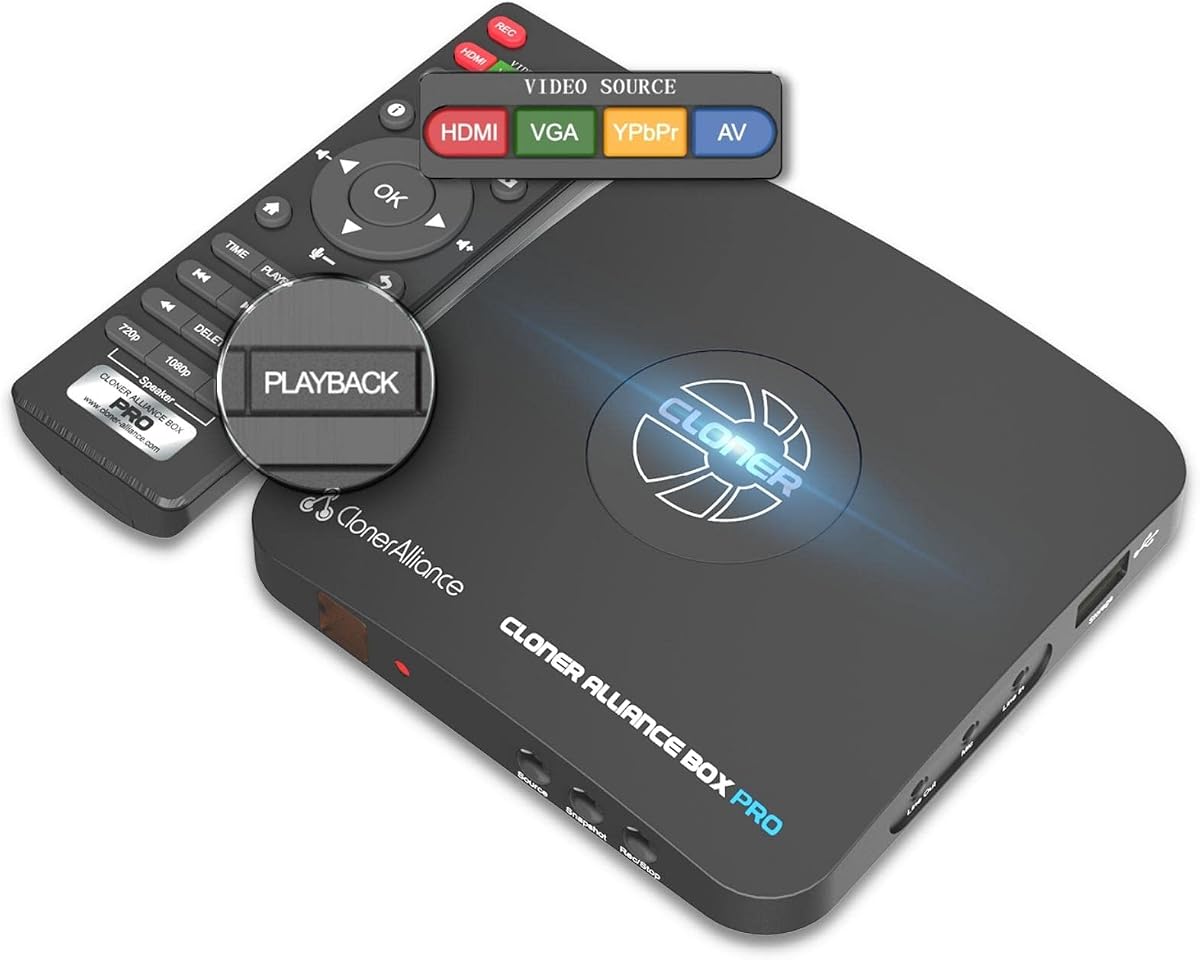
The ClonerAlliance Box Pro is a versatile standalone video recorder designed for capturing high-quality content without needing a computer. With a 4.0 rating, it stands out for its ability to convert analog sources into digital MP4 files seamlessly for modern viewing needs.
We may earn a commission when you buy through this link, at no additional cost to you.
Its key strengths include supporting various inputs like HDMI, RCA, and VGA, allowing users to digitize old VHS tapes or record gaming sessions. The device offers ultra-low latency below 90ms and allows scheduling recordings directly on the unit for convenience.
However, users should note that HDCP protected content will not record, showing an error instead. Additionally, while free editing software is included, it only works on Windows systems, which might limit Mac users seeking full functionality after capture.
This device is ideal for hobbyists or archivists looking to preserve legacy media or capture screen content. Its user-friendly design and comprehensive input options make it a top recommendation for those needing a robust capture solution.
Converts old VHS and composite sources into modern digital files for easy sharing and storage on USB drives without extra hardware.
Records directly to USB storage and plays back on your TV using the included remote, eliminating the need for a PC entirely.
We may earn a commission when you buy through this link, at no additional cost to you.
The Tablo TV 4th Gen offers a powerful OTA DVR solution with four tuners allowing simultaneous recording and watching. Despite a 3.2 rating, it provides excellent flexibility for cord-cutters who want to access local channels without monthly fees or contracts.
We may earn a commission when you buy through this link, at no additional cost to you.
Its standout feature is the whole-home access allowing multiple compatible devices to stream live or recorded content simultaneously. The device includes over 50 hours of storage and supports major platforms like Roku, Apple TV, and Android TV for broad compatibility.
However, it requires a consistent high-speed internet connection for setup and streaming which might be a hurdle in some areas. Also, the lower user rating suggests potential software or connectivity issues that buyers should research further before purchasing.
For households with multiple viewers wanting flexible access to live TV, this unit delivers great value. Its lack of ongoing fees makes it a cost-effective choice for long-term local channel recording and streaming needs.
With four tuners, you can record up to four shows at once while watching another, ensuring you never miss a program in a busy household.
Pay once for the device and enjoy local channels without hidden fees or monthly costs, offering true ownership of your DVR experience.
We may earn a commission when you buy through this link, at no additional cost to you.
The Tablo TV 2-Tuner version provides an affordable entry point for OTA DVR users who do not need as much recording capacity. It shares most features with the 4-tuner model but costs less, making it a budget-friendly option for smaller households or single viewers.
We may earn a commission when you buy through this link, at no additional cost to you.
It allows recording one channel while watching another, offering decent flexibility for most schedules. The device connects via Wi-Fi or Ethernet and works with popular streaming players ensuring broad integration into existing home entertainment setups.
The main limitation is the two-tuner constraint which may cause conflicts during busy TV times. Also like all Tablo devices it requires an internet connection for full functionality which might not suit everyone seeking a truly offline system.
This model is ideal for those seeking basic live TV recording without subscriptions. Its lower price and reliable whole-home access make it a strong contender for casual viewers focused on local network channels primarily.
Get access to local broadcast channels and recording capabilities without any monthly fees, saving money compared to traditional cable DVR services.
Stream recorded shows to smartphones or tablets allowing you to watch your favorite content anywhere in the home or while traveling.
We may earn a commission when you buy through this link, at no additional cost to you.
This bundle combines the Tablo 2-tuner DVR with a 35-mile range antenna providing a complete solution for OTA recording. It is convenient for users who want to avoid buying separate antenna hardware and get started with live TV recording immediately.
We may earn a commission when you buy through this link, at no additional cost to you.
The device supports whole-home streaming and records multiple shows as needed. It integrates well with Roku and smart TVs allowing easy access to recorded content across the household without extra equipment or cables.
However antennaenna performance depends on location and signal strength so the included range may not cover distant stations. Also the need for internet connectivity remains which limits offline-only users who prefer local storage only without streaming needs.
Ideal for first-time OTA users the this bundle offers everything needed to start cutting the cord. The included antenna and no-subscription promise make it a convenient choice for local channel enthusiasts looking for simplicity.
Receive both the DVR and antenna in one package so you can set up live TV recording and streaming in under an hour.
Access your recorded shows on almost any modern streaming device ensuring you can watch on the TV or mobile screen easily.
We may earn a commission when you buy through this link, at no additional cost to you.
The Mediasonic Converter Box is a straightforward ATSC digital tuner with recording capabilities ideal for older TVs or basic setups. It supports Clear QAM for unscrambled cable channels and allows recording to a USB drive making it practical for budget-conscious users.
We may earn a commission when you buy through this link, at no additional cost to you.
Its front display shows channel numbers and time in standby mode which is a nice touch for visibility. The unit handles up to 2TB USB hard drives allowing extensive storage for recorded shows without complex network requirements.
However it does not support ATSC 3.0 future broadcast standards limiting future-proofing. Also recording requires an external drive and does not work with many major cable providers for subscription services.
This box is best for those converting analog TVs or seeking a no-frills DVR solution. Its sturdy metal case and simple interface make it accessible for seniors or anyone wanting local recording without internet streaming.
Plug a USB hard drive into the box to record live TV locally without needing Wi-Fi or an internet connection for basic functionality.
The Clear QAM feature allows you to watch unscrambled cable signals if your provider supports it without additional set-top boxes.
We may earn a commission when you buy through this link, at no additional cost to you.
This Toshiba unit merges VCR and DVD recorder functions with a digital tuner providing a unique hybrid option for home entertainment. It allows users to dub VHS tapes to DVD and record digital broadcasts directly making it valuable for preserving analog media.
We may earn a commission when you buy through this link, at no additional cost to you.
Features like 1080p upconversion enhance older video content when output via HDMI. The device also plays back MP3 and JPEG files from discs or drives adding versatility to its primary recording functions.
However being a 2009 model means it may lack modern streaming features or firmware updates. Its larger physical size might not suit compact entertainment centers but it remains a robust choice for legacy format handling.
Perfect for households with extensive VHS collections this recorder offers a reliable way to digitize or archive tapes. It bridges the gap between old and new formats effectively for users invested in physical media preservation.
Use the built-in dubbing feature to copy VHS tapes directly to DVD discs preserving precious memories in a durable digital format.
The upconversion feature boosts DVD quality up to 1080p ensuring your classic discs look better on modern high-definition TVs.
We may earn a commission when you buy through this link, at no additional cost to you.
This premium bundle offers the highest capacity with four tuners plus an antenna ensuring maximum flexibility for live TV. It is designed for large households needing to record multiple shows while watching others without any monthly subscription fees.
We may earn a commission when you buy through this link, at no additional cost to you.
Features include whole-home streaming and compatibility with Roku Apple TV and other devices. The included antenna simplifies setup making it easier to start capturing local broadcasts immediately without extra purchases.
The cost is higher than standard models but justified by the four-tuner capacity. However internet connectivity remains essential for streaming which might limit offline users seeking purely local storage options for recorded shows.
Ideal for heavy TV watchers this bundle delivers top-tier capacity and convenience. Its all-in-one nature and lack of subscriptions make it a premium choice for serious cord-cutters wanting complete control over their TV schedule.
Record up to four shows simultaneously while watching another ensuring you never miss any programming during prime time hours.
Get both the DVR and a 35-mile antenna together so you can connect and start recording local channels within minutes.
We may earn a commission when you buy through this link, at no additional cost to you.
The ClonerAlliance UHD Pro delivers top-tier capture quality supporting 4K Ultra-HD recording with advanced codecs. With a 4.1 rating it stands out for capturing high-fidelity video suitable for gaming or professional content archiving without needing a PC setup.
We may earn a commission when you buy through this link, at no additional cost to you.
It supports H.265 and H.264 encoding for efficient storage sizes and allows TF card usage besides USB drives. The 4K passthrough ensures your TV receives full quality during recording so viewing is not interrupted or reduced.
However like similar devices it blocks HDCP protected content which limits recording from certain paid sources. PC users might find the setup complex compared to standalone devices requiring extra drivers for full capture functionality.
Best for creatives or gamers this recorder provides excellent control over frame rates and resolution. Its ability to capture 4K content reliably makes it a powerful tool for preserving high-quality video sources efficiently.
Capture 4K Ultra-HD content with cinematic frame rates ensuring your recordings look crisp and detailed on modern displays.
Choose between TF cards and USB drives for storage giving you options for size and speed based on your specific needs.
We may earn a commission when you buy through this link, at no additional cost to you.
This renewed model offers the Tablo 2-tuner experience at a more accessible price point. It retains core features like two ATSC tuners and Wi-Fi connectivity making it a practical choice for those seeking reliable OTA DVR functionality without premium pricing.
We may earn a commission when you buy through this link, at no additional cost to you.
With 128GB of onboard storage it provides ample space for recording shows. The device supports whole-home streaming allowing you to watch recorded content on smartphones or other connected devices easily.
Being renewed means condition may vary so buyers should check seller ratings. Also the warranty is typically shorter than new units which might be a concern for long-term reliability and peace of mind.
Best for budget-conscious buyers this option delivers solid performance for the price. It allows flexible viewing across multiple rooms without monthly fees making it a cost-effective way to enjoy local TV.
Save money with a certified refurbished unit that still provides full streaming and recording capabilities for your local channels.
Use Wi-Fi to connect the DVR to your network making placement easier and streaming possible to multiple devices around the house.
We may earn a commission when you buy through this link, at no additional cost to you.
This renewed unit offers four tuners at a budget-friendly price making high capacity DVR recording accessible. It supports simultaneous recording and watching while allowing access via multiple apps so households can share content easily.
We may earn a commission when you buy through this link, at no additional cost to you.
Time-shift viewing lets you start watching a program while it is still recording which is a great feature for live events. The 128GB storage provides space for hours of content without needing extra drives.
However as a renewed product physical condition may vary slightly. Also the need for internet connectivity remains essential for streaming which might not suit users wanting an offline-only local recording system.
Ideal for those wanting power without the price tag this model delivers four-tuner capability affordably. It is a practical solution for busy households needing flexibility and convenience for managing local channel schedules.
Start watching a live show as it is recording so you never have to wait for the full episode to finish.
Access four tuners at a renewed price for maximum recording power without paying premium costs for a brand new device.
We may earn a commission when you buy through this link, at no additional cost to you.
Selecting the right DVR requires understanding your needs for tuners storage and connectivity to ensure smooth recording and playback experience.
The number of tuners determines how many shows you can record simultaneously while watching another. Look for at least two tuners for basic flexibility but consider four if your household has many different schedules.
More tuners provide better multi-user flexibility and prevent conflicts during prime time programming hours.
Storage capacity defines how much content you can record. Check if the DVR supports external hard drives or USB cards and note the maximum limit like 2TB to ensure enough space for your library.
Choose models with expandable storage to avoid running out of space quickly as your recorded content grows.
Ensure the DVR has the right inputs like HDMI RCA or coaxial based on your existing TV setup. Some devices require an antenna while others accept HDMI signals from existing receivers for flexibility.
Match input types to your sources to avoid needing extra adapters or complicated wiring setups.
Most modern DVRs avoid monthly fees charging only upfront for the hardware. Verify if there are any hidden costs or required subscriptions for streaming features beyond local channel recording.
Opt for devices labeled no subscription to save money on ongoing costs over the lifespan of the unit.
Many DVRs require internet for setup and streaming which enables features like remote viewing and app integration. Ensure your home network is reliable if you plan to stream outside your immediate TV room.
Strong internet connectivity is key for accessing recorded shows on multiple devices throughout your home.
Check which streaming devices like Roku or Apple TV work with the DVR. Broad compatibility ensures you can access content on almost any screen without needing proprietary hardware.
Wide device support makes the system more versatile and future-proof for your existing entertainment gear.
Higher resolution recording like 1080p or 4K captures more detail but uses more storage. Choose based on your display capabilities and how much space you have for files.
Balance resolution with storage needs to avoid excessive file sizes without losing noticeable quality.
Simple setup processes save time and reduce frustration. Look for options with guided mobile apps or clear instructions to get started quickly.
User-friendly setup ensures you can start recording your favorite shows almost immediately after unboxing.
Connect your antenna or input source securely to the DVR and power it on. Follow the on-screen or mobile app instructions to complete initial setup and connect to your Wi-Fi or home network.
Schedule recordings using the remote or app by selecting channels and times. This allows your DVR to automatically capture shows without needing manual intervention each day.
Keep the device in a well-ventilated area to prevent overheating. Clean vents gently with compressed air and avoid blocking airflow to ensure smooth performance and longevity.
Most OTA DVRs like Tablo require internet for streaming and setup but local recording can often work offline. However for full features like remote access an active connection is needed for consistent performance.
Many DVRs support Clear QAM which allows recording unscrambled cable channels. But encrypted premium channels usually require a cable provider's set-top box and cannot be recorded directly on these standalone units.
It depends on the number of tuners in your DVR. A two-tuner model can record two shows simultaneously while a four-tuner unit lets you record four and watch another at the same time.
You need an antenna that receives ATSC signals. Any standard indoor or outdoor TV antenna will work but ensure it is positioned correctly for the best signal strength in your area.
No most of these DVRs do not require a subscription. You pay once for the device and can record and watch free local channels without monthly fees or contracts.
Yes many modern DVRs allow streaming recorded content to smartphones and tablets through their apps. This lets you watch your favorite shows anywhere you have a network connection.
The top picks like the ClonerAlliance Box Pro and Tablo TV models offer excellent options for various needs from simple local recording to flexible streaming across multiple devices.
Prioritize factors like tuner count and storage capacity based on your household size and how many shows you record regularly to avoid future limitations.
Remember that prices and availability may change so check current listings before purchasing to ensure you get the best value for your specific TV setup.