
Zalman CUBIX M-ATX
4.5Editor score
Compact 17.1 liter volume
Pre-installed 80mm fan
Supports standard ATX PSU
This guide compares the top ten cube shaped PC case models for performance cooling design and build quality to help you choose the ideal chassis for your next
Choosing the right cube shaped PC case can transform your desktop setup into a stunning visual centerpiece. These compact enclosures offer unique designs that balance aesthetics with performance. They fit powerful components while keeping your workspace organized and stylish.
We evaluated ten leading models based on airflow design component compatibility and build quality. Our analysis focuses on real-world usability and thermal performance. Each option provides distinct advantages for gamers and professionals seeking small form factor solutions.
Each pick highlights specific strengths like glass panels or modular interiors. Prices fluctuate frequently so verify current deals before purchasing. Read on to find the perfect enclosure for your hardware needs and budget constraints today.
4.5Editor score
4.7Editor score

4.7Editor score
The following table provides a side-by-side comparison of all ten models including key specifications and ratings to help you quickly identify the best fit for your build.



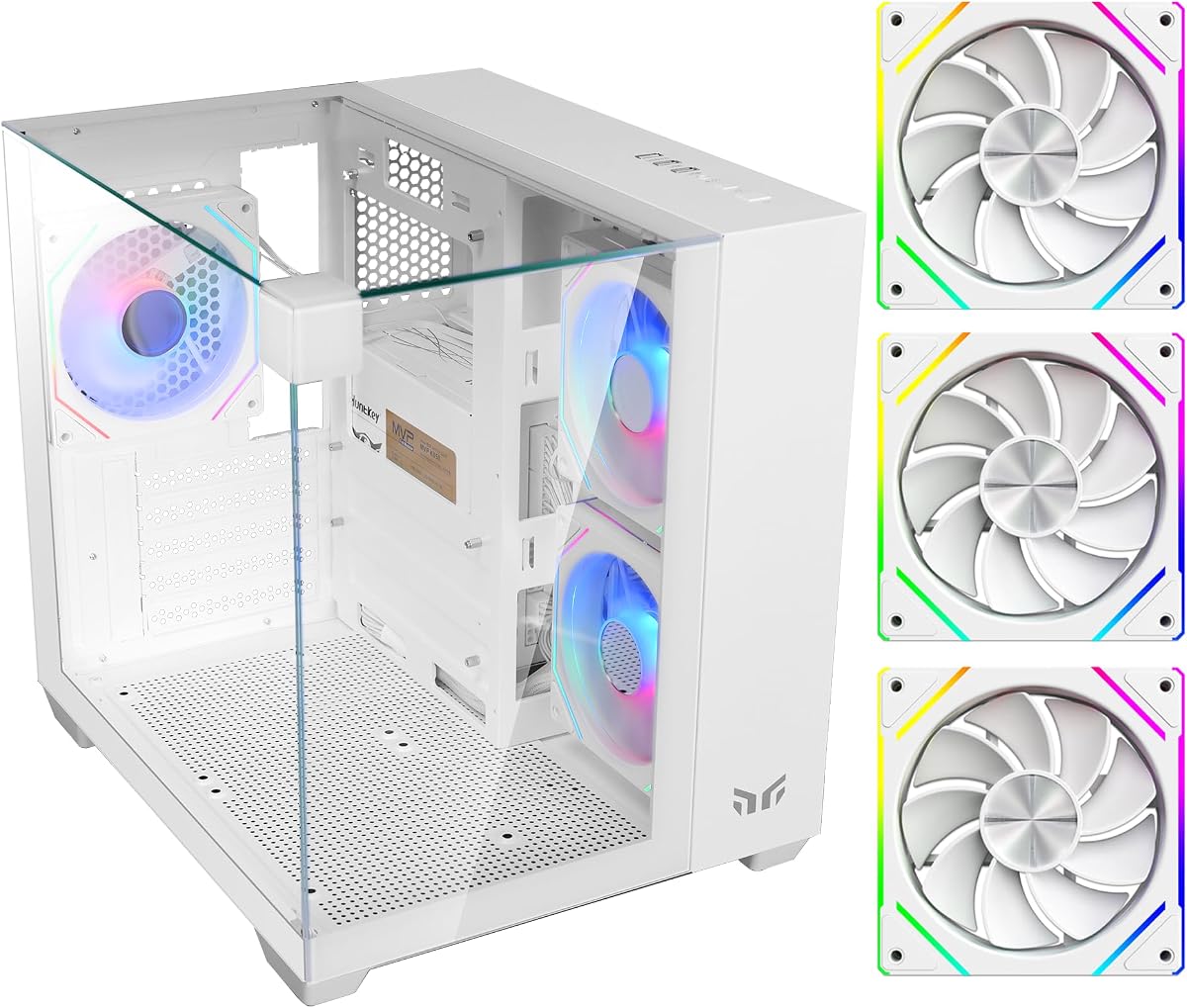
This case stands out with its 270 degree panoramic glass view that transforms your PC into a visual centerpiece. It rates highly for users wanting an eye-catching setup without sacrificing compact size. The pre-installed fans ensure immediate airflow performance.
We may earn a commission when you buy through this link, at no additional cost to you.
The triple tempered glass panels offer unmatched visibility from multiple angles while maintaining structural integrity. You get three pre-installed ARGB fans that sync easily with modern motherboards. The interior layout supports GPUs up to 325mm which is generous for a cube design.
While the glass looks premium it does require careful handling during installation. Cable routing is straightforward but tight spaces might challenge larger custom loops. However the PSU shroud helps hide excess wiring effectively keeping the look clean.
Buy this if you want a striking visual focus for your gaming setup. It balances style and function well for small desktop spaces. The build quality and included accessories make it a top value pick.
The pillar-less design ensures uninterrupted views of your hardware and lighting effects.
Supports powerful M-ATX builds in a 28.5L footprint ideal for small desks.
We may earn a commission when you buy through this link, at no additional cost to you.
This model offers exceptional value for budget builders seeking a small form factor case. It rates well for durability and simplicity with a clean aesthetic that fits any room. The compact volume keeps it out of the way while supporting standard components.
We may earn a commission when you buy through this link, at no additional cost to you.
Built with 0.8T steel it provides robust protection for your hardware at a low cost. The perforated front panel ensures decent airflow for the included 80mm fan. You can fit GPUs up to 260mm which covers most mainstream graphics cards easily.
The single fan setup means you might need to add more for high-end parts. Space is limited compared to larger cubes so cable management requires attention. But for entry builds this offers reliable performance without breaking the bank.
Ideal for office setups or secondary gaming rigs where budget and space matter most. It delivers solid protection and basic cooling efficiently. A practical choice for those prioritizing function over flashy features.
At 17.1 liters it fits easily on desks or shelves without crowding your workspace.
Front I/O includes USB 3.0 and audio jacks for essential daily access.
We may earn a commission when you buy through this link, at no additional cost to you.
This case is a standout for modularity and airflow thanks to its dual chamber layout. It rates consistently high among enthusiasts who value flexibility and cooling performance. The brushed aluminum front adds a premium feel that matches its functional design.
We may earn a commission when you buy through this link, at no additional cost to you.
The modular interior allows you to configure drive bays and fans to suit your needs. You get three silent fans included with space for many more to optimize temperatures. It supports up to ten drives making it perfect for storage-heavy builds.
The larger size means it takes up more desk space than typical cubes. The price reflects its build quality and unique design features. However the flexibility it offers justifies the investment for serious builders.
Buy this if you need maximum airflow and storage in a cube form. It stands out for customization and quality. A top tier choice for those who prioritize performance and expandability.
Separates components to reduce heat soak and improve overall system cooling.
Supports up to ten HDDs or SSDs for massive storage capacity.
We may earn a commission when you buy through this link, at no additional cost to you.
This case offers unique flexibility with its reversible I/O panel and orientation options. It allows you to place it horizontally or vertically to suit your desk layout. This versatility makes it a strong contender for custom setups.
We may earn a commission when you buy through this link, at no additional cost to you.
The full front mesh panel ensures excellent airflow for high-performance components. You can fit GPUs up to 415mm which accommodates even the largest modern graphics cards. It supports E-ATX motherboards providing room for advanced systems.
The reversible panel requires careful alignment during build which may take extra time. The size means it is not suitable for very small desks. Still the cooling and compatibility are excellent for power users.
Choose this if you want a flexible chassis that adapts to your space. It balances cooling and compatibility effectively. A great option for those who value placement options and future-proofing.
Reversible I/O and handles let you customize layout for any orientation.
Accommodates E-ATX boards and massive GPUs for advanced builds.
We may earn a commission when you buy through this link, at no additional cost to you.
This micro-ATX case focuses on visual impact with five ARGB fans out of the box. It offers dual glass panels for excellent visibility of your internal components. The RGB modes can be controlled directly on the case top panel.
We may earn a commission when you buy through this link, at no additional cost to you.
The dual chamber layout helps separate airflow zones for better temperature control. You can fit GPUs up to 340mm which is generous for this form factor. Screw in PCI covers simplify GPU installation without punching out holes.
The fans may not match premium quality but offer good initial performance. Syncing requires an ARGB motherboard which limits compatibility for some users. Still it provides a complete look without needing extra parts.
Buy this if you want a colorful setup with minimal extra cost. It delivers strong visual appeal and decent cooling. A solid pick for mid-range builds prioritizing RGB.
Five fans and top button offer 366 modes without external controllers.
Screw in PCI covers and room for multiple drives simplify assembly.
We may earn a commission when you buy through this link, at no additional cost to you.
This compact micro-ATX case delivers a clean aesthetic with fixed FRGB lighting. It supports modern connectivity with a USB Type-C port on the front panel. The design is simple and efficient for small gaming rigs.
We may earn a commission when you buy through this link, at no additional cost to you.
It fits GPUs up to 280mm which covers most standard graphics cards easily. The three preinstalled fans provide decent airflow for entry to mid level builds. The black and white color scheme looks modern and sleek on any desk.
The fans are fixed in speed which limits thermal optimization under load. Expansion slots are limited compared to larger towers. However for tight spaces it offers a great balance of style and function.
Ideal for casual gamers who want a tidy setup with RGB flair. It is affordable and easy to build in. A practical choice for small footprint needs.
USB Type-C allows for fast data transfer with compatible devices.
Compact design keeps your desk clear while supporting standard hardware.
We may earn a commission when you buy through this link, at no additional cost to you.
This mid tower ATX case offers excellent cooling with seven PWM fans included. It supports massive GPUs up to 400mm and provides dual glass views of your setup. The design focuses on airflow and component visibility for high performance.
We may earn a commission when you buy through this link, at no additional cost to you.
The PWM connectors allow you to control fan speeds via your motherboard for noise management. Water cooling support extends up to 360mm radiators for serious thermal needs. Dust filters help keep the interior clean over time.
The size means it requires a large desk space due to its dimensions. Noise may increase if fans run at full speed without tuning. Still the included fans provide great value for a complex build.
Choose this if you need serious cooling and GPU room in a cube. It supports advanced cooling and hardware easily. A great value for performance focused builders.
Seven fans with PWM support allow precise speed adjustment for noise.
Supports up to 360mm radiators for high-end liquid cooling loops.
We may earn a commission when you buy through this link, at no additional cost to you.
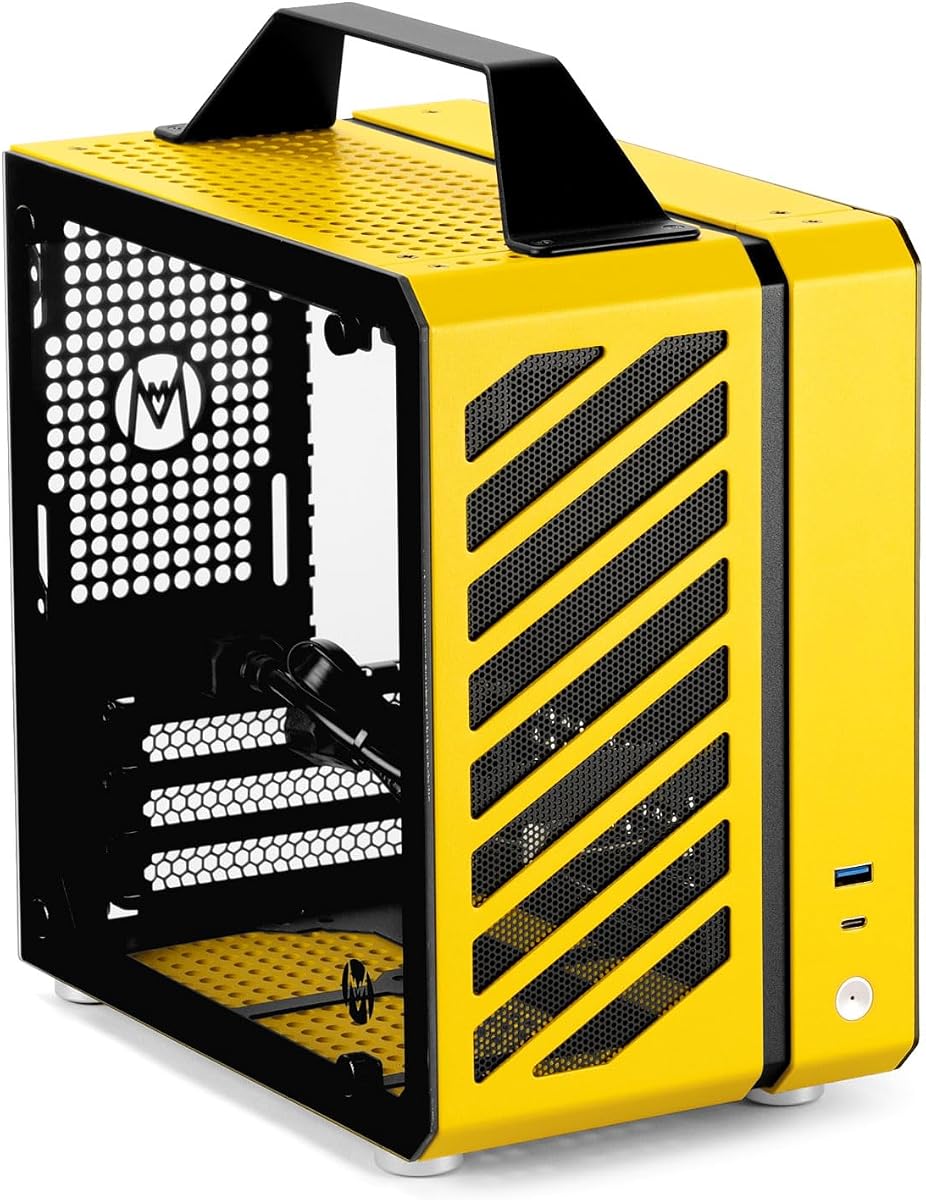
This case is built for portability with a handle and ultra-small 9.9L volume. It supports Mini-ITX motherboards and SFX power supplies to fit tight spaces. The aluminum steel hybrid frame provides durability despite the small size.
We may earn a commission when you buy through this link, at no additional cost to you.
Multi-fan support allows for optimized airflow in this tiny enclosure. Tool-free installation features simplify assembly compared to traditional ITX cases. Dust filters help protect sensitive components during travel or use.
You must use smaller SFX PSUs and ITX boards which can increase cost. Build complexity is higher due to the compact layout constraints. However it enables easy transport for LAN parties or travel.
Perfect for gamers needing a portable rig for travel or small spaces. It balances build quality with extreme compactness. A unique choice for those needing mobility.
Integrated aluminum handle makes it easy to carry to events.
Detachable panels simplify installation compared to traditional cases.
We may earn a commission when you buy through this link, at no additional cost to you.
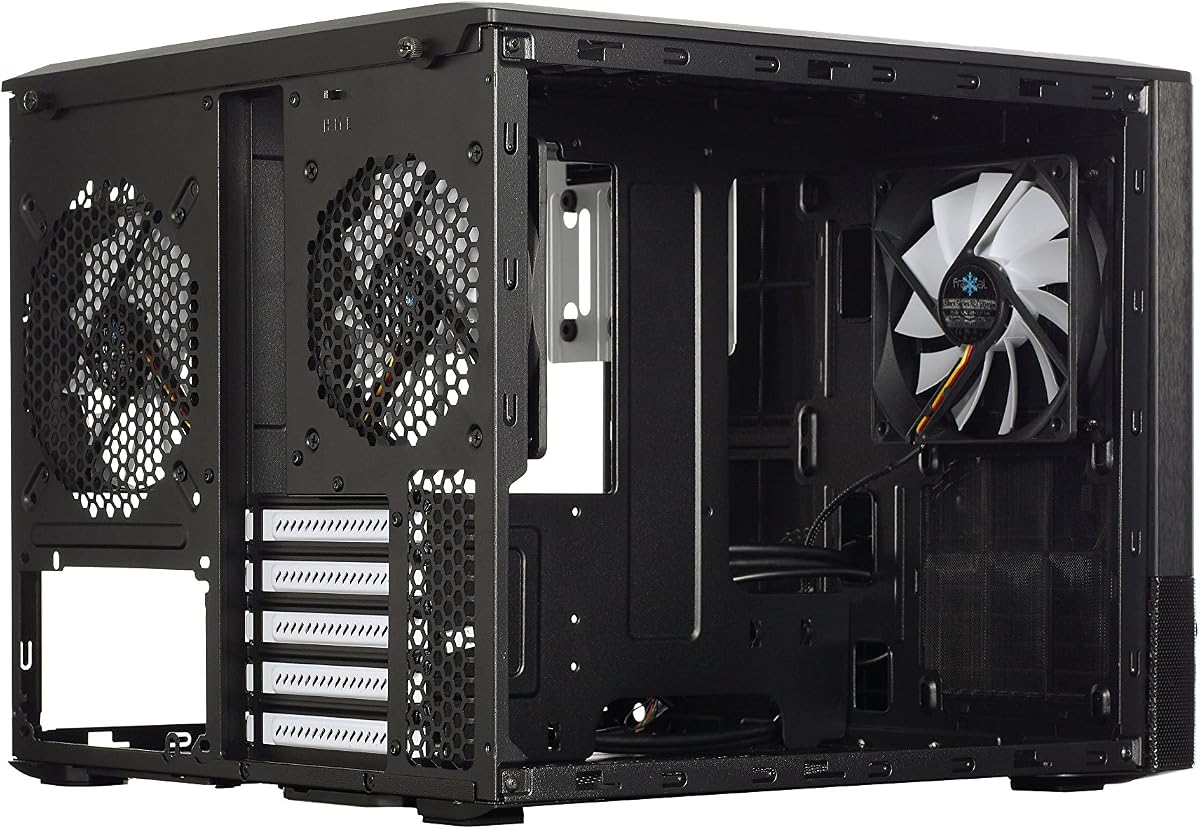
This variant of the Node 804 offers massive drive capacity with up to ten HDDs. It maintains the same premium modular design and airflow performance as the main model. Ideal for storage heavy NAS or server builds in a cube style.
We may earn a commission when you buy through this link, at no additional cost to you.
The aluminum and steel construction ensures durability and a premium look. Internal bays are configurable to suit your mix of SSDs and hard drives. It supports MicroATX and Mini-ITX boards for versatile hardware choices.
Since no PSU is included you must select a compatible unit separately. The size requires a dedicated floor or large desk space. But the storage options are unmatched for this category.
Buy this if you need extensive storage in a compact cube form. It delivers professional grade flexibility and build quality. A niche choice for storage needs.
Up to ten drive bays allow for extensive data capacity.
Aluminum and steel construction ensures lasting durability and sleek look.
We may earn a commission when you buy through this link, at no additional cost to you.
This version offers the same great features as the black variant with a unique white finish. It supports compact ATX builds with high airflow and glass panels. The Moonstone color provides a clean modern look for bright desks.
We may earn a commission when you buy through this link, at no additional cost to you.
It allows flexible horizontal or vertical orientation just like the standard model. The mesh front ensures cooling remains effective for your components. The glass panels showcase your internal hardware beautifully.
White cases show dust more than darker ones so regular cleaning is needed. The rating is slightly lower due to cosmetic preferences. But the performance remains solid for standard gaming needs.
Choose this if you prefer a light color scheme for your build. It matches the performance of other models with a fresh style. A great pick for aesthetic focused builders.
The Moonstone finish offers a bright clean look for modern setups.
Retains the high airflow design of the original model.
We may earn a commission when you buy through this link, at no additional cost to you.
Selecting the right cube shaped PC case involves balancing aesthetics with internal functionality and build quality.
Check if the case supports Mini-ITX or Micro-ATX boards as most cubes do not fit standard ATX. Ensure the dimensions match your motherboard and GPU needs.
Always verify motherboard form factor before buying to avoid compatibility issues.
Look for mesh panels or included fans to ensure components stay cool during intense use. Cube cases often rely on specific layouts for effective thermal management.
Prioritize cases with multiple fan mounts or pre-installed cooling solutions.
Measure your GPU and CPU cooler dimensions against the case limits to ensure they fit. Some models restrict longer graphics cards or taller air coolers.
Confirm GPU and cooler clearances to avoid assembly problems later.
Steel and aluminum frames offer durability while tempered glass adds premium looks. Strong materials protect your components from damage during transport or use.
Look for sturdy materials like steel or aluminum for better longevity.
Interior routing options help keep your setup tidy and improve airflow. A good PSU shroud hides excess wiring for a clean appearance.
Prioritize models with dedicated cable routing features for easy assembly.
If you want colorful displays ensure the case supports ARGB sync or includes controllers. Some models have built-in lighting that requires specific motherboard headers.
Check lighting options to ensure they match your control system.
Balance your budget against features like glass panels and pre-installed fans. Some models offer better value if they include essential components.
Consider all included parts to determine true value before purchasing.
Some cases allow horizontal or vertical placement to suit your desk layout. Flexible mounting provides more freedom for fitting into tight spaces.
Check orientation flexibility if you need specific placement for your desk.
Always place the case on a stable surface to prevent accidental movement or damage during operation. Ensure adequate space around vents for effective cooling performance.
Dust regularly using compressed air to maintain airflow and prevent overheating issues. Remove dust filters every few months to wash and dry them completely.
If you plan to move the case use a proper handle or sturdy carrying method. Secure components tightly to avoid shifting during transport or relocation.
Most cube shaped PC cases support Micro-ATX or Mini-ITX motherboards. Full ATX boards may not fit due to space constraints. Always check the compatibility list before purchasing your motherboard for this case type.
Use the built-in cable routing holes and ties to hide wires neatly. A PSU shroud helps conceal the power supply cables for a cleaner look. Try to route cables away from airflow paths for better cooling.
They are excellent for space saving gaming setups with stylish visuals. Cooling is often good if the design includes mesh panels or enough fans. Just ensure your GPU fits within the internal limits.
Most support graphics cards between 260mm and 400mm in length. Check the specific clearance provided by the manufacturer to ensure your card fits. Some models allow longer cards without front fans installed.
Yes many models allow adding more fans or liquid cooling radiators. Check the available fan mount locations and radiator support. Upgrading can improve thermal performance for demanding builds.
Cube cases offer unique aesthetics and a smaller footprint for tight desks. They often feature glass panels to showcase components beautifully. They save space while still offering solid cooling and style.
Some models like the Node 804 support up to ten 3.5 inch drives. Others may have limited bays due to their compact nature. Check the drive bay count for your storage needs.
A standard screwdriver set is usually sufficient for most models. Many designs use tool-free trays for easier component installation. Consult the manual for specific requirements before starting.
We reviewed ten top models offering unique benefits from budget friendly to premium modular designs. The best picks deliver excellent cooling and style for any desktop setup.
Prioritize airflow and component size when selecting your new chassis. Look for features like glass panels or flexible orientation that match your needs.
Prices change frequently so always check current deals before purchasing your next case. Verify compatibility to ensure the build works smoothly.