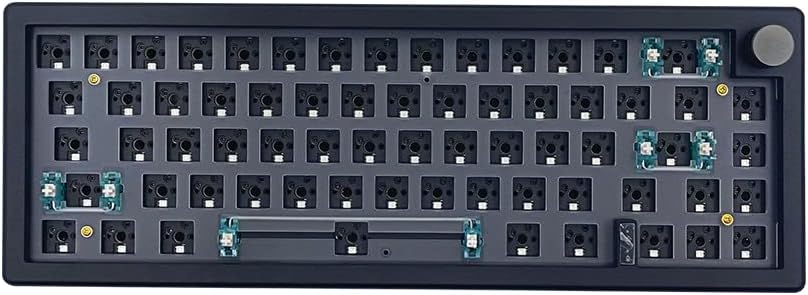
BOYI GMK67 Barebones Keyboard Kit (Black)
4.3Editor score
65% compact layout
Hot swappable switches
Multifunction knob
Discover the top barebones keyboard kits for DIY enthusiasts. This guide compares ten customizable mechanical kits with hot swap, RGB, and wireless options.
Barebones keyboard kits offer enthusiasts a unique way to build custom mechanical keyboards tailored to personal preferences. These kits provide the essential structure and electronics while allowing users to choose switches and keycaps for a truly personalized experience.
We compared ten leading barebones kits based on build quality, connectivity options, programmability, and value. Each product was evaluated for its gasket mount design, hot-swap capabilities, and additional features like screens or knobs to ensure a comprehensive selection.
Each pick highlights key features, pros, and cons to help you find the perfect foundation for your next build. Please note that product availability and pricing can change frequently, so check current listings before making your final decision.
4.3Editor score

4.8Editor score

4.6Editor score
This table provides a side by side comparison of all ten barebones kits featured in this guide. Review the specifications and key features to quickly identify which kit aligns best with your specific needs and budget.


The GMK104 Barebones Kit stands out with its integrated smart display and knob, offering a unique customization experience. Rated highly by users, it combines full size functionality with modern wireless connectivity options that suit diverse workflows.
We may earn a commission when you buy through this link, at no additional cost to you.
Its VIA programmability allows for complex macros and key remapping, while the hot swap PCB supports various switch types without soldering. The gasket mounted design ensures a premium typing feel with reduced vibration and improved acoustic properties.
While the price reflects the advanced features, the battery life supports extended use across multiple devices. Users may find the initial setup for the screen and macros slightly involved but the results are well worth the effort.
This kit is ideal for enthusiasts who want a full size board with added multimedia control. The inclusion of a screen and knob makes it a standout choice for those seeking a highly personalized desktop experience.
The smart display allows real time image updates and multimedia control through dedicated buttons.
Support for Bluetooth 5.0 and 2.4GHz ensures stable connections across different devices.
We may earn a commission when you buy through this link, at no additional cost to you.
The BOYI GMK67 offers exceptional value for builders seeking a compact 65% layout with gasket mounting. It balances cost and performance effectively, making it an accessible entry point into custom mechanical keyboards.
We may earn a commission when you buy through this link, at no additional cost to you.
Features like hot swap terminals and VIA support allow for easy customization of switches and lighting. The multifunction knob adds convenience for volume control, enhancing the overall user experience during gaming or work.
The inclusion of pre installed foam reduces cavity noise, improving the acoustic profile significantly. While it lacks optical switch compatibility, it supports a wide range of standard mechanical switches for versatile building options.
Ideal for gamers or office workers needing space saving solutions, this kit delivers solid performance without breaking the budget. The polycarbonate plate included allows for further customization of typing feel and sound.
The 65% layout retains arrow keys while saving significant desk space for users.
Pre installed foam and gasket mounts work together to minimize unwanted hollow sounds.
We may earn a commission when you buy through this link, at no additional cost to you.
The GMK104 White edition matches the Black version in features but offers a distinct aesthetic appeal. With a top rating, it satisfies users looking for a premium finish combined with robust functionality and extensive customization options.
We may earn a commission when you buy through this link, at no additional cost to you.
Its full size layout ensures no compromise on key availability while the smart screen adds a layer of interactivity. The metal knob provides precise volume control, contributing to a high end tactile experience during daily use.
Battery capacity supports long wireless sessions, and the hot swap PCB simplifies maintenance or changes. The silent gasket structure is particularly beneficial for shared office environments where noise reduction is a priority.
This kit is perfect for users who want a complete package without sacrificing performance. The white color scheme offers a clean look that pairs well with modern desk setups and lighting configurations.
The white color option provides a sleek alternative for users preferring lighter setups.
High ratings indicate consistent quality and satisfaction across multiple user reviews.
We may earn a commission when you buy through this link, at no additional cost to you.
The GMK108 Kit expands on standard full size boards by including additional function keys for enhanced productivity. It targets users who need every key available while still enjoying the benefits of a modern customizable platform.
We may earn a commission when you buy through this link, at no additional cost to you.
Its triple mode connectivity supports various connection methods ensuring reliability across different setups. The VIA programmability enables complex workflows, making it a strong candidate for power users who rely on macros.
While the rating is slightly lower than top competitors, the feature set remains competitive for the price. The south facing RGB provides excellent visibility for keycaps, enhancing the visual appeal of the build.
Ideal for office tasks requiring a numpad and extra keys, this kit balances utility with customization. Users should consider desk space as the 108 key layout requires a larger area compared to compact options.
Extra function keys allow for efficient access to common shortcuts and system commands.
South facing RGB ensures keycap legends remain visible under various lighting conditions.
We may earn a commission when you buy through this link, at no additional cost to you.
The GMK87 Kit offers a Tenkeyless layout that balances functionality and space efficiency effectively. Its integrated TFT screen adds a unique interactive element that distinguishes it from standard TKL boards in the market.
We may earn a commission when you buy through this link, at no additional cost to you.
Wireless connectivity options allow for flexible setups across multiple devices easily. The inclusion of a knob and gasket mount ensures a premium feel, though users may need time to learn the software settings.
Battery capacity is decent but may require periodic charging during heavy use. The ergonomic design with kickstands helps maintain a comfortable typing angle for extended sessions.
This kit suits users wanting a clean desk with multimedia controls without full size bulk. The white color adds a modern touch that complements many gaming or work environments beautifully.
The TFT screen allows real time customization of images and system information.
Triple mode connection ensures users can switch between devices seamlessly.
We may earn a commission when you buy through this link, at no additional cost to you.
The M87 Kit focuses on delivering a quiet and reliable experience through sound absorbing materials. Its simple yet functional design appeals to users who prioritize comfort and noise reduction over advanced features.
We may earn a commission when you buy through this link, at no additional cost to you.
High quality silencing pads ensure that keystrokes do not disturb others, making it ideal for shared spaces. The hot swappable terminals support standard mechanical switches, allowing for easy customization of tactile feedback.
While it lacks wireless connectivity, the detachable USB C cable ensures portability and durability. The factory set lighting modes offer immediate visual appeal without needing extensive configuration.
Perfect for quiet offices or homes, this kit delivers a balanced typing experience at an affordable price. The anti ghosting feature ensures smooth performance during gaming or rapid typing tasks.
Silicon pads and foam work together to absorb clatter and improve sound quality.
Detachable cable design allows for easy packing and transport of the keyboard.
We may earn a commission when you buy through this link, at no additional cost to you.
The GMK87 Black Kit focuses heavily on visual customization with extensive RGB capabilities and software support. It offers a robust platform for users who want to express their style through lighting and key layouts.
We may earn a commission when you buy through this link, at no additional cost to you.
Dynamic RGB effects allow for millions of color combinations, creating a stunning visual atmosphere. The VIA software enables detailed macro programming, adding a layer of functionality beyond standard typing tasks.
Ergonomic features like foldable stands and cable storage compartments add practical value to the design. While battery life may vary under heavy use, the wireless mode offers significant convenience for daily work.
This kit is ideal for gamers or streamers looking to enhance their setup aesthetics. The combination of wireless freedom and vibrant lighting makes it a compelling choice for creative environments.
Dynamic RGB allows users to match lighting to mood or specific gaming events.
A built in compartment helps manage cables when the keyboard is not in use.
We may earn a commission when you buy through this link, at no additional cost to you.
The BOYI GMK67Pro adds QMK support to the popular 65% layout, appealing to advanced users seeking deeper customization. It maintains a compact profile while offering robust wireless connectivity and gasket mounting features.
We may earn a commission when you buy through this link, at no additional cost to you.
QMK and VIA support allow for open source programming flexibility that power users appreciate. The multifunction knob and hot swap PCB provide convenient daily controls without requiring soldering or special tools.
Build quality is described as solid with ample foam included to dampen sound effectively. While the small footprint may limit arrow keys for some, the portability and performance are well balanced.
Suitable for enthusiasts who want open source firmware options, this kit offers a refined experience. The black finish matches many modern setups and supports a wide range of MX switch options easily.
QMK firmware allows for advanced customization beyond standard proprietary software limits.
The 65% size makes it easy to transport for meetings or travel setups.
We may earn a commission when you buy through this link, at no additional cost to you.
The M87 White Kit offers a straightforward approach to custom keyboards at an entry level price. It prioritizes essential features like hot swap and sound dampening without complex wireless or screen integrations.
We may earn a commission when you buy through this link, at no additional cost to you.
The 75% layout provides a practical balance between size and functionality, retaining arrow keys in a compact form. Sound absorption foam ensures that typing remains pleasant without being disruptive to others nearby.
Assembly is designed to be simple, making it a great first build for beginners. While it lacks some advanced features of higher rated kits, it delivers a reliable experience for daily use.
This kit is ideal for users on a tight budget who still want a customizable typing experience. The white color offers a fresh look that brightens up desk setups effectively and neatly.
Beginner friendly design ensures first time builders can complete the assembly with ease.
Included foam helps reduce echo and improves the overall sound quality of typing.
We may earn a commission when you buy through this link, at no additional cost to you.
The GMK104 White Kit is a premium option combining high performance with a clean aesthetic appeal. Its top rating reflects user satisfaction with the blend of functionality and visual design provided in the package.
We may earn a commission when you buy through this link, at no additional cost to you.
Integrated multimedia controls and smart screen allow users to personalize their device dynamically. The full size layout ensures that productivity workflows are not interrupted by missing keys or numpad elements.
Despite the higher cost, the build quality and battery capacity justify the investment for serious users. The gasket mount provides a typing feel that is both comfortable and consistent over long periods.
Recommended for users who value design as much as performance, this kit stands out for its polish. It serves as a centerpiece for any desk setup while delivering professional grade typing capabilities.
The white finish provides a high contrast background for RGB lighting effects.
Full size layout ensures no compromise for users relying on numpad functions.
We may earn a commission when you buy through this link, at no additional cost to you.
Selecting the right barebones kit involves evaluating features that match your workflow and budget. This section outlines key factors to consider to ensure you find a platform that suits your needs.
Layout size determines the physical footprint and key availability of your keyboard. Full size boards offer numpads and function keys, while compact 65% or 75% kits save desk space. Consider how you use your keyboard daily to decide if you need every key or prefer portability.
Choose a layout that aligns with your daily tasks and available desk space.
Connectivity options range from wired USB to wireless Bluetooth or 2.4GHz. Wireless offers flexibility for multi device setups, while wired ensures zero latency. Tri mode kits provide the best of both worlds allowing you to switch based on your current activity.
Opt for tri mode if you work across multiple devices regularly.
Hot swap PCBs allow you to change switches without soldering. This feature is essential for experimentation and future upgrades. Ensure the PCB supports the switch pins you plan to use, such as 3 pin or 5 pin variants.
Look for hot swap support to maintain flexibility over time.
Gasket mounting provides a softer, more cushioned typing feel by isolating the PCB from the case. Plate mounting is stiffer and more direct. For a premium typing experience, gasket mounts are generally preferred by enthusiasts.
Prefer gasket mounts for improved comfort and sound isolation.
Software like VIA and QMK allows for key remapping and macro creation. Open source options like QMK offer deeper customization for technical users. Check if the firmware supports your operating system before purchasing.
Ensure the software supports your OS for seamless customization.
Case materials like polycarbonate, aluminum, or plastic affect durability and sound. Polycarbonate often offers a unique acoustic profile while aluminum is heavier and solid. Foam insulation is crucial for reducing hollow resonance inside the case.
Select materials that match your sound and weight preferences.
Features like smart screens, rotary knobs, and RGB lighting add utility and flair. While nice to have, they may increase complexity or price. Decide if these extras align with your usage patterns.
Weigh extra features against your budget and needs.
For wireless kits, battery capacity dictates how often you need to recharge. Larger batteries like 4000mAh support longer usage between charges. Consider your daily usage hours to determine the right capacity.
Check battery specs to match your usage duration.
Begin by installing switches and keycaps according to the included guide. Ensure the PCB is properly seated and all connections are secure before powering on the device.
Configure your lighting and key mappings using the provided software. Regular updates to firmware can improve performance and add new features to your setup.
Clean the surface with a soft cloth and avoid excessive moisture. Proper care extends the lifespan of the electronics and maintains the aesthetic quality of the build.
A barebones keyboard kit provides the essential components such as the case, PCB, and plate without switches or keycaps. This allows users to build a custom keyboard tailored to their specific tactile and visual preferences.
Most modern barebones kits feature hot swap PCBs that allow you to install switches without soldering. However, older models may require soldering, so check the product description before purchasing to be sure.
Many kits explicitly state compatibility with both Windows and macOS. Some may require remapping specific keys like Command or Option to function correctly, which is often supported via software tools.
Gasket mounting reduces vibration by floating the plate and PCB on dampeners. This creates a softer typing feel and improves acoustic properties by minimizing the hollow sound often found in rigid cases.
Lighting customization is typically handled through software like VIA or proprietary apps. You can change colors, brightness, and effects easily once the keyboard is connected to your computer via USB.
Many modern wireless kits support 2.4GHz dongle connections which offer stability comparable to wired setups. Bluetooth is great for general use but 2.4GHz is preferred for competitive gaming due to lower latency.
The top picks highlight the diversity available in the current market from full size boards to compact layouts. Whether you prioritize budget, premium features, or specific layouts like 65% there is a kit for everyone.
Prioritize features like hot swap and programmability to ensure long term value. These aspects allow you to adapt your keyboard as your needs change without buying a new device.
Remember to check current prices and availability before making your final choice. Product details may vary by region or time so verifying the latest listings ensures a smooth purchase experience.