
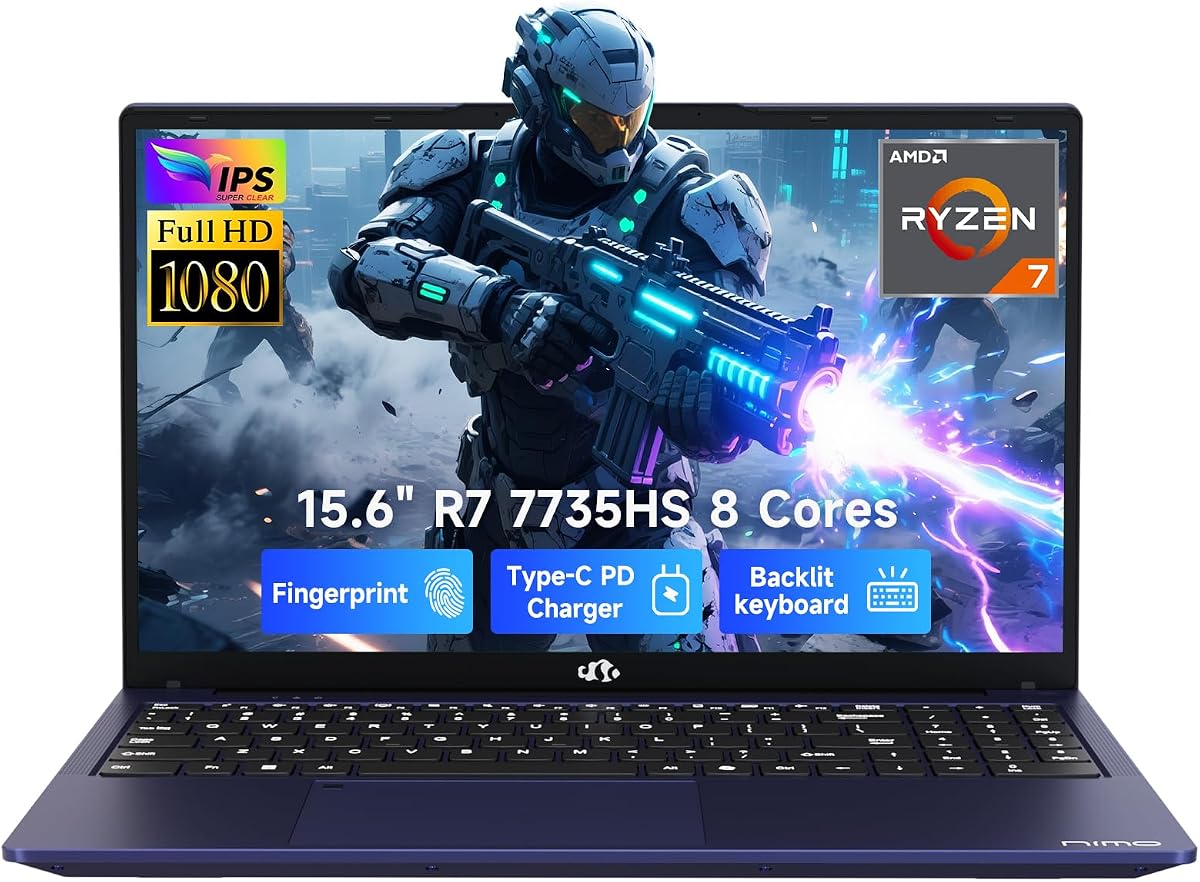
NIMO Light Gaming Laptop
4.4Editor score
Ryzen 7 7735HS Processor
Radeon 680M Integrated Graphics
DDR5 RAM Support
Finding the right machine for emulation requires balancing processing power with thermal management. Emulators rely heavily on single-core speed and memory bandwidth to replicate legacy console environments accurately. Choosing a device that handles this load ensures smooth gameplay without stuttering or lag during sessions.
We evaluated ten recent laptop models based on their architecture, upgrade potential, and real-world multitasking capabilities. Each selection prioritizes consistent performance under sustained loads, which is critical when running complex emulator cores alongside modern operating systems. This list covers options across various price points to suit different budgets and needs.
Each pick highlights specific strengths like GPU integration, display quality, or connectivity for external controllers. While prices fluctuate regularly on major retail platforms, the core specifications remain stable indicators of long-term viability. Use these insights to match a device with your specific emulation targets and usage patterns.
4.4Editor score
4.3Editor score

4.4Editor score
As an Amazon Associate we earn from qualifying purchases.
This table provides a side-by-side overview of the top ten laptops evaluated for emulation tasks, highlighting key specifications that influence performance and usability.


This laptop ranks first for its balance of power and cost. It scores 4.4 out of 5 from users. The Ryzen 7 7735HS processor delivers excellent emulation capability.
We may earn a commission when you buy through this link, at no additional cost to you.
The AMD Radeon 680M integrated graphics handle 1080p gaming smoothly. Dual DDR5 slots allow for future memory upgrades to 64GB. This flexibility ensures longevity for demanding emulator cores.
Users note that while performance is strong, the battery life is average at roughly 53Wh. Additionally, the display lacks anti-glare treatment which might bother some in bright rooms.
For students or hobbyists needing a portable emulation station, this is a top recommendation. Its combination of modern architecture and reasonable pricing makes it a smart starting point.
The Ryzen 7 7735HS features 8 cores and 16 threads. This design ensures that even heavy emulation tasks run efficiently without dropping frames.
Two SO-DIMM slots let users increase RAM beyond the default. Upgrading to 32GB or 64GB helps with multi-window gaming setups.
We may earn a commission when you buy through this link, at no additional cost to you.
This model earns a 4.2 rating for its versatility. The 17.3 inch screen provides ample room for multitasking while gaming. It excels in memory capacity right out of the box.
We may earn a commission when you buy through this link, at no additional cost to you.
The 32GB DDR5 RAM allows for running multiple emulators simultaneously. The 1TB SSD ensures plenty of space for large game files. Fast charging via USB-C adds convenience during travel.
The main trade-off is weight, making it less ideal for daily commuting. The GPU is older than the newest RDNA 3 chips, though still competent for retro titles.
This laptop is best for home setups where screen real estate matters most. Users needing a portable device for emulation might prefer a 15 inch alternative.
With 32GB of DDR5 RAM, this system handles demanding workloads easily. The 1TB SSD is expandable to 4TB for extra storage.
The 17.3 inch display reduces eye strain during long sessions. Multiple USB-C and HDMI ports support external peripherals and monitors.
We may earn a commission when you buy through this link, at no additional cost to you.
This unit received a perfect 5.0 user rating. The Ryzen 7 8745HS processor offers desktop-class performance in a laptop chassis. It stands out for raw processing power.
We may earn a commission when you buy through this link, at no additional cost to you.
The Radeon 780M integrated graphics are excellent for 3D emulation. With 64GB of RAM, you can run heavy emulators alongside streaming tools. The 2TB SSD stores large libraries of games.
While expensive, the build quality justifies the cost. The 100W PD fast charging is a nice touch but the adapter remains large. This is a power user machine.
Buy this if you need the fastest emulation performance possible. It suits creators who also game, offering a complete workstation solution in a portable form.
The Radeon 780M uses RDNA 3 architecture for high efficiency. It supports modern features needed for advanced emulation cores.
USB4 and HDMI 2.1 allow for high-speed external connections. This ensures compatibility with modern docks and displays.
We may earn a commission when you buy through this link, at no additional cost to you.
Rated 4.3, this model offers a solid middle ground. It combines the powerful Ryzen 7 7735HS with 32GB of RAM. This configuration is ready for heavy multitasking immediately.
We may earn a commission when you buy through this link, at no additional cost to you.
The included 100W GaN II charger is compact and efficient. The laptop supports up to 64GB RAM upgrades later. This flexibility helps future proof the purchase.
However, port selection is somewhat limited to USB-C and HDMI. Display brightness is average which may affect outdoor use. These are minor drawbacks given the core performance.
It is an excellent choice for daily productivity combined with gaming. Users looking for a no compromise setup in a standard 15 inch size will appreciate it.
The cooling system keeps performance stable during long sessions. This prevents throttling when running multiple apps.
Fingerprint unlock provides quick access to your system. It adds convenience for securing your gaming profiles.
We may earn a commission when you buy through this link, at no additional cost to you.
This product maintains a 4.4 rating for reliability. The 180 degree hinge allows for easy sharing during meetings. Its backlit keyboard is useful for low light environments.
We may earn a commission when you buy through this link, at no additional cost to you.
The AMD Radeon 680M handles most emulation needs comfortably. Fast SSD boot times reduce wait time for launching apps. The 2-year warranty adds peace of mind.
Some users report pre installed software that can slow initial setup. The charger cord length could be longer for some desk setups. These are manageable minor issues.
It serves well as a primary device for students and professionals. The blend of performance and portability makes it a strong contender.
Weighing under 1.7kg, it is easy to carry in a backpack. This supports mobile work and gaming needs.
Dual USB-C and HDMI 2.0 support multi-monitor setups. This enhances the workflow for creative tasks.
We may earn a commission when you buy through this link, at no additional cost to you.
This model has a high 4.6 user rating. It uses the Ryzen 7 430U which outperforms older Celeron chips. The 16GB RAM is sufficient for light emulation tasks.
We may earn a commission when you buy through this link, at no additional cost to you.
The thin bezel design maximizes screen space within a compact chassis. Connectivity includes HDMI and USB-C for external peripherals. This makes it versatile for home office use.
The main limitation is the older CPU architecture which may struggle with complex 3D emulation. RAM is soldered on some variants limiting future upgrades. These factors affect longevity.
It is best suited for casual users or older game emulation. Budget conscious buyers looking for a new device should consider this option.
The FHD display offers crisp text and images. This is great for reading docs while gaming.
Wi-Fi 6 ensures fast downloads of game files. This keeps your library updated efficiently.
We may earn a commission when you buy through this link, at no additional cost to you.
Rated 5.0, this laptop is designed for office and light play. It includes Windows 11 Pro and Office out of the box. This simplifies setup for business users immediately.
We may earn a commission when you buy through this link, at no additional cost to you.
The Intel Core i7 processor handles multitasking well. The 15.6 inch Full HD display provides clear visuals for documents. Backlit keys allow typing in any lighting condition.
However, integrated graphics are limited for modern emulation. It lacks Wi-Fi 6 support found on newer models. These trade-offs are acceptable for business focused workflows.
This is an ideal choice for corporate environments with light gaming needs. The balance of features and price makes it a smart purchase.
Windows 11 Pro offers enhanced security and management tools. These are crucial for enterprise environments.
Weighing 3.5 lbs, it is easy to carry. This supports commuting or travel to meetings.
We may earn a commission when you buy through this link, at no additional cost to you.
This machine earns a 4.4 rating for gaming performance. The RTX 5060 GPU with DLSS 4 ensures high framerates. The 165Hz display makes visuals look incredibly smooth.
We may earn a commission when you buy through this link, at no additional cost to you.
Its advanced thermals include vapor chamber cooling for sustained loads. This is vital for emulation requiring constant CPU usage. Wi-Fi 7 offers future proof connectivity speeds.
The main trade off is cost and port weight. It is less suited for students carrying it daily. High end gaming justifies the investment.
This laptop is best for dedicated gaming rigs. Users prioritizing visuals and frame rates will find it unmatched in this list.
The RTX 5060 handles ray tracing and heavy loads. This supports modern emulation enhancements.
The 165Hz screen reduces motion blur significantly. This improves clarity during fast-paced games.
We may earn a commission when you buy through this link, at no additional cost to you.
Rated 4.5, this laptop excels in battery efficiency. It offers up to 14 hours of battery life. The 17.3 inch screen is great for media consumption.
We may earn a commission when you buy through this link, at no additional cost to you.
Ryzen 3 30 and Radeon 610M provide basic emulation. The AI noise reduction improves voice call quality. This makes it suitable for remote workers.
However, 8GB RAM limits heavy multitasking options. CPU performance is lower compared to Ryzen 7 models. This affects complex gaming performance.
It is best for students needing portability and long battery. Casual users who need a secondary machine will find it reliable.
The 14 hour life supports full day usage. This reduces need for frequent power checks.
The FHD display provides sharp images. This is excellent for streaming videos.
We may earn a commission when you buy through this link, at no additional cost to you.
This laptop has a high 4.7 rating for value. The Ryzen 7 430U handles multitasking well. It comes with 16GB RAM which is good for budget gaming.
We may earn a commission when you buy through this link, at no additional cost to you.
The webcam cover adds a privacy layer. Connectivity includes USB-C and HDMI. This ensures flexibility for peripherals.
The CPU is older and limits heavy gaming performance. Build quality varies between units which is a risk. These factors should be weighed.
It serves well for casual users seeking affordability. Those needing high performance might want to look elsewhere.
The 16GB RAM is a strong feature for the price. It supports basic multitasking needs.
The design is compact for easy transport. This supports working from anywhere.
We may earn a commission when you buy through this link, at no additional cost to you.
Selecting the right laptop for emulation requires considering several key factors to ensure smooth gameplay.
The CPU is the most critical component for emulation. Look for high clock speeds and strong single-core performance. Ryzen 7 or Core i7 chips are typically recommended.
Aim for modern processors to handle complex instruction sets efficiently.
Memory impacts how many apps run simultaneously without slowdowns. At least 16GB is suggested for serious emulation. 32GB or more provides better longevity.
Ensure slots are available for future upgrades if needed.
Integrated graphics like Radeon 680M handle most retro emulators well. Dedicated GPUs are needed for high-end 3D emulation. This affects visual quality and frame rates.
Check if the GPU supports required shader models.
SSDs significantly reduce loading times for large game files. PCIe Gen 4 SSDs offer the best performance. Aim for at least 512GB to store multiple libraries.
Fast storage prevents stuttering during asset loading.
A high-resolution screen improves visual fidelity during games. Look for IPS panels with good color accuracy. Refresh rate matters for smooth motion in fast-paced titles.
Ensure the display size fits your portability needs.
Effective cooling prevents performance throttling during long sessions. Laptops with vapor chambers or multiple fans work best. This keeps the system stable under heavy loads.
Check reviews for noise levels and heat output.
Connectivity options allow for external controllers and monitors. USB-C and USB-A ports are essential. HDMI or DisplayPort ensures compatibility with external screens.
More ports reduce the need for dongles or adapters.
Longer battery life supports mobile gaming setups. Look for models offering 6 hours or more of active use. Power efficient CPUs help extend runtime significantly.
Consider the charger size for travel convenience.
Start by updating your system drivers and BIOS for maximum compatibility. This ensures all hardware works smoothly with modern operating systems.
Keep the laptop on a hard surface to allow airflow. Using a cooling pad can help maintain lower internal temperatures during long sessions.
Regularly clean dust from vents to prevent overheating. Back up your game files to external drives to avoid data loss.
Generally, 16GB of RAM is the sweet spot for most emulation tasks. It allows enough memory for the operating system and the emulator to run together. Some lighter retro titles work with 8GB, but 16GB offers better safety.
Not always. Modern integrated graphics like AMD Radeon 680M are very capable for retro emulators. However, for newer 3D emulation, a dedicated GPU provides better frame rates and visual quality.
Processors with high single-core clock speeds work best. AMD Ryzen 7 and Intel Core i7 or i9 series are excellent choices. These handle the complex instructions emulation cores require efficiently.
SSD speed is crucial for reducing load times. Games often stream assets while playing, so a slow drive causes stuttering. Aim for PCIe Gen 4 NVMe SSDs for the smoothest experience.
Yes, almost any modern laptop can handle PlayStation 1 or SNES emulation. You only need a stronger CPU and GPU for consoles like Switch or PS3. Most models here support this well.
A higher refresh rate like 120Hz or 165Hz makes gameplay feel smoother. It reduces motion blur in fast games. If you play action titles, prioritize a high refresh display.
The NIMO Light Gaming Laptop and ROG Strix G16 offer distinct advantages depending on your budget. Both provide solid performance for a wide range of emulation needs.
Prioritize CPU speed and memory capacity for the best experience. A high refresh display also adds value for modern gaming titles.
Always check current availability and warranty terms before buying. Prices fluctuate, but these models remain strong performers for your needs.