
AI Auto-Tracking Sports Filming System
4.4Editor score
180 degree full-field lens
Hands-free auto-tracking
No subscription required
This guide compares the top ten court cameras with auto tracking for tennis, highlighting AI performance, lens quality, and streaming options for players and
Selecting the right court camera with auto tracking for tennis can transform how you capture and analyze your matches. Modern systems use artificial intelligence to follow the ball and players without needing a human operator. This allows you to focus entirely on your game while recording high quality footage for later review or live sharing with fans.
To compile this list, we evaluated products based on tracking accuracy, video resolution, and ease of setup. We considered systems designed specifically for sports as well as versatile PTZ cameras that can adapt to court environments. Each entry offers unique strengths, from dedicated AI sports solutions to professional broadcasting tools suitable for serious coaching and recruitment.
Each pick below details key features, pros, and cons to help you decide which system fits your needs. Ratings reflect user feedback and technical capabilities found in the current market. Please note that availability and pricing can change frequently, so verify the latest details directly on the product page before purchasing.
4.4Editor score

3.9Editor score

4.4Editor score
The following table provides a side-by-side comparison of all ten products selected for this guide. It highlights their primary features, tracking capabilities, and connectivity options to help you quickly identify the best match for your tennis court setup and recording needs.


The XbotGo Falcon All-in-One AI Action Camera stands out as a versatile solution for capturing sports action. With a rating of 3.9, it offers a comprehensive package that includes AI tracking and 4K recording. This makes it ideal for users who want an all-in-one system without needing extra accessories.
We may earn a commission when you buy through this link, at no additional cost to you.
Its key strength lies in the dual-lens system. One lens is dedicated to high-quality video recording while the other assists the AI tracking. This separation ensures that the video quality remains high even as the camera tracks movement. The built-in Wi-Fi allows for instant sharing of highlights which is great for social media engagement.
However, users should note that while it tracks general sports well, it may not have presets specifically tuned for tennis court boundaries. Additionally, audio capture requires an external microphone since there is no built-in audio source. These trade-offs are acceptable given the overall performance and ease of use for most players.
This camera is best suited for coaches and players who need reliable, high-quality footage for analysis or streaming. If you value ease of setup and do not need specialized tennis features, the Falcon offers excellent value. We recommend pairing it with a sturdy tripod for the best results on the court.
The dedicated recording lens ensures consistent 4K quality regardless of tracking movement.
Built-in Wi-Fi lets you broadcast matches instantly to fans and family.
We may earn a commission when you buy through this link, at no additional cost to you.
The XbotGo Chameleon is designed for dynamic sports with its 4K 60FPS recording capability. With a rating of 3.8, it excels at capturing fast movements without motion blur. The system uses AI to track action across a 360-degree range making it very flexible for different court layouts.
We may earn a commission when you buy through this link, at no additional cost to you.
Its standout feature is the AI-assisted auto-editing which helps create highlight reels automatically. This saves significant time for coaches and players who need to review footage quickly. The integration with Apple Watch allows for convenient angle adjustments without needing to touch the phone during a match.
On the downside, the system relies heavily on the mobile app for tracking control which might be a limitation for some users. Battery life can also vary depending on usage intensity and streaming demands. These factors are manageable but worth considering if you plan long recording sessions.
This camera is a great choice for players who want smooth slow-motion replay and automated editing. If you prioritize frame rate and smart features over pure manual control, the Chameleon delivers strong performance. Ensure you have a stable internet connection for the best streaming experience.
60FPS recording captures rapid tennis swings with exceptional clarity and fluidity.
AI auto-editing creates highlight clips instantly for quick sharing and review.
We may earn a commission when you buy through this link, at no additional cost to you.
The AI Auto-Tracking Sports Filming System offers a budget-friendly alternative with a high user rating of 4.4. It works by mounting your iPhone on a tripod and using app-based AI to track the action digitally. This eliminates the need for a dedicated hardware camera unit.
We may earn a commission when you buy through this link, at no additional cost to you.
Its main advantage is the 180-degree full-field lens which captures the entire court without mechanical panning errors. Since the camera itself does not move the risk of missing key plays due to motor lag is minimized. The system includes 20 hours of cloud storage which is generous for a basic package.
The limitation is that it requires an iPhone for operation which restricts compatibility for some users. Also, because it relies on digital zoom from your phone camera the resolution may not match dedicated 4K hardware in all lighting conditions. However for most amateur players the quality is sufficient.
This system is perfect for budget-conscious users who want reliable tracking without extra hardware. If you already own an iPhone and just need a reliable recording setup, this is an excellent choice. It simplifies the process significantly while maintaining high accuracy for court sports.
Uses your existing iPhone as the camera eliminating the need to buy a new device.
180-degree lens ensures you never miss action due to mechanical tracking limits.
We may earn a commission when you buy through this link, at no additional cost to you.
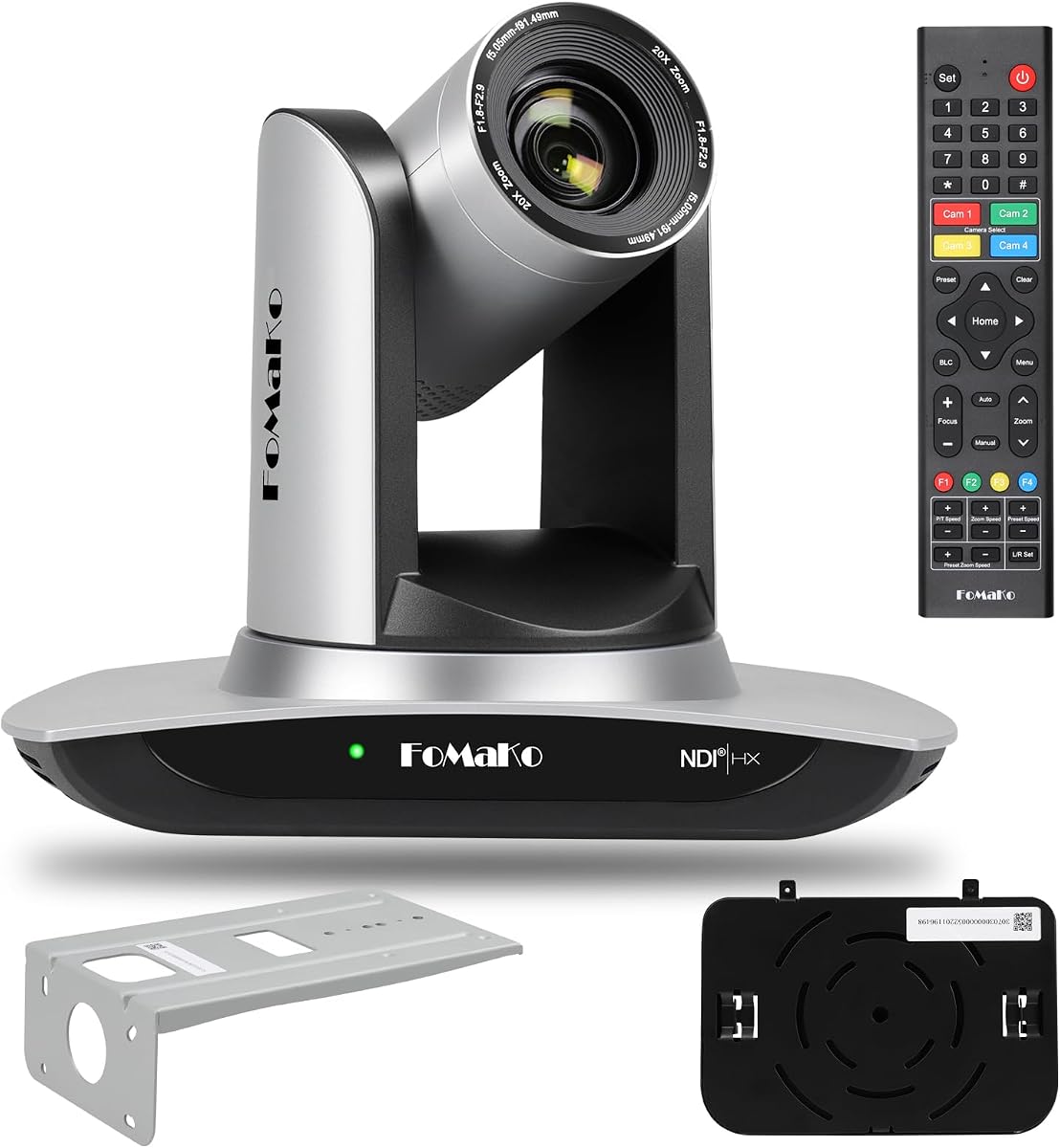
The FoMaKo 4K HDMI PTZ Camera brings professional broadcasting capabilities to tennis recording. With a rating of 4.4 it is a top choice for those who need high-end video quality and reliability. The Gen 3 AI tracking allows for precise control over how subjects are followed.
We may earn a commission when you buy through this link, at no additional cost to you.
Its primary strength is the NDI HX3 certification which ensures stable low-latency streaming even over standard networks. The 20x optical zoom provides great flexibility to capture details from a distance without losing clarity. Multiple outputs like HDMI USB and LAN allow integration with complex streaming setups.
However this camera is designed primarily for indoor professional events so outdoor setup may require additional protection. The initial configuration can be technical requiring knowledge of network settings and software integration. These hurdles are worth it for users who need broadcast-level performance.
If you are building a dedicated studio or streaming platform for your club this camera is ideal. It offers unmatched versatility and quality for those who need more than a basic setup. Ensure you have the technical support needed to configure it properly for best results.
NDI certification ensures stable high-quality video transmission for live production.
20x optical zoom allows capturing detailed shots from the sidelines.
We may earn a commission when you buy through this link, at no additional cost to you.
The XbotGo Falcon NT4 Bundle combines the Falcon camera with a sturdy NT4 steel tripod. While the rating is N/A due to being a bundle product the underlying camera has strong features. This kit is designed for users who want a complete solution without buying separate mounts.
We may earn a commission when you buy through this link, at no additional cost to you.
The steel tripod provides exceptional stability which is crucial for clear tracking during intense matches. It is lightweight enough to move between courts but heavy enough to resist wind. This setup ensures the camera stays steady even on uneven surfaces during play.
The limitation is that you are buying a fixed configuration which may not suit those who already own a tripod. Also the bundle does not add extra software features beyond the standard Falcon capabilities. It is a practical choice for convenience and stability.
This bundle is best for those who value convenience and stability in their recording setup. If you need a reliable and stable base for your AI camera this kit is a great investment. It simplifies deployment significantly for team sports and casual recording.
The steel tripod ensures the camera remains steady during fast-paced action.
We may earn a commission when you buy through this link, at no additional cost to you.
The FoMaKo 4K 60fps NDI PTZ Camera Bundle is a top-tier choice for professional productions. With a rating of 4.5 it supports high frame rates and multiple video outputs. This makes it suitable for environments where multiple angles or high-quality live feeds are required.
We may earn a commission when you buy through this link, at no additional cost to you.
Its key feature is the 3-channel video output which allows simultaneous streaming and recording. The support for NDI HX3 ensures efficient bandwidth usage and low latency. This is ideal for clubs that want to broadcast on multiple platforms or archive footage efficiently.
The complexity of setup is a significant factor for casual users. It requires networking knowledge and potentially additional switches for PoE power. The cost is also higher due to the bundled nature of the package. This makes it less accessible for casual users.
This bundle is ideal for serious broadcasters who need professional-grade tools. If you require 60FPS recording and multi-channel flexibility this system delivers. Ensure you have the infrastructure and technical skills to manage it effectively before purchasing.
Three simultaneous video outputs allow recording and streaming at the same time.
60FPS support captures fast tennis moves without motion blur.
We may earn a commission when you buy through this link, at no additional cost to you.
The Tenveo 4K NDI PTZ Camera is known for its robust face and human tracking features. With a rating of 4.4 it excels at keeping subjects centered. This makes it useful for scenarios where player focus is critical such as coaching or interviews.
We may earn a commission when you buy through this link, at no additional cost to you.
Its dual human body and face tracking algorithm ensures that the subject stays centered even if partially blocked. The 20x optical zoom allows for detailed shots without losing resolution. Multiple output options like HDMI and LAN provide flexibility for various streaming setups.
A limitation is the lack of a built-in microphone which means you must provide external audio. The network configuration for NDI also requires some technical understanding. These factors are manageable but should be considered for quick deployment.
This camera is best for users who need precise tracking of individuals. If you want to ensure players remain in focus during analysis this model performs well. Pair it with a quality external mic for the best overall recording experience.
AI tracking keeps players in frame even during partial occlusion.
Multiple ports allow connection to various production setups.
We may earn a commission when you buy through this link, at no additional cost to you.
The PTZOptics Move SE 30x offers the highest optical zoom in this list at 30x. With a rating of 4.7 it is highly regarded for its reliability. This makes it ideal for large courts where you need to capture details from a distance.
We may earn a commission when you buy through this link, at no additional cost to you.
Its strength is the 30x optical zoom which allows clear close-ups without digital degradation. The auto-tracking feature is reliable and ensures consistent framing. Multiple control options give you flexibility on how you manage the camera during a match.
However it is limited to 1080p resolution which may not satisfy users seeking 4K. The price point is also higher than standard cameras. If you value zoom power over raw resolution this is a strong candidate.
This camera is best for users who need to capture detail from far away. If you have a large court or limited space for setup the zoom capability is invaluable. It is a robust choice for professional setups.
30x optical zoom captures detailed action from the sidelines.
Reliable tracking keeps the player centered regardless of movement.
We may earn a commission when you buy through this link, at no additional cost to you.
The AI Auto Tracking NDI 6 Camera is a budget-friendly option with professional outputs. With a rating of 4.6 it is well received for its value. The inclusion of SDI output makes it useful for installations that require locking connectors.
We may earn a commission when you buy through this link, at no additional cost to you.
Its key benefit is the support for NDI HX3 which enables efficient streaming. The free CMS software simplifies setup and control on any computer. This reduces the need for additional control systems and makes management easier.
The limitation is that tracking is limited to a single target which may not suit team sports. Also the zoom is digital in some modes which can affect clarity. These factors are minor compared to the overall value provided.
This camera is best for users who need NDI features without high costs. If you need SDI options for long cable runs this is a strong choice. It balances cost and performance effectively for most users.
Provides NDI streaming capabilities at a budget-friendly price point.
Free CMS software makes configuration easy for non-experts.
We may earn a commission when you buy through this link, at no additional cost to you.
The FoMaKo NDI PTZ Camera is another top choice for reliable streaming. With a rating of 4.6 it is officially certified for NDI which ensures stability. The Gen 3 tracking provides better customization for different environments and subjects.
We may earn a commission when you buy through this link, at no additional cost to you.
Its main strength is the official NDI certification which guarantees reliable video flow. The multiple output ports allow for flexible integration with other devices. The web interface makes it easy to manage settings without installing complex software.
One limitation is the lack of built-in audio which requires external connections. Also you need external storage for long recordings unless using cloud options. These are minor issues given the overall performance and support.
This camera is ideal for users who need certified NDI streaming. If you value stability and official support this model is a strong candidate. It offers reliable performance for live streams and local recording.
NDI 6 certification ensures stable and efficient video transmission.
Web-based setup makes configuration accessible for any user.
We may earn a commission when you buy through this link, at no additional cost to you.
Selecting the right camera involves balancing tracking performance, video quality, and ease of use. Consider these factors to find a system that fits your specific needs and budget.
Tracking accuracy is crucial for keeping the ball and players in frame. Look for systems that use advanced AI to recognize sports objects reliably. Poor tracking can lead to missed moments which defeats the purpose of recording.
Prioritize cameras with proven sports tracking algorithms over basic movement detection.
Higher resolution like 4K allows you to zoom in during playback without losing detail. This is important for analyzing player form and ball trajectory. Ensure the camera supports the resolution you need for your use case.
For most players 1080p is sufficient but 4K offers better future-proofing.
A wider field of view captures more of the court without mechanical movement. Digital tracking often works better with wide lenses to avoid losing subjects. This reduces the need for physical panning which can cause lag.
Opt for lenses that cover the entire court from one angle to minimize setup.
Connectivity determines how easily you can stream or transfer footage. Look for Wi-Fi or NDI support for direct sharing. Wired options like HDMI are great for high-quality local production.
Choose connectivity that matches your streaming or recording workflow needs.
Quick setup ensures you can record whenever you play without frustration. App-based systems are often easier to configure than complex hardware. Consider how much time you want to spend on installation.
User-friendly apps and intuitive interfaces save time and reduce stress.
Decide if you prefer local storage or cloud services. Local storage gives you more control over files while cloud offers easy sharing. Ensure the camera supports your preferred method.
Check for free cloud hours included as this adds value to the package.
If using outdoors the camera should be weather-resistant or protected. Stability is also key to prevent movement during play. Choose a sturdy mount to ensure consistent footage.
Invest in a solid tripod to protect your equipment and maintain quality.
Determine how much you are willing to spend before browsing. Dedicated sports cameras often cost less than professional PTZ units. Balance features with what you can afford realistically.
Set a clear budget to narrow down options quickly and effectively.
Position your camera on a stable tripod at a height that captures the full court. Ensure the lens faces the playing area directly without obstructions like trees or poles. Proper placement is key to accurate tracking.
Use the companion app or web interface to configure tracking settings before play. Adjust sensitivity and area to match your court layout. Test a short clip to confirm the tracking stays on the ball.
Clean the lens regularly with a soft cloth to remove dust and debris. Store the camera in a dry place if using outdoors. Check for firmware updates to keep tracking performance optimal.
Most cameras support various surface types as long as the contrast is sufficient for tracking. Indoor and outdoor courts work well provided lighting is consistent. Adjust lighting settings if using in low light environments.
Yes many of these cameras offer built-in Wi-Fi or NDI streaming. You can connect to platforms like YouTube or Facebook easily. Ensure your internet connection is stable for smooth broadcasting.
Some models offer free cloud storage without subscriptions but others may require fees. Check the product details to confirm storage policies. Many basic systems operate entirely without monthly fees.
Setup usually involves installing the app and positioning the camera. Follow the prompts to calibrate the tracking area. Test it with a few swings to ensure it follows movement accurately.
Most cameras do not have built-in mics so external audio is needed. You can connect a lapel mic to your phone or recording device. This ensures high-quality sound for analysis.
Tracking range depends on the lens and optical zoom capabilities. Most cameras work well within 20 to 50 feet of the action. For distant courts a zoom lens may be necessary.
Most indoor PTZ cameras are not waterproof unless stated. Outdoor models usually require a protective cover. Always check the IP rating before exposing to rain or dust.
Battery life varies by model but most require constant power. Some use USB power adapters for continuous recording. Plan accordingly if you need mobile power solutions.
We explored ten top systems ranging from budget phone setups to professional PTZ cameras. Each offers unique strengths whether you prioritize resolution or ease of use. The best choice depends on your specific goals and budget.
Focus on tracking accuracy and video quality to ensure useful footage for analysis. Consider how easy the system is to deploy for regular practice. A reliable camera can significantly enhance your training experience.
Remember to verify current pricing and availability before buying as markets change. These products represent the current best options for tennis court recording. We hope this guide helps you make an informed decision.